0. 실습 환경 배포
# 코드 다운로드, 작업 디렉터리 이동
$ cd aews/2w

# 이번에 2w를 새로 다운로드 (기존 폴더에 2w만 받아짐)
aews git:(main*) $ git pull origin main
remote: Enumerating objects: 8, done.
remote: Counting objects: 100% (8/8), done.
remote: Compressing objects: 100% (7/7), done.
remote: Total 7 (delta 0), reused 7 (delta 0), pack-reused 0 (from 0)
Unpacking objects: 100% (7/7), 3.51 KiB | 359.00 KiB/s, done.
From https://github.com/gasida/aews
 * branch            main       -> FETCH_HEAD
   c95a0bb..1ad820c  main       -> origin/main
Updating c95a0bb..1ad820c
Fast-forward
 2w/eks.tf     | 169 ++++++++++++++++++++++++++++++++++++++++++++++++++++++++++++++++++++++++++++++++++++++++++
 2w/outputs.tf |   4 +++
 2w/var.tf     |  72 ++++++++++++++++++++++++++++++++++++++
 2w/vpc.tf     |  50 +++++++++++++++++++++++++++
 4 files changed, 295 insertions(+)
 create mode 100644 2w/eks.tf
 create mode 100644 2w/outputs.tf
 create mode 100644 2w/var.tf
 create mode 100644 2w/vpc.tf


# 변수 지정
aews git:(main*) $ export TF_VAR_KeyName=test-key
aews git:(main*) $ export TF_VAR_ssh_access_cidr=$(curl -s ipinfo.io/ip)/32
aews git:(main*) $ echo $TF_VAR_KeyName $TF_VAR_ssh_access_cidr

test-key 1x.x.x.x/32


# 배포 : 12분 정도 소요
:2w git:(main*) $ terraform init
Initializing the backend...
Initializing modules...
Downloading registry.terraform.io/terraform-aws-modules/eks/aws 21.15.1 for eks...
- eks in .terraform/modules/eks
- eks.eks_managed_node_group in .terraform/modules/eks/modules/eks-managed-node-group
- eks.eks_managed_node_group.user_data in .terraform/modules/eks/modules/_user_data
- eks.fargate_profile in .terraform/modules/eks/modules/fargate-profile
Downloading registry.terraform.io/terraform-aws-modules/kms/aws 4.0.0 for eks.kms...
- eks.kms in .terraform/modules/eks.kms
- eks.self_managed_node_group in .terraform/modules/eks/modules/self-managed-node-group
- eks.self_managed_node_group.user_data in .terraform/modules/eks/modules/_user_data
Downloading registry.terraform.io/terraform-aws-modules/vpc/aws 6.6.0 for vpc...
- vpc in .terraform/modules/vpc
Initializing provider plugins...
- Finding hashicorp/aws versions matching ">= 6.0.0, >= 6.28.0"...
- Finding hashicorp/tls versions matching ">= 4.0.0"...
- Finding hashicorp/time versions matching ">= 0.9.0"...
- Finding hashicorp/cloudinit versions matching ">= 2.0.0"...
- Finding hashicorp/null versions matching ">= 3.0.0"...
- Installing hashicorp/aws v6.37.0...
- Installed hashicorp/aws v6.37.0 (signed by HashiCorp)
- Installing hashicorp/tls v4.2.1...
- Installed hashicorp/tls v4.2.1 (signed by HashiCorp)
- Installing hashicorp/time v0.13.1...
- Installed hashicorp/time v0.13.1 (signed by HashiCorp)
- Installing hashicorp/cloudinit v2.3.7...
- Installed hashicorp/cloudinit v2.3.7 (signed by HashiCorp)
- Installing hashicorp/null v3.2.4...
- Installed hashicorp/null v3.2.4 (signed by HashiCorp)
Terraform has created a lock file .terraform.lock.hcl to record the provider
selections it made above. Include this file in your version control repository
so that Terraform can guarantee to make the same selections by default when
you run "terraform init" in the future.

Terraform has been successfully initialized!

You may now begin working with Terraform. Try running "terraform plan" to see
any changes that are required for your infrastructure. All Terraform commands
should now work.

If you ever set or change modules or backend configuration for Terraform,
rerun this command to reinitialize your working directory. If you forget, other
commands will detect it and remind you to do so if necessary.


2w git:(main*) $ nohup sh -c "terraform apply -auto-approve" > create.log 2>&1 &

[1] 13492


2w git:(main*) $ tail -f create.log

module.eks.aws_eks_addon.this["coredns"]: Still creating... [00m10s elapsed]
module.eks.aws_eks_addon.this["coredns"]: Creation complete after 15s [id=myeks:coredns]
module.eks.aws_eks_addon.this["kube-proxy"]: Still creating... [00m20s elapsed]
module.eks.aws_eks_addon.this["kube-proxy"]: Creation complete after 25s [id=myeks:kube-proxy]

Apply complete! Resources: 59 added, 0 changed, 0 destroyed.

Outputs:

configure_kubectl = "aws eks --region ap-northeast-2 update-kubeconfig --name myeks"


# 자격증명 설정
2w git:(main*) $ terraform output -raw configure_kubectl
aws eks --region ap-northeast-2 update-kubeconfig --name myeks%

2w git:(main*) $ aws eks --region ap-northeast-2 update-kubeconfig --name myeks
Added new context arn:aws:eks:ap-northeast-2:123123123:cluster/myeks to /Users/.kube/config

2w git:(main*) $ kubectl config rename-context $(cat ~/.kube/config | grep current-context | awk '{print $2}') myeks
Context "arn:aws:eks:ap-northeast-2:123123123:cluster/myeks" renamed to "myeks".
배포 후 기본 정보 확인
EKS 관리 콘솔 확인
- Overview 개요 : API server endpoint, Open ID Connect provider URL기본 정보(oidc)


- Compute 컴퓨팅 : Node groups 클릭 → 상세 정보 확인 ⇒ kubernetes 레이블 tier = primary


- Networking 네트워킹 : 서비스 IPv4 범위(10.100.0.0/16), 서브넷, access(public and private)..
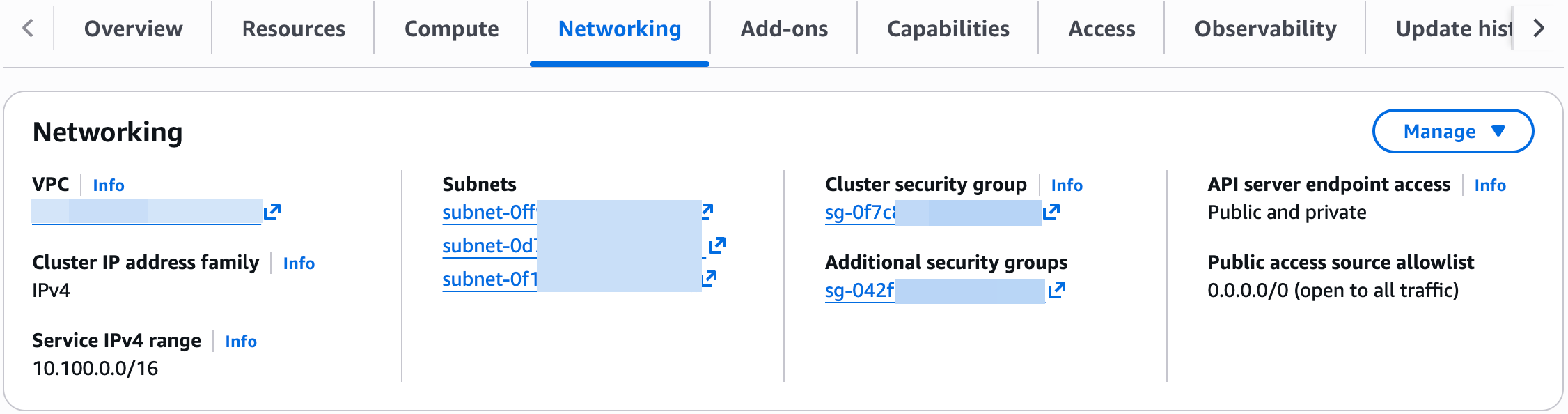
- Service IPv4 range : Kubernetes Service에 할당되는 “가상 IP 대역 (ClusterIP 대역)"
- Service란? Pod들을 묶어서 고정된 접속 주소를 제공
- Public access source allowlist : EKS API 서버에 접근할 IP
( API server endpoint access가 public으로 되어 있어서 API 서버로 외부 접근 가능)
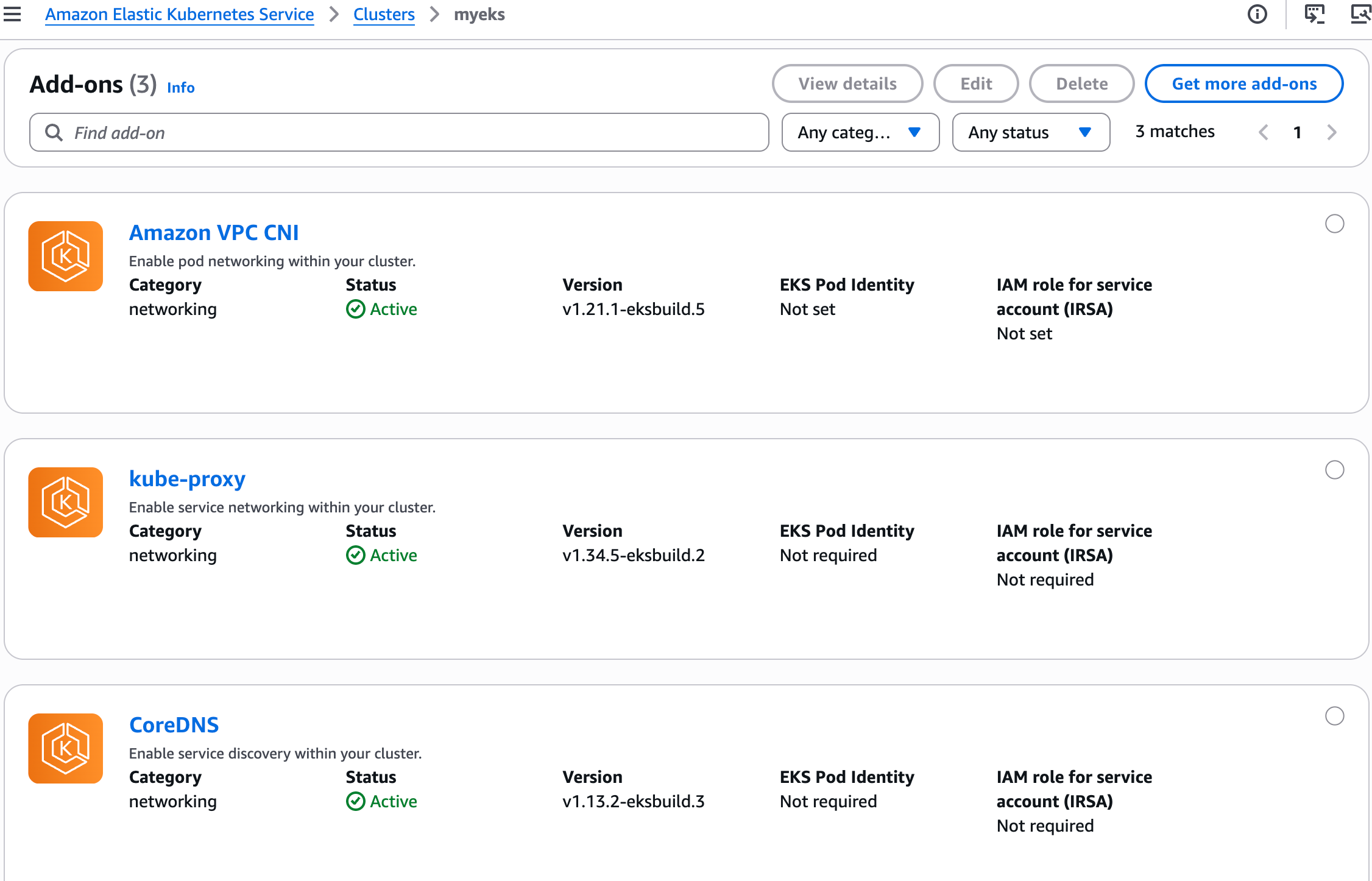
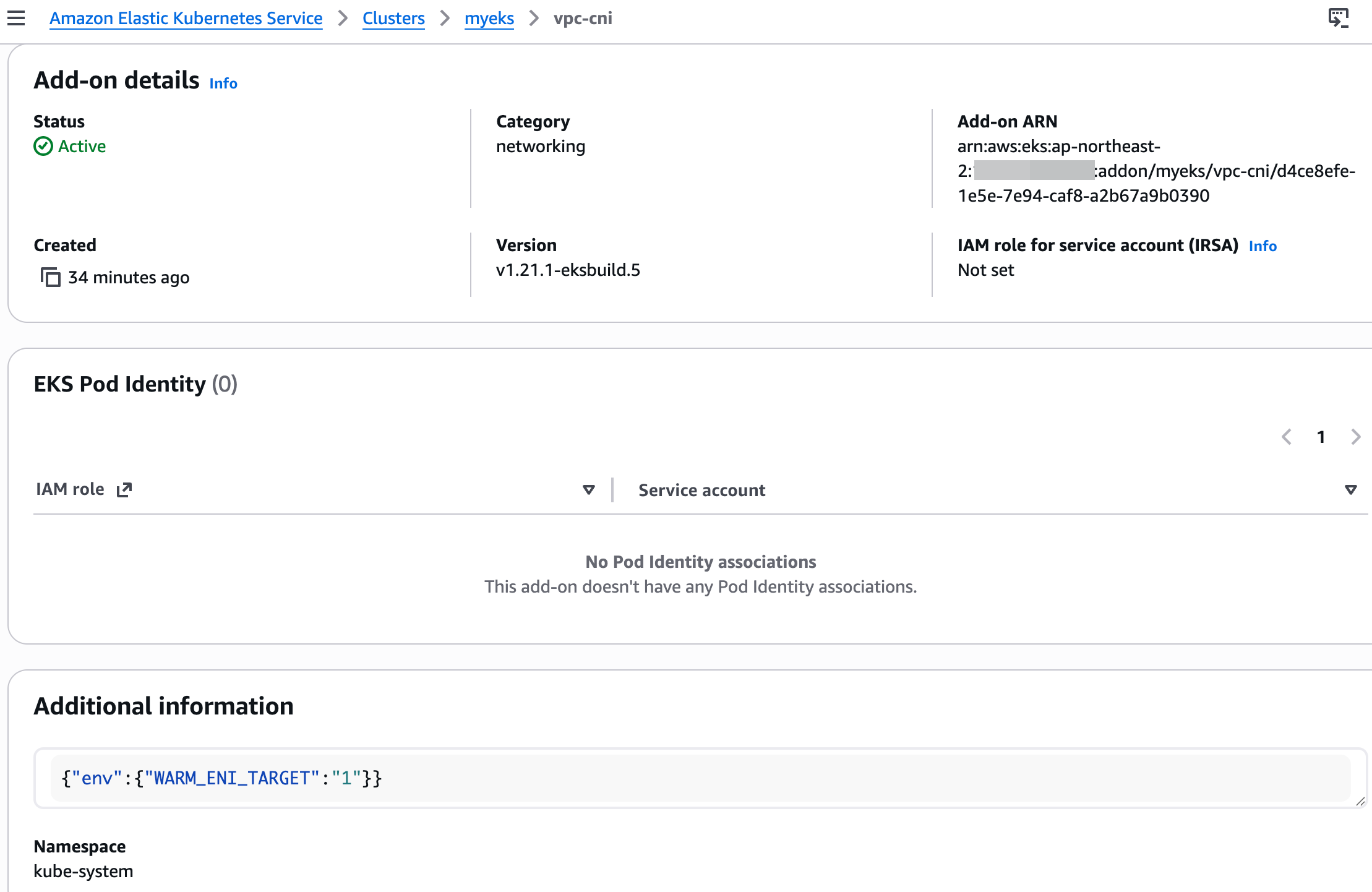
- Add-ons 추가 기능 : VPC CNI 클릭 후 추가 정보 확인
- Access : IAM access entries (설치 시 사용한 자격증명 username 확인)
EKS 기본 정보 확인
# 노드 라벨 확인
2w git:(main*) $ kubectl get node --show-labels
NAME                                               STATUS   ROLES    AGE   VERSION               LABELS
ip-192-168-1-210.ap-northeast-2.compute.internal   Ready    <none>   39m   v1.34.4-eks-f69f56f   beta.kubernetes.io/arch=amd64,beta.kubernetes.io/instance-type=t3.medium,beta.kubernetes.io/os=linux,eks.amazonaws.com/capacityType=ON_DEMAND,eks.amazonaws.com/nodegroup-image=ami-0041be04b53631868,eks.amazonaws.com/nodegroup=myeks-1nd-node-group,eks.amazonaws.com/sourceLaunchTemplateId=lt-08e395f933cfc84e6,eks.amazonaws.com/sourceLaunchTemplateVersion=1,failure-domain.beta.kubernetes.io/region=ap-northeast-2,failure-domain.beta.kubernetes.io/zone=ap-northeast-2a,k8s.io/cloud-provider-aws=5553ae84a0d29114870f67bbabd07d44,kubernetes.io/arch=amd64,kubernetes.io/hostname=ip-192-168-1-210.ap-northeast-2.compute.internal,kubernetes.io/os=linux,node.kubernetes.io/instance-type=t3.medium,tier=primary,topology.k8s.aws/zone-id=apne2-az1,topology.kubernetes.io/region=ap-northeast-2,topology.kubernetes.io/zone=ap-northeast-2a
ip-192-168-11-16.ap-northeast-2.compute.internal   Ready    <none>   39m   v1.34.4-eks-f69f56f   beta.kubernetes.io/arch=amd64,beta.kubernetes.io/instance-type=t3.medium,beta.kubernetes.io/os=linux,eks.amazonaws.com/capacityType=ON_DEMAND,eks.amazonaws.com/nodegroup-image=ami-0041be04b53631868,eks.amazonaws.com/nodegroup=myeks-1nd-node-group,eks.amazonaws.com/sourceLaunchTemplateId=lt-08e395f933cfc84e6,eks.amazonaws.com/sourceLaunchTemplateVersion=1,failure-domain.beta.kubernetes.io/region=ap-northeast-2,failure-domain.beta.kubernetes.io/zone=ap-northeast-2c,k8s.io/cloud-provider-aws=5553ae84a0d29114870f67bbabd07d44,kubernetes.io/arch=amd64,kubernetes.io/hostname=ip-192-168-11-16.ap-northeast-2.compute.internal,kubernetes.io/os=linux,node.kubernetes.io/instance-type=t3.medium,tier=primary,topology.k8s.aws/zone-id=apne2-az3,topology.kubernetes.io/region=ap-northeast-2,topology.kubernetes.io/zone=ap-northeast-2c
ip-192-168-6-183.ap-northeast-2.compute.internal   Ready    <none>   39m   v1.34.4-eks-f69f56f   beta.kubernetes.io/arch=amd64,beta.kubernetes.io/instance-type=t3.medium,beta.kubernetes.io/os=linux,eks.amazonaws.com/capacityType=ON_DEMAND,eks.amazonaws.com/nodegroup-image=ami-0041be04b53631868,eks.amazonaws.com/nodegroup=myeks-1nd-node-group,eks.amazonaws.com/sourceLaunchTemplateId=lt-08e395f933cfc84e6,eks.amazonaws.com/sourceLaunchTemplateVersion=1,failure-domain.beta.kubernetes.io/region=ap-northeast-2,failure-domain.beta.kubernetes.io/zone=ap-northeast-2b,k8s.io/cloud-provider-aws=5553ae84a0d29114870f67bbabd07d44,kubernetes.io/arch=amd64,kubernetes.io/hostname=ip-192-168-6-183.ap-northeast-2.compute.internal,kubernetes.io/os=linux,node.kubernetes.io/instance-type=t3.medium,tier=primary,topology.k8s.aws/zone-id=apne2-az2,topology.kubernetes.io/region=ap-northeast-2,topology.kubernetes.io/zone=ap-northeast-2b
[13:37:39] mzc01-voieul:2w git:(main*) $ kubectl get node -l tier=primary

NAME                                               STATUS   ROLES    AGE   VERSION
ip-192-168-1-210.ap-northeast-2.compute.internal   Ready    <none>   39m   v1.34.4-eks-f69f56f
ip-192-168-11-16.ap-northeast-2.compute.internal   Ready    <none>   39m   v1.34.4-eks-f69f56f
ip-192-168-6-183.ap-northeast-2.compute.internal   Ready    <none>   39m   v1.34.4-eks-f69f56f


2w git:(main*) $ kubectl get node -l tier=primary
NAME                                               STATUS   ROLES    AGE   VERSION
ip-192-168-1-210.ap-northeast-2.compute.internal   Ready    <none>   39m   v1.34.4-eks-f69f56f
ip-192-168-11-16.ap-northeast-2.compute.internal   Ready    <none>   39m   v1.34.4-eks-f69f56f
ip-192-168-6-183.ap-northeast-2.compute.internal   Ready    <none>   39m   v1.34.4-eks-f69f56f


# 파드 정보 확인
2w git:(main*) $ kubectl get pod -A
NAMESPACE     NAME                      READY   STATUS    RESTARTS   AGE
kube-system   aws-node-6922w            2/2     Running   0          41m
kube-system   aws-node-6ttt6            2/2     Running   0          41m
kube-system   aws-node-r77xb            2/2     Running   0          41m
kube-system   coredns-d487b6fcb-dkvpq   1/1     Running   0          40m
kube-system   coredns-d487b6fcb-ftjqs   1/1     Running   0          40m
kube-system   kube-proxy-54b6l          1/1     Running   0          40m
kube-system   kube-proxy-7kgjr          1/1     Running   0          40m
kube-system   kube-proxy-w2gzn          1/1     Running   0          40m

2w git:(main*) $ kubectl get pdb -n kube-system
NAME      MIN AVAILABLE   MAX UNAVAILABLE   ALLOWED DISRUPTIONS   AGE
coredns   N/A             1                 1                     40m


# 관리형 노드 그룹 확인
2w git:(main*) $ aws eks describe-nodegroup --cluster-name myeks --nodegroup-name myeks-1nd-node-group | jq

{
  "nodegroup": {
    "nodegroupName": "myeks-1nd-node-group",
    "nodegroupArn": "arn:aws:eks:ap-northeast-2:143649248460:nodegroup/myeks/myeks-1nd-node-group/dcce8efe-6362-fde5-2cf2-4c2c4ee74afa",
    "clusterName": "myeks",
    "version": "1.34",
    "releaseVersion": "1.34.4-20260317",
    "createdAt": "2026-03-24T12:56:41.571000+09:00",
    "modifiedAt": "2026-03-24T13:38:04.663000+09:00",
    "status": "ACTIVE",
    "capacityType": "ON_DEMAND",
    "scalingConfig": {
      "minSize": 2,
      "maxSize": 5,
      "desiredSize": 3
    },
    "instanceTypes": [
      "t3.medium"
    ],
    "subnets": [
      "subnet-0ff9ed04cb8b082ec",
      "subnet-0d7752b137e08028c",
      "subnet-0f16f6746d3a7c4be"
    ],
    "amiType": "AL2023_x86_64_STANDARD",
    "nodeRole": "arn:aws:iam::143649248460:role/myeks-1nd-node-group-eks-node-group-20260324034658874100000006",
    "labels": {
      "tier": "primary"
    },
    "resources": {
      "autoScalingGroups": [
        {
          "name": "eks-myeks-1nd-node-group-dcce8efe-6362-fde5-2cf2-4c2c4ee74afa"
        }
      ]
    },
    "health": {
      "issues": []
    },
    "updateConfig": {
      "maxUnavailablePercentage": 33
    },
    "launchTemplate": {
      "name": "primary-20260324035632468600000009",
      "version": "1",
      "id": "lt-08e395f933cfc84e6"
    },
    "tags": {
      "Terraform": "true",
      "Environment": "cloudneta-lab",
      "Name": "myeks-1nd-node-group"
    }
  }
}


# eks addon 확인
1. AWS VPC CNI 소개
- K8S CNI : Container Network Interface 는 k8s 네트워크 환경을 구성해준다 - 링크, 다양한 플러그인이 존재 - 링크
- AWS VPC CNI : 파드 IP 할당, 파드의 IP 네트워크 대역과 노드(워커)의 IP 대역이 같아서 직접 통신이 가능 - Docs , Github , Proposal
- Amazon Virtual Private Cloud(VPC) CNI add-on
- AWS에서 제공하는 VPC CNI는 EKS 클러스터의 기본 네트워킹 추가 기능 add-on 입니다. VPC CNI 추가 기능은 EKS 클러스터를 프로비저닝할 때 기본적으로 설치됩니다. VPC CNI는 Kubernetes 작업자 노드에서 실행됩니다. VPC CNI 추가 기능은 CNI 바이너리와 IP 주소 관리(ipamd) 플러그인으로 구성됩니다. CNI는 VPC 네트워크의 IP 주소를 포드에 할당합니다. ipamd는 각 Kubernetes 노드에 대한 AWS 탄력적 네트워킹 인터페이스(ENIs)를 관리하고 IPs의 웜 풀을 warm pool 유지합니다. VPC CNI는 빠른 포드 시작 시간을 위한 ENIs 및 IP 주소의 사전 할당 pre-allocation 을 위한 구성 옵션을 제공합니다. 권장 플러그인 관리 모범 사례는 Amazon VPC CNI를 참조하세요.
- VPC 와 통합 : VPC Flow logs , VPC 라우팅 정책, 보안 그룹(Security group) 을 사용 가능함
- Amazon EKS에서는 클러스터를 생성할 때 두 개 이상의 가용 영역에 서브넷을 지정하는 것이 좋습니다. Amazon VPC CNI는 노드 서브넷의 포드에 IP 주소를 할당합니다. 서브넷에서 사용 가능한 IP 주소를 확인하는 것이 좋습니다. EKS 클러스터를 배포하기 전에 VPC 및 서브넷 권장 사항을 고려하세요.
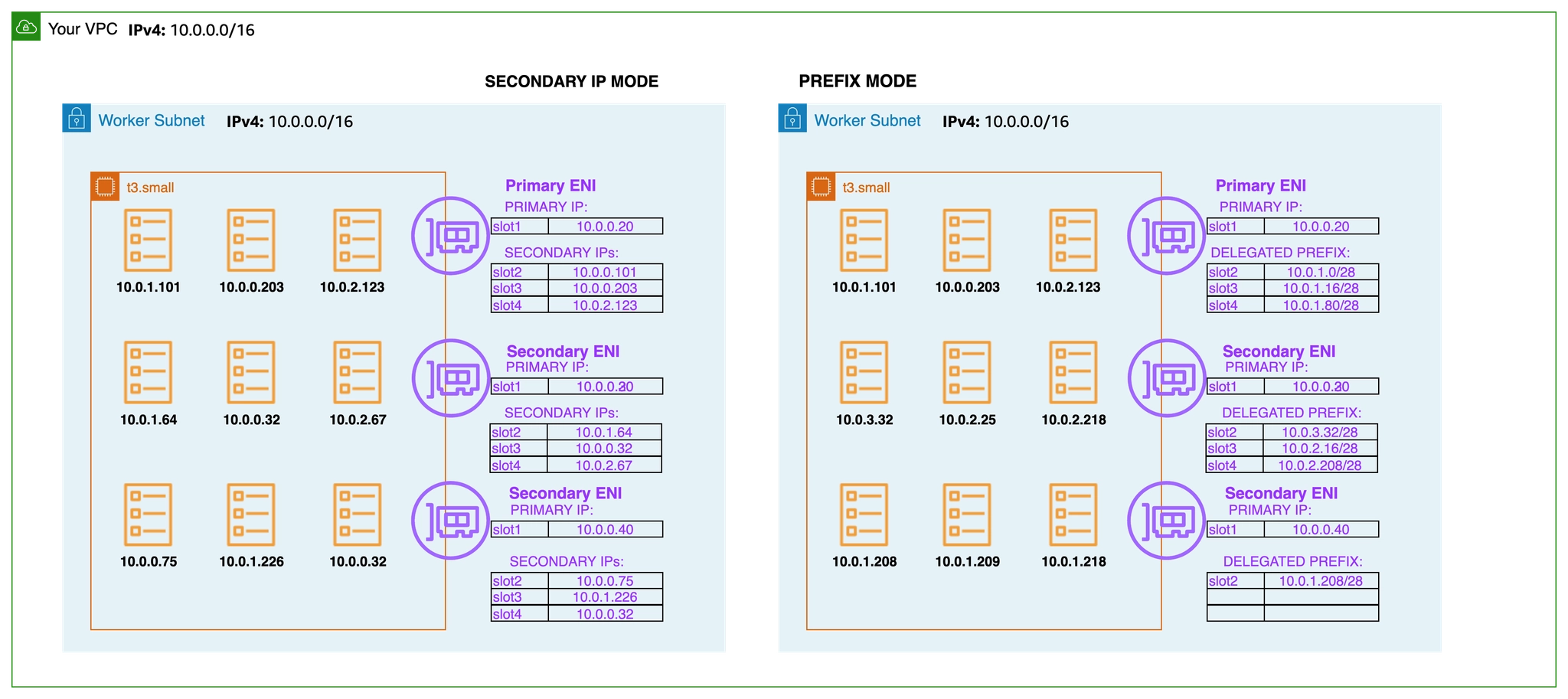
- 보조 IP 모드(기본값) secondary IP mode : Amazon VPC CNI는 노드의 기본 ENIs에 연결된 서브넷에서 ENI 및 보조 IP 주소의 웜 풀을 할당합니다. VPC CNI의이 모드를 보조 IP 모드라고 합니다. IP 주소 수와 따라서 **포드 수(Pod 밀도)**는 인스턴스 유형에 의해 정의된 ENIs 수와 ENI당 IP 주소(한도)로 정의됩니다. 보조 모드는 기본값이며 인스턴스 유형이 작은 소규모 클러스터에 적합합니다.
- 접두사 모드 (포드 밀도 필요 시) prefix mode : 포드 밀도 문제가 발생하는 경우 ENIs 접두사 모드를 사용하는 것이 좋습니다.
- 파드 보안 그룹 security groups for Pods : Amazon VPC CNI는 기본적으로 AWS VPC와 통합되며 사용자는 Kubernetes 클러스터 구축을 위한 기존 AWS VPC 네트워킹 및 보안 모범 사례를 적용할 수 있습니다. 여기에는 네트워크 트래픽 격리를 위해 VPC 흐름 로그, VPC 라우팅 정책 및 보안 그룹을 사용하는 기능이 포함됩니다. 기본적으로 Amazon VPC CNI는 노드의 기본 ENI와 연결된 보안 그룹을 포드에 적용합니다. 포드에 다른 네트워크 규칙을 할당하려는 경우 포드에 대한 보안 그룹을 활성화하는 것이 좋습니다.

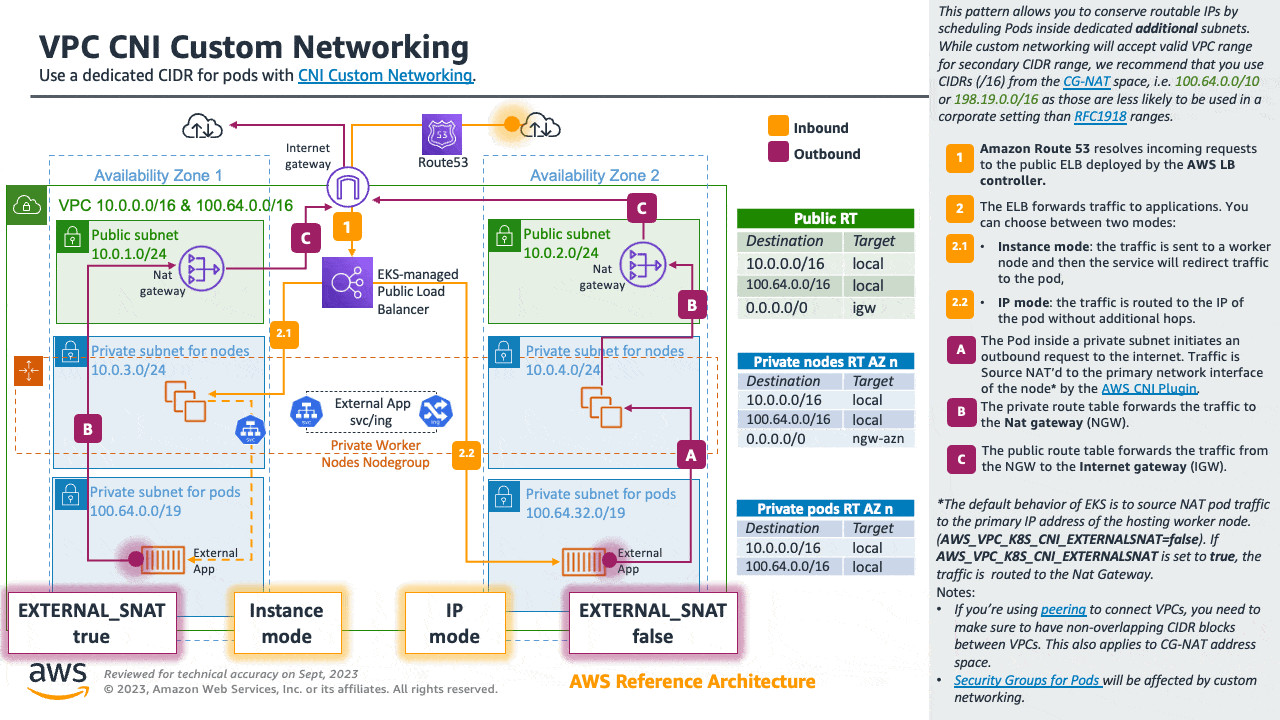
- 사용자 지정 네트워킹(보조 CIDR 할당 사용) custom networking : 기본적으로 VPC CNI는 노드의 기본 ENI에 할당된 서브넷의 포드에 IP 주소를 할당합니다. 수천 개의 워크로드가 있는 대규모 클러스터를 실행할 때 IPv4 주소가 부족한 것이 일반적입니다. AWS VPC를 사용하면 IPv4 CIDRs 블록의 고갈을 해결할 보조 CIDR을 할당하여 사용 가능한 IPs를 확장할 수 있습니다. AWS VPC CNI를 사용하면 포드에 대해 다른 서브넷 CIDR 범위를 사용할 수 있습니다. VPC CNI의이 기능을 사용자 지정 네트워킹이라고 합니다. 사용자 지정 네트워킹을 사용하여 EKS에서 100.64.0.0/10 및 198.19.0.0/16 CIDRs(CG-NAT)을 사용하는 것이 좋습니다. 이렇게 하면 포드가 더 이상 VPC의 RFC1918 IP 주소를 사용하지 않는 환경을 효과적으로 생성할 수 있습니다.
Amazon VPC CNI 플러그인 - Docs , Kor
소개
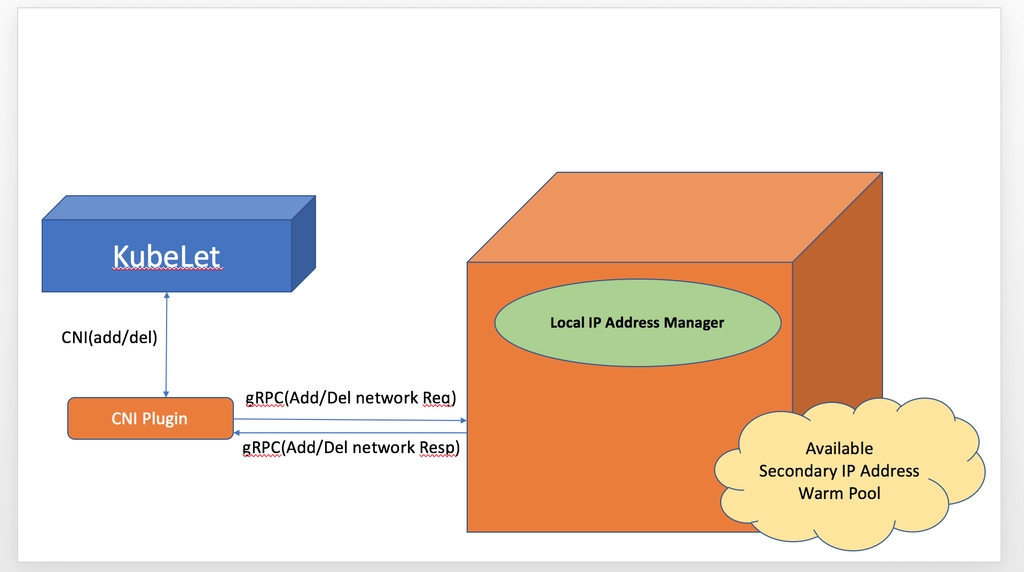
- Amazon EKS는 VPC CNI라고도 하는 Amazon VPC 컨테이너 네트워크 인터페이스 플러그인을 통해 클러스터 네트워킹을 구현합니다.
- CNI 플러그인을 사용하면 Kubernetes 포드가 VPC 네트워크에서와 동일한 IP 주소를 가질 수 있습니다.

- 특히 포드 내의 모든 컨테이너는 네트워크 네임스페이스를 공유하며 로컬 포트를 사용하여 서로 통신할 수 있습니다.
- (참고) 파드간 통신 시 일반적으로 K8S CNI는 오버레이(VXLAN, IP-IP 등) 통신을 하고, AWS VPC CNI는 동일 대역으로 직접 통신을 한다.

- Amazon VPC CNI에는 두 가지 구성 요소가 있습니다.
- 포드 간 통신을 활성화Pod-to-Pod 네트워크를 설정하는 CNI 바이너리입니다. CNI 바이너리는 노드 루트 파일 시스템에서 실행되며 새 포드가에 추가되거나 노드에서 기존 포드가 제거될 때 kubelet에 의해 호출됩니다.
- long-running node-local IP Address Management 장기 실행 노드-로컬 IP 주소 관리(IPAM) 데몬인 ipamd는 다음을 담당합니다.
- 노드에서 ENIs 관리 managing ENIs on a node
- 사용 가능한 IP 주소 또는 접두사의 웜 풀 유지 관리 maintaining a warm-pool of available IP addresses or prefix
- VPC ENI 에 미리 할당된 IP(=Local-IPAM Warm IP Pool)를 파드에서 사용할 수 있음 ← 파드의 빠른 시작을 위해서
- L-IPAM 소개 - 링크

Secondary IP mode Overview
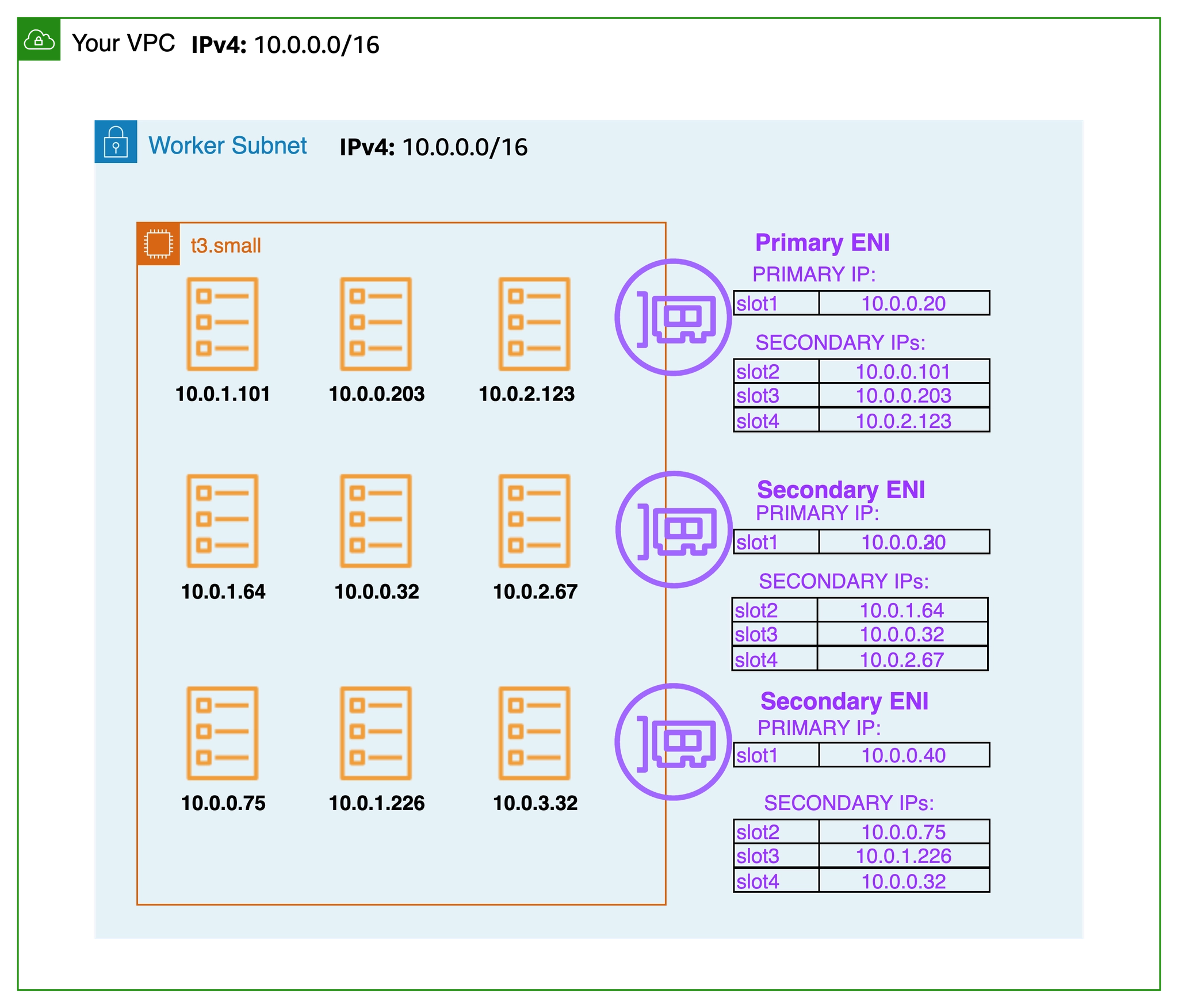
- 보조 IP 모드 Secondary IP mode 는 VPC CNI의 기본 모드입니다. 이 가이드에서는 보조 IP 모드가 활성화된 경우 VPC CNI 동작에 대한 일반적인 개요를 제공합니다. ipamd(IP 주소 할당)의 기능은 , Linux용 접두사 모드및 포드당 보안 그룹와 같은 VPC CNI의 구성 설정에 따라 달라질 수 있습니다사용자 지정 네트워킹.
- Amazon VPC CNI는 작업자 노드에 aws-node라는 Kubernetes Daemonset으로 배포됩니다. 작업자 노드가 프로비저닝되면 기본 ENI라고 하는 기본 ENI가 노드에 연결됩니다. CNI는 노드의 기본 ENIs에 연결된 서브넷에서 ENI 및 보조 IP 주소의 웜 풀을 할당합니다. 기본적으로 ipamd는 노드에 추가 ENI를 할당하려고 시도합니다. IPAMD는 단일 포드가 예약되고 기본 ENI의 보조 IP 주소가 할당될 때 추가 ENI를 할당합니다. 이 "웜" ENI를 사용하면 더 빠른 포드 네트워킹이 가능합니다. 보조 IP 주소 풀이 부족해지면 CNI는 다른 ENI를 추가하여 더 할당합니다.
- 풀의 ENIs 및 IP 주소 수는 WARM_ENI_TARGET, WARM_IP_TARGET, MINIMUM_IP_TARGET이라는 환경 변수를 통해 구성됩니다. aws-node Daemonset은 충분한 수의 ENIs가 연결되어 있는지 주기적으로 확인합니다. WARM_ENI_TARGET 또는 WARM_IP_TARGET 및 MINIMUM_IP_TARGET 조건이 모두 충족되면 충분한 수의 ENIs가 연결됩니다. ENIs가 충분하지 않으면 CNI는 MAX_ENI 한도에 도달할 때까지 EC2에 API를 호출하여 더 많이 연결합니다.
- WARM_ENI_TARGET : 미리 붙여둘 ENI 개수
- 예) WARM_ENI_TARGET = 1 ⇒ 항상 사용하지 않는 ENI 1개 유지
- 정의: 현재 사용 중인 ENI 외에 추가로 유지할 빈(Available) ENI의 개수입니다.
- 작동: 예를 들어 이 값이 1이면, 현재 ENI가 꽉 차지 않았더라도 VPC CNI는 나중에 올 Pod들을 위해 미리 ENI 하나를 더 할당받아 둡니다.
- 특징: ENI를 통째로 가져오므로 IP 확보 속도가 가장 빠르지만, IP 낭비가 심할 수 있습니다.
- WARM_IP_TARGET : 남겨둘 여유 IP 개수
- 예) WARM_IP_TARGET = 10 ⇒ 항상 10개 IP 여유 유지
- 정의: 현재 사용 중인 IP 외에 추가로 유지할 여유 IP 주소의 개수입니다.
- 작동: 이 값이 5라면, Pod가 10개 떠 있을 때 노드는 항상 15개의 IP를 확보하려고 시도합니다.
- 특징: WARM_ENI_TARGET보다 세밀하게(Fine-grained) IP를 관리할 수 있어 IP 자원이 부족한 VPC에서 선호됩니다.
- MINIMUM_IP_TARGET : 최소 확보해야 할 IP 총량
- 예) MINIMUM_IP_TARGET = 30 ⇒ 노드 시작 시 최소 30개 IP 확보
- 정의: 노드가 가동될 때 최소한으로 확보하고 있어야 하는 전체 IP의 개수입니다.
- 작동: 이 값이 20이면, Pod가 하나도 없더라도 일단 IP 20개를 확보해 둡니다.
- 특징: 초기 대규모 트래픽 유입으로 Pod가 급격히 늘어날 때(Scale-out) IP 할당 지연을 방지합니다. 보통 WARM_IP_TARGET과 함께 사용됩니다.
- aws-node 데몬셋에서 관련 env 확인
- 아래 파라미터 값이 설정되어 기본 ENI 외에 여분의 ENI 1개가 더 추가됨
- [현재 사용 중인 ENI] + [여분의 ENI 1개]

# aws-node DaemonSet의 env 확인
2w git:(main*) $ kubectl get ds aws-node -n kube-system -o json | jq '.spec.template.spec.containers[0].env'
[
{
"name": "ADDITIONAL_ENI_TAGS",
"value": "{}"
},
{
"name": "ANNOTATE_POD_IP",
"value": "false"
},
{
"name": "AWS_VPC_CNI_NODE_PORT_SUPPORT",
"value": "true"
},
{
"name": "AWS_VPC_ENI_MTU",
"value": "9001"
},
{
"name": "AWS_VPC_K8S_CNI_CUSTOM_NETWORK_CFG",
"value": "false"
},
{
"name": "AWS_VPC_K8S_CNI_EXTERNALSNAT",
"value": "false"
},
{
"name": "AWS_VPC_K8S_CNI_LOGLEVEL",
"value": "DEBUG"
},
{
"name": "AWS_VPC_K8S_CNI_LOG_FILE",
"value": "/host/var/log/aws-routed-eni/ipamd.log"
},
{
"name": "AWS_VPC_K8S_CNI_RANDOMIZESNAT",
"value": "prng"
},
{
"name": "AWS_VPC_K8S_CNI_VETHPREFIX",
"value": "eni"
},
{
"name": "AWS_VPC_K8S_PLUGIN_LOG_FILE",
"value": "/var/log/aws-routed-eni/plugin.log"
},
{
"name": "AWS_VPC_K8S_PLUGIN_LOG_LEVEL",
"value": "DEBUG"
},
{
"name": "CLUSTER_ENDPOINT",
"value": "https://ECAEBC91A81409A04556F202056B6FFE.gr7.ap-northeast-2.eks.amazonaws.com"
},
{
"name": "CLUSTER_NAME",
"value": "myeks"
},
{
"name": "DISABLE_INTROSPECTION",
"value": "false"
},
{
"name": "DISABLE_METRICS",
"value": "false"
},
{
"name": "DISABLE_NETWORK_RESOURCE_PROVISIONING",
"value": "false"
},
{
"name": "ENABLE_IMDS_ONLY_MODE",
"value": "false"
},
{
"name": "ENABLE_IPv4",
"value": "true"
},
{
"name": "ENABLE_IPv6",
"value": "false"
},
{
"name": "ENABLE_MULTI_NIC",
"value": "false"
},
{
"name": "ENABLE_POD_ENI",
"value": "false"
},
{
"name": "ENABLE_PREFIX_DELEGATION",
"value": "false"
},
{
"name": "ENABLE_SUBNET_DISCOVERY",
"value": "true"
},
{
"name": "NETWORK_POLICY_ENFORCING_MODE",
"value": "standard"
},
{
"name": "VPC_CNI_VERSION",
"value": "v1.21.1"
},
{
"name": "VPC_ID",
"value": "vpc-0a978c99d0f9f870a"
},
{
"name": "WARM_ENI_TARGET",
"value": "1"
},
{
"name": "WARM_PREFIX_TARGET",
"value": "1"
},
{
"name": "MY_NODE_NAME",
"valueFrom": {
"fieldRef": {
"apiVersion": "v1",
"fieldPath": "spec.nodeName"
}
}
},
{
"name": "MY_POD_NAME",
"valueFrom": {
"fieldRef": {
"apiVersion": "v1",
"fieldPath": "metadata.name"
}
}
}
]
2w git:(main*) $ kubectl describe ds aws-node -n kube-system | grep -E "WARM_ENI_TARGET|WARM_IP_TARGET|MINIMUM_IP_TARGET"
WARM_ENI_TARGET:
2w git:(main*) $ kubectl get daemonset aws-node --show-managed-fields -n kube-system -o yaml
apiVersion: apps/v1
kind: DaemonSet
metadata:
annotations:
deprecated.daemonset.template.generation: "1"
creationTimestamp: "2026-03-24T11:32:41Z"
generation: 1
labels:
app.kubernetes.io/instance: aws-vpc-cni
app.kubernetes.io/managed-by: Helm
app.kubernetes.io/name: aws-node
app.kubernetes.io/version: v1.21.1
helm.sh/chart: aws-vpc-cni-1.21.1
k8s-app: aws-node
managedFields:
- apiVersion: apps/v1
fieldsType: FieldsV1
fieldsV1:
f:metadata:
f:labels:
f:app.kubernetes.io/instance: {}
f:app.kubernetes.io/managed-by: {}
f:app.kubernetes.io/name: {}
f:app.kubernetes.io/version: {}
f:helm.sh/chart: {}
f:k8s-app: {}
f:spec:
f:selector: {}
f:template:
f:metadata:
f:labels:
f:app.kubernetes.io/instance: {}
f:app.kubernetes.io/name: {}
f:k8s-app: {}
f:spec:
f:affinity:
f:nodeAffinity:
f:requiredDuringSchedulingIgnoredDuringExecution: {}
f:containers:
k:{"name":"aws-eks-nodeagent"}:
.: {}
f:args: {}
f:env:
k:{"name":"MY_NODE_NAME"}:
.: {}
f:name: {}
f:valueFrom:
f:fieldRef: {}
f:image: {}
f:imagePullPolicy: {}
f:name: {}
f:ports:
k:{"containerPort":8162,"protocol":"TCP"}:
.: {}
f:containerPort: {}
f:name: {}
f:resources:
f:requests:
f:cpu: {}
f:securityContext:
f:capabilities:
f:add: {}
f:privileged: {}
f:volumeMounts:
k:{"mountPath":"/host/opt/cni/bin"}:
.: {}
f:mountPath: {}
f:name: {}
k:{"mountPath":"/sys/fs/bpf"}:
.: {}
f:mountPath: {}
f:name: {}
k:{"mountPath":"/var/log/aws-routed-eni"}:
.: {}
f:mountPath: {}
f:name: {}
k:{"mountPath":"/var/run/aws-node"}:
.: {}
f:mountPath: {}
f:name: {}
k:{"name":"aws-node"}:
.: {}
f:env:
k:{"name":"ADDITIONAL_ENI_TAGS"}:
.: {}
f:name: {}
f:value: {}
k:{"name":"ANNOTATE_POD_IP"}:
.: {}
f:name: {}
f:value: {}
k:{"name":"AWS_VPC_CNI_NODE_PORT_SUPPORT"}:
.: {}
f:name: {}
f:value: {}
k:{"name":"AWS_VPC_ENI_MTU"}:
.: {}
f:name: {}
f:value: {}
k:{"name":"AWS_VPC_K8S_CNI_CUSTOM_NETWORK_CFG"}:
.: {}
f:name: {}
f:value: {}
k:{"name":"AWS_VPC_K8S_CNI_EXTERNALSNAT"}:
.: {}
f:name: {}
f:value: {}
k:{"name":"AWS_VPC_K8S_CNI_LOG_FILE"}:
.: {}
f:name: {}
f:value: {}
k:{"name":"AWS_VPC_K8S_CNI_LOGLEVEL"}:
.: {}
f:name: {}
f:value: {}
k:{"name":"AWS_VPC_K8S_CNI_RANDOMIZESNAT"}:
.: {}
f:name: {}
f:value: {}
k:{"name":"AWS_VPC_K8S_CNI_VETHPREFIX"}:
.: {}
f:name: {}
f:value: {}
k:{"name":"AWS_VPC_K8S_PLUGIN_LOG_FILE"}:
.: {}
f:name: {}
f:value: {}
k:{"name":"AWS_VPC_K8S_PLUGIN_LOG_LEVEL"}:
.: {}
f:name: {}
f:value: {}
k:{"name":"CLUSTER_ENDPOINT"}:
.: {}
f:name: {}
f:value: {}
k:{"name":"CLUSTER_NAME"}:
.: {}
f:name: {}
f:value: {}
k:{"name":"DISABLE_INTROSPECTION"}:
.: {}
f:name: {}
f:value: {}
k:{"name":"DISABLE_METRICS"}:
.: {}
f:name: {}
f:value: {}
k:{"name":"DISABLE_NETWORK_RESOURCE_PROVISIONING"}:
.: {}
f:name: {}
f:value: {}
k:{"name":"ENABLE_IMDS_ONLY_MODE"}:
.: {}
f:name: {}
f:value: {}
k:{"name":"ENABLE_IPv4"}:
.: {}
f:name: {}
f:value: {}
k:{"name":"ENABLE_IPv6"}:
.: {}
f:name: {}
f:value: {}
k:{"name":"ENABLE_MULTI_NIC"}:
.: {}
f:name: {}
f:value: {}
k:{"name":"ENABLE_POD_ENI"}:
.: {}
f:name: {}
f:value: {}
k:{"name":"ENABLE_PREFIX_DELEGATION"}:
.: {}
f:name: {}
f:value: {}
k:{"name":"ENABLE_SUBNET_DISCOVERY"}:
.: {}
f:name: {}
f:value: {}
k:{"name":"MY_NODE_NAME"}:
.: {}
f:name: {}
f:valueFrom:
f:fieldRef: {}
k:{"name":"MY_POD_NAME"}:
.: {}
f:name: {}
f:valueFrom:
f:fieldRef: {}
k:{"name":"NETWORK_POLICY_ENFORCING_MODE"}:
.: {}
f:name: {}
f:value: {}
k:{"name":"VPC_CNI_VERSION"}:
.: {}
f:name: {}
f:value: {}
k:{"name":"VPC_ID"}:
.: {}
f:name: {}
f:value: {}
k:{"name":"WARM_ENI_TARGET"}:
.: {}
f:name: {}
f:value: {}
k:{"name":"WARM_PREFIX_TARGET"}:
.: {}
f:name: {}
f:value: {}
f:image: {}
f:livenessProbe:
f:exec:
f:command: {}
f:initialDelaySeconds: {}
f:timeoutSeconds: {}
f:name: {}
f:ports:
k:{"containerPort":61678,"protocol":"TCP"}:
.: {}
f:containerPort: {}
f:name: {}
f:readinessProbe:
f:exec:
f:command: {}
f:initialDelaySeconds: {}
f:timeoutSeconds: {}
f:resources:
f:requests:
f:cpu: {}
f:securityContext:
f:capabilities:
f:add: {}
f:volumeMounts:
k:{"mountPath":"/host/etc/cni/net.d"}:
.: {}
f:mountPath: {}
f:name: {}
k:{"mountPath":"/host/opt/cni/bin"}:
.: {}
f:mountPath: {}
f:name: {}
k:{"mountPath":"/host/var/log/aws-routed-eni"}:
.: {}
f:mountPath: {}
f:name: {}
k:{"mountPath":"/run/xtables.lock"}:
.: {}
f:mountPath: {}
f:name: {}
k:{"mountPath":"/var/run/aws-node"}:
.: {}
f:mountPath: {}
f:name: {}
f:hostNetwork: {}
f:initContainers:
k:{"name":"aws-vpc-cni-init"}:
.: {}
f:env:
k:{"name":"DISABLE_TCP_EARLY_DEMUX"}:
.: {}
f:name: {}
f:value: {}
k:{"name":"ENABLE_IPv6"}:
.: {}
f:name: {}
f:value: {}
f:image: {}
f:imagePullPolicy: {}
f:name: {}
f:resources:
f:requests:
f:cpu: {}
f:securityContext:
f:privileged: {}
f:volumeMounts:
k:{"mountPath":"/host/opt/cni/bin"}:
.: {}
f:mountPath: {}
f:name: {}
f:priorityClassName: {}
f:securityContext: {}
f:serviceAccountName: {}
f:terminationGracePeriodSeconds: {}
f:tolerations: {}
f:volumes:
k:{"name":"bpf-pin-path"}:
.: {}
f:hostPath:
f:path: {}
f:name: {}
k:{"name":"cni-bin-dir"}:
.: {}
f:hostPath:
f:path: {}
f:name: {}
k:{"name":"cni-net-dir"}:
.: {}
f:hostPath:
f:path: {}
f:name: {}
k:{"name":"log-dir"}:
.: {}
f:hostPath:
f:path: {}
f:type: {}
f:name: {}
k:{"name":"run-dir"}:
.: {}
f:hostPath:
f:path: {}
f:type: {}
f:name: {}
k:{"name":"xtables-lock"}:
.: {}
f:hostPath:
f:path: {}
f:type: {}
f:name: {}
f:updateStrategy:
f:rollingUpdate:
f:maxUnavailable: {}
f:type: {}
manager: eks
operation: Apply
time: "2026-03-24T11:32:41Z"
- apiVersion: apps/v1
fieldsType: FieldsV1
fieldsV1:
f:status:
f:currentNumberScheduled: {}
f:desiredNumberScheduled: {}
f:numberAvailable: {}
f:numberReady: {}
f:observedGeneration: {}
f:updatedNumberScheduled: {}
manager: kube-controller-manager
operation: Update
subresource: status
time: "2026-03-24T11:34:44Z"
name: aws-node
namespace: kube-system
resourceVersion: "1284"
uid: 74d414fc-b1fa-4059-b08f-c97bb86c4726
spec:
revisionHistoryLimit: 10
selector:
matchLabels:
k8s-app: aws-node
template:
metadata:
labels:
app.kubernetes.io/instance: aws-vpc-cni
app.kubernetes.io/name: aws-node
k8s-app: aws-node
spec:
affinity:
nodeAffinity:
requiredDuringSchedulingIgnoredDuringExecution:
nodeSelectorTerms:
- matchExpressions:
- key: kubernetes.io/os
operator: In
values:
- linux
- key: kubernetes.io/arch
operator: In
values:
- amd64
- arm64
- key: eks.amazonaws.com/compute-type
operator: NotIn
values:
- fargate
- hybrid
- auto
containers:
- env:
- name: ADDITIONAL_ENI_TAGS
value: '{}'
- name: ANNOTATE_POD_IP
value: "false"
- name: AWS_VPC_CNI_NODE_PORT_SUPPORT
value: "true"
- name: AWS_VPC_ENI_MTU
value: "9001"
- name: AWS_VPC_K8S_CNI_CUSTOM_NETWORK_CFG
value: "false"
- name: AWS_VPC_K8S_CNI_EXTERNALSNAT
value: "false"
- name: AWS_VPC_K8S_CNI_LOGLEVEL
value: DEBUG
- name: AWS_VPC_K8S_CNI_LOG_FILE
value: /host/var/log/aws-routed-eni/ipamd.log
- name: AWS_VPC_K8S_CNI_RANDOMIZESNAT
value: prng
- name: AWS_VPC_K8S_CNI_VETHPREFIX
value: eni
- name: AWS_VPC_K8S_PLUGIN_LOG_FILE
value: /var/log/aws-routed-eni/plugin.log
- name: AWS_VPC_K8S_PLUGIN_LOG_LEVEL
value: DEBUG
- name: CLUSTER_ENDPOINT
value: https://ECAEBC91A81409A04556F202056B6FFE.gr7.ap-northeast-2.eks.amazonaws.com
- name: CLUSTER_NAME
value: myeks
- name: DISABLE_INTROSPECTION
value: "false"
- name: DISABLE_METRICS
value: "false"
- name: DISABLE_NETWORK_RESOURCE_PROVISIONING
value: "false"
- name: ENABLE_IMDS_ONLY_MODE
value: "false"
- name: ENABLE_IPv4
value: "true"
- name: ENABLE_IPv6
value: "false"
- name: ENABLE_MULTI_NIC
value: "false"
- name: ENABLE_POD_ENI
value: "false"
- name: ENABLE_PREFIX_DELEGATION
value: "false"
- name: ENABLE_SUBNET_DISCOVERY
value: "true"
- name: NETWORK_POLICY_ENFORCING_MODE
value: standard
- name: VPC_CNI_VERSION
value: v1.21.1
- name: VPC_ID
value: vpc-0a978c99d0f9f870a
- name: WARM_ENI_TARGET
value: "1"
- name: WARM_PREFIX_TARGET
value: "1"
- name: MY_NODE_NAME
valueFrom:
fieldRef:
apiVersion: v1
fieldPath: spec.nodeName
- name: MY_POD_NAME
valueFrom:
fieldRef:
apiVersion: v1
fieldPath: metadata.name
image: 602401143452.dkr.ecr.ap-northeast-2.amazonaws.com/amazon-k8s-cni:v1.21.1-eksbuild.5
imagePullPolicy: IfNotPresent
livenessProbe:
exec:
command:
- /app/grpc-health-probe
- -addr=:50051
- -connect-timeout=5s
- -rpc-timeout=5s
failureThreshold: 3
initialDelaySeconds: 60
periodSeconds: 10
successThreshold: 1
timeoutSeconds: 10
name: aws-node
ports:
- containerPort: 61678
name: metrics
protocol: TCP
readinessProbe:
exec:
command:
- /app/grpc-health-probe
- -addr=:50051
- -connect-timeout=5s
- -rpc-timeout=5s
failureThreshold: 3
initialDelaySeconds: 1
periodSeconds: 10
successThreshold: 1
timeoutSeconds: 10
resources:
requests:
cpu: 25m
securityContext:
capabilities:
add:
- NET_ADMIN
- NET_RAW
terminationMessagePath: /dev/termination-log
terminationMessagePolicy: File
volumeMounts:
- mountPath: /host/opt/cni/bin
name: cni-bin-dir
- mountPath: /host/etc/cni/net.d
name: cni-net-dir
- mountPath: /host/var/log/aws-routed-eni
name: log-dir
- mountPath: /var/run/aws-node
name: run-dir
- mountPath: /run/xtables.lock
name: xtables-lock
- args:
- --enable-ipv6=false
- --enable-network-policy=false
- --enable-cloudwatch-logs=false
- --enable-policy-event-logs=false
- --log-file=/var/log/aws-routed-eni/network-policy-agent.log
- --metrics-bind-addr=:8162
- --health-probe-bind-addr=:8163
- --conntrack-cache-cleanup-period=300
- --log-level=debug
env:
- name: MY_NODE_NAME
valueFrom:
fieldRef:
apiVersion: v1
fieldPath: spec.nodeName
image: 602401143452.dkr.ecr.ap-northeast-2.amazonaws.com/amazon/aws-network-policy-agent:v1.3.1-eksbuild.1
imagePullPolicy: Always
name: aws-eks-nodeagent
ports:
- containerPort: 8162
name: agentmetrics
protocol: TCP
resources:
requests:
cpu: 25m
securityContext:
capabilities:
add:
- NET_ADMIN
privileged: true
terminationMessagePath: /dev/termination-log
terminationMessagePolicy: File
volumeMounts:
- mountPath: /host/opt/cni/bin
name: cni-bin-dir
- mountPath: /sys/fs/bpf
name: bpf-pin-path
- mountPath: /var/log/aws-routed-eni
name: log-dir
- mountPath: /var/run/aws-node
name: run-dir
dnsPolicy: ClusterFirst
hostNetwork: true
initContainers:
- env:
- name: DISABLE_TCP_EARLY_DEMUX
value: "false"
- name: ENABLE_IPv6
value: "false"
image: 602401143452.dkr.ecr.ap-northeast-2.amazonaws.com/amazon-k8s-cni-init:v1.21.1-eksbuild.5
imagePullPolicy: Always
name: aws-vpc-cni-init
resources:
requests:
cpu: 25m
securityContext:
privileged: true
terminationMessagePath: /dev/termination-log
terminationMessagePolicy: File
volumeMounts:
- mountPath: /host/opt/cni/bin
name: cni-bin-dir
priorityClassName: system-node-critical
restartPolicy: Always
schedulerName: default-scheduler
securityContext: {}
serviceAccount: aws-node
serviceAccountName: aws-node
terminationGracePeriodSeconds: 10
tolerations:
- operator: Exists
volumes:
- hostPath:
path: /sys/fs/bpf
type: ""
name: bpf-pin-path
- hostPath:
path: /opt/cni/bin
type: ""
name: cni-bin-dir
- hostPath:
path: /etc/cni/net.d
type: ""
name: cni-net-dir
- hostPath:
path: /var/log/aws-routed-eni
type: DirectoryOrCreate
name: log-dir
- hostPath:
path: /var/run/aws-node
type: DirectoryOrCreate
name: run-dir
- hostPath:
path: /run/xtables.lock
type: FileOrCreate
name: xtables-lock
updateStrategy:
rollingUpdate:
maxSurge: 0
maxUnavailable: 10%
type: RollingUpdate
status:
currentNumberScheduled: 3
desiredNumberScheduled: 3
numberAvailable: 3
numberMisscheduled: 0
numberReady: 3
observedGeneration: 1
updatedNumberScheduled: 3
VPC CNI 동작 흐름
1. 파드 통신을 위한 IPtables, 라우팅 설정 과정 : kubelet 에서 CNI 바이너리에 CNI 추가/삭제 요청을 통해 처리. 이때 L-IPAM 조회 확인
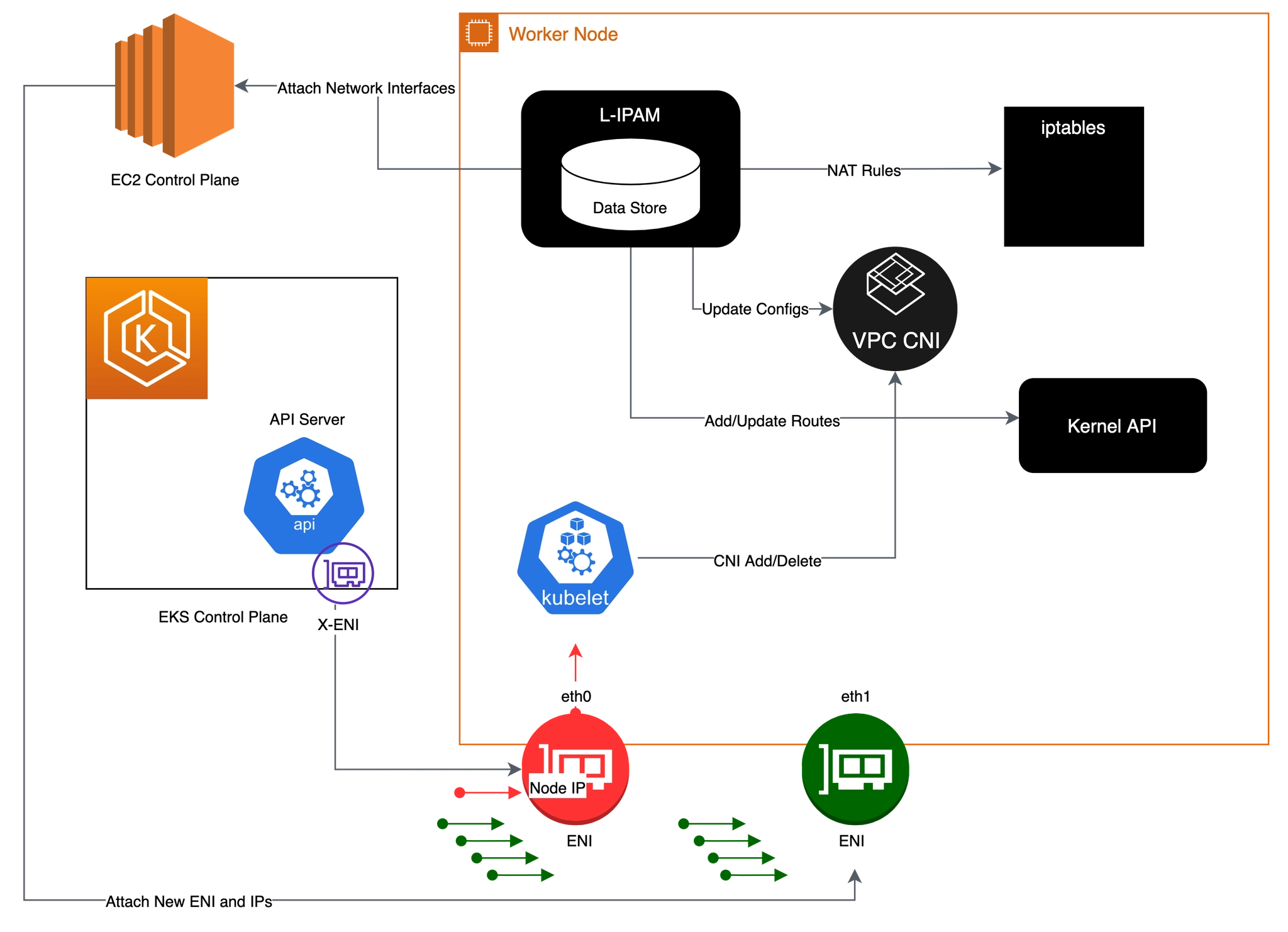
2. 파드 네트워크 환경 구성(파드 네트워크 네임스페이스) : kubelet → vpc cni → L-IPAM → kernel API ⇒ kubelet → New Pod
- Kubelet이 포드 추가 요청을 수신하면 CNI 바이너리가 사용 가능한 IP 주소에 대해 ipamd를 쿼리한 다음 ipamd가 포드에 제공합니다. CNI 바이너리가 호스트 및 포드 네트워크를 연결합니다.
- 노드에 배포된 포드는 기본적으로 기본 ENI와 동일한 보안 그룹에 할당됩니다. 또는 다른 보안 그룹으로 포드를 구성할 수 있습니다.
- IP 주소 풀이 고갈되면 플러그 인은 다른 탄력적 네트워크 인터페이스를 인스턴스에 자동으로 연결하고 이 인터페이스에 다른 보조 IP 주소 집합을 할당합니다. 이 프로세스는 노드가 탄력적 네트워크 인터페이스를 추가 지원할 수 없을 때까지 계속됩니다.
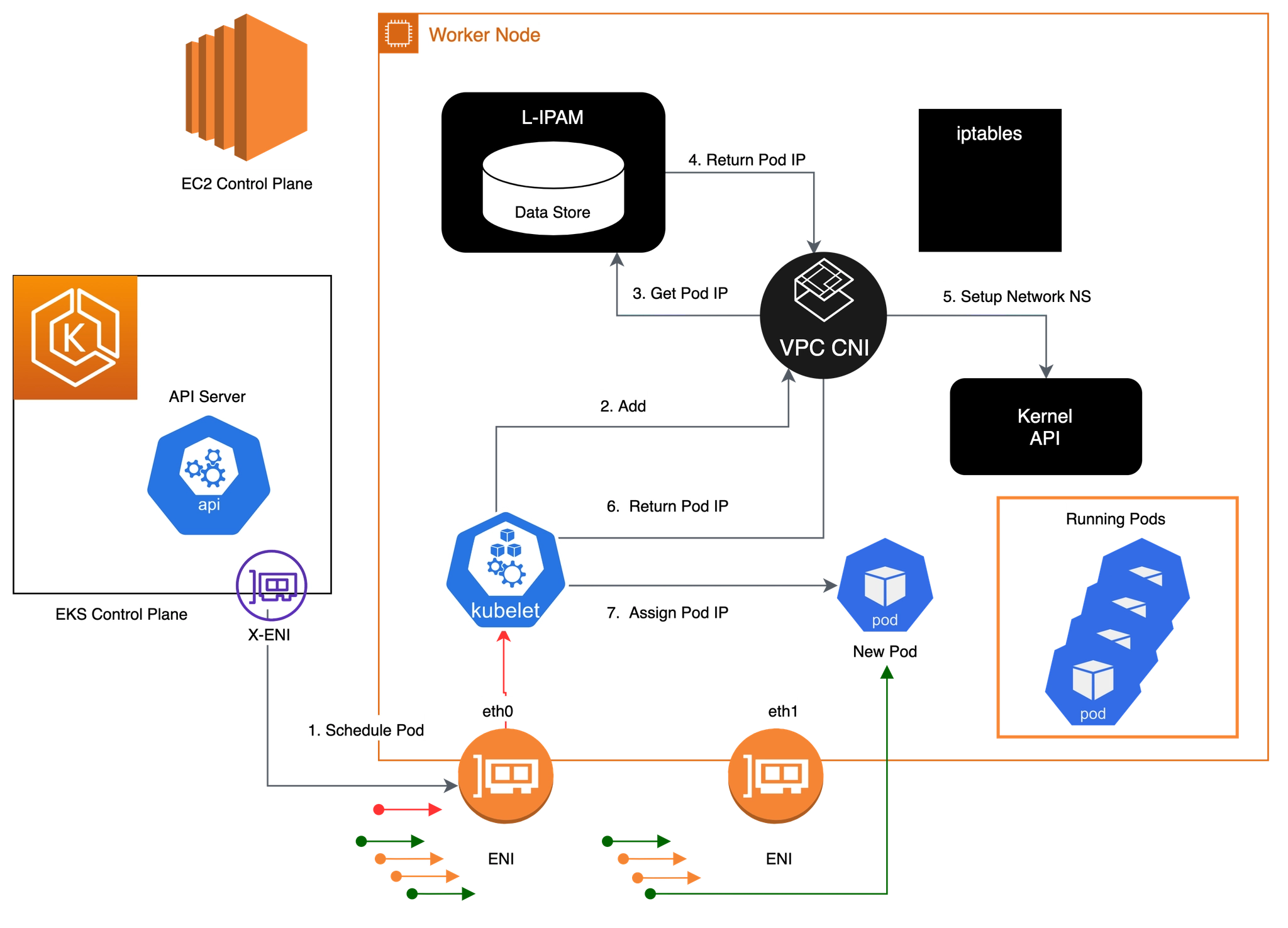
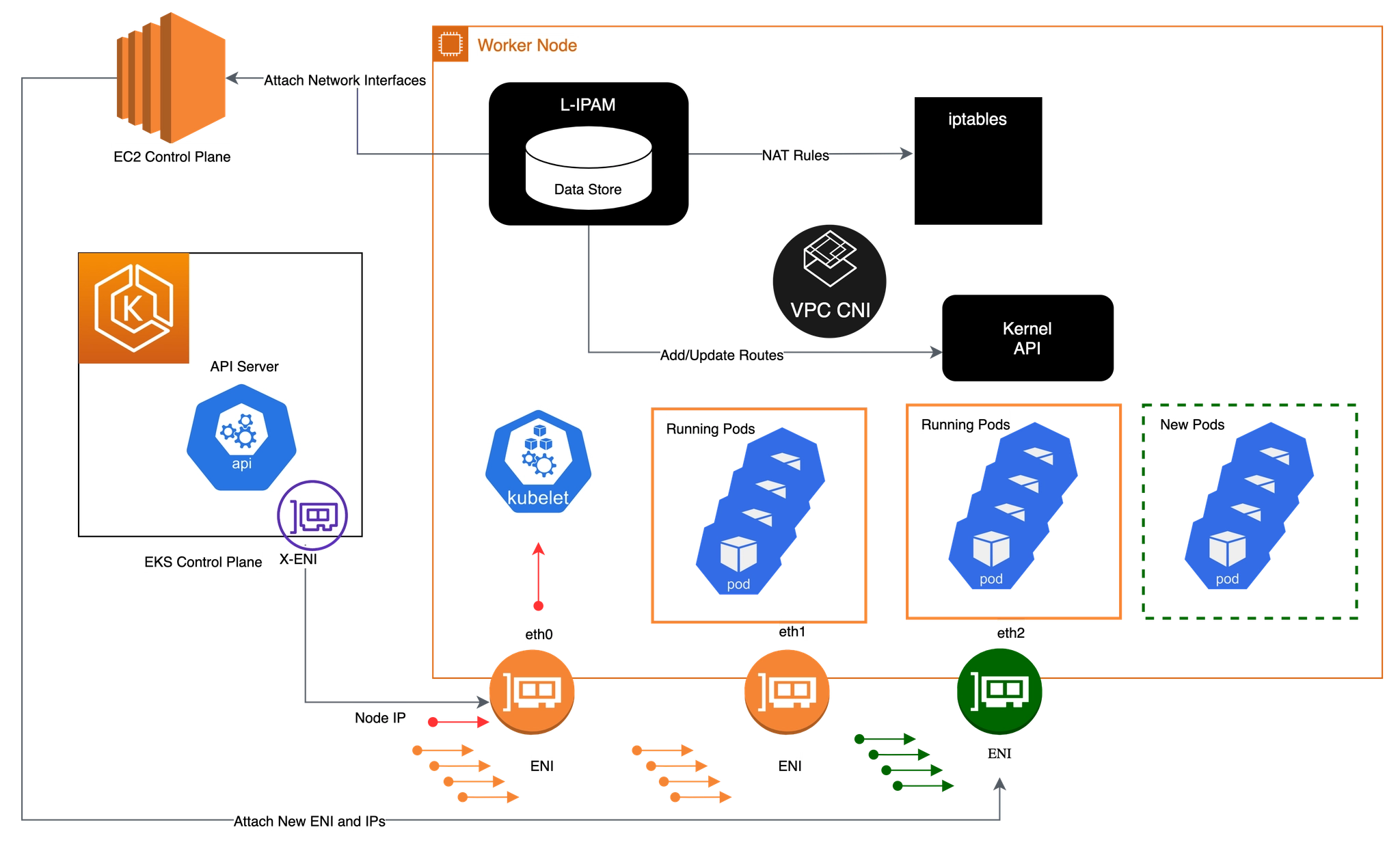
3. 포드가 삭제되면 VPC CNI는 포드의 IP 주소를 30초 cool down cache 에 배치합니다.
- cool down cache IPs는 새 포드에 할당되지 않습니다.
- cooling-off 쿨링 오프 기간이 끝나면 VPC CNI는 포드 IP를 웜 풀로 다시 이동합니다.
- 쿨링 오프 기간은 포드 IP 주소가 조기에 재활용되는 것을 방지하고 모든 클러스터 노드에서 kube-proxy가 iptables 규칙 업데이트를 완료하도록 허용합니다.
- IPs 또는 ENIs 수가 웜 풀 설정 수를 초과하면 ipamd 플러그인은 IPs 및 ENIs에 반환합니다.
2. 노드에서 기본 네트워크 정보 확인
노드 접속 및 IP 변수 지정
# EC2 ENI IP 확인
2w git:(main*) $ aws ec2 describe-instances --query "Reservations[*].Instances[*].{PublicIPAdd:PublicIpAddress,PrivateIPAdd:PrivateIpAddress,InstanceName:Tags[?Key=='Name']|[0].Value,Status:State.Name}" --filters Name=instance-state-name,Values=running --output table

# 아래 IP는 각자 실습 환경에 따라 사용
2w git:(main*) $ N1=13.125.90.155
N2=3.36.10.59
N3=52.79.83.80

# 워커 노드 SSH 접속
2w git:(main*) $ for i in $N1 $N2 $N3; do echo ">> node $i <<"; ssh -o StrictHostKeyChecking=no ec2-user@$i hostname; echo; done

>> node 13.125.90.155 <<
Warning: Permanently added '13.125.90.155' (ED25519) to the list of known hosts.
ip-192-168-3-7.ap-northeast-2.compute.internal

>> node 3.36.10.59 <<
Warning: Permanently added '3.36.10.59' (ED25519) to the list of known hosts.
ip-192-168-5-36.ap-northeast-2.compute.internal

>> node 52.79.83.80 <<
Warning: Permanently added '52.79.83.80' (ED25519) to the list of known hosts.
ip-192-168-11-144.ap-northeast-2.compute.internal
네트워크 기본 정보 확인
# 파드 상세 정보 확인
2w git:(main*) $ kubectl get daemonset aws-node --namespace kube-system -owide

NAME       DESIRED   CURRENT   READY   UP-TO-DATE   AVAILABLE   NODE SELECTOR   AGE   CONTAINERS                   IMAGES                                                                                                                                                                                    SELECTOR
aws-node   3         3         3       3            3           <none>          59m   aws-node,aws-eks-nodeagent   602401143452.dkr.ecr.ap-northeast-2.amazonaws.com/amazon-k8s-cni:v1.21.1-eksbuild.5,602401143452.dkr.ecr.ap-northeast-2.amazonaws.com/amazon/aws-network-policy-agent:v1.3.1-eksbuild.1   k8s-app=aws-node


2w git:(main*) $ kubectl describe daemonset aws-node --namespace kube-system

Name:           aws-node
Namespace:      kube-system
Selector:       k8s-app=aws-node
Node-Selector:  <none>
Labels:         app.kubernetes.io/instance=aws-vpc-cni
                app.kubernetes.io/managed-by=Helm
                app.kubernetes.io/name=aws-node
                app.kubernetes.io/version=v1.21.1
                helm.sh/chart=aws-vpc-cni-1.21.1
                k8s-app=aws-node
Annotations:    deprecated.daemonset.template.generation: 1
Desired Number of Nodes Scheduled: 3
Current Number of Nodes Scheduled: 3
Number of Nodes Scheduled with Up-to-date Pods: 3
Number of Nodes Scheduled with Available Pods: 3
Number of Nodes Misscheduled: 0
Pods Status:  3 Running / 0 Waiting / 0 Succeeded / 0 Failed
Pod Template:
  Labels:           app.kubernetes.io/instance=aws-vpc-cni
                    app.kubernetes.io/name=aws-node
                    k8s-app=aws-node
  Service Account:  aws-node
  Init Containers:
   aws-vpc-cni-init:
    Image:      602401143452.dkr.ecr.ap-northeast-2.amazonaws.com/amazon-k8s-cni-init:v1.21.1-eksbuild.5
    Port:       <none>
    Host Port:  <none>
    Requests:
      cpu:  25m
    Environment:
      DISABLE_TCP_EARLY_DEMUX:  false
      ENABLE_IPv6:              false
    Mounts:
      /host/opt/cni/bin from cni-bin-dir (rw)
  Containers:
   aws-node:
    Image:      602401143452.dkr.ecr.ap-northeast-2.amazonaws.com/amazon-k8s-cni:v1.21.1-eksbuild.5
    Port:       61678/TCP (metrics)
    Host Port:  0/TCP (metrics)
    Requests:
      cpu:      25m
    Liveness:   exec [/app/grpc-health-probe -addr=:50051 -connect-timeout=5s -rpc-timeout=5s] delay=60s timeout=10s period=10s #success=1 #failure=3
    Readiness:  exec [/app/grpc-health-probe -addr=:50051 -connect-timeout=5s -rpc-timeout=5s] delay=1s timeout=10s period=10s #success=1 #failure=3
    Environment:
      ADDITIONAL_ENI_TAGS:                    {}
      ANNOTATE_POD_IP:                        false
      AWS_VPC_CNI_NODE_PORT_SUPPORT:          true
      AWS_VPC_ENI_MTU:                        9001
      AWS_VPC_K8S_CNI_CUSTOM_NETWORK_CFG:     false
      AWS_VPC_K8S_CNI_EXTERNALSNAT:           false
      AWS_VPC_K8S_CNI_LOGLEVEL:               DEBUG
      AWS_VPC_K8S_CNI_LOG_FILE:               /host/var/log/aws-routed-eni/ipamd.log
      AWS_VPC_K8S_CNI_RANDOMIZESNAT:          prng
      AWS_VPC_K8S_CNI_VETHPREFIX:             eni
      AWS_VPC_K8S_PLUGIN_LOG_FILE:            /var/log/aws-routed-eni/plugin.log
      AWS_VPC_K8S_PLUGIN_LOG_LEVEL:           DEBUG
      CLUSTER_ENDPOINT:                       https://ECAEBC91A81409A04556F202056B6FFE.gr7.ap-northeast-2.eks.amazonaws.com
      CLUSTER_NAME:                           myeks
      DISABLE_INTROSPECTION:                  false
      DISABLE_METRICS:                        false
      DISABLE_NETWORK_RESOURCE_PROVISIONING:  false
      ENABLE_IMDS_ONLY_MODE:                  false
      ENABLE_IPv4:                            true
      ENABLE_IPv6:                            false
      ENABLE_MULTI_NIC:                       false
      ENABLE_POD_ENI:                         false
      ENABLE_PREFIX_DELEGATION:               false
      ENABLE_SUBNET_DISCOVERY:                true
      NETWORK_POLICY_ENFORCING_MODE:          standard
      VPC_CNI_VERSION:                        v1.21.1
      VPC_ID:                                 vpc-0a978c99d0f9f870a
      WARM_ENI_TARGET:                        1
      WARM_PREFIX_TARGET:                     1
      MY_NODE_NAME:                            (v1:spec.nodeName)
      MY_POD_NAME:                             (v1:metadata.name)
    Mounts:
      /host/etc/cni/net.d from cni-net-dir (rw)
      /host/opt/cni/bin from cni-bin-dir (rw)
      /host/var/log/aws-routed-eni from log-dir (rw)
      /run/xtables.lock from xtables-lock (rw)
      /var/run/aws-node from run-dir (rw)
   aws-eks-nodeagent:
    Image:      602401143452.dkr.ecr.ap-northeast-2.amazonaws.com/amazon/aws-network-policy-agent:v1.3.1-eksbuild.1
    Port:       8162/TCP (agentmetrics)
    Host Port:  0/TCP (agentmetrics)
    Args:
      --enable-ipv6=false
      --enable-network-policy=false
      --enable-cloudwatch-logs=false
      --enable-policy-event-logs=false
      --log-file=/var/log/aws-routed-eni/network-policy-agent.log
      --metrics-bind-addr=:8162
      --health-probe-bind-addr=:8163
      --conntrack-cache-cleanup-period=300
      --log-level=debug
    Requests:
      cpu:  25m
    Environment:
      MY_NODE_NAME:   (v1:spec.nodeName)
    Mounts:
      /host/opt/cni/bin from cni-bin-dir (rw)
      /sys/fs/bpf from bpf-pin-path (rw)
      /var/log/aws-routed-eni from log-dir (rw)
      /var/run/aws-node from run-dir (rw)
  Volumes:
   bpf-pin-path:
    Type:          HostPath (bare host directory volume)
    Path:          /sys/fs/bpf
    HostPathType:
   cni-bin-dir:
    Type:          HostPath (bare host directory volume)
    Path:          /opt/cni/bin
    HostPathType:
   cni-net-dir:
    Type:          HostPath (bare host directory volume)
    Path:          /etc/cni/net.d
    HostPathType:
   log-dir:
    Type:          HostPath (bare host directory volume)
    Path:          /var/log/aws-routed-eni
    HostPathType:  DirectoryOrCreate
   run-dir:
    Type:          HostPath (bare host directory volume)
    Path:          /var/run/aws-node
    HostPathType:  DirectoryOrCreate
   xtables-lock:
    Type:               HostPath (bare host directory volume)
    Path:               /run/xtables.lock
    HostPathType:       FileOrCreate
  Priority Class Name:  system-node-critical
  Node-Selectors:       <none>
  Tolerations:          op=Exists
Events:
  Type    Reason            Age   From                  Message
  ----    ------            ----  ----                  -------
  Normal  SuccessfulCreate  58m   daemonset-controller  Created pod: aws-node-kmscr
  Normal  SuccessfulCreate  58m   daemonset-controller  Created pod: aws-node-mlbgs
  Normal  SuccessfulCreate  58m   daemonset-controller  Created pod: aws-node-4skpv


# aws-node 데몬셋 env 확인
2w git:(main*) $ kubectl get ds aws-node -n kube-system -o json | jq '.spec.template.spec.containers[0].env'

[
  {
    "name": "ADDITIONAL_ENI_TAGS",
    "value": "{}"
  },
  {
    "name": "ANNOTATE_POD_IP",
    "value": "false"
  },
  {
    "name": "AWS_VPC_CNI_NODE_PORT_SUPPORT",
    "value": "true"
  },
  {
    "name": "AWS_VPC_ENI_MTU",
    "value": "9001"
  },
  {
    "name": "AWS_VPC_K8S_CNI_CUSTOM_NETWORK_CFG",
    "value": "false"
  },
  {
    "name": "AWS_VPC_K8S_CNI_EXTERNALSNAT",
    "value": "false"
  },
  {
    "name": "AWS_VPC_K8S_CNI_LOGLEVEL",
    "value": "DEBUG"
  },
  {
    "name": "AWS_VPC_K8S_CNI_LOG_FILE",
    "value": "/host/var/log/aws-routed-eni/ipamd.log"
  },
  {
    "name": "AWS_VPC_K8S_CNI_RANDOMIZESNAT",
    "value": "prng"
  },
  {
    "name": "AWS_VPC_K8S_CNI_VETHPREFIX",
    "value": "eni"
  },
  {
    "name": "AWS_VPC_K8S_PLUGIN_LOG_FILE",
    "value": "/var/log/aws-routed-eni/plugin.log"
  },
  {
    "name": "AWS_VPC_K8S_PLUGIN_LOG_LEVEL",
    "value": "DEBUG"
  },
  {
    "name": "CLUSTER_ENDPOINT",
    "value": "https://ECAEBC91A81409A04556F202056B6FFE.gr7.ap-northeast-2.eks.amazonaws.com"
  },
  {
    "name": "CLUSTER_NAME",
    "value": "myeks"
  },
  {
    "name": "DISABLE_INTROSPECTION",
    "value": "false"
  },
  {
    "name": "DISABLE_METRICS",
    "value": "false"
  },
  {
    "name": "DISABLE_NETWORK_RESOURCE_PROVISIONING",
    "value": "false"
  },
  {
    "name": "ENABLE_IMDS_ONLY_MODE",
    "value": "false"
  },
  {
    "name": "ENABLE_IPv4",
    "value": "true"
  },
  {
    "name": "ENABLE_IPv6",
    "value": "false"
  },
  {
    "name": "ENABLE_MULTI_NIC",
    "value": "false"
  },
  {
    "name": "ENABLE_POD_ENI",
    "value": "false"
  },
  {
    "name": "ENABLE_PREFIX_DELEGATION",
    "value": "false"
  },
  {
    "name": "ENABLE_SUBNET_DISCOVERY",
    "value": "true"
  },
  {
    "name": "NETWORK_POLICY_ENFORCING_MODE",
    "value": "standard"
  },
  {
    "name": "VPC_CNI_VERSION",
    "value": "v1.21.1"
  },
  {
    "name": "VPC_ID",
    "value": "vpc-0a978c99d0f9f870a"
  },
  {
    "name": "WARM_ENI_TARGET",
    "value": "1"
  },
  {
    "name": "WARM_PREFIX_TARGET",
    "value": "1"
  },
  {
    "name": "MY_NODE_NAME",
    "valueFrom": {
      "fieldRef": {
        "apiVersion": "v1",
        "fieldPath": "spec.nodeName"
      }
    }
  },
  {
    "name": "MY_POD_NAME",
    "valueFrom": {
      "fieldRef": {
        "apiVersion": "v1",
        "fieldPath": "metadata.name"
      }
    }
  }
]
노드에 네트워크 정보 확인
# cni log 확인
# cni 관련 트러블슈팅 시, ipamd.log 파일 참조
2w git:(main*) $ 2w git:(main*) $ for i in $N1 $N2 $N3; do echo ">> node $i <<"; ssh ec2-user@$i tree /var/log/aws-routed-eni ; echo; done

>> node 13.125.90.155 <<
/var/log/aws-routed-eni
├── ebpf-sdk.log
├── ipamd.log
└── network-policy-agent.log

0 directories, 3 files

>> node 3.36.10.59 <<
/var/log/aws-routed-eni
├── ebpf-sdk.log
├── egress-v6-plugin.log
├── ipamd.log
├── network-policy-agent.log
└── plugin.log

0 directories, 5 files

>> node 52.79.83.80 <<
/var/log/aws-routed-eni
├── ebpf-sdk.log
├── egress-v6-plugin.log
├── ipamd.log
├── network-policy-agent.log
└── plugin.log

0 directories, 5 files


2w git:(main*) $ for i in $N1 $N2 $N3; do echo ">> node $i <<"; ssh ec2-user@$i sudo cat /var/log/aws-routed-eni/plugin.log | jq ; echo; done

>> node 13.125.90.155 <<
cat: /var/log/aws-routed-eni/plugin.log: No such file or directory

>> node 3.36.10.59 <<
{
  "level": "info",
  "ts": "2026-03-24T12:42:24.088Z",
  "caller": "routed-eni-cni-plugin/cni.go:131",
  "msg": "Constructed new logger instance"
}
{
  "level": "info",
  "ts": "2026-03-24T12:42:24.088Z",
  "caller": "routed-eni-cni-plugin/cni.go:140",
  "msg": "Received CNI add request: ContainerID(9057ac941292277cf8bd3dc28f6c58bb90eced5232b75132d27679e64eac99dc) Netns(/var/run/netns/cni-b50f9442-d17b-8951-95c3-46862cb4df5d) IfName(eth0) Args(K8S_POD_UID=e0586ebd-ba17-42fc-afa1-195787394f7c;IgnoreUnknown=1;K8S_POD_NAMESPACE=kube-system;K8S_POD_NAME=coredns-cc56d5f8b-9nvgz;K8S_POD_INFRA_CONTAINER_ID=9057ac941292277cf8bd3dc28f6c58bb90eced5232b75132d27679e64eac99dc) Path(/opt/cni/bin) argsStdinData({\"capabilities\":{\"io.kubernetes.cri.pod-annotations\":true},\"cniVersion\":\"0.4.0\",\"mtu\":\"9001\",\"name\":\"aws-cni\",\"pluginLogFile\":\"/var/log/aws-routed-eni/plugin.log\",\"pluginLogLevel\":\"DEBUG\",\"podSGEnforcingMode\":\"strict\",\"runtimeConfig\":{\"io.kubernetes.cri.pod-annotations\":{\"kubernetes.io/config.seen\":\"2026-03-24T12:42:23.738464638Z\",\"kubernetes.io/config.source\":\"api\"}},\"type\":\"aws-cni\",\"vethPrefix\":\"eni\"})"
}
{
  "level": "debug",
  "ts": "2026-03-24T12:42:24.088Z",
  "caller": "routed-eni-cni-plugin/cni.go:140",
  "msg": "Prev Result: <nil>\n"
}
{
  "level": "debug",
  "ts": "2026-03-24T12:42:24.088Z",
  "caller": "routed-eni-cni-plugin/cni.go:140",
  "msg": "MTU value set is 9001:"
}
{
  "level": "debug",
  "ts": "2026-03-24T12:42:24.088Z",
  "caller": "routed-eni-cni-plugin/cni.go:140",
  "msg": "pod requires multi-nic attachment: false"
}
{
  "level": "info",
  "ts": "2026-03-24T12:42:24.094Z",
  "caller": "routed-eni-cni-plugin/cni.go:140",
  "msg": "Received add network response from ipamd for container 9057ac941292277cf8bd3dc28f6c58bb90eced5232b75132d27679e64eac99dc interface eth0: Success:true IPAllocationMetadata:{IPv4Addr:\"192.168.5.76\" RouteTableId:254} VPCv4CIDRs:\"192.168.0.0/16\" NetworkPolicyMode:\"standard\""
}
{
  "level": "debug",
  "ts": "2026-03-24T12:42:24.094Z",
  "caller": "routed-eni-cni-plugin/cni.go:279",
  "msg": "SetupPodNetwork: hostVethName=eni481fe145bd1, contVethName=eth0, netnsPath=/var/run/netns/cni-b50f9442-d17b-8951-95c3-46862cb4df5d, ipAddr=192.168.5.76/32, routeTableNumber=254, mtu=9001"
}
{
  "level": "debug",
  "ts": "2026-03-24T12:42:24.132Z",
  "caller": "driver/driver.go:276",
  "msg": "Successfully set IPv6 sysctls on hostVeth eni481fe145bd1"
}
{
  "level": "debug",
  "ts": "2026-03-24T12:42:24.135Z",
  "caller": "driver/driver.go:286",
  "msg": "Successfully setup container route, containerAddr=192.168.5.76/32, hostVeth=eni481fe145bd1, rtTable=main"
}
{
  "level": "debug",
  "ts": "2026-03-24T12:42:24.135Z",
  "caller": "driver/driver.go:286",
  "msg": "Successfully setup toContainer rule, containerAddr=192.168.5.76/32, rtTable=main"
}
{
  "level": "debug",
  "ts": "2026-03-24T12:42:24.135Z",
  "caller": "routed-eni-cni-plugin/cni.go:140",
  "msg": "Using dummy interface: {Name:dummy481fe145bd1 Mac:0 Mtu:0 Sandbox:0 SocketPath: PciID:}"
}
{
  "level": "debug",
  "ts": "2026-03-24T12:42:24.141Z",
  "caller": "routed-eni-cni-plugin/cni.go:140",
  "msg": "Network Policy agent for EnforceNpToPod returned Success : true"
}

>> node 52.79.83.80 <<
{
  "level": "info",
  "ts": "2026-03-24T12:42:24.117Z",
  "caller": "routed-eni-cni-plugin/cni.go:131",
  "msg": "Constructed new logger instance"
}
{
  "level": "info",
  "ts": "2026-03-24T12:42:24.117Z",
  "caller": "routed-eni-cni-plugin/cni.go:140",
  "msg": "Received CNI add request: ContainerID(f4ed3b515de27c5ae54519c12dbc5c7eef96985c43951b5550e9d8d4dbe6a7a2) Netns(/var/run/netns/cni-4c8defb0-eb51-0e65-cc93-fee1aa750c32) IfName(eth0) Args(K8S_POD_NAME=coredns-cc56d5f8b-x7p4t;K8S_POD_INFRA_CONTAINER_ID=f4ed3b515de27c5ae54519c12dbc5c7eef96985c43951b5550e9d8d4dbe6a7a2;K8S_POD_UID=11e0e653-7cdb-4fe1-8e95-a36318ce3606;IgnoreUnknown=1;K8S_POD_NAMESPACE=kube-system) Path(/opt/cni/bin) argsStdinData({\"capabilities\":{\"io.kubernetes.cri.pod-annotations\":true},\"cniVersion\":\"0.4.0\",\"mtu\":\"9001\",\"name\":\"aws-cni\",\"pluginLogFile\":\"/var/log/aws-routed-eni/plugin.log\",\"pluginLogLevel\":\"DEBUG\",\"podSGEnforcingMode\":\"strict\",\"runtimeConfig\":{\"io.kubernetes.cri.pod-annotations\":{\"kubernetes.io/config.seen\":\"2026-03-24T12:42:23.784005411Z\",\"kubernetes.io/config.source\":\"api\"}},\"type\":\"aws-cni\",\"vethPrefix\":\"eni\"})"
}
{
  "level": "debug",
  "ts": "2026-03-24T12:42:24.117Z",
  "caller": "routed-eni-cni-plugin/cni.go:140",
  "msg": "Prev Result: <nil>\n"
}
{
  "level": "debug",
  "ts": "2026-03-24T12:42:24.117Z",
  "caller": "routed-eni-cni-plugin/cni.go:140",
  "msg": "MTU value set is 9001:"
}
{
  "level": "debug",
  "ts": "2026-03-24T12:42:24.117Z",
  "caller": "routed-eni-cni-plugin/cni.go:140",
  "msg": "pod requires multi-nic attachment: false"
}
{
  "level": "info",
  "ts": "2026-03-24T12:42:24.121Z",
  "caller": "routed-eni-cni-plugin/cni.go:140",
  "msg": "Received add network response from ipamd for container f4ed3b515de27c5ae54519c12dbc5c7eef96985c43951b5550e9d8d4dbe6a7a2 interface eth0: Success:true IPAllocationMetadata:{IPv4Addr:\"192.168.10.183\" RouteTableId:254} VPCv4CIDRs:\"192.168.0.0/16\" NetworkPolicyMode:\"standard\""
}
{
  "level": "debug",
  "ts": "2026-03-24T12:42:24.121Z",
  "caller": "routed-eni-cni-plugin/cni.go:279",
  "msg": "SetupPodNetwork: hostVethName=eni6422ac782e4, contVethName=eth0, netnsPath=/var/run/netns/cni-4c8defb0-eb51-0e65-cc93-fee1aa750c32, ipAddr=192.168.10.183/32, routeTableNumber=254, mtu=9001"
}
{
  "level": "debug",
  "ts": "2026-03-24T12:42:24.204Z",
  "caller": "driver/driver.go:276",
  "msg": "Successfully set IPv6 sysctls on hostVeth eni6422ac782e4"
}
{
  "level": "debug",
  "ts": "2026-03-24T12:42:24.204Z",
  "caller": "driver/driver.go:286",
  "msg": "Successfully setup container route, containerAddr=192.168.10.183/32, hostVeth=eni6422ac782e4, rtTable=main"
}
{
  "level": "debug",
  "ts": "2026-03-24T12:42:24.204Z",
  "caller": "driver/driver.go:286",
  "msg": "Successfully setup toContainer rule, containerAddr=192.168.10.183/32, rtTable=main"
}
{
  "level": "debug",
  "ts": "2026-03-24T12:42:24.204Z",
  "caller": "routed-eni-cni-plugin/cni.go:140",
  "msg": "Using dummy interface: {Name:dummy6422ac782e4 Mac:0 Mtu:0 Sandbox:0 SocketPath: PciID:}"
}
{
  "level": "debug",
  "ts": "2026-03-24T12:42:24.208Z",
  "caller": "routed-eni-cni-plugin/cni.go:140",
  "msg": "Network Policy agent for EnforceNpToPod returned Success : true"
}


# 네트워크 정보 확인 : eniY는 pod network 네임스페이스와 veth pair
2w git:(main*) $ for i in $N1 $N2 $N3; do echo ">> node $i <<"; ssh ec2-user@$i sudo ip -br -c addr; echo; done

>> node 13.125.90.155 <<
lo               UNKNOWN        127.0.0.1/8 ::1/128
ens5             UP             192.168.3.7/22 metric 512 fe80::4d:80ff:feab:fb03/64

>> node 3.36.10.59 <<
lo               UNKNOWN        127.0.0.1/8 ::1/128
ens5             UP             192.168.5.36/22 metric 512 fe80::409:ffff:fe29:eb23/64
eni481fe145bd1@if3 UP             fe80::80b9:cff:fe9d:bd66/64
ens6             UP             192.168.4.106/22 fe80::459:b6ff:fefa:9319/64

>> node 52.79.83.80 <<
lo               UNKNOWN        127.0.0.1/8 ::1/128
ens5             UP             192.168.11.144/22 metric 512 fe80::83c:3eff:fe51:1309/64
eni6422ac782e4@if3 UP             fe80::1c59:e7ff:fe6d:e994/64
ens6             UP             192.168.9.236/22 fe80::899:8aff:fe8a:2813/64


2w git:(main*) $ for i in $N1 $N2 $N3; do echo ">> node $i <<"; ssh ec2-user@$i sudo ip -c addr; echo; done

>> node 13.125.90.155 <<
1: lo: <LOOPBACK,UP,LOWER_UP> mtu 65536 qdisc noqueue state UNKNOWN group default qlen 1000
    link/loopback 00:00:00:00:00:00 brd 00:00:00:00:00:00
    inet 127.0.0.1/8 scope host lo
       valid_lft forever preferred_lft forever
    inet6 ::1/128 scope host noprefixroute
       valid_lft forever preferred_lft forever
2: ens5: <BROADCAST,MULTICAST,UP,LOWER_UP> mtu 9001 qdisc mq state UP group default qlen 1000
    link/ether 02:4d:80:ab:fb:03 brd ff:ff:ff:ff:ff:ff
    altname enp0s5
    inet 192.168.3.7/22 metric 512 brd 192.168.3.255 scope global dynamic ens5
       valid_lft 2778sec preferred_lft 2778sec
    inet6 fe80::4d:80ff:feab:fb03/64 scope link proto kernel_ll
       valid_lft forever preferred_lft forever

>> node 3.36.10.59 <<
1: lo: <LOOPBACK,UP,LOWER_UP> mtu 65536 qdisc noqueue state UNKNOWN group default qlen 1000
    link/loopback 00:00:00:00:00:00 brd 00:00:00:00:00:00
    inet 127.0.0.1/8 scope host lo
       valid_lft forever preferred_lft forever
    inet6 ::1/128 scope host noprefixroute
       valid_lft forever preferred_lft forever
2: ens5: <BROADCAST,MULTICAST,UP,LOWER_UP> mtu 9001 qdisc mq state UP group default qlen 1000
    link/ether 06:09:ff:29:eb:23 brd ff:ff:ff:ff:ff:ff
    altname enp0s5
    inet 192.168.5.36/22 metric 512 brd 192.168.7.255 scope global dynamic ens5
       valid_lft 2775sec preferred_lft 2775sec
    inet6 fe80::409:ffff:fe29:eb23/64 scope link proto kernel_ll
       valid_lft forever preferred_lft forever
3: eni481fe145bd1@if3: <BROADCAST,MULTICAST,UP,LOWER_UP> mtu 9001 qdisc noqueue state UP group default
    link/ether 82:b9:0c:9d:bd:66 brd ff:ff:ff:ff:ff:ff link-netns cni-b50f9442-d17b-8951-95c3-46862cb4df5d
    inet6 fe80::80b9:cff:fe9d:bd66/64 scope link proto kernel_ll
       valid_lft forever preferred_lft forever
4: ens6: <BROADCAST,MULTICAST,UP,LOWER_UP> mtu 9001 qdisc mq state UP group default qlen 1000
    link/ether 06:59:b6:fa:93:19 brd ff:ff:ff:ff:ff:ff
    altname enp0s6
    inet 192.168.4.106/22 brd 192.168.7.255 scope global ens6
       valid_lft forever preferred_lft forever
    inet6 fe80::459:b6ff:fefa:9319/64 scope link proto kernel_ll
       valid_lft forever preferred_lft forever

>> node 52.79.83.80 <<
1: lo: <LOOPBACK,UP,LOWER_UP> mtu 65536 qdisc noqueue state UNKNOWN group default qlen 1000
    link/loopback 00:00:00:00:00:00 brd 00:00:00:00:00:00
    inet 127.0.0.1/8 scope host lo
       valid_lft forever preferred_lft forever
    inet6 ::1/128 scope host noprefixroute
       valid_lft forever preferred_lft forever
2: ens5: <BROADCAST,MULTICAST,UP,LOWER_UP> mtu 9001 qdisc mq state UP group default qlen 1000
    link/ether 0a:3c:3e:51:13:09 brd ff:ff:ff:ff:ff:ff
    altname enp0s5
    inet 192.168.11.144/22 metric 512 brd 192.168.11.255 scope global dynamic ens5
       valid_lft 2776sec preferred_lft 2776sec
    inet6 fe80::83c:3eff:fe51:1309/64 scope link proto kernel_ll
       valid_lft forever preferred_lft forever
3: eni6422ac782e4@if3: <BROADCAST,MULTICAST,UP,LOWER_UP> mtu 9001 qdisc noqueue state UP group default
    link/ether 1e:59:e7:6d:e9:94 brd ff:ff:ff:ff:ff:ff link-netns cni-4c8defb0-eb51-0e65-cc93-fee1aa750c32
    inet6 fe80::1c59:e7ff:fe6d:e994/64 scope link proto kernel_ll
       valid_lft forever preferred_lft forever
4: ens6: <BROADCAST,MULTICAST,UP,LOWER_UP> mtu 9001 qdisc mq state UP group default qlen 1000
    link/ether 0a:99:8a:8a:28:13 brd ff:ff:ff:ff:ff:ff
    altname enp0s6
    inet 192.168.9.236/22 brd 192.168.11.255 scope global ens6
       valid_lft forever preferred_lft forever
    inet6 fe80::899:8aff:fe8a:2813/64 scope link proto kernel_ll
       valid_lft forever preferred_lft forever


2w git:(main*) $ for i in $N1 $N2 $N3; do echo ">> node $i <<"; ssh ec2-user@$i sudo ip -c route; echo; done

>> node 13.125.90.155 <<
default via 192.168.0.1 dev ens5 proto dhcp src 192.168.3.7 metric 512
192.168.0.0/22 dev ens5 proto kernel scope link src 192.168.3.7 metric 512
192.168.0.1 dev ens5 proto dhcp scope link src 192.168.3.7 metric 512
192.168.0.2 dev ens5 proto dhcp scope link src 192.168.3.7 metric 512

>> node 3.36.10.59 <<
default via 192.168.4.1 dev ens5 proto dhcp src 192.168.5.36 metric 512
192.168.0.2 via 192.168.4.1 dev ens5 proto dhcp src 192.168.5.36 metric 512
192.168.4.0/22 dev ens5 proto kernel scope link src 192.168.5.36 metric 512
192.168.4.1 dev ens5 proto dhcp scope link src 192.168.5.36 metric 512
192.168.5.76 dev eni481fe145bd1 scope link

>> node 52.79.83.80 <<
default via 192.168.8.1 dev ens5 proto dhcp src 192.168.11.144 metric 512
192.168.0.2 via 192.168.8.1 dev ens5 proto dhcp src 192.168.11.144 metric 512
192.168.8.0/22 dev ens5 proto kernel scope link src 192.168.11.144 metric 512
192.168.8.1 dev ens5 proto dhcp scope link src 192.168.11.144 metric 512
192.168.10.183 dev eni6422ac782e4 scope link


2w git:(main*) $ ssh ec2-user@$N1 sudo iptables -t nat -S

-P PREROUTING ACCEPT
-P INPUT ACCEPT
-P OUTPUT ACCEPT
-P POSTROUTING ACCEPT
-N AWS-CONNMARK-CHAIN-0
-N AWS-SNAT-CHAIN-0
-N KUBE-KUBELET-CANARY
-N KUBE-MARK-MASQ
-N KUBE-NODEPORTS
-N KUBE-POSTROUTING
-N KUBE-PROXY-CANARY
-N KUBE-SEP-5UDGFAFYELDECNYA
-N KUBE-SEP-7ETZDPY2QTUGX22R
-N KUBE-SEP-BAHASVEYSP77KY2T
-N KUBE-SEP-BU7V3HIQWPVU7HYM
-N KUBE-SEP-G5V4KEWYO6B2RBGW
-N KUBE-SEP-PQBIC6FYNOGG3SED
-N KUBE-SEP-S5CQZPQZARHXYA6J
-N KUBE-SEP-XYDDOFWXZXQGZRSQ
-N KUBE-SEP-ZNIZZUBEGKJH5NYC
-N KUBE-SERVICES
-N KUBE-SVC-ERIFXISQEP7F7OF4
-N KUBE-SVC-I7SKRZYQ7PWYV5X7
-N KUBE-SVC-JD5MR3NA4I4DYORP
-N KUBE-SVC-NPX46M4PTMTKRN6Y
-N KUBE-SVC-TCOU7JCQXEZGVUNU
-A PREROUTING -m comment --comment "kubernetes service portals" -j KUBE-SERVICES
-A PREROUTING -i eni+ -m comment --comment "AWS, outbound connections" -j AWS-CONNMARK-CHAIN-0
-A PREROUTING -m comment --comment "AWS, CONNMARK" -j CONNMARK --restore-mark --nfmask 0x80 --ctmask 0x80
-A OUTPUT -m comment --comment "kubernetes service portals" -j KUBE-SERVICES
-A POSTROUTING -m comment --comment "kubernetes postrouting rules" -j KUBE-POSTROUTING
-A POSTROUTING -m comment --comment "AWS SNAT CHAIN" -j AWS-SNAT-CHAIN-0
-A AWS-CONNMARK-CHAIN-0 -d 192.168.0.0/16 -m comment --comment "AWS CONNMARK CHAIN, VPC CIDR" -j RETURN
-A AWS-CONNMARK-CHAIN-0 -m comment --comment "AWS, CONNMARK" -j CONNMARK --set-xmark 0x80/0x80
-A AWS-SNAT-CHAIN-0 -d 192.168.0.0/16 -m comment --comment "AWS SNAT CHAIN" -j RETURN
-A AWS-SNAT-CHAIN-0 ! -o vlan+ -m comment --comment "AWS, SNAT" -m addrtype ! --dst-type LOCAL -j SNAT --to-source 192.168.3.7 --random-fully
-A KUBE-MARK-MASQ -j MARK --set-xmark 0x4000/0x4000
-A KUBE-POSTROUTING -m mark ! --mark 0x4000/0x4000 -j RETURN
-A KUBE-POSTROUTING -j MARK --set-xmark 0x4000/0x0
-A KUBE-POSTROUTING -m comment --comment "kubernetes service traffic requiring SNAT" -j MASQUERADE --random-fully
-A KUBE-SEP-5UDGFAFYELDECNYA -s 192.168.10.183/32 -m comment --comment "kube-system/kube-dns:dns" -j KUBE-MARK-MASQ
-A KUBE-SEP-5UDGFAFYELDECNYA -p udp -m comment --comment "kube-system/kube-dns:dns" -m udp -j DNAT --to-destination 192.168.10.183:53
-A KUBE-SEP-7ETZDPY2QTUGX22R -s 192.168.10.183/32 -m comment --comment "kube-system/kube-dns:metrics" -j KUBE-MARK-MASQ
-A KUBE-SEP-7ETZDPY2QTUGX22R -p tcp -m comment --comment "kube-system/kube-dns:metrics" -m tcp -j DNAT --to-destination 192.168.10.183:9153
-A KUBE-SEP-BAHASVEYSP77KY2T -s 192.168.6.31/32 -m comment --comment "default/kubernetes:https" -j KUBE-MARK-MASQ
-A KUBE-SEP-BAHASVEYSP77KY2T -p tcp -m comment --comment "default/kubernetes:https" -m tcp -j DNAT --to-destination 192.168.6.31:443
-A KUBE-SEP-BU7V3HIQWPVU7HYM -s 192.168.10.183/32 -m comment --comment "kube-system/kube-dns:dns-tcp" -j KUBE-MARK-MASQ
-A KUBE-SEP-BU7V3HIQWPVU7HYM -p tcp -m comment --comment "kube-system/kube-dns:dns-tcp" -m tcp -j DNAT --to-destination 192.168.10.183:53
-A KUBE-SEP-G5V4KEWYO6B2RBGW -s 192.168.0.98/32 -m comment --comment "default/kubernetes:https" -j KUBE-MARK-MASQ
-A KUBE-SEP-G5V4KEWYO6B2RBGW -p tcp -m comment --comment "default/kubernetes:https" -m tcp -j DNAT --to-destination 192.168.0.98:443
-A KUBE-SEP-PQBIC6FYNOGG3SED -s 192.168.5.76/32 -m comment --comment "kube-system/kube-dns:dns" -j KUBE-MARK-MASQ
-A KUBE-SEP-PQBIC6FYNOGG3SED -p udp -m comment --comment "kube-system/kube-dns:dns" -m udp -j DNAT --to-destination 192.168.5.76:53
-A KUBE-SEP-S5CQZPQZARHXYA6J -s 192.168.5.76/32 -m comment --comment "kube-system/kube-dns:metrics" -j KUBE-MARK-MASQ
-A KUBE-SEP-S5CQZPQZARHXYA6J -p tcp -m comment --comment "kube-system/kube-dns:metrics" -m tcp -j DNAT --to-destination 192.168.5.76:9153
-A KUBE-SEP-XYDDOFWXZXQGZRSQ -s 172.0.32.0/32 -m comment --comment "kube-system/eks-extension-metrics-api:metrics-api" -j KUBE-MARK-MASQ
-A KUBE-SEP-XYDDOFWXZXQGZRSQ -p tcp -m comment --comment "kube-system/eks-extension-metrics-api:metrics-api" -m tcp -j DNAT --to-destination 172.0.32.0:10443
-A KUBE-SEP-ZNIZZUBEGKJH5NYC -s 192.168.5.76/32 -m comment --comment "kube-system/kube-dns:dns-tcp" -j KUBE-MARK-MASQ
-A KUBE-SEP-ZNIZZUBEGKJH5NYC -p tcp -m comment --comment "kube-system/kube-dns:dns-tcp" -m tcp -j DNAT --to-destination 192.168.5.76:53
-A KUBE-SERVICES -d 10.100.0.10/32 -p udp -m comment --comment "kube-system/kube-dns:dns cluster IP" -m udp --dport 53 -j KUBE-SVC-TCOU7JCQXEZGVUNU
-A KUBE-SERVICES -d 10.100.0.10/32 -p tcp -m comment --comment "kube-system/kube-dns:dns-tcp cluster IP" -m tcp --dport 53 -j KUBE-SVC-ERIFXISQEP7F7OF4
-A KUBE-SERVICES -d 10.100.0.10/32 -p tcp -m comment --comment "kube-system/kube-dns:metrics cluster IP" -m tcp --dport 9153 -j KUBE-SVC-JD5MR3NA4I4DYORP
-A KUBE-SERVICES -d 10.100.0.1/32 -p tcp -m comment --comment "default/kubernetes:https cluster IP" -m tcp --dport 443 -j KUBE-SVC-NPX46M4PTMTKRN6Y
-A KUBE-SERVICES -d 10.100.54.197/32 -p tcp -m comment --comment "kube-system/eks-extension-metrics-api:metrics-api cluster IP" -m tcp --dport 443 -j KUBE-SVC-I7SKRZYQ7PWYV5X7
-A KUBE-SERVICES -m comment --comment "kubernetes service nodeports; NOTE: this must be the last rule in this chain" -m addrtype --dst-type LOCAL -j KUBE-NODEPORTS
-A KUBE-SVC-ERIFXISQEP7F7OF4 -m comment --comment "kube-system/kube-dns:dns-tcp -> 192.168.10.183:53" -m statistic --mode random --probability 0.50000000000 -j KUBE-SEP-BU7V3HIQWPVU7HYM
-A KUBE-SVC-ERIFXISQEP7F7OF4 -m comment --comment "kube-system/kube-dns:dns-tcp -> 192.168.5.76:53" -j KUBE-SEP-ZNIZZUBEGKJH5NYC
-A KUBE-SVC-I7SKRZYQ7PWYV5X7 -m comment --comment "kube-system/eks-extension-metrics-api:metrics-api -> 172.0.32.0:10443" -j KUBE-SEP-XYDDOFWXZXQGZRSQ
-A KUBE-SVC-JD5MR3NA4I4DYORP -m comment --comment "kube-system/kube-dns:metrics -> 192.168.10.183:9153" -m statistic --mode random --probability 0.50000000000 -j KUBE-SEP-7ETZDPY2QTUGX22R
-A KUBE-SVC-JD5MR3NA4I4DYORP -m comment --comment "kube-system/kube-dns:metrics -> 192.168.5.76:9153" -j KUBE-SEP-S5CQZPQZARHXYA6J
-A KUBE-SVC-NPX46M4PTMTKRN6Y -m comment --comment "default/kubernetes:https -> 192.168.0.98:443" -m statistic --mode random --probability 0.50000000000 -j KUBE-SEP-G5V4KEWYO6B2RBGW
-A KUBE-SVC-NPX46M4PTMTKRN6Y -m comment --comment "default/kubernetes:https -> 192.168.6.31:443" -j KUBE-SEP-BAHASVEYSP77KY2T
-A KUBE-SVC-TCOU7JCQXEZGVUNU -m comment --comment "kube-system/kube-dns:dns -> 192.168.10.183:53" -m statistic --mode random --probability 0.50000000000 -j KUBE-SEP-5UDGFAFYELDECNYA
-A KUBE-SVC-TCOU7JCQXEZGVUNU -m comment --comment "kube-system/kube-dns:dns -> 192.168.5.76:53" -j KUBE-SEP-PQBIC6FYNOGG3SED
워커 노드1 기본 네트워크 구성
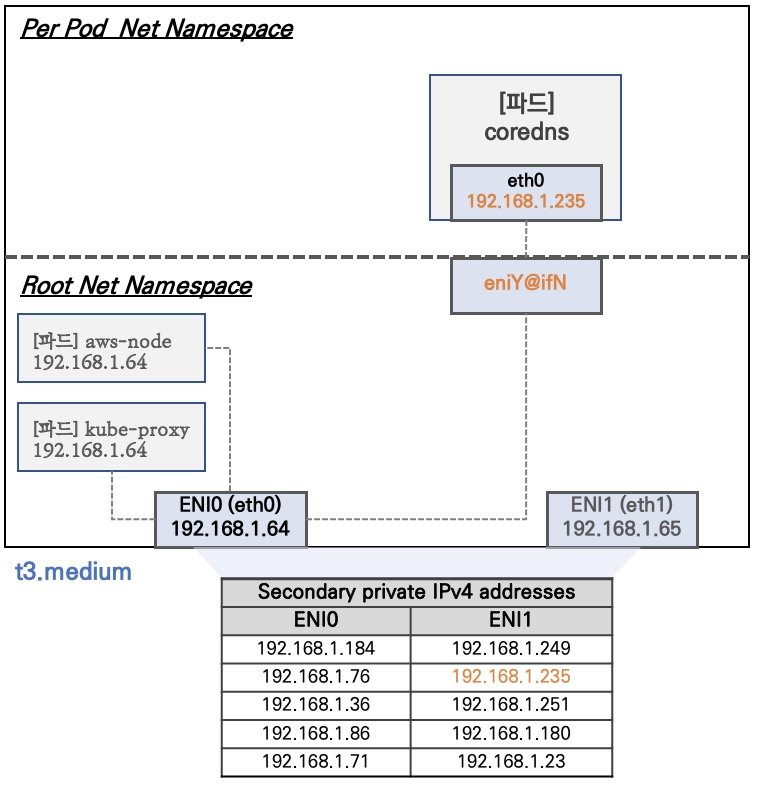
- Network 네임스페이스는 호스트(Root)와 파드 별(Per Pod)로 구분된다.
- 특정한 파드(kube-proxy, aws-node)는 호스트(Root)의 IP를 그대로 사용한다 ⇒ 파드의 Host Network 옵션
- t3.medium 의 경우 ENI 마다 최대 6개의 IP를 가질 수 있다.
- ENI0, ENI1 으로 2개의 ENI는 자신의 IP 이외에 추가적으로 5개의 보조 프라이빗 IP를 가질수 있다.
- coredns 파드는 veth 으로 호스트에는 eniY@ifN 인터페이스와 파드에 eth0 과 연결되어 있다.
워커 노드1 인스턴스의 네트워크 정보 확인 : 프라이빗 IP와 보조 프라이빗 IP 확인
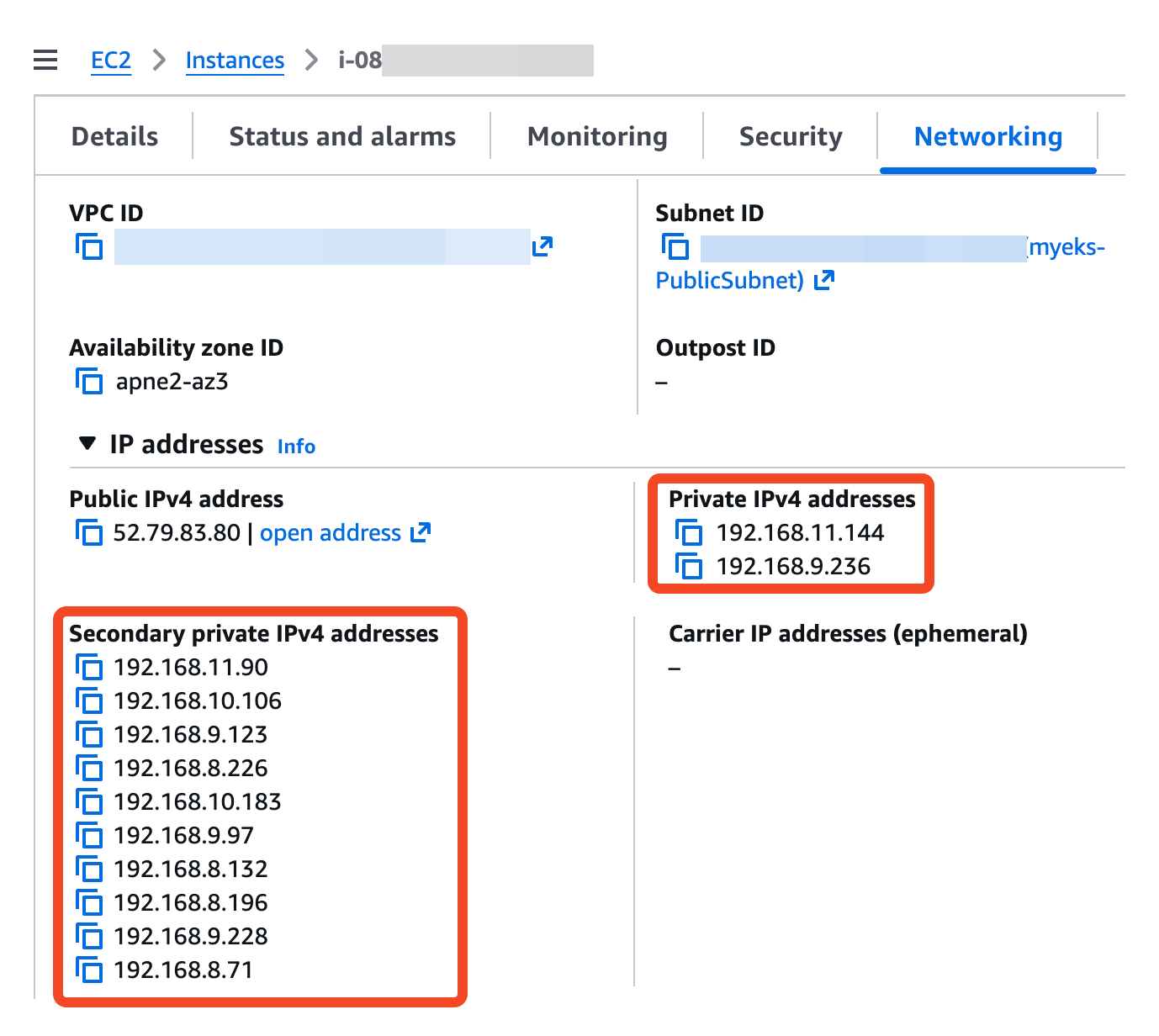
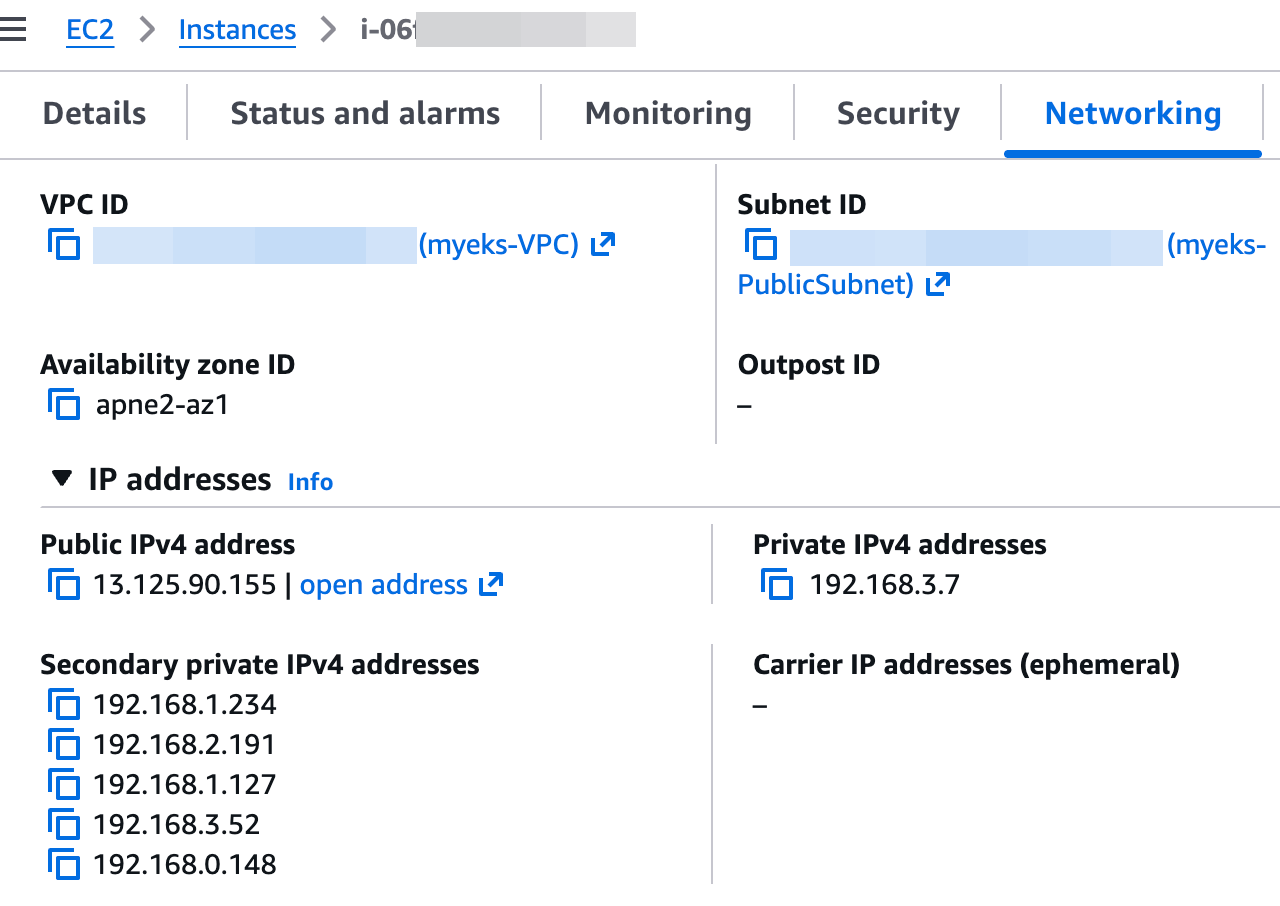
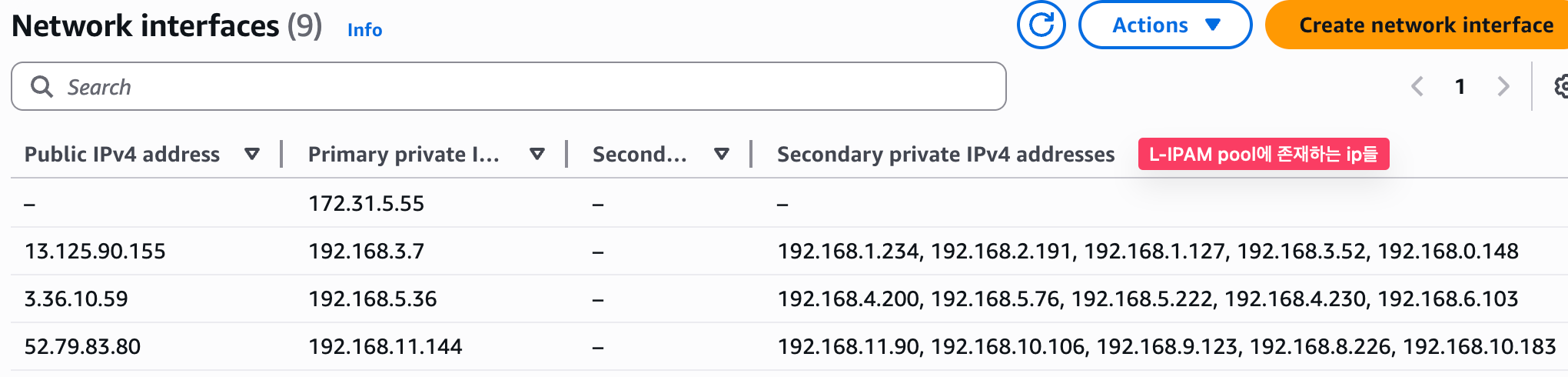
보조 IPv4 주소를 coredns 파드가 사용하는지 확인 ⇒ coredns 파드가 배치되지 않은 워커 노드에 ENI 갯수 확인!
# coredns 파드 IP 정보 확인
2w git:(main*) $ kubectl get pod -n kube-system -l k8s-app=kube-dns -owide

NAME                      READY   STATUS    RESTARTS   AGE   IP               NODE                                                NOMINATED NODE   READINESS GATES
coredns-cc56d5f8b-9nvgz   1/1     Running   0          22m   192.168.5.76     ip-192-168-5-36.ap-northeast-2.compute.internal     <none>           <none>
coredns-cc56d5f8b-x7p4t   1/1     Running   0          22m   192.168.10.183   ip-192-168-11-144.ap-northeast-2.compute.internal   <none>           <none>


# 노드의 라우팅 정보 확인 >> EC2 네트워크 정보의 '보조 프라이빗 IPv4 주소'와 비교해보자
2w git:(main*) $ for i in $N1 $N2 $N3; do echo ">> node $i <<"; ssh ec2-user@$i sudo ip -c route; echo; done

>> node 13.125.90.155 <<
default via 192.168.0.1 dev ens5 proto dhcp src 192.168.3.7 metric 512
192.168.0.0/22 dev ens5 proto kernel scope link src 192.168.3.7 metric 512
192.168.0.1 dev ens5 proto dhcp scope link src 192.168.3.7 metric 512
192.168.0.2 dev ens5 proto dhcp scope link src 192.168.3.7 metric 512

>> node 3.36.10.59 <<
default via 192.168.4.1 dev ens5 proto dhcp src 192.168.5.36 metric 512
192.168.0.2 via 192.168.4.1 dev ens5 proto dhcp src 192.168.5.36 metric 512
192.168.4.0/22 dev ens5 proto kernel scope link src 192.168.5.36 metric 512
192.168.4.1 dev ens5 proto dhcp scope link src 192.168.5.36 metric 512
192.168.5.76 dev eni481fe145bd1 scope link

>> node 52.79.83.80 <<
default via 192.168.8.1 dev ens5 proto dhcp src 192.168.11.144 metric 512
192.168.0.2 via 192.168.8.1 dev ens5 proto dhcp src 192.168.11.144 metric 512
192.168.8.0/22 dev ens5 proto kernel scope link src 192.168.11.144 metric 512
192.168.8.1 dev ens5 proto dhcp scope link src 192.168.11.144 metric 512
192.168.10.183 dev eni6422ac782e4 scope link


# IpamD debugging commands
# https://github.com/aws/amazon-vpc-cni-k8s/blob/master/docs/troubleshooting.md
2w git:(main*) $ for i in $N1 $N2 $N3; do echo ">> node $i <<"; ssh ec2-user@$i curl -s http://localhost:61679/v1/enis | jq; echo; done

>> node 13.125.90.155 <<
{
  "0": {
    "TotalIPs": 5,
    "AssignedIPs": 0,
    "ENIs": {
      "eni-0a8570b9957443866": {
        "ID": "eni-0a8570b9957443866",
        "IsPrimary": true,
        "IsTrunk": false,
        "IsEFA": false,
        "DeviceNumber": 0,
        "AvailableIPv4Cidrs": {
          "192.168.0.148/32": {
            "Cidr": {
              "IP": "192.168.0.148",
              "Mask": "/////w=="
            },
            "IPAddresses": {},
            "IsPrefix": false,
            "AddressFamily": ""
          },
          "192.168.1.127/32": {
            "Cidr": {
              "IP": "192.168.1.127",
              "Mask": "/////w=="
            },
            "IPAddresses": {},
            "IsPrefix": false,
            "AddressFamily": ""
          },
          "192.168.1.234/32": {
            "Cidr": {
              "IP": "192.168.1.234",
              "Mask": "/////w=="
            },
            "IPAddresses": {},
            "IsPrefix": false,
            "AddressFamily": ""
          },
          "192.168.2.191/32": {
            "Cidr": {
              "IP": "192.168.2.191",
              "Mask": "/////w=="
            },
            "IPAddresses": {},
            "IsPrefix": false,
            "AddressFamily": ""
          },
          "192.168.3.52/32": {
            "Cidr": {
              "IP": "192.168.3.52",
              "Mask": "/////w=="
            },
            "IPAddresses": {},
            "IsPrefix": false,
            "AddressFamily": ""
          }
        },
        "IPv6Cidrs": {},
        "RouteTableID": 254
      }
    }
  }
}

>> node 3.36.10.59 <<
{
  "0": {
    "TotalIPs": 10,
    "AssignedIPs": 1,
    "ENIs": {
      "eni-04d4a0d9fd216b46b": {
        "ID": "eni-04d4a0d9fd216b46b",
        "IsPrimary": true,
        "IsTrunk": false,
        "IsEFA": false,
        "DeviceNumber": 0,
        "AvailableIPv4Cidrs": {
          "192.168.4.200/32": {
            "Cidr": {
              "IP": "192.168.4.200",
              "Mask": "/////w=="
            },
            "IPAddresses": {},
            "IsPrefix": false,
            "AddressFamily": ""
          },
          "192.168.4.230/32": {
            "Cidr": {
              "IP": "192.168.4.230",
              "Mask": "/////w=="
            },
            "IPAddresses": {},
            "IsPrefix": false,
            "AddressFamily": ""
          },
          "192.168.5.222/32": {
            "Cidr": {
              "IP": "192.168.5.222",
              "Mask": "/////w=="
            },
            "IPAddresses": {},
            "IsPrefix": false,
            "AddressFamily": ""
          },
          "192.168.5.76/32": {
            "Cidr": {
              "IP": "192.168.5.76",
              "Mask": "/////w=="
            },
            "IPAddresses": {
              "192.168.5.76": {
                "Address": "192.168.5.76",
                "IPAMKey": {
                  "networkName": "aws-cni",
                  "containerID": "9057ac941292277cf8bd3dc28f6c58bb90eced5232b75132d27679e64eac99dc",
                  "ifName": "eth0"
                },
                "IPAMMetadata": {
                  "k8sPodNamespace": "kube-system",
                  "k8sPodName": "coredns-cc56d5f8b-9nvgz",
                  "interfacesCount": 1
                },
                "AssignedTime": "2026-03-24T12:42:24.092004241Z",
                "UnassignedTime": "0001-01-01T00:00:00Z"
              }
            },
            "IsPrefix": false,
            "AddressFamily": ""
          },
          "192.168.6.103/32": {
            "Cidr": {
              "IP": "192.168.6.103",
              "Mask": "/////w=="
            },
            "IPAddresses": {},
            "IsPrefix": false,
            "AddressFamily": ""
          }
        },
        "IPv6Cidrs": {},
        "RouteTableID": 254
      },
      "eni-0dc14ba34e34f6c18": {
        "ID": "eni-0dc14ba34e34f6c18",
        "IsPrimary": false,
        "IsTrunk": false,
        "IsEFA": false,
        "DeviceNumber": 1,
        "AvailableIPv4Cidrs": {
          "192.168.4.227/32": {
            "Cidr": {
              "IP": "192.168.4.227",
              "Mask": "/////w=="
            },
            "IPAddresses": {},
            "IsPrefix": false,
            "AddressFamily": ""
          },
          "192.168.4.49/32": {
            "Cidr": {
              "IP": "192.168.4.49",
              "Mask": "/////w=="
            },
            "IPAddresses": {},
            "IsPrefix": false,
            "AddressFamily": ""
          },
          "192.168.5.192/32": {
            "Cidr": {
              "IP": "192.168.5.192",
              "Mask": "/////w=="
            },
            "IPAddresses": {},
            "IsPrefix": false,
            "AddressFamily": ""
          },
          "192.168.7.144/32": {
            "Cidr": {
              "IP": "192.168.7.144",
              "Mask": "/////w=="
            },
            "IPAddresses": {},
            "IsPrefix": false,
            "AddressFamily": ""
          },
          "192.168.7.146/32": {
            "Cidr": {
              "IP": "192.168.7.146",
              "Mask": "/////w=="
            },
            "IPAddresses": {},
            "IsPrefix": false,
            "AddressFamily": ""
          }
        },
        "IPv6Cidrs": {},
        "RouteTableID": 2
      }
    }
  }
}

>> node 52.79.83.80 <<
{
  "0": {
    "TotalIPs": 10,
    "AssignedIPs": 1,
    "ENIs": {
      "eni-086e74c1e91f43cb2": {
        "ID": "eni-086e74c1e91f43cb2",
        "IsPrimary": false,
        "IsTrunk": false,
        "IsEFA": false,
        "DeviceNumber": 1,
        "AvailableIPv4Cidrs": {
          "192.168.8.132/32": {
            "Cidr": {
              "IP": "192.168.8.132",
              "Mask": "/////w=="
            },
            "IPAddresses": {},
            "IsPrefix": false,
            "AddressFamily": ""
          },
          "192.168.8.196/32": {
            "Cidr": {
              "IP": "192.168.8.196",
              "Mask": "/////w=="
            },
            "IPAddresses": {},
            "IsPrefix": false,
            "AddressFamily": ""
          },
          "192.168.8.71/32": {
            "Cidr": {
              "IP": "192.168.8.71",
              "Mask": "/////w=="
            },
            "IPAddresses": {},
            "IsPrefix": false,
            "AddressFamily": ""
          },
          "192.168.9.228/32": {
            "Cidr": {
              "IP": "192.168.9.228",
              "Mask": "/////w=="
            },
            "IPAddresses": {},
            "IsPrefix": false,
            "AddressFamily": ""
          },
          "192.168.9.97/32": {
            "Cidr": {
              "IP": "192.168.9.97",
              "Mask": "/////w=="
            },
            "IPAddresses": {},
            "IsPrefix": false,
            "AddressFamily": ""
          }
        },
        "IPv6Cidrs": {},
        "RouteTableID": 2
      },
      "eni-0eac3123a10629bc0": {
        "ID": "eni-0eac3123a10629bc0",
        "IsPrimary": true,
        "IsTrunk": false,
        "IsEFA": false,
        "DeviceNumber": 0,
        "AvailableIPv4Cidrs": {
          "192.168.10.106/32": {
            "Cidr": {
              "IP": "192.168.10.106",
              "Mask": "/////w=="
            },
            "IPAddresses": {},
            "IsPrefix": false,
            "AddressFamily": ""
          },
          "192.168.10.183/32": {
            "Cidr": {
              "IP": "192.168.10.183",
              "Mask": "/////w=="
            },
            "IPAddresses": {
              "192.168.10.183": {
                "Address": "192.168.10.183",
                "IPAMKey": {
                  "networkName": "aws-cni",
                  "containerID": "f4ed3b515de27c5ae54519c12dbc5c7eef96985c43951b5550e9d8d4dbe6a7a2",
                  "ifName": "eth0"
                },
                "IPAMMetadata": {
                  "k8sPodNamespace": "kube-system",
                  "k8sPodName": "coredns-cc56d5f8b-x7p4t",
                  "interfacesCount": 1
                },
                "AssignedTime": "2026-03-24T12:42:24.119716014Z",
                "UnassignedTime": "0001-01-01T00:00:00Z"
              }
            },
            "IsPrefix": false,
            "AddressFamily": ""
          },
          "192.168.11.90/32": {
            "Cidr": {
              "IP": "192.168.11.90",
              "Mask": "/////w=="
            },
            "IPAddresses": {},
            "IsPrefix": false,
            "AddressFamily": ""
          },
          "192.168.8.226/32": {
            "Cidr": {
              "IP": "192.168.8.226",
              "Mask": "/////w=="
            },
            "IPAddresses": {},
            "IsPrefix": false,
            "AddressFamily": ""
          },
          "192.168.9.123/32": {
            "Cidr": {
              "IP": "192.168.9.123",
              "Mask": "/////w=="
            },
            "IPAddresses": {},
            "IsPrefix": false,
            "AddressFamily": ""
          }
        },
        "IPv6Cidrs": {},
        "RouteTableID": 254
      }
    }
  }
}
Network-Multitool 디플로이먼트 생성 - https://github.com/Praqma/Network-MultiTool
# [터미널1~3] 노드 모니터링
ssh ec2-user@$N1
watch -d "ip link | egrep 'ens|eni' ;echo;echo "[ROUTE TABLE]"; route -n | grep eni"

ssh ec2-user@$N2
watch -d "ip link | egrep 'ens|eni' ;echo;echo "[ROUTE TABLE]"; route -n | grep eni"

ssh ec2-user@$N3
watch -d "ip link | egrep 'ens|eni' ;echo;echo "[ROUTE TABLE]"; route -n | grep eni"


# Network-Multitool 디플로이먼트 생성
cat <<EOF | kubectl apply -f -
apiVersion: apps/v1
kind: Deployment
metadata:
  name: netshoot-pod
spec:
  replicas: 3
  selector:
    matchLabels:
      app: netshoot-pod
  template:
    metadata:
      labels:
        app: netshoot-pod
    spec:
      containers:
      - name: netshoot-pod
        image: praqma/network-multitool
        ports:
        - containerPort: 80
        - containerPort: 443
        env:
        - name: HTTP_PORT
          value: "80"
        - name: HTTPS_PORT
          value: "443"
      terminationGracePeriodSeconds: 0
EOF


# 파드 이름 변수 지정
2w git:(main*) $ PODNAME1=$(kubectl get pod -l app=netshoot-pod -o jsonpath='{.items[0].metadata.name}')
2w git:(main*) $ PODNAME2=$(kubectl get pod -l app=netshoot-pod -o jsonpath='{.items[1].metadata.name}')
2w git:(main*) $ PODNAME3=$(kubectl get pod -l app=netshoot-pod -o jsonpath='{.items[2].metadata.name}')

2w git:(main*) $ echo $PODNAME1 $PODNAME2 $PODNAME3
netshoot-pod-64fbf7fb5-9scs4 netshoot-pod-64fbf7fb5-kz8ff netshoot-pod-64fbf7fb5-zgqsp


# 파드 확인
2w git:(main*) $ kubectl get pod -o wide
NAME                           READY   STATUS    RESTARTS   AGE     IP               NODE                                                NOMINATED NODE   READINESS GATES
netshoot-pod-64fbf7fb5-9scs4   1/1     Running   0          2m11s   192.168.1.234    ip-192-168-3-7.ap-northeast-2.compute.internal      <none>           <none>
netshoot-pod-64fbf7fb5-kz8ff   1/1     Running   0          2m11s   192.168.10.106   ip-192-168-11-144.ap-northeast-2.compute.internal   <none>           <none>
netshoot-pod-64fbf7fb5-zgqsp   1/1     Running   0          2m11s   192.168.4.200    ip-192-168-5-36.ap-northeast-2.compute.internal     <none>           <none>

2w git:(main*) $ kubectl get pod -o=custom-columns=NAME:.metadata.name,IP:.status.podIP
NAME                           IP
netshoot-pod-64fbf7fb5-9scs4   192.168.1.234
netshoot-pod-64fbf7fb5-kz8ff   192.168.10.106
netshoot-pod-64fbf7fb5-zgqsp   192.168.4.200


s-aews $ for i in $N1 $N2 $N3; do echo ">> node $i <<"; ssh ec2-user@$i sudo ip -c route; echo; done
>> node 13.125.90.155 <<
default via 192.168.0.1 dev ens5 proto dhcp src 192.168.3.7 metric 512
192.168.0.0/22 dev ens5 proto kernel scope link src 192.168.3.7 metric 512
192.168.0.1 dev ens5 proto dhcp scope link src 192.168.3.7 metric 512
192.168.0.2 dev ens5 proto dhcp scope link src 192.168.3.7 metric 512
192.168.1.234 dev eni728a59de5d0 scope link

>> node 3.36.10.59 <<
default via 192.168.4.1 dev ens5 proto dhcp src 192.168.5.36 metric 512
192.168.0.2 via 192.168.4.1 dev ens5 proto dhcp src 192.168.5.36 metric 512
192.168.4.0/22 dev ens5 proto kernel scope link src 192.168.5.36 metric 512
192.168.4.1 dev ens5 proto dhcp scope link src 192.168.5.36 metric 512
192.168.4.200 dev eni16b2ba08303 scope link
192.168.5.76 dev eni481fe145bd1 scope link

>> node 52.79.83.80 <<
default via 192.168.8.1 dev ens5 proto dhcp src 192.168.11.144 metric 512
192.168.0.2 via 192.168.8.1 dev ens5 proto dhcp src 192.168.11.144 metric 512
192.168.8.0/22 dev ens5 proto kernel scope link src 192.168.11.144 metric 512
192.168.8.1 dev ens5 proto dhcp scope link src 192.168.11.144 metric 512
192.168.10.106 dev eni98bb2c9cd6c scope link
192.168.10.183 dev eni6422ac782e4 scope link
파드가 생성되면, 워커 노드에 eniY@ifN 가 추가되고 라우팅 테이블에도 정보가 추가된다.
테스트용 파드 eniY 정보 확인 - 워커 노드 EC2
# 노드3에서 네트워크 인터페이스 정보 확인
ssh ec2-user@$N2
----------------
[ec2-user@ip-192-168-5-36 ~]$ ip -br -c addr show
lo               UNKNOWN        127.0.0.1/8 ::1/128
ens5             UP             192.168.5.36/22 metric 512 fe80::409:ffff:fe29:eb23/64
eni481fe145bd1@if3 UP             fe80::80b9:cff:fe9d:bd66/64
ens6             UP             192.168.4.106/22 fe80::459:b6ff:fefa:9319/64
eni16b2ba08303@if3 UP             fe80::e44d:65ff:feef:2c50/64


[ec2-user@ip-192-168-5-36 ~]$ ip -c link
1: lo: <LOOPBACK,UP,LOWER_UP> mtu 65536 qdisc noqueue state UNKNOWN mode DEFAULT group default qlen 1000
    link/loopback 00:00:00:00:00:00 brd 00:00:00:00:00:00
2: ens5: <BROADCAST,MULTICAST,UP,LOWER_UP> mtu 9001 qdisc mq state UP mode DEFAULT group default qlen 1000
    link/ether 06:09:ff:29:eb:23 brd ff:ff:ff:ff:ff:ff
    altname enp0s5
3: eni481fe145bd1@if3: <BROADCAST,MULTICAST,UP,LOWER_UP> mtu 9001 qdisc noqueue state UP mode DEFAULT group default
    link/ether 82:b9:0c:9d:bd:66 brd ff:ff:ff:ff:ff:ff link-netns cni-b50f9442-d17b-8951-95c3-46862cb4df5d
4: ens6: <BROADCAST,MULTICAST,UP,LOWER_UP> mtu 9001 qdisc mq state UP mode DEFAULT group default qlen 1000
    link/ether 06:59:b6:fa:93:19 brd ff:ff:ff:ff:ff:ff
    altname enp0s6
5: eni16b2ba08303@if3: <BROADCAST,MULTICAST,UP,LOWER_UP> mtu 9001 qdisc noqueue state UP mode DEFAULT group default
    link/ether e6:4d:65:ef:2c:50 brd ff:ff:ff:ff:ff:ff link-netns cni-5eddec93-7408-ac2f-7035-0f754ef40068


[ec2-user@ip-192-168-5-36 ~]$ ip -c addr
1: lo: <LOOPBACK,UP,LOWER_UP> mtu 65536 qdisc noqueue state UNKNOWN group default qlen 1000
    link/loopback 00:00:00:00:00:00 brd 00:00:00:00:00:00
    inet 127.0.0.1/8 scope host lo
       valid_lft forever preferred_lft forever
    inet6 ::1/128 scope host noprefixroute
       valid_lft forever preferred_lft forever
2: ens5: <BROADCAST,MULTICAST,UP,LOWER_UP> mtu 9001 qdisc mq state UP group default qlen 1000
    link/ether 06:09:ff:29:eb:23 brd ff:ff:ff:ff:ff:ff
    altname enp0s5
    inet 192.168.5.36/22 metric 512 brd 192.168.7.255 scope global dynamic ens5
       valid_lft 2647sec preferred_lft 2647sec
    inet6 fe80::409:ffff:fe29:eb23/64 scope link proto kernel_ll
       valid_lft forever preferred_lft forever
3: eni481fe145bd1@if3: <BROADCAST,MULTICAST,UP,LOWER_UP> mtu 9001 qdisc noqueue state UP group default
    link/ether 82:b9:0c:9d:bd:66 brd ff:ff:ff:ff:ff:ff link-netns cni-b50f9442-d17b-8951-95c3-46862cb4df5d
    inet6 fe80::80b9:cff:fe9d:bd66/64 scope link proto kernel_ll
       valid_lft forever preferred_lft forever
4: ens6: <BROADCAST,MULTICAST,UP,LOWER_UP> mtu 9001 qdisc mq state UP group default qlen 1000
    link/ether 06:59:b6:fa:93:19 brd ff:ff:ff:ff:ff:ff
    altname enp0s6
    inet 192.168.4.106/22 brd 192.168.7.255 scope global ens6
       valid_lft forever preferred_lft forever
    inet6 fe80::459:b6ff:fefa:9319/64 scope link proto kernel_ll
       valid_lft forever preferred_lft forever
5: eni16b2ba08303@if3: <BROADCAST,MULTICAST,UP,LOWER_UP> mtu 9001 qdisc noqueue state UP group default
    link/ether e6:4d:65:ef:2c:50 brd ff:ff:ff:ff:ff:ff link-netns cni-5eddec93-7408-ac2f-7035-0f754ef40068
    inet6 fe80::e44d:65ff:feef:2c50/64 scope link proto kernel_ll
       valid_lft forever preferred_lft forever


[ec2-user@ip-192-168-5-36 ~]$ ip route
default via 192.168.4.1 dev ens5 proto dhcp src 192.168.5.36 metric 512
192.168.0.2 via 192.168.4.1 dev ens5 proto dhcp src 192.168.5.36 metric 512
192.168.4.0/22 dev ens5 proto kernel scope link src 192.168.5.36 metric 512
192.168.4.1 dev ens5 proto dhcp scope link src 192.168.5.36 metric 512
192.168.4.200 dev eni16b2ba08303 scope link
192.168.5.76 dev eni481fe145bd1 scope link


exit
테스트용 파드 접속(exec) 후 확인
# 테스트용 파드 접속(exec) 후 Shell 실행
2w git:(main*) $ kubectl exec -it $PODNAME1 -- bash
bash-5.1#

# 아래부터는 pod-1 Shell 에서 실행 : 네트워크 정보 확인
----------------------------
bash-5.1# ip -c addr
1: lo: <LOOPBACK,UP,LOWER_UP> mtu 65536 qdisc noqueue state UNKNOWN group default qlen 1000
    link/loopback 00:00:00:00:00:00 brd 00:00:00:00:00:00
    inet 127.0.0.1/8 scope host lo
       valid_lft forever preferred_lft forever
    inet6 ::1/128 scope host
       valid_lft forever preferred_lft forever
3: eth0@if3: <BROADCAST,MULTICAST,UP,LOWER_UP> mtu 9001 qdisc noqueue state UP group default
    link/ether f2:10:fc:98:f4:d4 brd ff:ff:ff:ff:ff:ff link-netnsid 0
    inet 192.168.1.234/32 scope global eth0
       valid_lft forever preferred_lft forever
    inet6 fe80::f010:fcff:fe98:f4d4/64 scope link
       valid_lft forever preferred_lft forever

bash-5.1# ip -c route
default via 169.254.1.1 dev eth0
169.254.1.1 dev eth0 scope link


bash-5.1# cat /etc/resolv.conf
search default.svc.cluster.local svc.cluster.local cluster.local ap-northeast-2.compute.internal
nameserver 10.100.0.10
options ndots:5

exit
----------------------------
ddd
# Node 및 Pod 정보 확인
2w git:(main*) $ k get node -owide
NAME                                                STATUS   ROLES    AGE    VERSION               INTERNAL-IP      EXTERNAL-IP     OS-IMAGE                        KERNEL-VERSION                   CONTAINER-RUNTIME
ip-192-168-11-144.ap-northeast-2.compute.internal   Ready    <none>   110m   v1.34.4-eks-f69f56f   192.168.11.144   52.79.83.80     Amazon Linux 2023.10.20260302   6.12.73-95.123.amzn2023.x86_64   containerd://2.2.1+unknown
ip-192-168-3-7.ap-northeast-2.compute.internal      Ready    <none>   110m   v1.34.4-eks-f69f56f   192.168.3.7      13.125.90.155   Amazon Linux 2023.10.20260302   6.12.73-95.123.amzn2023.x86_64   containerd://2.2.1+unknown
ip-192-168-5-36.ap-northeast-2.compute.internal     Ready    <none>   110m   v1.34.4-eks-f69f56f   192.168.5.36     3.36.10.59      Amazon Linux 2023.10.20260302   6.12.73-95.123.amzn2023.x86_64   containerd://2.2.1+unknown


2w git:(main*) $ k get pods -owide
NAME                           READY   STATUS    RESTARTS   AGE   IP               NODE                                                NOMINATED NODE   READINESS GATES
netshoot-pod-64fbf7fb5-9scs4   1/1     Running   0          14m   192.168.1.234    ip-192-168-3-7.ap-northeast-2.compute.internal      <none>           <none>
netshoot-pod-64fbf7fb5-kz8ff   1/1     Running   0          14m   192.168.10.106   ip-192-168-11-144.ap-northeast-2.compute.internal   <none>           <none>
netshoot-pod-64fbf7fb5-zgqsp   1/1     Running   0          14m   192.168.4.200    ip-192-168-5-36.ap-northeast-2.compute.internal     <none>           <none>


# 파드2 Shell 실행
kubectl exec -it $PODNAME2 -- ip -c addr

# 파드3 Shell 실행
kubectl exec -it $PODNAME3 -- ip -br -c addr
3. 노드 간 파드 통신
- 목표 : 파드간 통신 시 tcpdump 내용을 확인하고 통신 과정을 알아본다.
- 파드간 통신 흐름 : AWS VPC CNI 경우 별도의 오버레이(Overlay) 통신 기술 없이, VPC Native 하게 파드간 직접 통신이 가능하다.
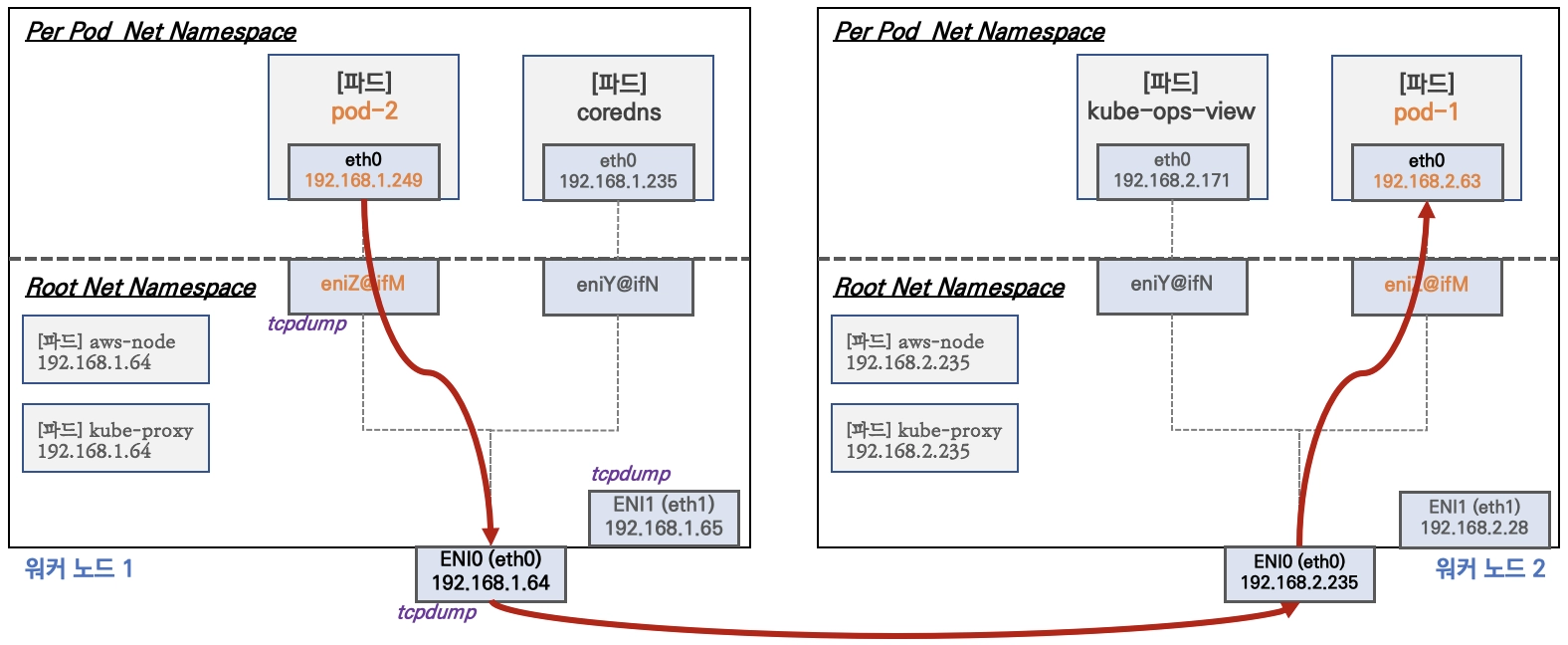
파드간 통신 시 과정 참고
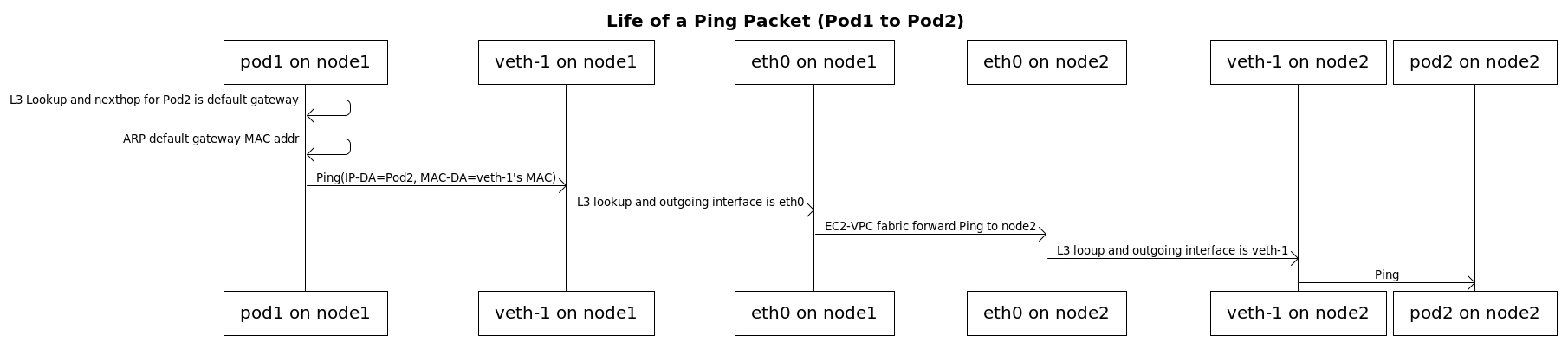
[실습] 파드간 통신 테스트 및 확인 : 별도의 NAT 동작 없이 통신 가능!
# 파드 IP 변수 지정
2w git:(main*) $ PODIP1=$(kubectl get pod -l app=netshoot-pod -o jsonpath='{.items[0].status.podIP}')
PODIP2=$(kubectl get pod -l app=netshoot-pod -o jsonpath='{.items[1].status.podIP}')
PODIP3=$(kubectl get pod -l app=netshoot-pod -o jsonpath='{.items[2].status.podIP}')
echo $PODIP1 $PODIP2 $PODIP3
192.168.1.234 192.168.10.106 192.168.4.200


# 파드1 Shell 에서 파드2로 ping 테스트
2w git:(main*) $ kubectl exec -it $PODNAME1 -- ping -c 2 $PODIP2
PING 192.168.10.106 (192.168.10.106) 56(84) bytes of data.
64 bytes from 192.168.10.106: icmp_seq=1 ttl=125 time=1.59 ms
64 bytes from 192.168.10.106: icmp_seq=2 ttl=125 time=1.25 ms

--- 192.168.10.106 ping statistics ---
2 packets transmitted, 2 received, 0% packet loss, time 1002ms
rtt min/avg/max/mdev = 1.245/1.416/1.587/0.171 ms


2w git:(main*) $ kubectl exec -it $PODNAME1 -- curl -s http://$PODIP2
Praqma Network MultiTool (with NGINX) - netshoot-pod-64fbf7fb5-kz8ff - 192.168.10.106 - HTTP: 80 , HTTPS: 443
<br>
<hr>
<br>

<h1>05 Jan 2022 - Press-release: `Praqma/Network-Multitool` is now `wbitt/Network-Multitool`</h1>

<h2>Important note about name/org change:</h2>
<p>
Few years ago, I created this tool with Henrik Høegh, as `praqma/network-multitool`. Praqma was bought by another company, and now the "Praqma" brand is being dismantled. This means the network-multitool's git and docker repositories must go. Since, I was the one maintaining the docker image for all these years, it was decided by the current representatives of the company to hand it over to me so I can continue maintaining it. So, apart from a small change in the repository name, nothing has changed.<br>
</p>
<p>
The existing/old/previous container image `praqma/network-multitool` will continue to work and will remain available for **"some time"** - may be for a couple of months - not sure though.
</p>
<p>
- Kamran Azeem <kamranazeem@gmail.com> <a href=https://github.com/KamranAzeem>https://github.com/KamranAzeem</a>
</p>

<h2>Some important URLs:</h2>

<ul>
  <li>The new official github repository for this tool is: <a href=https://github.com/wbitt/Network-MultiTool>https://github.com/wbitt/Network-MultiTool</a></li>

  <li>The docker repository to pull this image is now: <a href=https://hub.docker.com/r/wbitt/network-multitool>https://hub.docker.com/r/wbitt/network-multitool</a></li>
</ul>

<br>
Or:
<br>

<pre>
  <code>
  docker pull wbitt/network-multitool
  </code>
</pre>


<hr>


2w git:(main*) $ kubectl exec -it $PODNAME1 -- curl -sk https://$PODIP2
Praqma Network MultiTool (with NGINX) - netshoot-pod-64fbf7fb5-kz8ff - 192.168.10.106 - HTTP: 80 , HTTPS: 443
<br>
<hr>
<br>

<h1>05 Jan 2022 - Press-release: `Praqma/Network-Multitool` is now `wbitt/Network-Multitool`</h1>

<h2>Important note about name/org change:</h2>
<p>
Few years ago, I created this tool with Henrik Høegh, as `praqma/network-multitool`. Praqma was bought by another company, and now the "Praqma" brand is being dismantled. This means the network-multitool's git and docker repositories must go. Since, I was the one maintaining the docker image for all these years, it was decided by the current representatives of the company to hand it over to me so I can continue maintaining it. So, apart from a small change in the repository name, nothing has changed.<br>
</p>
<p>
The existing/old/previous container image `praqma/network-multitool` will continue to work and will remain available for **"some time"** - may be for a couple of months - not sure though.
</p>
<p>
- Kamran Azeem <kamranazeem@gmail.com> <a href=https://github.com/KamranAzeem>https://github.com/KamranAzeem</a>
</p>

<h2>Some important URLs:</h2>

<ul>
  <li>The new official github repository for this tool is: <a href=https://github.com/wbitt/Network-MultiTool>https://github.com/wbitt/Network-MultiTool</a></li>

  <li>The docker repository to pull this image is now: <a href=https://hub.docker.com/r/wbitt/network-multitool>https://hub.docker.com/r/wbitt/network-multitool</a></li>
</ul>

<br>
Or:
<br>

<pre>
  <code>
  docker pull wbitt/network-multitool
  </code>
</pre>


<hr>


# 파드2 Shell 에서 파드3로 ping 테스트
2w git:(main*) $ kubectl exec -it $PODNAME2 -- ping -c 2 $PODIP3

PING 192.168.4.200 (192.168.4.200) 56(84) bytes of data.
64 bytes from 192.168.4.200: icmp_seq=1 ttl=125 time=1.62 ms
64 bytes from 192.168.4.200: icmp_seq=2 ttl=125 time=1.28 ms

--- 192.168.4.200 ping statistics ---
2 packets transmitted, 2 received, 0% packet loss, time 1002ms
rtt min/avg/max/mdev = 1.276/1.446/1.616/0.170 ms


# 파드3 Shell 에서 파드1로 ping 테스트
2w git:(main*) $ kubectl exec -it $PODNAME3 -- ping -c 2 $PODIP1

PING 192.168.1.234 (192.168.1.234) 56(84) bytes of data.
64 bytes from 192.168.1.234: icmp_seq=1 ttl=125 time=1.06 ms
64 bytes from 192.168.1.234: icmp_seq=2 ttl=125 time=0.824 ms

--- 192.168.1.234 ping statistics ---
2 packets transmitted, 2 received, 0% packet loss, time 1001ms
rtt min/avg/max/mdev = 0.824/0.943/1.062/0.119 ms


# 워커 노드 EC2 : TCPDUMP 확인
## For Pod to external (outside VPC) traffic, we will program iptables to SNAT using Primary IP address on the Primary ENI.
[ec2-user@ip-192-168-3-7 ~]$ sudo tcpdump -i any -nn icmp
tcpdump: data link type LINUX_SLL2
dropped privs to tcpdump
tcpdump: verbose output suppressed, use -v[v]... for full protocol decode
listening on any, link-type LINUX_SLL2 (Linux cooked v2), snapshot length 262144 bytes

[ec2-user@ip-192-168-5-36 ~]$ watch -d "ip link | egrep 'ens|eni' ;echo;echo "[ROUTE TABLE]"; route -n | grep eni"
[1]+  Stopped                 watch -d "ip link | egrep 'ens|eni' ;echo;echo "[ROUTE TABLE]"; route -n | grep eni"
[ec2-user@ip-192-168-5-36 ~]$ sudo tcpdump -i any -nn icmp
tcpdump: data link type LINUX_SLL2
dropped privs to tcpdump
tcpdump: verbose output suppressed, use -v[v]... for full protocol decode
listening on any, link-type LINUX_SLL2 (Linux cooked v2), snapshot length 262144 bytes


# 파드 ping 테스트
2w git:(main*) $ kubectl exec -it $PODNAME1 -- ping -c 2 $PODIP3
PING 192.168.4.200 (192.168.4.200) 56(84) bytes of data.
64 bytes from 192.168.4.200: icmp_seq=1 ttl=125 time=0.897 ms
64 bytes from 192.168.4.200: icmp_seq=2 ttl=125 time=0.835 ms

--- 192.168.4.200 ping statistics ---
2 packets transmitted, 2 received, 0% packet loss, time 1045ms
rtt min/avg/max/mdev = 0.835/0.866/0.897/0.031 ms


# Node에서 TCPDUMP 재확인
[ec2-user@ip-192-168-3-7 ~]$ sudo tcpdump -i ens5 -nn icmp
dropped privs to tcpdump
tcpdump: verbose output suppressed, use -v[v]... for full protocol decode
listening on ens5, link-type EN10MB (Ethernet), snapshot length 262144 bytes
13:34:36.019761 IP 192.168.1.234 > 192.168.4.200: ICMP echo request, id 4, seq 1, length 64
13:34:36.020570 IP 192.168.4.200 > 192.168.1.234: ICMP echo reply, id 4, seq 1, length 64
13:34:37.034019 IP 192.168.1.234 > 192.168.4.200: ICMP echo request, id 4, seq 2, length 64
13:34:37.034798 IP 192.168.4.200 > 192.168.1.234: ICMP echo reply, id 4, seq 2, length 64


[ec2-user@ip-192-168-5-36 ~]$ sudo tcpdump -i ens5 -nn icmp
dropped privs to tcpdump
tcpdump: verbose output suppressed, use -v[v]... for full protocol decode
listening on ens5, link-type EN10MB (Ethernet), snapshot length 262144 bytes
13:34:36.020137 IP 192.168.1.234 > 192.168.4.200: ICMP echo request, id 4, seq 1, length 64
13:34:36.020223 IP 192.168.4.200 > 192.168.1.234: ICMP echo reply, id 4, seq 1, length 64
13:34:37.034401 IP 192.168.1.234 > 192.168.4.200: ICMP echo request, id 4, seq 2, length 64
13:34:37.034457 IP 192.168.4.200 > 192.168.1.234: ICMP echo reply, id 4, seq 2, length 64
4. 파드에서 외부 통신
- 파드에서 외부 통신 흐름 : iptable 에 SNAT 을 통하여 노드의 eth0(ens5) IP로 변경되어서 외부와 통신됨
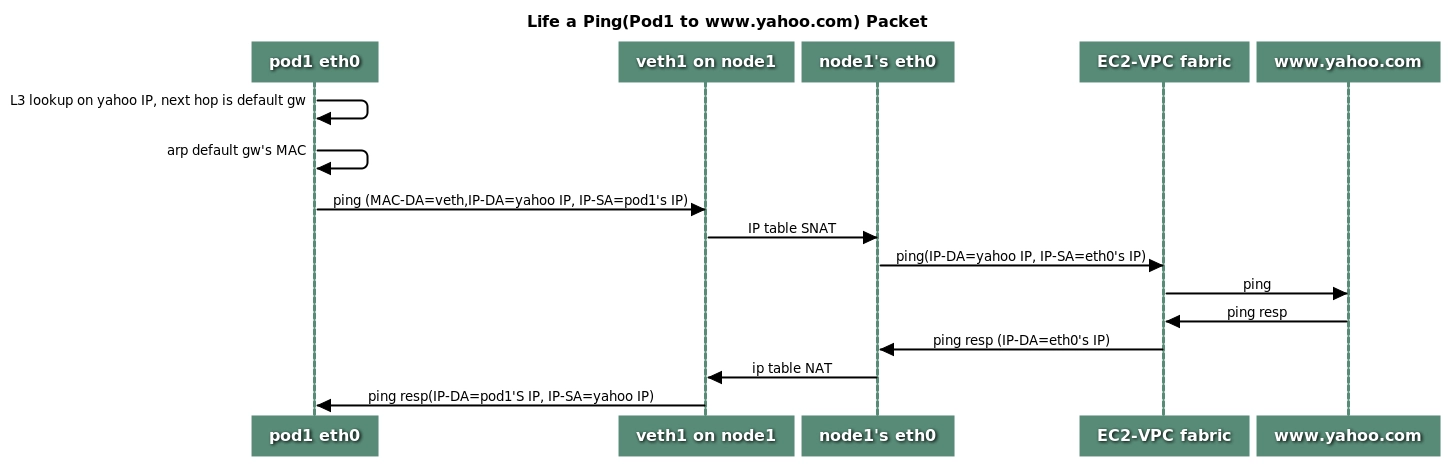
- (참고) VPC CNI 의 External source network address translation (SNAT) 설정에 따라, 외부(인터넷) 통신 시 SNAT 하거나 혹은 SNAT 없이 통신을 할 수 있다 - 링크
[실습] 파드에서 외부 통신 테스트 및 확인
- 파드 shell 실행 후 외부로 ping 테스트 & 워커 노드에서 tcpdump 및 iptables 정보 확인
# pod-1 Shell 에서 외부로 ping
2w git:(main*) $ kubectl exec -it $PODNAME2 -- ping -c 1 www.google.com

PING www.google.com (142.251.157.119) 56(84) bytes of data.
64 bytes from 142.251.157.119 (142.251.157.119): icmp_seq=1 ttl=106 time=21.7 ms

--- www.google.com ping statistics ---
1 packets transmitted, 1 received, 0% packet loss, time 0ms
rtt min/avg/max/mdev = 21.693/21.693/21.693/0.000 ms


# Node2에서 확인
13:39:21.468312 IP 192.168.3.7 > 142.251.153.119: ICMP echo request, id 63626, seq 1, length 64
13:39:21.491632 IP 142.251.153.119 > 192.168.3.7: ICMP echo reply, id 63626, seq 1, length 64
13:39:25.975422 IP 192.168.3.7 > 142.251.155.119: ICMP echo request, id 58444, seq 1, length 64
13:39:25.992810 IP 142.251.155.119 > 192.168.3.7: ICMP echo reply, id 58444, seq 1, length 64


# 퍼블릭IP 확인
2w git:(main*) $ for i in $N1 $N2 $N3; do echo ">> node $i <<"; ssh ec2-user@$i curl -s ipinfo.io/ip; echo; echo; done

>> node 13.125.90.155 <<
13.125.90.155

>> node 3.36.10.59 <<
3.36.10.59

>> node 52.79.83.80 <<
52.79.83.80


# 작업용 EC2 : pod-1 Shell 에서 외부 접속 확인 - 공인IP는 어떤 주소인가?
## The right way to check the weather - [링크](https://github.com/chubin/wttr.in)
2w git:(main*) $ for i in $PODNAME1 $PODNAME2 $PODNAME3; do echo ">> Pod : $i <<"; kubectl exec -it $i -- curl -s ipinfo.io/ip; echo; echo; done

>> Pod : netshoot-pod-64fbf7fb5-9scs4 <<
13.125.90.155

>> Pod : netshoot-pod-64fbf7fb5-kz8ff <<
52.79.83.80

>> Pod : netshoot-pod-64fbf7fb5-zgqsp <<
3.36.10.59
- 디플로이먼트 삭제 : kubectl delete deploy netshoot-pod
5. AWS VPC CNI 설정 변경
AWS VPC CNI 설정 변경 적용
1. eks.tf 수정
  # add-on
  addons = {
    coredns = {
      most_recent = true
    }
    kube-proxy = {
      most_recent = true
    }
    vpc-cni = {
      most_recent = true
      before_compute = true
      configuration_values = jsonencode({
        env = {
          #WARM_ENI_TARGET = "1" # 현재 ENI 외에 여유 ENI 1개를 항상 확보
          WARM_IP_TARGET  = "5" # 현재 사용 중인 IP 외에 여유 IP 5개를 항상 유지, 설정 시 WARM_ENI_TARGET 무시됨
          MINIMUM_IP_TARGET   = "10" # 노드 시작 시 최소 확보해야 할 IP 총량 10개
          #ENABLE_PREFIX_DELEGATION = "true"
          #WARM_PREFIX_TARGET = "1" # PREFIX_DELEGATION 사용 시, 1개의 여유 대역(/28) 유지
        }
      })
    }
  }
2. 설정 적용
# 모니터링
watch -d kubectl get pod -n kube-system -l k8s-app=aws-node # aws-node 데몬셋 파드 확인
watch -d eksctl get addon --cluster myeks # addon 확인

# 적용
terraform plan
terraform apply -auto-approve
3. 확인
# 파드 재생성 확인
2w git:(main*) $ kubectl get pod -n kube-system -l k8s-app=aws-node

NAME             READY   STATUS    RESTARTS   AGE
aws-node-7sjr8   2/2     Running   0          36s
aws-node-gzlvq   2/2     Running   0          28s
aws-node-t9q94   2/2     Running   0          40s


# aws-node DaemonSet의 env 확인
2w git:(main*) $ kubectl describe ds aws-node -n kube-system | grep -E "WARM_IP_TARGET|MINIMUM_IP_TARGET"

      MINIMUM_IP_TARGET:                      10
      WARM_IP_TARGET:                         5


# 노드 정보 확인 : (hostNetwork 제외) 파드가 없는 노드에도 ENI 추가 확인!
2w git:(main*) $ for i in $N1 $N2 $N3; do echo ">> node $i <<"; ssh ec2-user@$i sudo ip -c addr; echo; done

>> node 13.125.90.155 <<
1: lo: <LOOPBACK,UP,LOWER_UP> mtu 65536 qdisc noqueue state UNKNOWN group default qlen 1000
    link/loopback 00:00:00:00:00:00 brd 00:00:00:00:00:00
    inet 127.0.0.1/8 scope host lo
       valid_lft forever preferred_lft forever
    inet6 ::1/128 scope host noprefixroute
       valid_lft forever preferred_lft forever
2: ens5: <BROADCAST,MULTICAST,UP,LOWER_UP> mtu 9001 qdisc mq state UP group default qlen 1000
    link/ether 02:4d:80:ab:fb:03 brd ff:ff:ff:ff:ff:ff
    altname enp0s5
    inet 192.168.3.7/22 metric 512 brd 192.168.3.255 scope global dynamic ens5
       valid_lft 2335sec preferred_lft 2335sec
    inet6 fe80::4d:80ff:feab:fb03/64 scope link proto kernel_ll
       valid_lft forever preferred_lft forever
5: ens6: <BROADCAST,MULTICAST,UP,LOWER_UP> mtu 9001 qdisc mq state UP group default qlen 1000
    link/ether 02:47:9f:e8:62:8f brd ff:ff:ff:ff:ff:ff
    altname enp0s6
    inet 192.168.3.9/22 brd 192.168.3.255 scope global ens6
       valid_lft forever preferred_lft forever
    inet6 fe80::47:9fff:fee8:628f/64 scope link proto kernel_ll
       valid_lft forever preferred_lft forever

>> node 3.36.10.59 <<
1: lo: <LOOPBACK,UP,LOWER_UP> mtu 65536 qdisc noqueue state UNKNOWN group default qlen 1000
    link/loopback 00:00:00:00:00:00 brd 00:00:00:00:00:00
    inet 127.0.0.1/8 scope host lo
       valid_lft forever preferred_lft forever
    inet6 ::1/128 scope host noprefixroute
       valid_lft forever preferred_lft forever
2: ens5: <BROADCAST,MULTICAST,UP,LOWER_UP> mtu 9001 qdisc mq state UP group default qlen 1000
    link/ether 06:09:ff:29:eb:23 brd ff:ff:ff:ff:ff:ff
    altname enp0s5
    inet 192.168.5.36/22 metric 512 brd 192.168.7.255 scope global dynamic ens5
       valid_lft 2333sec preferred_lft 2333sec
    inet6 fe80::409:ffff:fe29:eb23/64 scope link proto kernel_ll
       valid_lft forever preferred_lft forever
3: eni481fe145bd1@if3: <BROADCAST,MULTICAST,UP,LOWER_UP> mtu 9001 qdisc noqueue state UP group default
    link/ether 82:b9:0c:9d:bd:66 brd ff:ff:ff:ff:ff:ff link-netns cni-b50f9442-d17b-8951-95c3-46862cb4df5d
    inet6 fe80::80b9:cff:fe9d:bd66/64 scope link proto kernel_ll
       valid_lft forever preferred_lft forever
4: ens6: <BROADCAST,MULTICAST,UP,LOWER_UP> mtu 9001 qdisc mq state UP group default qlen 1000
    link/ether 06:59:b6:fa:93:19 brd ff:ff:ff:ff:ff:ff
    altname enp0s6
    inet 192.168.4.106/22 brd 192.168.7.255 scope global ens6
       valid_lft forever preferred_lft forever
    inet6 fe80::459:b6ff:fefa:9319/64 scope link proto kernel_ll
       valid_lft forever preferred_lft forever

>> node 52.79.83.80 <<
1: lo: <LOOPBACK,UP,LOWER_UP> mtu 65536 qdisc noqueue state UNKNOWN group default qlen 1000
    link/loopback 00:00:00:00:00:00 brd 00:00:00:00:00:00
    inet 127.0.0.1/8 scope host lo
       valid_lft forever preferred_lft forever
    inet6 ::1/128 scope host noprefixroute
       valid_lft forever preferred_lft forever
2: ens5: <BROADCAST,MULTICAST,UP,LOWER_UP> mtu 9001 qdisc mq state UP group default qlen 1000
    link/ether 0a:3c:3e:51:13:09 brd ff:ff:ff:ff:ff:ff
    altname enp0s5
    inet 192.168.11.144/22 metric 512 brd 192.168.11.255 scope global dynamic ens5
       valid_lft 2334sec preferred_lft 2334sec
    inet6 fe80::83c:3eff:fe51:1309/64 scope link proto kernel_ll
       valid_lft forever preferred_lft forever
3: eni6422ac782e4@if3: <BROADCAST,MULTICAST,UP,LOWER_UP> mtu 9001 qdisc noqueue state UP group default
    link/ether 1e:59:e7:6d:e9:94 brd ff:ff:ff:ff:ff:ff link-netns cni-4c8defb0-eb51-0e65-cc93-fee1aa750c32
    inet6 fe80::1c59:e7ff:fe6d:e994/64 scope link proto kernel_ll
       valid_lft forever preferred_lft forever
4: ens6: <BROADCAST,MULTICAST,UP,LOWER_UP> mtu 9001 qdisc mq state UP group default qlen 1000
    link/ether 0a:99:8a:8a:28:13 brd ff:ff:ff:ff:ff:ff
    altname enp0s6
    inet 192.168.9.236/22 brd 192.168.11.255 scope global ens6
       valid_lft forever preferred_lft forever
    inet6 fe80::899:8aff:fe8a:2813/64 scope link proto kernel_ll
       valid_lft forever preferred_lft forever


# cni log 확인
2w git:(main*) $ for i in $N1 $N2 $N3; do echo ">> node $i <<"; ssh ec2-user@$i tree /var/log/aws-routed-eni ; echo; done

>> node 13.125.90.155 <<
/var/log/aws-routed-eni
├── ebpf-sdk.log
├── egress-v6-plugin.log
├── ipamd.log
├── network-policy-agent.log
└── plugin.log

0 directories, 5 files

>> node 3.36.10.59 <<
/var/log/aws-routed-eni
├── ebpf-sdk.log
├── egress-v6-plugin.log
├── ipamd.log
├── network-policy-agent.log
└── plugin.log

0 directories, 5 files

>> node 52.79.83.80 <<
/var/log/aws-routed-eni
├── ebpf-sdk.log
├── egress-v6-plugin.log
├── ipamd.log
├── network-policy-agent.log
└── plugin.log

0 directories, 5 files


2w git:(main*) $ for i in $N1 $N2 $N3; do echo ">> node $i <<"; ssh ec2-user@$i sudo cat /var/log/aws-routed-eni/plugin.log | jq ; echo; done

>> node 13.125.90.155 <<
{
  "level": "info",
  "ts": "2026-03-24T13:11:22.893Z",
  "caller": "routed-eni-cni-plugin/cni.go:131",
  "msg": "Constructed new logger instance"
}
{
  "level": "info",
  "ts": "2026-03-24T13:11:22.893Z",
  "caller": "routed-eni-cni-plugin/cni.go:140",
  "msg": "Received CNI add request: ContainerID(6b944f9b13abcdb8c2a477ed9457410639bf7bf5f66fea063c3fb4401def2fa7) Netns(/var/run/netns/cni-fe7fad89-605d-5958-858b-eb6b44907b9a) IfName(eth0) Args(K8S_POD_UID=00aa5245-d205-45dd-816b-767b7407e8df;IgnoreUnknown=1;K8S_POD_NAMESPACE=default;K8S_POD_NAME=netshoot-pod-64fbf7fb5-9scs4;K8S_POD_INFRA_CONTAINER_ID=6b944f9b13abcdb8c2a477ed9457410639bf7bf5f66fea063c3fb4401def2fa7) Path(/opt/cni/bin) argsStdinData({\"capabilities\":{\"io.kubernetes.cri.pod-annotations\":true},\"cniVersion\":\"0.4.0\",\"mtu\":\"9001\",\"name\":\"aws-cni\",\"pluginLogFile\":\"/var/log/aws-routed-eni/plugin.log\",\"pluginLogLevel\":\"DEBUG\",\"podSGEnforcingMode\":\"strict\",\"runtimeConfig\":{\"io.kubernetes.cri.pod-annotations\":{\"kubernetes.io/config.seen\":\"2026-03-24T13:11:22.521887016Z\",\"kubernetes.io/config.source\":\"api\"}},\"type\":\"aws-cni\",\"vethPrefix\":\"eni\"})"
}
{
  "level": "debug",
  "ts": "2026-03-24T13:11:22.894Z",
  "caller": "routed-eni-cni-plugin/cni.go:140",
  "msg": "Prev Result: <nil>\n"
}
{
  "level": "debug",
  "ts": "2026-03-24T13:11:22.894Z",
  "caller": "routed-eni-cni-plugin/cni.go:140",
  "msg": "MTU value set is 9001:"
}
{
  "level": "debug",
  "ts": "2026-03-24T13:11:22.894Z",
  "caller": "routed-eni-cni-plugin/cni.go:140",
  "msg": "pod requires multi-nic attachment: false"
}
{
  "level": "info",
  "ts": "2026-03-24T13:11:22.897Z",
  "caller": "routed-eni-cni-plugin/cni.go:140",
  "msg": "Received add network response from ipamd for container 6b944f9b13abcdb8c2a477ed9457410639bf7bf5f66fea063c3fb4401def2fa7 interface eth0: Success:true IPAllocationMetadata:{IPv4Addr:\"192.168.1.234\" RouteTableId:254} VPCv4CIDRs:\"192.168.0.0/16\" NetworkPolicyMode:\"standard\""
}
{
  "level": "debug",
  "ts": "2026-03-24T13:11:22.897Z",
  "caller": "routed-eni-cni-plugin/cni.go:279",
  "msg": "SetupPodNetwork: hostVethName=eni728a59de5d0, contVethName=eth0, netnsPath=/var/run/netns/cni-fe7fad89-605d-5958-858b-eb6b44907b9a, ipAddr=192.168.1.234/32, routeTableNumber=254, mtu=9001"
}
{
  "level": "debug",
  "ts": "2026-03-24T13:11:22.955Z",
  "caller": "driver/driver.go:276",
  "msg": "Successfully set IPv6 sysctls on hostVeth eni728a59de5d0"
}
{
  "level": "debug",
  "ts": "2026-03-24T13:11:22.955Z",
  "caller": "driver/driver.go:286",
  "msg": "Successfully setup container route, containerAddr=192.168.1.234/32, hostVeth=eni728a59de5d0, rtTable=main"
}
{
  "level": "debug",
  "ts": "2026-03-24T13:11:22.955Z",
  "caller": "driver/driver.go:286",
  "msg": "Successfully setup toContainer rule, containerAddr=192.168.1.234/32, rtTable=main"
}
{
  "level": "debug",
  "ts": "2026-03-24T13:11:22.955Z",
  "caller": "routed-eni-cni-plugin/cni.go:140",
  "msg": "Using dummy interface: {Name:dummy728a59de5d0 Mac:0 Mtu:0 Sandbox:0 SocketPath: PciID:}"
}
{
  "level": "debug",
  "ts": "2026-03-24T13:11:22.959Z",
  "caller": "routed-eni-cni-plugin/cni.go:140",
  "msg": "Network Policy agent for EnforceNpToPod returned Success : true"
}
{
  "level": "info",
  "ts": "2026-03-24T13:47:27.636Z",
  "caller": "routed-eni-cni-plugin/cni.go:131",
  "msg": "Constructed new logger instance"
}
{
  "level": "debug",
  "ts": "2026-03-24T13:47:27.636Z",
  "caller": "routed-eni-cni-plugin/cni.go:361",
  "msg": "Prev Result: &{0.4.0 [{Name:eni728a59de5d0 Mac: Sandbox:} {Name:eth0 Mac:254 Sandbox:/var/run/netns/cni-fe7fad89-605d-5958-858b-eb6b44907b9a} {Name:dummy728a59de5d0 Mac:0 Sandbox:0}] [{Version:4 Interface:0xc000219de0 Address:{IP:192.168.1.234 Mask:ffffffff} Gateway:<nil>}] [] {[]  [] []}}\n"
}
{
  "level": "info",
  "ts": "2026-03-24T13:47:27.636Z",
  "caller": "routed-eni-cni-plugin/cni.go:361",
  "msg": "Received CNI del request: ContainerID(6b944f9b13abcdb8c2a477ed9457410639bf7bf5f66fea063c3fb4401def2fa7) Netns(/var/run/netns/cni-fe7fad89-605d-5958-858b-eb6b44907b9a) IfName(eth0) Args(K8S_POD_NAMESPACE=default;K8S_POD_NAME=netshoot-pod-64fbf7fb5-9scs4;K8S_POD_INFRA_CONTAINER_ID=6b944f9b13abcdb8c2a477ed9457410639bf7bf5f66fea063c3fb4401def2fa7;K8S_POD_UID=00aa5245-d205-45dd-816b-767b7407e8df;IgnoreUnknown=1) Path(/opt/cni/bin) argsStdinData({\"capabilities\":{\"io.kubernetes.cri.pod-annotations\":true},\"cniVersion\":\"0.4.0\",\"mtu\":\"9001\",\"name\":\"aws-cni\",\"pluginLogFile\":\"/var/log/aws-routed-eni/plugin.log\",\"pluginLogLevel\":\"DEBUG\",\"podSGEnforcingMode\":\"strict\",\"prevResult\":{\"cniVersion\":\"0.4.0\",\"dns\":{},\"interfaces\":[{\"name\":\"eni728a59de5d0\"},{\"mac\":\"254\",\"name\":\"eth0\",\"sandbox\":\"/var/run/netns/cni-fe7fad89-605d-5958-858b-eb6b44907b9a\"},{\"mac\":\"0\",\"name\":\"dummy728a59de5d0\",\"sandbox\":\"0\"}],\"ips\":[{\"address\":\"192.168.1.234/32\",\"interface\":1,\"version\":\"4\"}]},\"runtimeConfig\":{\"io.kubernetes.cri.pod-annotations\":{\"kubernetes.io/config.seen\":\"2026-03-24T13:11:22.521887016Z\",\"kubernetes.io/config.source\":\"api\"}},\"type\":\"aws-cni\",\"vethPrefix\":\"eni\"})"
}
{
  "level": "info",
  "ts": "2026-03-24T13:47:27.638Z",
  "caller": "routed-eni-cni-plugin/cni.go:361",
  "msg": "Received del network response from ipamd for pod netshoot-pod-64fbf7fb5-9scs4 namespace default sandbox 6b944f9b13abcdb8c2a477ed9457410639bf7bf5f66fea063c3fb4401def2fa7: Success:true IPAllocationMetadata:{IPv4Addr:\"192.168.1.234\" RouteTableId:254} NetworkPolicyMode:\"standard\""
}
{
  "level": "debug",
  "ts": "2026-03-24T13:47:27.639Z",
  "caller": "routed-eni-cni-plugin/cni.go:487",
  "msg": "TeardownPodNetwork: containerAddr=192.168.1.234/32, routeTable=254"
}
{
  "level": "debug",
  "ts": "2026-03-24T13:47:27.639Z",
  "caller": "driver/driver.go:307",
  "msg": "Successfully deleted toContainer rule, containerAddr=192.168.1.234/32, rtTable=main"
}
{
  "level": "debug",
  "ts": "2026-03-24T13:47:27.639Z",
  "caller": "driver/driver.go:307",
  "msg": "Successfully deleted container route, containerAddr=192.168.1.234/32, rtTable=main"
}
{
  "level": "debug",
  "ts": "2026-03-24T13:47:27.640Z",
  "caller": "routed-eni-cni-plugin/cni.go:361",
  "msg": "Network Policy agent for DeletePodNp returned Success : true"
}
{
  "level": "info",
  "ts": "2026-03-24T13:47:30.838Z",
  "caller": "routed-eni-cni-plugin/cni.go:131",
  "msg": "Constructed new logger instance"
}
{
  "level": "debug",
  "ts": "2026-03-24T13:47:30.838Z",
  "caller": "routed-eni-cni-plugin/cni.go:361",
  "msg": "Prev Result: <nil>\n"
}
{
  "level": "info",
  "ts": "2026-03-24T13:47:30.838Z",
  "caller": "routed-eni-cni-plugin/cni.go:361",
  "msg": "Received CNI del request: ContainerID(6b944f9b13abcdb8c2a477ed9457410639bf7bf5f66fea063c3fb4401def2fa7) Netns() IfName(eth0) Args(K8S_POD_NAMESPACE=default;K8S_POD_NAME=netshoot-pod-64fbf7fb5-9scs4;K8S_POD_INFRA_CONTAINER_ID=6b944f9b13abcdb8c2a477ed9457410639bf7bf5f66fea063c3fb4401def2fa7;K8S_POD_UID=00aa5245-d205-45dd-816b-767b7407e8df;IgnoreUnknown=1) Path(/opt/cni/bin) argsStdinData({\"capabilities\":{\"io.kubernetes.cri.pod-annotations\":true},\"cniVersion\":\"0.4.0\",\"mtu\":\"9001\",\"name\":\"aws-cni\",\"pluginLogFile\":\"/var/log/aws-routed-eni/plugin.log\",\"pluginLogLevel\":\"DEBUG\",\"podSGEnforcingMode\":\"strict\",\"runtimeConfig\":{\"io.kubernetes.cri.pod-annotations\":{\"kubernetes.io/config.seen\":\"2026-03-24T13:11:22.521887016Z\",\"kubernetes.io/config.source\":\"api\"}},\"type\":\"aws-cni\",\"vethPrefix\":\"eni\"})"
}
{
  "level": "info",
  "ts": "2026-03-24T13:47:30.839Z",
  "caller": "routed-eni-cni-plugin/cni.go:361",
  "msg": "Container 6b944f9b13abcdb8c2a477ed9457410639bf7bf5f66fea063c3fb4401def2fa7 not found"
}
{
  "level": "info",
  "ts": "2026-03-24T13:47:30.861Z",
  "caller": "routed-eni-cni-plugin/cni.go:131",
  "msg": "Constructed new logger instance"
}
{
  "level": "debug",
  "ts": "2026-03-24T13:47:30.861Z",
  "caller": "routed-eni-cni-plugin/cni.go:361",
  "msg": "Prev Result: <nil>\n"
}
{
  "level": "info",
  "ts": "2026-03-24T13:47:30.861Z",
  "caller": "routed-eni-cni-plugin/cni.go:361",
  "msg": "Received CNI del request: ContainerID(6b944f9b13abcdb8c2a477ed9457410639bf7bf5f66fea063c3fb4401def2fa7) Netns() IfName(eth0) Args(K8S_POD_UID=00aa5245-d205-45dd-816b-767b7407e8df;IgnoreUnknown=1;K8S_POD_NAMESPACE=default;K8S_POD_NAME=netshoot-pod-64fbf7fb5-9scs4;K8S_POD_INFRA_CONTAINER_ID=6b944f9b13abcdb8c2a477ed9457410639bf7bf5f66fea063c3fb4401def2fa7) Path(/opt/cni/bin) argsStdinData({\"capabilities\":{\"io.kubernetes.cri.pod-annotations\":true},\"cniVersion\":\"0.4.0\",\"mtu\":\"9001\",\"name\":\"aws-cni\",\"pluginLogFile\":\"/var/log/aws-routed-eni/plugin.log\",\"pluginLogLevel\":\"DEBUG\",\"podSGEnforcingMode\":\"strict\",\"runtimeConfig\":{\"io.kubernetes.cri.pod-annotations\":{\"kubernetes.io/config.seen\":\"2026-03-24T13:11:22.521887016Z\",\"kubernetes.io/config.source\":\"api\"}},\"type\":\"aws-cni\",\"vethPrefix\":\"eni\"})"
}
{
  "level": "info",
  "ts": "2026-03-24T13:47:30.863Z",
  "caller": "routed-eni-cni-plugin/cni.go:361",
  "msg": "Container 6b944f9b13abcdb8c2a477ed9457410639bf7bf5f66fea063c3fb4401def2fa7 not found"
}

>> node 3.36.10.59 <<
{
  "level": "info",
  "ts": "2026-03-24T12:42:24.088Z",
  "caller": "routed-eni-cni-plugin/cni.go:131",
  "msg": "Constructed new logger instance"
}
{
  "level": "info",
  "ts": "2026-03-24T12:42:24.088Z",
  "caller": "routed-eni-cni-plugin/cni.go:140",
  "msg": "Received CNI add request: ContainerID(9057ac941292277cf8bd3dc28f6c58bb90eced5232b75132d27679e64eac99dc) Netns(/var/run/netns/cni-b50f9442-d17b-8951-95c3-46862cb4df5d) IfName(eth0) Args(K8S_POD_UID=e0586ebd-ba17-42fc-afa1-195787394f7c;IgnoreUnknown=1;K8S_POD_NAMESPACE=kube-system;K8S_POD_NAME=coredns-cc56d5f8b-9nvgz;K8S_POD_INFRA_CONTAINER_ID=9057ac941292277cf8bd3dc28f6c58bb90eced5232b75132d27679e64eac99dc) Path(/opt/cni/bin) argsStdinData({\"capabilities\":{\"io.kubernetes.cri.pod-annotations\":true},\"cniVersion\":\"0.4.0\",\"mtu\":\"9001\",\"name\":\"aws-cni\",\"pluginLogFile\":\"/var/log/aws-routed-eni/plugin.log\",\"pluginLogLevel\":\"DEBUG\",\"podSGEnforcingMode\":\"strict\",\"runtimeConfig\":{\"io.kubernetes.cri.pod-annotations\":{\"kubernetes.io/config.seen\":\"2026-03-24T12:42:23.738464638Z\",\"kubernetes.io/config.source\":\"api\"}},\"type\":\"aws-cni\",\"vethPrefix\":\"eni\"})"
}
{
  "level": "debug",
  "ts": "2026-03-24T12:42:24.088Z",
  "caller": "routed-eni-cni-plugin/cni.go:140",
  "msg": "Prev Result: <nil>\n"
}
{
  "level": "debug",
  "ts": "2026-03-24T12:42:24.088Z",
  "caller": "routed-eni-cni-plugin/cni.go:140",
  "msg": "MTU value set is 9001:"
}
{
  "level": "debug",
  "ts": "2026-03-24T12:42:24.088Z",
  "caller": "routed-eni-cni-plugin/cni.go:140",
  "msg": "pod requires multi-nic attachment: false"
}
{
  "level": "info",
  "ts": "2026-03-24T12:42:24.094Z",
  "caller": "routed-eni-cni-plugin/cni.go:140",
  "msg": "Received add network response from ipamd for container 9057ac941292277cf8bd3dc28f6c58bb90eced5232b75132d27679e64eac99dc interface eth0: Success:true IPAllocationMetadata:{IPv4Addr:\"192.168.5.76\" RouteTableId:254} VPCv4CIDRs:\"192.168.0.0/16\" NetworkPolicyMode:\"standard\""
}
{
  "level": "debug",
  "ts": "2026-03-24T12:42:24.094Z",
  "caller": "routed-eni-cni-plugin/cni.go:279",
  "msg": "SetupPodNetwork: hostVethName=eni481fe145bd1, contVethName=eth0, netnsPath=/var/run/netns/cni-b50f9442-d17b-8951-95c3-46862cb4df5d, ipAddr=192.168.5.76/32, routeTableNumber=254, mtu=9001"
}
{
  "level": "debug",
  "ts": "2026-03-24T12:42:24.132Z",
  "caller": "driver/driver.go:276",
  "msg": "Successfully set IPv6 sysctls on hostVeth eni481fe145bd1"
}
{
  "level": "debug",
  "ts": "2026-03-24T12:42:24.135Z",
  "caller": "driver/driver.go:286",
  "msg": "Successfully setup container route, containerAddr=192.168.5.76/32, hostVeth=eni481fe145bd1, rtTable=main"
}
{
  "level": "debug",
  "ts": "2026-03-24T12:42:24.135Z",
  "caller": "driver/driver.go:286",
  "msg": "Successfully setup toContainer rule, containerAddr=192.168.5.76/32, rtTable=main"
}
{
  "level": "debug",
  "ts": "2026-03-24T12:42:24.135Z",
  "caller": "routed-eni-cni-plugin/cni.go:140",
  "msg": "Using dummy interface: {Name:dummy481fe145bd1 Mac:0 Mtu:0 Sandbox:0 SocketPath: PciID:}"
}
{
  "level": "debug",
  "ts": "2026-03-24T12:42:24.141Z",
  "caller": "routed-eni-cni-plugin/cni.go:140",
  "msg": "Network Policy agent for EnforceNpToPod returned Success : true"
}
{
  "level": "info",
  "ts": "2026-03-24T13:11:22.963Z",
  "caller": "routed-eni-cni-plugin/cni.go:131",
  "msg": "Constructed new logger instance"
}
{
  "level": "info",
  "ts": "2026-03-24T13:11:22.963Z",
  "caller": "routed-eni-cni-plugin/cni.go:140",
  "msg": "Received CNI add request: ContainerID(7818576c777dd8ca6e3816cd6e88e1b235e385847fb9177b2af20e0dd6c3405e) Netns(/var/run/netns/cni-5eddec93-7408-ac2f-7035-0f754ef40068) IfName(eth0) Args(K8S_POD_INFRA_CONTAINER_ID=7818576c777dd8ca6e3816cd6e88e1b235e385847fb9177b2af20e0dd6c3405e;K8S_POD_UID=ed6536a7-63c5-407f-b34a-f3b00a8e8b5e;IgnoreUnknown=1;K8S_POD_NAMESPACE=default;K8S_POD_NAME=netshoot-pod-64fbf7fb5-zgqsp) Path(/opt/cni/bin) argsStdinData({\"capabilities\":{\"io.kubernetes.cri.pod-annotations\":true},\"cniVersion\":\"0.4.0\",\"mtu\":\"9001\",\"name\":\"aws-cni\",\"pluginLogFile\":\"/var/log/aws-routed-eni/plugin.log\",\"pluginLogLevel\":\"DEBUG\",\"podSGEnforcingMode\":\"strict\",\"runtimeConfig\":{\"io.kubernetes.cri.pod-annotations\":{\"kubernetes.io/config.seen\":\"2026-03-24T13:11:22.595466664Z\",\"kubernetes.io/config.source\":\"api\"}},\"type\":\"aws-cni\",\"vethPrefix\":\"eni\"})"
}
{
  "level": "debug",
  "ts": "2026-03-24T13:11:22.963Z",
  "caller": "routed-eni-cni-plugin/cni.go:140",
  "msg": "Prev Result: <nil>\n"
}
{
  "level": "debug",
  "ts": "2026-03-24T13:11:22.963Z",
  "caller": "routed-eni-cni-plugin/cni.go:140",
  "msg": "MTU value set is 9001:"
}
{
  "level": "debug",
  "ts": "2026-03-24T13:11:22.963Z",
  "caller": "routed-eni-cni-plugin/cni.go:140",
  "msg": "pod requires multi-nic attachment: false"
}
{
  "level": "info",
  "ts": "2026-03-24T13:11:22.966Z",
  "caller": "routed-eni-cni-plugin/cni.go:140",
  "msg": "Received add network response from ipamd for container 7818576c777dd8ca6e3816cd6e88e1b235e385847fb9177b2af20e0dd6c3405e interface eth0: Success:true IPAllocationMetadata:{IPv4Addr:\"192.168.4.200\" RouteTableId:254} VPCv4CIDRs:\"192.168.0.0/16\" NetworkPolicyMode:\"standard\""
}
{
  "level": "debug",
  "ts": "2026-03-24T13:11:22.966Z",
  "caller": "routed-eni-cni-plugin/cni.go:279",
  "msg": "SetupPodNetwork: hostVethName=eni16b2ba08303, contVethName=eth0, netnsPath=/var/run/netns/cni-5eddec93-7408-ac2f-7035-0f754ef40068, ipAddr=192.168.4.200/32, routeTableNumber=254, mtu=9001"
}
{
  "level": "debug",
  "ts": "2026-03-24T13:11:23.005Z",
  "caller": "driver/driver.go:276",
  "msg": "Successfully set IPv6 sysctls on hostVeth eni16b2ba08303"
}
{
  "level": "debug",
  "ts": "2026-03-24T13:11:23.006Z",
  "caller": "driver/driver.go:286",
  "msg": "Successfully setup container route, containerAddr=192.168.4.200/32, hostVeth=eni16b2ba08303, rtTable=main"
}
{
  "level": "debug",
  "ts": "2026-03-24T13:11:23.007Z",
  "caller": "driver/driver.go:286",
  "msg": "Successfully setup toContainer rule, containerAddr=192.168.4.200/32, rtTable=main"
}
{
  "level": "debug",
  "ts": "2026-03-24T13:11:23.007Z",
  "caller": "routed-eni-cni-plugin/cni.go:140",
  "msg": "Using dummy interface: {Name:dummy16b2ba08303 Mac:0 Mtu:0 Sandbox:0 SocketPath: PciID:}"
}
{
  "level": "debug",
  "ts": "2026-03-24T13:11:23.011Z",
  "caller": "routed-eni-cni-plugin/cni.go:140",
  "msg": "Network Policy agent for EnforceNpToPod returned Success : true"
}
{
  "level": "info",
  "ts": "2026-03-24T13:47:27.667Z",
  "caller": "routed-eni-cni-plugin/cni.go:131",
  "msg": "Constructed new logger instance"
}
{
  "level": "debug",
  "ts": "2026-03-24T13:47:27.667Z",
  "caller": "routed-eni-cni-plugin/cni.go:361",
  "msg": "Prev Result: &{0.4.0 [{Name:eni16b2ba08303 Mac: Sandbox:} {Name:eth0 Mac:254 Sandbox:/var/run/netns/cni-5eddec93-7408-ac2f-7035-0f754ef40068} {Name:dummy16b2ba08303 Mac:0 Sandbox:0}] [{Version:4 Interface:0xc000219de0 Address:{IP:192.168.4.200 Mask:ffffffff} Gateway:<nil>}] [] {[]  [] []}}\n"
}
{
  "level": "info",
  "ts": "2026-03-24T13:47:27.667Z",
  "caller": "routed-eni-cni-plugin/cni.go:361",
  "msg": "Received CNI del request: ContainerID(7818576c777dd8ca6e3816cd6e88e1b235e385847fb9177b2af20e0dd6c3405e) Netns(/var/run/netns/cni-5eddec93-7408-ac2f-7035-0f754ef40068) IfName(eth0) Args(K8S_POD_NAME=netshoot-pod-64fbf7fb5-zgqsp;K8S_POD_INFRA_CONTAINER_ID=7818576c777dd8ca6e3816cd6e88e1b235e385847fb9177b2af20e0dd6c3405e;K8S_POD_UID=ed6536a7-63c5-407f-b34a-f3b00a8e8b5e;IgnoreUnknown=1;K8S_POD_NAMESPACE=default) Path(/opt/cni/bin) argsStdinData({\"capabilities\":{\"io.kubernetes.cri.pod-annotations\":true},\"cniVersion\":\"0.4.0\",\"mtu\":\"9001\",\"name\":\"aws-cni\",\"pluginLogFile\":\"/var/log/aws-routed-eni/plugin.log\",\"pluginLogLevel\":\"DEBUG\",\"podSGEnforcingMode\":\"strict\",\"prevResult\":{\"cniVersion\":\"0.4.0\",\"dns\":{},\"interfaces\":[{\"name\":\"eni16b2ba08303\"},{\"mac\":\"254\",\"name\":\"eth0\",\"sandbox\":\"/var/run/netns/cni-5eddec93-7408-ac2f-7035-0f754ef40068\"},{\"mac\":\"0\",\"name\":\"dummy16b2ba08303\",\"sandbox\":\"0\"}],\"ips\":[{\"address\":\"192.168.4.200/32\",\"interface\":1,\"version\":\"4\"}]},\"runtimeConfig\":{\"io.kubernetes.cri.pod-annotations\":{\"kubernetes.io/config.seen\":\"2026-03-24T13:11:22.595466664Z\",\"kubernetes.io/config.source\":\"api\"}},\"type\":\"aws-cni\",\"vethPrefix\":\"eni\"})"
}
{
  "level": "info",
  "ts": "2026-03-24T13:47:27.670Z",
  "caller": "routed-eni-cni-plugin/cni.go:361",
  "msg": "Received del network response from ipamd for pod netshoot-pod-64fbf7fb5-zgqsp namespace default sandbox 7818576c777dd8ca6e3816cd6e88e1b235e385847fb9177b2af20e0dd6c3405e: Success:true IPAllocationMetadata:{IPv4Addr:\"192.168.4.200\" RouteTableId:254} NetworkPolicyMode:\"standard\""
}
{
  "level": "debug",
  "ts": "2026-03-24T13:47:27.670Z",
  "caller": "routed-eni-cni-plugin/cni.go:487",
  "msg": "TeardownPodNetwork: containerAddr=192.168.4.200/32, routeTable=254"
}
{
  "level": "debug",
  "ts": "2026-03-24T13:47:27.670Z",
  "caller": "driver/driver.go:307",
  "msg": "Successfully deleted toContainer rule, containerAddr=192.168.4.200/32, rtTable=main"
}
{
  "level": "debug",
  "ts": "2026-03-24T13:47:27.670Z",
  "caller": "driver/driver.go:307",
  "msg": "Successfully deleted container route, containerAddr=192.168.4.200/32, rtTable=main"
}
{
  "level": "debug",
  "ts": "2026-03-24T13:47:27.671Z",
  "caller": "routed-eni-cni-plugin/cni.go:361",
  "msg": "Network Policy agent for DeletePodNp returned Success : true"
}
{
  "level": "info",
  "ts": "2026-03-24T13:47:31.128Z",
  "caller": "routed-eni-cni-plugin/cni.go:131",
  "msg": "Constructed new logger instance"
}
{
  "level": "debug",
  "ts": "2026-03-24T13:47:31.128Z",
  "caller": "routed-eni-cni-plugin/cni.go:361",
  "msg": "Prev Result: <nil>\n"
}
{
  "level": "info",
  "ts": "2026-03-24T13:47:31.128Z",
  "caller": "routed-eni-cni-plugin/cni.go:361",
  "msg": "Received CNI del request: ContainerID(7818576c777dd8ca6e3816cd6e88e1b235e385847fb9177b2af20e0dd6c3405e) Netns() IfName(eth0) Args(K8S_POD_NAME=netshoot-pod-64fbf7fb5-zgqsp;K8S_POD_INFRA_CONTAINER_ID=7818576c777dd8ca6e3816cd6e88e1b235e385847fb9177b2af20e0dd6c3405e;K8S_POD_UID=ed6536a7-63c5-407f-b34a-f3b00a8e8b5e;IgnoreUnknown=1;K8S_POD_NAMESPACE=default) Path(/opt/cni/bin) argsStdinData({\"capabilities\":{\"io.kubernetes.cri.pod-annotations\":true},\"cniVersion\":\"0.4.0\",\"mtu\":\"9001\",\"name\":\"aws-cni\",\"pluginLogFile\":\"/var/log/aws-routed-eni/plugin.log\",\"pluginLogLevel\":\"DEBUG\",\"podSGEnforcingMode\":\"strict\",\"runtimeConfig\":{\"io.kubernetes.cri.pod-annotations\":{\"kubernetes.io/config.seen\":\"2026-03-24T13:11:22.595466664Z\",\"kubernetes.io/config.source\":\"api\"}},\"type\":\"aws-cni\",\"vethPrefix\":\"eni\"})"
}
{
  "level": "info",
  "ts": "2026-03-24T13:47:31.130Z",
  "caller": "routed-eni-cni-plugin/cni.go:361",
  "msg": "Container 7818576c777dd8ca6e3816cd6e88e1b235e385847fb9177b2af20e0dd6c3405e not found"
}
{
  "level": "info",
  "ts": "2026-03-24T13:47:31.153Z",
  "caller": "routed-eni-cni-plugin/cni.go:131",
  "msg": "Constructed new logger instance"
}
{
  "level": "debug",
  "ts": "2026-03-24T13:47:31.153Z",
  "caller": "routed-eni-cni-plugin/cni.go:361",
  "msg": "Prev Result: <nil>\n"
}
{
  "level": "info",
  "ts": "2026-03-24T13:47:31.153Z",
  "caller": "routed-eni-cni-plugin/cni.go:361",
  "msg": "Received CNI del request: ContainerID(7818576c777dd8ca6e3816cd6e88e1b235e385847fb9177b2af20e0dd6c3405e) Netns() IfName(eth0) Args(K8S_POD_NAMESPACE=default;K8S_POD_NAME=netshoot-pod-64fbf7fb5-zgqsp;K8S_POD_INFRA_CONTAINER_ID=7818576c777dd8ca6e3816cd6e88e1b235e385847fb9177b2af20e0dd6c3405e;K8S_POD_UID=ed6536a7-63c5-407f-b34a-f3b00a8e8b5e;IgnoreUnknown=1) Path(/opt/cni/bin) argsStdinData({\"capabilities\":{\"io.kubernetes.cri.pod-annotations\":true},\"cniVersion\":\"0.4.0\",\"mtu\":\"9001\",\"name\":\"aws-cni\",\"pluginLogFile\":\"/var/log/aws-routed-eni/plugin.log\",\"pluginLogLevel\":\"DEBUG\",\"podSGEnforcingMode\":\"strict\",\"runtimeConfig\":{\"io.kubernetes.cri.pod-annotations\":{\"kubernetes.io/config.seen\":\"2026-03-24T13:11:22.595466664Z\",\"kubernetes.io/config.source\":\"api\"}},\"type\":\"aws-cni\",\"vethPrefix\":\"eni\"})"
}
{
  "level": "info",
  "ts": "2026-03-24T13:47:31.155Z",
  "caller": "routed-eni-cni-plugin/cni.go:361",
  "msg": "Container 7818576c777dd8ca6e3816cd6e88e1b235e385847fb9177b2af20e0dd6c3405e not found"
}

>> node 52.79.83.80 <<
{
  "level": "info",
  "ts": "2026-03-24T12:42:24.117Z",
  "caller": "routed-eni-cni-plugin/cni.go:131",
  "msg": "Constructed new logger instance"
}
{
  "level": "info",
  "ts": "2026-03-24T12:42:24.117Z",
  "caller": "routed-eni-cni-plugin/cni.go:140",
  "msg": "Received CNI add request: ContainerID(f4ed3b515de27c5ae54519c12dbc5c7eef96985c43951b5550e9d8d4dbe6a7a2) Netns(/var/run/netns/cni-4c8defb0-eb51-0e65-cc93-fee1aa750c32) IfName(eth0) Args(K8S_POD_NAME=coredns-cc56d5f8b-x7p4t;K8S_POD_INFRA_CONTAINER_ID=f4ed3b515de27c5ae54519c12dbc5c7eef96985c43951b5550e9d8d4dbe6a7a2;K8S_POD_UID=11e0e653-7cdb-4fe1-8e95-a36318ce3606;IgnoreUnknown=1;K8S_POD_NAMESPACE=kube-system) Path(/opt/cni/bin) argsStdinData({\"capabilities\":{\"io.kubernetes.cri.pod-annotations\":true},\"cniVersion\":\"0.4.0\",\"mtu\":\"9001\",\"name\":\"aws-cni\",\"pluginLogFile\":\"/var/log/aws-routed-eni/plugin.log\",\"pluginLogLevel\":\"DEBUG\",\"podSGEnforcingMode\":\"strict\",\"runtimeConfig\":{\"io.kubernetes.cri.pod-annotations\":{\"kubernetes.io/config.seen\":\"2026-03-24T12:42:23.784005411Z\",\"kubernetes.io/config.source\":\"api\"}},\"type\":\"aws-cni\",\"vethPrefix\":\"eni\"})"
}
{
  "level": "debug",
  "ts": "2026-03-24T12:42:24.117Z",
  "caller": "routed-eni-cni-plugin/cni.go:140",
  "msg": "Prev Result: <nil>\n"
}
{
  "level": "debug",
  "ts": "2026-03-24T12:42:24.117Z",
  "caller": "routed-eni-cni-plugin/cni.go:140",
  "msg": "MTU value set is 9001:"
}
{
  "level": "debug",
  "ts": "2026-03-24T12:42:24.117Z",
  "caller": "routed-eni-cni-plugin/cni.go:140",
  "msg": "pod requires multi-nic attachment: false"
}
{
  "level": "info",
  "ts": "2026-03-24T12:42:24.121Z",
  "caller": "routed-eni-cni-plugin/cni.go:140",
  "msg": "Received add network response from ipamd for container f4ed3b515de27c5ae54519c12dbc5c7eef96985c43951b5550e9d8d4dbe6a7a2 interface eth0: Success:true IPAllocationMetadata:{IPv4Addr:\"192.168.10.183\" RouteTableId:254} VPCv4CIDRs:\"192.168.0.0/16\" NetworkPolicyMode:\"standard\""
}
{
  "level": "debug",
  "ts": "2026-03-24T12:42:24.121Z",
  "caller": "routed-eni-cni-plugin/cni.go:279",
  "msg": "SetupPodNetwork: hostVethName=eni6422ac782e4, contVethName=eth0, netnsPath=/var/run/netns/cni-4c8defb0-eb51-0e65-cc93-fee1aa750c32, ipAddr=192.168.10.183/32, routeTableNumber=254, mtu=9001"
}
{
  "level": "debug",
  "ts": "2026-03-24T12:42:24.204Z",
  "caller": "driver/driver.go:276",
  "msg": "Successfully set IPv6 sysctls on hostVeth eni6422ac782e4"
}
{
  "level": "debug",
  "ts": "2026-03-24T12:42:24.204Z",
  "caller": "driver/driver.go:286",
  "msg": "Successfully setup container route, containerAddr=192.168.10.183/32, hostVeth=eni6422ac782e4, rtTable=main"
}
{
  "level": "debug",
  "ts": "2026-03-24T12:42:24.204Z",
  "caller": "driver/driver.go:286",
  "msg": "Successfully setup toContainer rule, containerAddr=192.168.10.183/32, rtTable=main"
}
{
  "level": "debug",
  "ts": "2026-03-24T12:42:24.204Z",
  "caller": "routed-eni-cni-plugin/cni.go:140",
  "msg": "Using dummy interface: {Name:dummy6422ac782e4 Mac:0 Mtu:0 Sandbox:0 SocketPath: PciID:}"
}
{
  "level": "debug",
  "ts": "2026-03-24T12:42:24.208Z",
  "caller": "routed-eni-cni-plugin/cni.go:140",
  "msg": "Network Policy agent for EnforceNpToPod returned Success : true"
}
{
  "level": "info",
  "ts": "2026-03-24T13:11:22.954Z",
  "caller": "routed-eni-cni-plugin/cni.go:131",
  "msg": "Constructed new logger instance"
}
{
  "level": "info",
  "ts": "2026-03-24T13:11:22.954Z",
  "caller": "routed-eni-cni-plugin/cni.go:140",
  "msg": "Received CNI add request: ContainerID(0d61e31a16bfff45bcf9135fc12377dc6a003de408fa34d97cb271b990eba094) Netns(/var/run/netns/cni-4faff08d-52c9-cd6a-7e2b-7cb75a439fef) IfName(eth0) Args(K8S_POD_UID=18a22f5c-af9a-4bea-bd75-87a3ae3d6799;IgnoreUnknown=1;K8S_POD_NAMESPACE=default;K8S_POD_NAME=netshoot-pod-64fbf7fb5-kz8ff;K8S_POD_INFRA_CONTAINER_ID=0d61e31a16bfff45bcf9135fc12377dc6a003de408fa34d97cb271b990eba094) Path(/opt/cni/bin) argsStdinData({\"capabilities\":{\"io.kubernetes.cri.pod-annotations\":true},\"cniVersion\":\"0.4.0\",\"mtu\":\"9001\",\"name\":\"aws-cni\",\"pluginLogFile\":\"/var/log/aws-routed-eni/plugin.log\",\"pluginLogLevel\":\"DEBUG\",\"podSGEnforcingMode\":\"strict\",\"runtimeConfig\":{\"io.kubernetes.cri.pod-annotations\":{\"kubernetes.io/config.seen\":\"2026-03-24T13:11:22.580050989Z\",\"kubernetes.io/config.source\":\"api\"}},\"type\":\"aws-cni\",\"vethPrefix\":\"eni\"})"
}
{
  "level": "debug",
  "ts": "2026-03-24T13:11:22.954Z",
  "caller": "routed-eni-cni-plugin/cni.go:140",
  "msg": "Prev Result: <nil>\n"
}
{
  "level": "debug",
  "ts": "2026-03-24T13:11:22.954Z",
  "caller": "routed-eni-cni-plugin/cni.go:140",
  "msg": "MTU value set is 9001:"
}
{
  "level": "debug",
  "ts": "2026-03-24T13:11:22.954Z",
  "caller": "routed-eni-cni-plugin/cni.go:140",
  "msg": "pod requires multi-nic attachment: false"
}
{
  "level": "info",
  "ts": "2026-03-24T13:11:22.958Z",
  "caller": "routed-eni-cni-plugin/cni.go:140",
  "msg": "Received add network response from ipamd for container 0d61e31a16bfff45bcf9135fc12377dc6a003de408fa34d97cb271b990eba094 interface eth0: Success:true IPAllocationMetadata:{IPv4Addr:\"192.168.10.106\" RouteTableId:254} VPCv4CIDRs:\"192.168.0.0/16\" NetworkPolicyMode:\"standard\""
}
{
  "level": "debug",
  "ts": "2026-03-24T13:11:22.958Z",
  "caller": "routed-eni-cni-plugin/cni.go:279",
  "msg": "SetupPodNetwork: hostVethName=eni98bb2c9cd6c, contVethName=eth0, netnsPath=/var/run/netns/cni-4faff08d-52c9-cd6a-7e2b-7cb75a439fef, ipAddr=192.168.10.106/32, routeTableNumber=254, mtu=9001"
}
{
  "level": "debug",
  "ts": "2026-03-24T13:11:23.005Z",
  "caller": "driver/driver.go:276",
  "msg": "Successfully set IPv6 sysctls on hostVeth eni98bb2c9cd6c"
}
{
  "level": "debug",
  "ts": "2026-03-24T13:11:23.005Z",
  "caller": "driver/driver.go:286",
  "msg": "Successfully setup container route, containerAddr=192.168.10.106/32, hostVeth=eni98bb2c9cd6c, rtTable=main"
}
{
  "level": "debug",
  "ts": "2026-03-24T13:11:23.005Z",
  "caller": "driver/driver.go:286",
  "msg": "Successfully setup toContainer rule, containerAddr=192.168.10.106/32, rtTable=main"
}
{
  "level": "debug",
  "ts": "2026-03-24T13:11:23.005Z",
  "caller": "routed-eni-cni-plugin/cni.go:140",
  "msg": "Using dummy interface: {Name:dummy98bb2c9cd6c Mac:0 Mtu:0 Sandbox:0 SocketPath: PciID:}"
}
{
  "level": "debug",
  "ts": "2026-03-24T13:11:23.012Z",
  "caller": "routed-eni-cni-plugin/cni.go:140",
  "msg": "Network Policy agent for EnforceNpToPod returned Success : true"
}
{
  "level": "info",
  "ts": "2026-03-24T13:47:27.687Z",
  "caller": "routed-eni-cni-plugin/cni.go:131",
  "msg": "Constructed new logger instance"
}
{
  "level": "debug",
  "ts": "2026-03-24T13:47:27.687Z",
  "caller": "routed-eni-cni-plugin/cni.go:361",
  "msg": "Prev Result: &{0.4.0 [{Name:eni98bb2c9cd6c Mac: Sandbox:} {Name:eth0 Mac:254 Sandbox:/var/run/netns/cni-4faff08d-52c9-cd6a-7e2b-7cb75a439fef} {Name:dummy98bb2c9cd6c Mac:0 Sandbox:0}] [{Version:4 Interface:0xc0001f7de0 Address:{IP:192.168.10.106 Mask:ffffffff} Gateway:<nil>}] [] {[]  [] []}}\n"
}
{
  "level": "info",
  "ts": "2026-03-24T13:47:27.687Z",
  "caller": "routed-eni-cni-plugin/cni.go:361",
  "msg": "Received CNI del request: ContainerID(0d61e31a16bfff45bcf9135fc12377dc6a003de408fa34d97cb271b990eba094) Netns(/var/run/netns/cni-4faff08d-52c9-cd6a-7e2b-7cb75a439fef) IfName(eth0) Args(K8S_POD_NAMESPACE=default;K8S_POD_NAME=netshoot-pod-64fbf7fb5-kz8ff;K8S_POD_INFRA_CONTAINER_ID=0d61e31a16bfff45bcf9135fc12377dc6a003de408fa34d97cb271b990eba094;K8S_POD_UID=18a22f5c-af9a-4bea-bd75-87a3ae3d6799;IgnoreUnknown=1) Path(/opt/cni/bin) argsStdinData({\"capabilities\":{\"io.kubernetes.cri.pod-annotations\":true},\"cniVersion\":\"0.4.0\",\"mtu\":\"9001\",\"name\":\"aws-cni\",\"pluginLogFile\":\"/var/log/aws-routed-eni/plugin.log\",\"pluginLogLevel\":\"DEBUG\",\"podSGEnforcingMode\":\"strict\",\"prevResult\":{\"cniVersion\":\"0.4.0\",\"dns\":{},\"interfaces\":[{\"name\":\"eni98bb2c9cd6c\"},{\"mac\":\"254\",\"name\":\"eth0\",\"sandbox\":\"/var/run/netns/cni-4faff08d-52c9-cd6a-7e2b-7cb75a439fef\"},{\"mac\":\"0\",\"name\":\"dummy98bb2c9cd6c\",\"sandbox\":\"0\"}],\"ips\":[{\"address\":\"192.168.10.106/32\",\"interface\":1,\"version\":\"4\"}]},\"runtimeConfig\":{\"io.kubernetes.cri.pod-annotations\":{\"kubernetes.io/config.seen\":\"2026-03-24T13:11:22.580050989Z\",\"kubernetes.io/config.source\":\"api\"}},\"type\":\"aws-cni\",\"vethPrefix\":\"eni\"})"
}
{
  "level": "info",
  "ts": "2026-03-24T13:47:27.689Z",
  "caller": "routed-eni-cni-plugin/cni.go:361",
  "msg": "Received del network response from ipamd for pod netshoot-pod-64fbf7fb5-kz8ff namespace default sandbox 0d61e31a16bfff45bcf9135fc12377dc6a003de408fa34d97cb271b990eba094: Success:true IPAllocationMetadata:{IPv4Addr:\"192.168.10.106\" RouteTableId:254} NetworkPolicyMode:\"standard\""
}
{
  "level": "debug",
  "ts": "2026-03-24T13:47:27.689Z",
  "caller": "routed-eni-cni-plugin/cni.go:487",
  "msg": "TeardownPodNetwork: containerAddr=192.168.10.106/32, routeTable=254"
}
{
  "level": "debug",
  "ts": "2026-03-24T13:47:27.690Z",
  "caller": "driver/driver.go:307",
  "msg": "Successfully deleted toContainer rule, containerAddr=192.168.10.106/32, rtTable=main"
}
{
  "level": "debug",
  "ts": "2026-03-24T13:47:27.690Z",
  "caller": "driver/driver.go:307",
  "msg": "Successfully deleted container route, containerAddr=192.168.10.106/32, rtTable=main"
}
{
  "level": "debug",
  "ts": "2026-03-24T13:47:27.691Z",
  "caller": "routed-eni-cni-plugin/cni.go:361",
  "msg": "Network Policy agent for DeletePodNp returned Success : true"
}
{
  "level": "info",
  "ts": "2026-03-24T13:47:30.292Z",
  "caller": "routed-eni-cni-plugin/cni.go:131",
  "msg": "Constructed new logger instance"
}
{
  "level": "debug",
  "ts": "2026-03-24T13:47:30.292Z",
  "caller": "routed-eni-cni-plugin/cni.go:361",
  "msg": "Prev Result: <nil>\n"
}
{
  "level": "info",
  "ts": "2026-03-24T13:47:30.292Z",
  "caller": "routed-eni-cni-plugin/cni.go:361",
  "msg": "Received CNI del request: ContainerID(0d61e31a16bfff45bcf9135fc12377dc6a003de408fa34d97cb271b990eba094) Netns() IfName(eth0) Args(K8S_POD_NAMESPACE=default;K8S_POD_NAME=netshoot-pod-64fbf7fb5-kz8ff;K8S_POD_INFRA_CONTAINER_ID=0d61e31a16bfff45bcf9135fc12377dc6a003de408fa34d97cb271b990eba094;K8S_POD_UID=18a22f5c-af9a-4bea-bd75-87a3ae3d6799;IgnoreUnknown=1) Path(/opt/cni/bin) argsStdinData({\"capabilities\":{\"io.kubernetes.cri.pod-annotations\":true},\"cniVersion\":\"0.4.0\",\"mtu\":\"9001\",\"name\":\"aws-cni\",\"pluginLogFile\":\"/var/log/aws-routed-eni/plugin.log\",\"pluginLogLevel\":\"DEBUG\",\"podSGEnforcingMode\":\"strict\",\"runtimeConfig\":{\"io.kubernetes.cri.pod-annotations\":{\"kubernetes.io/config.seen\":\"2026-03-24T13:11:22.580050989Z\",\"kubernetes.io/config.source\":\"api\"}},\"type\":\"aws-cni\",\"vethPrefix\":\"eni\"})"
}
{
  "level": "info",
  "ts": "2026-03-24T13:47:30.294Z",
  "caller": "routed-eni-cni-plugin/cni.go:361",
  "msg": "Container 0d61e31a16bfff45bcf9135fc12377dc6a003de408fa34d97cb271b990eba094 not found"
}
{
  "level": "info",
  "ts": "2026-03-24T13:47:30.315Z",
  "caller": "routed-eni-cni-plugin/cni.go:131",
  "msg": "Constructed new logger instance"
}
{
  "level": "debug",
  "ts": "2026-03-24T13:47:30.315Z",
  "caller": "routed-eni-cni-plugin/cni.go:361",
  "msg": "Prev Result: <nil>\n"
}
{
  "level": "info",
  "ts": "2026-03-24T13:47:30.315Z",
  "caller": "routed-eni-cni-plugin/cni.go:361",
  "msg": "Received CNI del request: ContainerID(0d61e31a16bfff45bcf9135fc12377dc6a003de408fa34d97cb271b990eba094) Netns() IfName(eth0) Args(IgnoreUnknown=1;K8S_POD_NAMESPACE=default;K8S_POD_NAME=netshoot-pod-64fbf7fb5-kz8ff;K8S_POD_INFRA_CONTAINER_ID=0d61e31a16bfff45bcf9135fc12377dc6a003de408fa34d97cb271b990eba094;K8S_POD_UID=18a22f5c-af9a-4bea-bd75-87a3ae3d6799) Path(/opt/cni/bin) argsStdinData({\"capabilities\":{\"io.kubernetes.cri.pod-annotations\":true},\"cniVersion\":\"0.4.0\",\"mtu\":\"9001\",\"name\":\"aws-cni\",\"pluginLogFile\":\"/var/log/aws-routed-eni/plugin.log\",\"pluginLogLevel\":\"DEBUG\",\"podSGEnforcingMode\":\"strict\",\"runtimeConfig\":{\"io.kubernetes.cri.pod-annotations\":{\"kubernetes.io/config.seen\":\"2026-03-24T13:11:22.580050989Z\",\"kubernetes.io/config.source\":\"api\"}},\"type\":\"aws-cni\",\"vethPrefix\":\"eni\"})"
}
{
  "level": "info",
  "ts": "2026-03-24T13:47:30.317Z",
  "caller": "routed-eni-cni-plugin/cni.go:361",
  "msg": "Container 0d61e31a16bfff45bcf9135fc12377dc6a003de408fa34d97cb271b990eba094 not found"


  "level": "debug",
  "ts": "2026-03-24T14:25:57.208Z",
  "caller": "datastore/data_store.go:1014",
  "msg": "ENI eni-0eac3123a10629bc0 cannot be deleted because it is primary"
}
{
  "level": "debug",
  "ts": "2026-03-24T14:25:57.208Z",
  "caller": "datastore/data_store.go:1014",
  "msg": "ENI eni-086e74c1e91f43cb2 cannot be deleted because it is required for WARM_IP_TARGET: 5"
}
{
  "level": "debug",
  "ts": "2026-03-24T14:26:02.208Z",
  "caller": "ipamd/ipamd.go:765",
  "msg": "IP stats for Network Card 0 - total IPs: 10, assigned IPs: 1, cooldown IPs: 0"
}
{
  "level": "debug",
  "ts": "2026-03-24T14:26:02.209Z",
  "caller": "ipamd/ipamd.go:832",
  "msg": "Node found \"ip-192-168-11-144.ap-northeast-2.compute.internal\" - no of taints - 0"
}
{
  "level": "debug",
  "ts": "2026-03-24T14:26:02.209Z",
  "caller": "datastore/data_store.go:1014",
  "msg": "ENI eni-0eac3123a10629bc0 cannot be deleted because it is primary"
}
{
  "level": "debug",
  "ts": "2026-03-24T14:26:02.209Z",
  "caller": "datastore/data_store.go:1014",
  "msg": "ENI eni-086e74c1e91f43cb2 cannot be deleted because it is required for WARM_IP_TARGET: 5"
}
{
  "level": "debug",
  "ts": "2026-03-24T14:26:07.210Z",
  "caller": "ipamd/ipamd.go:765",
  "msg": "IP stats for Network Card 0 - total IPs: 10, assigned IPs: 1, cooldown IPs: 0"
}
{
  "level": "debug",
  "ts": "2026-03-24T14:26:07.210Z",
  "caller": "ipamd/ipamd.go:832",
  "msg": "Node found \"ip-192-168-11-144.ap-northeast-2.compute.internal\" - no of taints - 0"
}
{
  "level": "debug",
  "ts": "2026-03-24T14:26:07.210Z",
  "caller": "datastore/data_store.go:1014",
  "msg": "ENI eni-0eac3123a10629bc0 cannot be deleted because it is primary"
}
{
  "level": "debug",
  "ts": "2026-03-24T14:26:07.210Z",
  "caller": "datastore/data_store.go:1014",
  "msg": "ENI eni-086e74c1e91f43cb2 cannot be deleted because it is required for WARM_IP_TARGET: 5"
}
{
  "level": "debug",
  "ts": "2026-03-24T14:26:09.711Z",
  "caller": "ipamd/ipamd.go:768",
  "msg": "Reconciling ENI/IP pool info because time since last 1m0.016310777s > 1m0s"
}
{
  "level": "debug",
  "ts": "2026-03-24T14:26:09.712Z",
  "caller": "ipamd/ipamd.go:1552",
  "msg": "Total number of interfaces found: 2 "
}
{
  "level": "debug",
  "ts": "2026-03-24T14:26:09.712Z",
  "caller": "awsutils/awsutils.go:607",
  "msg": "Found ENI MAC address: 0a:3c:3e:51:13:09"
}
{
  "level": "debug",
  "ts": "2026-03-24T14:26:09.716Z",
  "caller": "awsutils/awsutils.go:607",
  "msg": "Found ENI: eni-0eac3123a10629bc0, MAC 0a:3c:3e:51:13:09, device 0"
}
{
  "level": "debug",
  "ts": "2026-03-24T14:26:09.718Z",
  "caller": "awsutils/awsutils.go:607",
  "msg": "Found IPv4 addresses associated with interface. This is not efa-only interface"
}
{
  "level": "debug",
  "ts": "2026-03-24T14:26:09.720Z",
  "caller": "awsutils/awsutils.go:607",
  "msg": "Found ENI MAC address: 0a:99:8a:8a:28:13"
}
{
  "level": "debug",
  "ts": "2026-03-24T14:26:09.723Z",
  "caller": "awsutils/awsutils.go:607",
  "msg": "Found ENI: eni-086e74c1e91f43cb2, MAC 0a:99:8a:8a:28:13, device 1"
}
{
  "level": "debug",
  "ts": "2026-03-24T14:26:09.726Z",
  "caller": "awsutils/awsutils.go:607",
  "msg": "Found IPv4 addresses associated with interface. This is not efa-only interface"
}
{
  "level": "debug",
  "ts": "2026-03-24T14:26:09.729Z",
  "caller": "ipamd/ipamd.go:768",
  "msg": "Reconcile existing ENI eni-0eac3123a10629bc0 IP pool"
}
{
  "level": "info",
  "ts": "2026-03-24T14:26:09.729Z",
  "caller": "ipamd/ipamd.go:1698",
  "msg": "Reconcile and skip primary IP 192.168.11.144 on ENI eni-0eac3123a10629bc0"
}
{
  "level": "info",
  "ts": "2026-03-24T14:26:09.729Z",
  "caller": "ipamd/ipamd.go:1698",
  "msg": "Trying to add 192.168.11.90"
}
{
  "level": "info",
  "ts": "2026-03-24T14:26:09.729Z",
  "caller": "ipamd/ipamd.go:1822",
  "msg": "Adding 192.168.11.90/32 to DS for eni-0eac3123a10629bc0"
}
{
  "level": "info",
  "ts": "2026-03-24T14:26:09.729Z",
  "caller": "ipamd/ipamd.go:1822",
  "msg": "IP already in DS"
}
{
  "level": "info",
  "ts": "2026-03-24T14:26:09.729Z",
  "caller": "ipamd/ipamd.go:1698",
  "msg": "Trying to add 192.168.10.106"
}
{
  "level": "info",
  "ts": "2026-03-24T14:26:09.729Z",
  "caller": "ipamd/ipamd.go:1822",
  "msg": "Adding 192.168.10.106/32 to DS for eni-0eac3123a10629bc0"
}
{
  "level": "info",
  "ts": "2026-03-24T14:26:09.729Z",
  "caller": "ipamd/ipamd.go:1822",
  "msg": "IP already in DS"
}
{
  "level": "info",
  "ts": "2026-03-24T14:26:09.729Z",
  "caller": "ipamd/ipamd.go:1698",
  "msg": "Trying to add 192.168.9.123"
}
{
  "level": "info",
  "ts": "2026-03-24T14:26:09.729Z",
  "caller": "ipamd/ipamd.go:1822",
  "msg": "Adding 192.168.9.123/32 to DS for eni-0eac3123a10629bc0"
}
{
  "level": "info",
  "ts": "2026-03-24T14:26:09.729Z",
  "caller": "ipamd/ipamd.go:1822",
  "msg": "IP already in DS"
}
{
  "level": "info",
  "ts": "2026-03-24T14:26:09.729Z",
  "caller": "ipamd/ipamd.go:1698",
  "msg": "Trying to add 192.168.8.226"
}
{
  "level": "info",
  "ts": "2026-03-24T14:26:09.729Z",
  "caller": "ipamd/ipamd.go:1822",
  "msg": "Adding 192.168.8.226/32 to DS for eni-0eac3123a10629bc0"
}
{
  "level": "info",
  "ts": "2026-03-24T14:26:09.729Z",
  "caller": "ipamd/ipamd.go:1822",
  "msg": "IP already in DS"
}
{
  "level": "info",
  "ts": "2026-03-24T14:26:09.729Z",
  "caller": "ipamd/ipamd.go:1698",
  "msg": "Trying to add 192.168.10.183"
}
{
  "level": "info",
  "ts": "2026-03-24T14:26:09.729Z",
  "caller": "ipamd/ipamd.go:1822",
  "msg": "Adding 192.168.10.183/32 to DS for eni-0eac3123a10629bc0"
}
{
  "level": "info",
  "ts": "2026-03-24T14:26:09.729Z",
  "caller": "ipamd/ipamd.go:1822",
  "msg": "IP already in DS"
}
{
  "level": "debug",
  "ts": "2026-03-24T14:26:09.729Z",
  "caller": "ipamd/ipamd.go:768",
  "msg": "Reconcile existing ENI eni-0eac3123a10629bc0 IP prefixes"
}
{
  "level": "debug",
  "ts": "2026-03-24T14:26:09.729Z",
  "caller": "ipamd/ipamd.go:1624",
  "msg": "Found prefix pool count 0 for eni eni-0eac3123a10629bc0\n"
}
{
  "level": "debug",
  "ts": "2026-03-24T14:26:09.729Z",
  "caller": "ipamd/ipamd.go:768",
  "msg": "Reconcile existing ENI eni-086e74c1e91f43cb2 IP pool"
}
{
  "level": "info",
  "ts": "2026-03-24T14:26:09.729Z",
  "caller": "ipamd/ipamd.go:1698",
  "msg": "Reconcile and skip primary IP 192.168.9.236 on ENI eni-086e74c1e91f43cb2"
}
{
  "level": "info",
  "ts": "2026-03-24T14:26:09.729Z",
  "caller": "ipamd/ipamd.go:1698",
  "msg": "Trying to add 192.168.9.97"
}
{
  "level": "info",
  "ts": "2026-03-24T14:26:09.729Z",
  "caller": "ipamd/ipamd.go:1822",
  "msg": "Adding 192.168.9.97/32 to DS for eni-086e74c1e91f43cb2"
}
{
  "level": "info",
  "ts": "2026-03-24T14:26:09.729Z",
  "caller": "ipamd/ipamd.go:1822",
  "msg": "IP already in DS"
}
{
  "level": "info",
  "ts": "2026-03-24T14:26:09.729Z",
  "caller": "ipamd/ipamd.go:1698",
  "msg": "Trying to add 192.168.8.132"
}
{
  "level": "info",
  "ts": "2026-03-24T14:26:09.729Z",
  "caller": "ipamd/ipamd.go:1822",
  "msg": "Adding 192.168.8.132/32 to DS for eni-086e74c1e91f43cb2"
}
{
  "level": "info",
  "ts": "2026-03-24T14:26:09.729Z",
  "caller": "ipamd/ipamd.go:1822",
  "msg": "IP already in DS"
}
{
  "level": "info",
  "ts": "2026-03-24T14:26:09.729Z",
  "caller": "ipamd/ipamd.go:1698",
  "msg": "Trying to add 192.168.8.196"
}
{
  "level": "info",
  "ts": "2026-03-24T14:26:09.729Z",
  "caller": "ipamd/ipamd.go:1822",
  "msg": "Adding 192.168.8.196/32 to DS for eni-086e74c1e91f43cb2"
}
{
  "level": "info",
  "ts": "2026-03-24T14:26:09.729Z",
  "caller": "ipamd/ipamd.go:1822",
  "msg": "IP already in DS"
}
{
  "level": "info",
  "ts": "2026-03-24T14:26:09.729Z",
  "caller": "ipamd/ipamd.go:1698",
  "msg": "Trying to add 192.168.9.228"
}
{
  "level": "info",
  "ts": "2026-03-24T14:26:09.729Z",
  "caller": "ipamd/ipamd.go:1822",
  "msg": "Adding 192.168.9.228/32 to DS for eni-086e74c1e91f43cb2"
}
{
  "level": "info",
  "ts": "2026-03-24T14:26:09.729Z",
  "caller": "ipamd/ipamd.go:1822",
  "msg": "IP already in DS"
}
{
  "level": "info",
  "ts": "2026-03-24T14:26:09.729Z",
  "caller": "ipamd/ipamd.go:1698",
  "msg": "Trying to add 192.168.8.71"
}
{
  "level": "info",
  "ts": "2026-03-24T14:26:09.729Z",
  "caller": "ipamd/ipamd.go:1822",
  "msg": "Adding 192.168.8.71/32 to DS for eni-086e74c1e91f43cb2"
}
{
  "level": "info",
  "ts": "2026-03-24T14:26:09.729Z",
  "caller": "ipamd/ipamd.go:1822",
  "msg": "IP already in DS"
}
{
  "level": "debug",
  "ts": "2026-03-24T14:26:09.729Z",
  "caller": "ipamd/ipamd.go:768",
  "msg": "Reconcile existing ENI eni-086e74c1e91f43cb2 IP prefixes"
}
{
  "level": "debug",
  "ts": "2026-03-24T14:26:09.729Z",
  "caller": "ipamd/ipamd.go:1624",
  "msg": "Found prefix pool count 0 for eni eni-086e74c1e91f43cb2\n"
}
{
  "level": "debug",
  "ts": "2026-03-24T14:26:09.729Z",
  "caller": "ipamd/ipamd.go:768",
  "msg": "Successfully Reconciled ENI/IP pool"
}
{
  "level": "debug",
  "ts": "2026-03-24T14:26:09.729Z",
  "caller": "ipamd/ipamd.go:1669",
  "msg": "IP pool stats for network card 0: Total IPs/Prefixes = 10/0, AssignedIPs/CooldownIPs: 1/0, c.maxIPsPerENI = 5"
}
{
  "level": "debug",
  "ts": "2026-03-24T14:26:09.729Z",
  "caller": "ipamd/ipamd.go:768",
  "msg": "Primary IP for ENI eni-0eac3123a10629bc0 is 192.168.11.144"
}
{
  "level": "debug",
  "ts": "2026-03-24T14:26:09.729Z",
  "caller": "ipamd/ipamd.go:768",
  "msg": "Primary IP for ENI eni-086e74c1e91f43cb2 is 192.168.9.236"
}
{
  "level": "debug",
  "ts": "2026-03-24T14:26:12.229Z",
  "caller": "ipamd/ipamd.go:765",
  "msg": "IP stats for Network Card 0 - total IPs: 10, assigned IPs: 1, cooldown IPs: 0"
}
{
  "level": "debug",
  "ts": "2026-03-24T14:26:12.229Z",
  "caller": "ipamd/ipamd.go:832",
  "msg": "Node found \"ip-192-168-11-144.ap-northeast-2.compute.internal\" - no of taints - 0"
}
{
  "level": "debug",
  "ts": "2026-03-24T14:26:12.229Z",
  "caller": "datastore/data_store.go:1014",
  "msg": "ENI eni-0eac3123a10629bc0 cannot be deleted because it is primary"
}
{
  "level": "debug",
  "ts": "2026-03-24T14:26:12.229Z",
  "caller": "datastore/data_store.go:1014",
  "msg": "ENI eni-086e74c1e91f43cb2 cannot be deleted because it is required for WARM_IP_TARGET: 5"
}
{
  "level": "debug",
  "ts": "2026-03-24T14:26:17.232Z",
  "caller": "ipamd/ipamd.go:765",
  "msg": "IP stats for Network Card 0 - total IPs: 10, assigned IPs: 1, cooldown IPs: 0"
}
{
  "level": "debug",
  "ts": "2026-03-24T14:26:17.232Z",
  "caller": "ipamd/ipamd.go:832",
  "msg": "Node found \"ip-192-168-11-144.ap-northeast-2.compute.internal\" - no of taints - 0"
}
{
  "level": "debug",
  "ts": "2026-03-24T14:26:17.232Z",
  "caller": "datastore/data_store.go:1014",
  "msg": "ENI eni-0eac3123a10629bc0 cannot be deleted because it is primary"
}
{
  "level": "debug",
  "ts": "2026-03-24T14:26:17.232Z",
  "caller": "datastore/data_store.go:1014",
  "msg": "ENI eni-086e74c1e91f43cb2 cannot be deleted because it is required for WARM_IP_TARGET: 5"
}
{
  "level": "debug",
  "ts": "2026-03-24T14:26:22.232Z",
  "caller": "ipamd/ipamd.go:765",
  "msg": "IP stats for Network Card 0 - total IPs: 10, assigned IPs: 1, cooldown IPs: 0"
}
{
  "level": "debug",
  "ts": "2026-03-24T14:26:22.232Z",
  "caller": "ipamd/ipamd.go:832",
  "msg": "Node found \"ip-192-168-11-144.ap-northeast-2.compute.internal\" - no of taints - 0"
}
{
  "level": "debug",
  "ts": "2026-03-24T14:26:22.232Z",
  "caller": "datastore/data_store.go:1014",
  "msg": "ENI eni-0eac3123a10629bc0 cannot be deleted because it is primary"
}
{
  "level": "debug",
  "ts": "2026-03-24T14:26:22.232Z",
  "caller": "datastore/data_store.go:1014",
  "msg": "ENI eni-086e74c1e91f43cb2 cannot be deleted because it is required for WARM_IP_TARGET: 5"
}
{
  "level": "debug",
  "ts": "2026-03-24T14:26:27.236Z",
  "caller": "ipamd/ipamd.go:765",
  "msg": "IP stats for Network Card 0 - total IPs: 10, assigned IPs: 1, cooldown IPs: 0"
}
{
  "level": "debug",
  "ts": "2026-03-24T14:26:27.236Z",
  "caller": "ipamd/ipamd.go:832",
  "msg": "Node found \"ip-192-168-11-144.ap-northeast-2.compute.internal\" - no of taints - 0"
}
{
  "level": "debug",
  "ts": "2026-03-24T14:26:27.236Z",
  "caller": "datastore/data_store.go:1014",
  "msg": "ENI eni-0eac3123a10629bc0 cannot be deleted because it is primary"
}
{
  "level": "debug",
  "ts": "2026-03-24T14:26:27.236Z",
  "caller": "datastore/data_store.go:1014",
  "msg": "ENI eni-086e74c1e91f43cb2 cannot be deleted because it is required for WARM_IP_TARGET: 5"
}
{
  "level": "debug",
  "ts": "2026-03-24T14:26:32.237Z",
  "caller": "ipamd/ipamd.go:765",
  "msg": "IP stats for Network Card 0 - total IPs: 10, assigned IPs: 1, cooldown IPs: 0"
}
{
  "level": "debug",
  "ts": "2026-03-24T14:26:32.237Z",
  "caller": "ipamd/ipamd.go:832",
  "msg": "Node found \"ip-192-168-11-144.ap-northeast-2.compute.internal\" - no of taints - 0"
}
{
  "level": "debug",
  "ts": "2026-03-24T14:26:32.237Z",
  "caller": "datastore/data_store.go:1014",
  "msg": "ENI eni-086e74c1e91f43cb2 cannot be deleted because it is required for WARM_IP_TARGET: 5"
}
{
  "level": "debug",
  "ts": "2026-03-24T14:26:32.237Z",
  "caller": "datastore/data_store.go:1014",
  "msg": "ENI eni-0eac3123a10629bc0 cannot be deleted because it is primary"
}
{
  "level": "debug",
  "ts": "2026-03-24T14:26:37.238Z",
  "caller": "ipamd/ipamd.go:765",
  "msg": "IP stats for Network Card 0 - total IPs: 10, assigned IPs: 1, cooldown IPs: 0"
}
{
  "level": "debug",
  "ts": "2026-03-24T14:26:37.238Z",
  "caller": "ipamd/ipamd.go:832",
  "msg": "Node found \"ip-192-168-11-144.ap-northeast-2.compute.internal\" - no of taints - 0"
}
{
  "level": "debug",
  "ts": "2026-03-24T14:26:37.238Z",
  "caller": "datastore/data_store.go:1014",
  "msg": "ENI eni-0eac3123a10629bc0 cannot be deleted because it is primary"
}
{
  "level": "debug",
  "ts": "2026-03-24T14:26:37.238Z",
  "caller": "datastore/data_store.go:1014",
  "msg": "ENI eni-086e74c1e91f43cb2 cannot be deleted because it is required for WARM_IP_TARGET: 5"
}
{
  "level": "debug",
  "ts": "2026-03-24T14:26:42.239Z",
  "caller": "ipamd/ipamd.go:765",
  "msg": "IP stats for Network Card 0 - total IPs: 10, assigned IPs: 1, cooldown IPs: 0"
}
{
  "level": "debug",
  "ts": "2026-03-24T14:26:42.239Z",
  "caller": "ipamd/ipamd.go:832",
  "msg": "Node found \"ip-192-168-11-144.ap-northeast-2.compute.internal\" - no of taints - 0"
}
{
  "level": "debug",
  "ts": "2026-03-24T14:26:42.239Z",
  "caller": "datastore/data_store.go:1014",
  "msg": "ENI eni-086e74c1e91f43cb2 cannot be deleted because it is required for WARM_IP_TARGET: 5"
}
{
  "level": "debug",
  "ts": "2026-03-24T14:26:42.239Z",
  "caller": "datastore/data_store.go:1014",
  "msg": "ENI eni-0eac3123a10629bc0 cannot be deleted because it is primary"
}
{
  "level": "debug",
  "ts": "2026-03-24T14:26:47.242Z",
  "caller": "ipamd/ipamd.go:765",
  "msg": "IP stats for Network Card 0 - total IPs: 10, assigned IPs: 1, cooldown IPs: 0"
}
{
  "level": "debug",
  "ts": "2026-03-24T14:26:47.242Z",
  "caller": "ipamd/ipamd.go:832",
  "msg": "Node found \"ip-192-168-11-144.ap-northeast-2.compute.internal\" - no of taints - 0"
}
{
  "level": "debug",
  "ts": "2026-03-24T14:26:47.242Z",
  "caller": "datastore/data_store.go:1014",
  "msg": "ENI eni-0eac3123a10629bc0 cannot be deleted because it is primary"
}
{
  "level": "debug",
  "ts": "2026-03-24T14:26:47.242Z",
  "caller": "datastore/data_store.go:1014",
  "msg": "ENI eni-086e74c1e91f43cb2 cannot be deleted because it is required for WARM_IP_TARGET: 5"
}
{
  "level": "debug",
  "ts": "2026-03-24T14:26:52.245Z",
  "caller": "ipamd/ipamd.go:765",
  "msg": "IP stats for Network Card 0 - total IPs: 10, assigned IPs: 1, cooldown IPs: 0"
}
{
  "level": "debug",
  "ts": "2026-03-24T14:26:52.245Z",
  "caller": "ipamd/ipamd.go:832",
  "msg": "Node found \"ip-192-168-11-144.ap-northeast-2.compute.internal\" - no of taints - 0"
}
{
  "level": "debug",
  "ts": "2026-03-24T14:26:52.245Z",
  "caller": "datastore/data_store.go:1014",
  "msg": "ENI eni-0eac3123a10629bc0 cannot be deleted because it is primary"
}
{
  "level": "debug",
  "ts": "2026-03-24T14:26:52.245Z",
  "caller": "datastore/data_store.go:1014",
  "msg": "ENI eni-086e74c1e91f43cb2 cannot be deleted because it is required for WARM_IP_TARGET: 5"
}
{
  "level": "debug",
  "ts": "2026-03-24T14:26:57.247Z",
  "caller": "ipamd/ipamd.go:765",
  "msg": "IP stats for Network Card 0 - total IPs: 10, assigned IPs: 1, cooldown IPs: 0"
}
{
  "level": "debug",
  "ts": "2026-03-24T14:26:57.247Z",
  "caller": "ipamd/ipamd.go:832",
  "msg": "Node found \"ip-192-168-11-144.ap-northeast-2.compute.internal\" - no of taints - 0"
}
{
  "level": "debug",
  "ts": "2026-03-24T14:26:57.247Z",
  "caller": "datastore/data_store.go:1014",
  "msg": "ENI eni-0eac3123a10629bc0 cannot be deleted because it is primary"
}
{
  "level": "debug",
  "ts": "2026-03-24T14:26:57.247Z",
  "caller": "datastore/data_store.go:1014",
  "msg": "ENI eni-086e74c1e91f43cb2 cannot be deleted because it is required for WARM_IP_TARGET: 5"
}
{
  "level": "debug",
  "ts": "2026-03-24T14:27:02.247Z",
  "caller": "ipamd/ipamd.go:765",
  "msg": "IP stats for Network Card 0 - total IPs: 10, assigned IPs: 1, cooldown IPs: 0"
}
{
  "level": "debug",
  "ts": "2026-03-24T14:27:02.247Z",
  "caller": "ipamd/ipamd.go:832",
  "msg": "Node found \"ip-192-168-11-144.ap-northeast-2.compute.internal\" - no of taints - 0"
}
{
  "level": "debug",
  "ts": "2026-03-24T14:27:02.248Z",
  "caller": "datastore/data_store.go:1014",
  "msg": "ENI eni-0eac3123a10629bc0 cannot be deleted because it is primary"
}
{
  "level": "debug",
  "ts": "2026-03-24T14:27:02.248Z",
  "caller": "datastore/data_store.go:1014",
  "msg": "ENI eni-086e74c1e91f43cb2 cannot be deleted because it is required for WARM_IP_TARGET: 5"
}
{
  "level": "debug",
  "ts": "2026-03-24T14:27:07.249Z",
  "caller": "ipamd/ipamd.go:765",
  "msg": "IP stats for Network Card 0 - total IPs: 10, assigned IPs: 1, cooldown IPs: 0"
}
{
  "level": "debug",
  "ts": "2026-03-24T14:27:07.249Z",
  "caller": "ipamd/ipamd.go:832",
  "msg": "Node found \"ip-192-168-11-144.ap-northeast-2.compute.internal\" - no of taints - 0"
}
{
  "level": "debug",
  "ts": "2026-03-24T14:27:07.249Z",
  "caller": "datastore/data_store.go:1014",
  "msg": "ENI eni-0eac3123a10629bc0 cannot be deleted because it is primary"
}
{
  "level": "debug",
  "ts": "2026-03-24T14:27:07.249Z",
  "caller": "datastore/data_store.go:1014",
  "msg": "ENI eni-086e74c1e91f43cb2 cannot be deleted because it is required for WARM_IP_TARGET: 5"
}
{
  "level": "debug",
  "ts": "2026-03-24T14:27:09.751Z",
  "caller": "ipamd/ipamd.go:768",
  "msg": "Reconciling ENI/IP pool info because time since last 1m0.021369799s > 1m0s"
}
{
  "level": "debug",
  "ts": "2026-03-24T14:27:09.752Z",
  "caller": "ipamd/ipamd.go:1552",
  "msg": "Total number of interfaces found: 2 "
}
{
  "level": "debug",
  "ts": "2026-03-24T14:27:09.752Z",
  "caller": "awsutils/awsutils.go:607",
  "msg": "Found ENI MAC address: 0a:3c:3e:51:13:09"
}
{
  "level": "debug",
  "ts": "2026-03-24T14:27:09.754Z",
  "caller": "awsutils/awsutils.go:607",
  "msg": "Found ENI: eni-0eac3123a10629bc0, MAC 0a:3c:3e:51:13:09, device 0"
}
{
  "level": "debug",
  "ts": "2026-03-24T14:27:09.756Z",
  "caller": "awsutils/awsutils.go:607",
  "msg": "Found IPv4 addresses associated with interface. This is not efa-only interface"
}
{
  "level": "debug",
  "ts": "2026-03-24T14:27:09.758Z",
  "caller": "awsutils/awsutils.go:607",
  "msg": "Found ENI MAC address: 0a:99:8a:8a:28:13"
}
{
  "level": "debug",
  "ts": "2026-03-24T14:27:09.760Z",
  "caller": "awsutils/awsutils.go:607",
  "msg": "Found ENI: eni-086e74c1e91f43cb2, MAC 0a:99:8a:8a:28:13, device 1"
}
{
  "level": "debug",
  "ts": "2026-03-24T14:27:09.762Z",
  "caller": "awsutils/awsutils.go:607",
  "msg": "Found IPv4 addresses associated with interface. This is not efa-only interface"
}
{
  "level": "debug",
  "ts": "2026-03-24T14:27:09.764Z",
  "caller": "ipamd/ipamd.go:768",
  "msg": "Reconcile existing ENI eni-0eac3123a10629bc0 IP pool"
}
{
  "level": "info",
  "ts": "2026-03-24T14:27:09.764Z",
  "caller": "ipamd/ipamd.go:1698",
  "msg": "Reconcile and skip primary IP 192.168.11.144 on ENI eni-0eac3123a10629bc0"
}
{
  "level": "info",
  "ts": "2026-03-24T14:27:09.764Z",
  "caller": "ipamd/ipamd.go:1698",
  "msg": "Trying to add 192.168.11.90"
}
{
  "level": "info",
  "ts": "2026-03-24T14:27:09.764Z",
  "caller": "ipamd/ipamd.go:1822",
  "msg": "Adding 192.168.11.90/32 to DS for eni-0eac3123a10629bc0"
}
{
  "level": "info",
  "ts": "2026-03-24T14:27:09.764Z",
  "caller": "ipamd/ipamd.go:1822",
  "msg": "IP already in DS"
}
{
  "level": "info",
  "ts": "2026-03-24T14:27:09.764Z",
  "caller": "ipamd/ipamd.go:1698",
  "msg": "Trying to add 192.168.10.106"
}
{
  "level": "info",
  "ts": "2026-03-24T14:27:09.764Z",
  "caller": "ipamd/ipamd.go:1822",
  "msg": "Adding 192.168.10.106/32 to DS for eni-0eac3123a10629bc0"
}
{
  "level": "info",
  "ts": "2026-03-24T14:27:09.764Z",
  "caller": "ipamd/ipamd.go:1822",
  "msg": "IP already in DS"
}
{
  "level": "info",
  "ts": "2026-03-24T14:27:09.764Z",
  "caller": "ipamd/ipamd.go:1698",
  "msg": "Trying to add 192.168.9.123"
}
{
  "level": "info",
  "ts": "2026-03-24T14:27:09.764Z",
  "caller": "ipamd/ipamd.go:1822",
  "msg": "Adding 192.168.9.123/32 to DS for eni-0eac3123a10629bc0"
}
{
  "level": "info",
  "ts": "2026-03-24T14:27:09.764Z",
  "caller": "ipamd/ipamd.go:1822",
  "msg": "IP already in DS"
}
{
  "level": "info",
  "ts": "2026-03-24T14:27:09.764Z",
  "caller": "ipamd/ipamd.go:1698",
  "msg": "Trying to add 192.168.8.226"
}
{
  "level": "info",
  "ts": "2026-03-24T14:27:09.764Z",
  "caller": "ipamd/ipamd.go:1822",
  "msg": "Adding 192.168.8.226/32 to DS for eni-0eac3123a10629bc0"
}
{
  "level": "info",
  "ts": "2026-03-24T14:27:09.764Z",
  "caller": "ipamd/ipamd.go:1822",
  "msg": "IP already in DS"
}
{
  "level": "info",
  "ts": "2026-03-24T14:27:09.764Z",
  "caller": "ipamd/ipamd.go:1698",
  "msg": "Trying to add 192.168.10.183"
}
{
  "level": "info",
  "ts": "2026-03-24T14:27:09.764Z",
  "caller": "ipamd/ipamd.go:1822",
  "msg": "Adding 192.168.10.183/32 to DS for eni-0eac3123a10629bc0"
}
{
  "level": "info",
  "ts": "2026-03-24T14:27:09.764Z",
  "caller": "ipamd/ipamd.go:1822",
  "msg": "IP already in DS"
}
{
  "level": "debug",
  "ts": "2026-03-24T14:27:09.764Z",
  "caller": "ipamd/ipamd.go:768",
  "msg": "Reconcile existing ENI eni-0eac3123a10629bc0 IP prefixes"
}
{
  "level": "debug",
  "ts": "2026-03-24T14:27:09.764Z",
  "caller": "ipamd/ipamd.go:1624",
  "msg": "Found prefix pool count 0 for eni eni-0eac3123a10629bc0\n"
}
{
  "level": "debug",
  "ts": "2026-03-24T14:27:09.764Z",
  "caller": "ipamd/ipamd.go:768",
  "msg": "Reconcile existing ENI eni-086e74c1e91f43cb2 IP pool"
}
{
  "level": "info",
  "ts": "2026-03-24T14:27:09.764Z",
  "caller": "ipamd/ipamd.go:1698",
  "msg": "Reconcile and skip primary IP 192.168.9.236 on ENI eni-086e74c1e91f43cb2"
}
{
  "level": "info",
  "ts": "2026-03-24T14:27:09.764Z",
  "caller": "ipamd/ipamd.go:1698",
  "msg": "Trying to add 192.168.9.97"
}
{
  "level": "info",
  "ts": "2026-03-24T14:27:09.764Z",
  "caller": "ipamd/ipamd.go:1822",
  "msg": "Adding 192.168.9.97/32 to DS for eni-086e74c1e91f43cb2"
}
{
  "level": "info",
  "ts": "2026-03-24T14:27:09.764Z",
  "caller": "ipamd/ipamd.go:1822",
  "msg": "IP already in DS"
}
{
  "level": "info",
  "ts": "2026-03-24T14:27:09.764Z",
  "caller": "ipamd/ipamd.go:1698",
  "msg": "Trying to add 192.168.8.132"
}
{
  "level": "info",
  "ts": "2026-03-24T14:27:09.764Z",
  "caller": "ipamd/ipamd.go:1822",
  "msg": "Adding 192.168.8.132/32 to DS for eni-086e74c1e91f43cb2"
}
{
  "level": "info",
  "ts": "2026-03-24T14:27:09.764Z",
  "caller": "ipamd/ipamd.go:1822",
  "msg": "IP already in DS"
}
{
  "level": "info",
  "ts": "2026-03-24T14:27:09.764Z",
  "caller": "ipamd/ipamd.go:1698",
  "msg": "Trying to add 192.168.8.196"
}
{
  "level": "info",
  "ts": "2026-03-24T14:27:09.764Z",
  "caller": "ipamd/ipamd.go:1822",
  "msg": "Adding 192.168.8.196/32 to DS for eni-086e74c1e91f43cb2"
}
{
  "level": "info",
  "ts": "2026-03-24T14:27:09.764Z",
  "caller": "ipamd/ipamd.go:1822",
  "msg": "IP already in DS"
}
{
  "level": "info",
  "ts": "2026-03-24T14:27:09.764Z",
  "caller": "ipamd/ipamd.go:1698",
  "msg": "Trying to add 192.168.9.228"
}
{
  "level": "info",
  "ts": "2026-03-24T14:27:09.764Z",
  "caller": "ipamd/ipamd.go:1822",
  "msg": "Adding 192.168.9.228/32 to DS for eni-086e74c1e91f43cb2"
}
{
  "level": "info",
  "ts": "2026-03-24T14:27:09.764Z",
  "caller": "ipamd/ipamd.go:1822",
  "msg": "IP already in DS"
}
{
  "level": "info",
  "ts": "2026-03-24T14:27:09.764Z",
  "caller": "ipamd/ipamd.go:1698",
  "msg": "Trying to add 192.168.8.71"
}
{
  "level": "info",
  "ts": "2026-03-24T14:27:09.764Z",
  "caller": "ipamd/ipamd.go:1822",
  "msg": "Adding 192.168.8.71/32 to DS for eni-086e74c1e91f43cb2"
}
{
  "level": "info",
  "ts": "2026-03-24T14:27:09.764Z",
  "caller": "ipamd/ipamd.go:1822",
  "msg": "IP already in DS"
}
{
  "level": "debug",
  "ts": "2026-03-24T14:27:09.764Z",
  "caller": "ipamd/ipamd.go:768",
  "msg": "Reconcile existing ENI eni-086e74c1e91f43cb2 IP prefixes"
}
{
  "level": "debug",
  "ts": "2026-03-24T14:27:09.764Z",
  "caller": "ipamd/ipamd.go:1624",
  "msg": "Found prefix pool count 0 for eni eni-086e74c1e91f43cb2\n"
}
{
  "level": "debug",
  "ts": "2026-03-24T14:27:09.764Z",
  "caller": "ipamd/ipamd.go:768",
  "msg": "Successfully Reconciled ENI/IP pool"
}
{
  "level": "debug",
  "ts": "2026-03-24T14:27:09.764Z",
  "caller": "ipamd/ipamd.go:1669",
  "msg": "IP pool stats for network card 0: Total IPs/Prefixes = 10/0, AssignedIPs/CooldownIPs: 1/0, c.maxIPsPerENI = 5"
}
{
  "level": "debug",
  "ts": "2026-03-24T14:27:09.764Z",
  "caller": "ipamd/ipamd.go:768",
  "msg": "Primary IP for ENI eni-086e74c1e91f43cb2 is 192.168.9.236"
}
{
  "level": "debug",
  "ts": "2026-03-24T14:27:09.764Z",
  "caller": "ipamd/ipamd.go:768",
  "msg": "Primary IP for ENI eni-0eac3123a10629bc0 is 192.168.11.144"
}
{
  "level": "debug",
  "ts": "2026-03-24T14:27:12.265Z",
  "caller": "ipamd/ipamd.go:765",
  "msg": "IP stats for Network Card 0 - total IPs: 10, assigned IPs: 1, cooldown IPs: 0"
}
{
  "level": "debug",
  "ts": "2026-03-24T14:27:12.265Z",
  "caller": "ipamd/ipamd.go:832",
  "msg": "Node found \"ip-192-168-11-144.ap-northeast-2.compute.internal\" - no of taints - 0"
}
{
  "level": "debug",
  "ts": "2026-03-24T14:27:12.265Z",
  "caller": "datastore/data_store.go:1014",
  "msg": "ENI eni-0eac3123a10629bc0 cannot be deleted because it is primary"
}
{
  "level": "debug",
  "ts": "2026-03-24T14:27:12.265Z",
  "caller": "datastore/data_store.go:1014",
  "msg": "ENI eni-086e74c1e91f43cb2 cannot be deleted because it is required for WARM_IP_TARGET: 5"
}
{
  "level": "debug",
  "ts": "2026-03-24T14:27:17.266Z",
  "caller": "ipamd/ipamd.go:765",
  "msg": "IP stats for Network Card 0 - total IPs: 10, assigned IPs: 1, cooldown IPs: 0"
}
{
  "level": "debug",
  "ts": "2026-03-24T14:27:17.266Z",
  "caller": "ipamd/ipamd.go:832",
  "msg": "Node found \"ip-192-168-11-144.ap-northeast-2.compute.internal\" - no of taints - 0"
}
{
  "level": "debug",
  "ts": "2026-03-24T14:27:17.266Z",
  "caller": "datastore/data_store.go:1014",
  "msg": "ENI eni-0eac3123a10629bc0 cannot be deleted because it is primary"
}
{
  "level": "debug",
  "ts": "2026-03-24T14:27:17.266Z",
  "caller": "datastore/data_store.go:1014",
  "msg": "ENI eni-086e74c1e91f43cb2 cannot be deleted because it is required for WARM_IP_TARGET: 5"
}
{
  "level": "debug",
  "ts": "2026-03-24T14:27:22.269Z",
  "caller": "ipamd/ipamd.go:765",
  "msg": "IP stats for Network Card 0 - total IPs: 10, assigned IPs: 1, cooldown IPs: 0"
}
{
  "level": "debug",
  "ts": "2026-03-24T14:27:22.269Z",
  "caller": "ipamd/ipamd.go:832",
  "msg": "Node found \"ip-192-168-11-144.ap-northeast-2.compute.internal\" - no of taints - 0"
}
{
  "level": "debug",
  "ts": "2026-03-24T14:27:22.269Z",
  "caller": "datastore/data_store.go:1014",
  "msg": "ENI eni-0eac3123a10629bc0 cannot be deleted because it is primary"
}
{
  "level": "debug",
  "ts": "2026-03-24T14:27:22.269Z",
  "caller": "datastore/data_store.go:1014",
  "msg": "ENI eni-086e74c1e91f43cb2 cannot be deleted because it is required for WARM_IP_TARGET: 5"
}
6. 노드에 파드 생성 갯수 제한
사전 준비 : kube-ops-view 설치
# kube-ops-view
:2w git:(main*) $ helm repo add geek-cookbook https://geek-cookbook.github.io/charts/

"geek-cookbook" already exists with the same configuration, skipping
[23:30:23] mzc01-voieul:2w git:(main*) $ helm install kube-ops-view geek-cookbook/kube-ops-view --version 1.2.2 --set service.main.type=NodePort,service.main.ports.http.nodePort=30000 --set env.TZ="Asia/Seoul" --namespace kube-system

NAME: kube-ops-view
LAST DEPLOYED: Tue Mar 24 23:30:30 2026
NAMESPACE: kube-system
STATUS: deployed
REVISION: 1
TEST SUITE: None
NOTES:
1. Get the application URL by running these commands:
  export NODE_PORT=$(kubectl get --namespace kube-system -o jsonpath="{.spec.ports[0].nodePort}" services kube-ops-view)
  export NODE_IP=$(kubectl get nodes --namespace kube-system -o jsonpath="{.items[0].status.addresses[0].address}")
  echo http://$NODE_IP:$NODE_PORT


# 확인
2w git:(main*) $ kubectl get deploy,pod,svc,ep -n kube-system -l app.kubernetes.io/instance=kube-ops-view

Warning: v1 Endpoints is deprecated in v1.33+; use discovery.k8s.io/v1 EndpointSlice
NAME                            READY   UP-TO-DATE   AVAILABLE   AGE
deployment.apps/kube-ops-view   0/1     1            0           5s

NAME                                READY   STATUS              RESTARTS   AGE
pod/kube-ops-view-97fd86569-57489   0/1     ContainerCreating   0          5s

NAME                    TYPE       CLUSTER-IP     EXTERNAL-IP   PORT(S)          AGE
service/kube-ops-view   NodePort   10.100.52.54   <none>        8080:30000/TCP   5s

NAME                      ENDPOINTS   AGE
endpoints/kube-ops-view   <none>      5s


# kube-ops-view 접속
open "http://$N1:30000/#scale=1.5"
open "http://$N1:30000/#scale=1.3"
[보조 IP] Secondary IPv4 addresses (기본값) : 인스턴스 유형에 최대 ENI 갯수와 할당 가능 IP 수를 조합하여 선정
[보조 IP] 워커 노드의 인스턴스 타입 별 파드 생성 갯수 제한
- 인스턴스 타입 별 ENI 최대 갯수와 할당 가능한 최대 IP 갯수에 따라서 파드 배치 갯수가 결정됨.
- 단, aws-node 와 kube-proxy 파드는 호스트의 IP를 사용함으로 최대 갯수에서 제외함.

☛ 최대 파드 생성 갯수
: (Number of network interfaces for the instance type × (the number of IP addressess per network interface - 1)) + 2
[보조 IP] 워커 노드의 인스턴스 정보 확인 : t3.medium 사용 시
# t3 타입의 정보(필터) 확인
2w git:(main*) $ aws ec2 describe-instance-types --filters Name=instance-type,Values=t3.\* \
 --query "InstanceTypes[].{Type: InstanceType, MaxENI: NetworkInfo.MaximumNetworkInterfaces, IPv4addr: NetworkInfo.Ipv4AddressesPerInterface}" \
 --output table

--------------------------------------
|        DescribeInstanceTypes       |
+----------+----------+--------------+
| IPv4addr | MaxENI   |    Type      |
+----------+----------+--------------+
|  15      |  4       |  t3.2xlarge  |
|  6       |  3       |  t3.medium   |
|  12      |  3       |  t3.large    |
|  15      |  4       |  t3.xlarge   |
|  2       |  2       |  t3.nano     |
|  2       |  2       |  t3.micro    |
|  4       |  3       |  t3.small    |
+----------+----------+--------------+


# c5 타입의 정보(필터) 확인
2w git:(main*) $ aws ec2 describe-instance-types --filters Name=instance-type,Values=c5\*.\* \
 --query "InstanceTypes[].{Type: InstanceType, MaxENI: NetworkInfo.MaximumNetworkInterfaces, IPv4addr: NetworkInfo.Ipv4AddressesPerInterface}" \
 --output table
+----------+----------+----------------+
| IPv4addr | MaxENI   |     Type       |
+----------+----------+----------------+
|  15      |  4       |  c5n.2xlarge   |
|  10      |  3       |  c5d.large     |
|  30      |  8       |  c5d.12xlarge  |
|  10      |  3       |  c5n.large     |
|  30      |  8       |  c5.4xlarge    |
|  30      |  8       |  c5a.4xlarge   |
|  30      |  8       |  c5n.4xlarge   |
|  30      |  8       |  c5n.9xlarge   |
|  30      |  8       |  c5a.12xlarge  |
|  15      |  4       |  c5a.2xlarge   |
|  50      |  15      |  c5a.24xlarge  |
|  15      |  4       |  c5a.xlarge    |
|  30      |  8       |  c5.12xlarge   |
|  50      |  15      |  c5d.24xlarge  |
|  15      |  4       |  c5.xlarge     |
|  15      |  4       |  c5d.2xlarge   |
|  50      |  15      |  c5.24xlarge   |
|  30      |  8       |  c5d.4xlarge   |
|  50      |  15      |  c5n.18xlarge  |
|  50      |  15      |  c5.metal      |
|  50      |  15      |  c5d.18xlarge  |
|  30      |  8       |  c5.9xlarge    |
|  10      |  3       |  c5.large      |
|  50      |  15      |  c5d.metal     |
|  50      |  15      |  c5a.16xlarge  |
|  50      |  15      |  c5n.metal     |
|  15      |  4       |  c5d.xlarge    |
|  15      |  4       |  c5.2xlarge    |
|  30      |  8       |  c5a.8xlarge   |
|  10      |  3       |  c5a.large     |
|  15      |  4       |  c5n.xlarge    |
|  30      |  8       |  c5d.9xlarge   |
|  50      |  15      |  c5.18xlarge   |
+----------+----------+----------------+


# 워커노드 상세 정보 확인 : 노드 상세 정보의 Allocatable 에 pods 에 17개 정보 확인
2w git:(main*) $ kubectl describe node | grep Allocatable: -A6

Allocatable:
  cpu:                1930m
  ephemeral-storage:  18181869946
  hugepages-1Gi:      0
  hugepages-2Mi:      0
  memory:             3371440Ki
  pods:               17
--
Allocatable:
  cpu:                1930m
  ephemeral-storage:  18181869946
  hugepages-1Gi:      0
  hugepages-2Mi:      0
  memory:             3371448Ki
  pods:               17
--
Allocatable:
  cpu:                1930m
  ephemeral-storage:  18181869946
  hugepages-1Gi:      0
  hugepages-2Mi:      0
  memory:             3371440Ki
  pods:               17
[보조 IP] 최대 파드 생성 및 확인
# 워커 노드 3대 EC2 - 모니터링 : 각각 ssh 접속 후
while true; do ip -br -c addr show && echo "--------------" ; date "+%Y-%m-%d %H:%M:%S" ; sleep 1; done
# 터미널1
watch -d 'kubectl get pods -o wide'
# 터미널2
## 디플로이먼트 생성
cat <<EOF | kubectl apply -f -
apiVersion: apps/v1
kind: Deployment
metadata:
name: nginx-deployment
labels:
app: nginx
spec:
replicas: 3
selector:
matchLabels:
app: nginx
template:
metadata:
labels:
app: nginx
spec:
containers:
- name: nginx
image: nginx:alpine
ports:
- containerPort: 80
EOF
# 파드 증가 테스트 >> 파드 정상 생성 확인, 워커 노드에서 eth, eni 갯수 확인
2w git:(main*) $ kubectl scale deployment nginx-deployment --replicas=8
deployment.apps/nginx-deployment scaled
2w git:(main*) $ kubectl scale deployment nginx-deployment --replicas=15
deployment.apps/nginx-deployment scaled
2w git:(main*) $ kubectl scale deployment nginx-deployment --replicas=30
deployment.apps/nginx-deployment scaled
# 모니터링 결과 (ENI 3개 확인)
lo UNKNOWN 127.0.0.1/8 ::1/128
ens5 UP 192.168.5.36/22 metric 512 fe80::409:ffff:fe29:eb23/64
eni481fe145bd1@if3 UP fe80::80b9:cff:fe9d:bd66/64
ens6 UP 192.168.4.106/22 fe80::459:b6ff:fefa:9319/64
enid42857647bf@if3 UP fe80::6c81:78ff:fe4b:87c0/64
eni3d5a081f040@if3 UP fe80::48c0:39ff:fef7:105d/64
eni528586e4be2@if3 UP fe80::3016:8cff:fe76:fa14/64
enice007578e3c@if3 UP fe80::d4dd:89ff:fe1c:8702/64
eni1489742025c@if3 UP fe80::84ba:15ff:fec3:9a92/64
ens7 UP 192.168.7.233/22 fe80::4f7:aeff:fe87:a195/64
eni6971316c44f@if3 UP fe80::e457:63ff:fe03:66c7/64
enife87951cc04@if3 UP fe80::3cb9:28ff:fe74:f51/64
eniecf90dc48ff@if3 UP fe80::2847:38ff:fe7b:a3fa/64
eni749b1ba23e7@if3 UP fe80::108a:28ff:fe34:fd39/64
enif12175e9cb7@if3 UP fe80::789e:caff:fe7d:23df/64
# 파드 증가 테스트 >> 파드 정상 생성 확인, 워커 노드에서 eth, eni 갯수 확인 >> 어떤일이 벌어졌는가?
2w git:(main*) $ kubectl scale deployment nginx-deployment --replicas=50
deployment.apps/nginx-deployment scaled
# pod 상태 확인
2w git:(main*) $ k get pods
NAME READY STATUS RESTARTS AGE
nginx-deployment-54fc99c8d-28m76 0/1 Pending 0 29s
nginx-deployment-54fc99c8d-2qmlt 1/1 Running 0 2m47s
nginx-deployment-54fc99c8d-2tl7d 1/1 Running 0 2m21s
nginx-deployment-54fc99c8d-5sql8 1/1 Running 0 2m21s
nginx-deployment-54fc99c8d-5ttt9 1/1 Running 0 2m21s
nginx-deployment-54fc99c8d-6c77m 1/1 Running 0 29s
nginx-deployment-54fc99c8d-7fxxx 1/1 Running 0 29s
nginx-deployment-54fc99c8d-7jlhq 1/1 Running 0 2m21s
nginx-deployment-54fc99c8d-7qphg 1/1 Running 0 29s
nginx-deployment-54fc99c8d-b96jz 1/1 Running 0 29s
nginx-deployment-54fc99c8d-cbgkh 1/1 Running 0 2m21s
nginx-deployment-54fc99c8d-cz7qg 1/1 Running 0 2m21s
nginx-deployment-54fc99c8d-d6sqz 0/1 Pending 0 29s
nginx-deployment-54fc99c8d-dhwgj 1/1 Running 0 2m47s
nginx-deployment-54fc99c8d-dsphb 1/1 Running 0 2m21s
nginx-deployment-54fc99c8d-f576b 1/1 Running 0 3m29s
nginx-deployment-54fc99c8d-fvjxz 1/1 Running 0 2m21s
nginx-deployment-54fc99c8d-g6zjt 0/1 Pending 0 29s
nginx-deployment-54fc99c8d-gjzjx 1/1 Running 0 29s
nginx-deployment-54fc99c8d-gz4b6 1/1 Running 0 2m21s
nginx-deployment-54fc99c8d-hbz5f 1/1 Running 0 29s
nginx-deployment-54fc99c8d-hcxtq 1/1 Running 0 4m45s
nginx-deployment-54fc99c8d-hm759 1/1 Running 0 3m29s
nginx-deployment-54fc99c8d-j2g9p 1/1 Running 0 2m47s
nginx-deployment-54fc99c8d-jvdkm 1/1 Running 0 2m21s
nginx-deployment-54fc99c8d-k4pxd 1/1 Running 0 2m21s
nginx-deployment-54fc99c8d-k5xtw 1/1 Running 0 4m45s
nginx-deployment-54fc99c8d-kcvl6 1/1 Running 0 2m47s
nginx-deployment-54fc99c8d-ljq82 1/1 Running 0 3m29s
nginx-deployment-54fc99c8d-lww5c 0/1 Pending 0 29s
nginx-deployment-54fc99c8d-nvzms 1/1 Running 0 2m47s
nginx-deployment-54fc99c8d-nw5lb 1/1 Running 0 4m45s
nginx-deployment-54fc99c8d-pjbqc 1/1 Running 0 29s
nginx-deployment-54fc99c8d-pm44w 1/1 Running 0 29s
nginx-deployment-54fc99c8d-pvbf9 0/1 Pending 0 29s
nginx-deployment-54fc99c8d-q5645 0/1 Pending 0 29s
nginx-deployment-54fc99c8d-qffwr 0/1 Pending 0 29s
nginx-deployment-54fc99c8d-qqfg6 1/1 Running 0 29s
nginx-deployment-54fc99c8d-rgzx6 1/1 Running 0 2m21s
nginx-deployment-54fc99c8d-rl9nr 1/1 Running 0 29s
nginx-deployment-54fc99c8d-rlrpr 1/1 Running 0 29s
nginx-deployment-54fc99c8d-sqjk2 0/1 Pending 0 29s
nginx-deployment-54fc99c8d-tjcdx 1/1 Running 0 2m47s
nginx-deployment-54fc99c8d-vm77g 1/1 Running 0 3m29s
nginx-deployment-54fc99c8d-vnn7k 1/1 Running 0 2m21s
nginx-deployment-54fc99c8d-xk6fm 1/1 Running 0 2m21s
nginx-deployment-54fc99c8d-z6tvk 1/1 Running 0 2m21s
nginx-deployment-54fc99c8d-zk4cb 1/1 Running 0 29s
nginx-deployment-54fc99c8d-znkpw 1/1 Running 0 3m29s
nginx-deployment-54fc99c8d-ztpgv 1/1 Running 0 2m47s
# 파드 생성 실패!
2w git:(main*) $ kubectl events
LAST SEEN TYPE REASON OBJECT MESSAGE
5m33s Normal SuccessfulCreate ReplicaSet/nginx-deployment-54fc99c8d Created pod: nginx-deployment-54fc99c8d-hcxtq
5m33s Normal ScalingReplicaSet Deployment/nginx-deployment Scaled up replica set nginx-deployment-54fc99c8d from 0 to 3
5m33s Normal SuccessfulCreate ReplicaSet/nginx-deployment-54fc99c8d Created pod: nginx-deployment-54fc99c8d-k5xtw
5m33s Normal SuccessfulCreate ReplicaSet/nginx-deployment-54fc99c8d Created pod: nginx-deployment-54fc99c8d-nw5lb
5m32s Normal Scheduled Pod/nginx-deployment-54fc99c8d-k5xtw Successfully assigned default/nginx-deployment-54fc99c8d-k5xtw to ip-192-168-11-144.ap-northeast-2.compute.internal
5m32s Normal Scheduled Pod/nginx-deployment-54fc99c8d-nw5lb Successfully assigned default/nginx-deployment-54fc99c8d-nw5lb to ip-192-168-5-36.ap-northeast-2.compute.internal
5m32s Normal Scheduled Pod/nginx-deployment-54fc99c8d-hcxtq Successfully assigned default/nginx-deployment-54fc99c8d-hcxtq to ip-192-168-3-7.ap-northeast-2.compute.internal
5m32s Normal Pulling Pod/nginx-deployment-54fc99c8d-k5xtw Pulling image "nginx:alpine"
5m32s Normal Pulling Pod/nginx-deployment-54fc99c8d-hcxtq Pulling image "nginx:alpine"
5m32s Normal Pulling Pod/nginx-deployment-54fc99c8d-nw5lb Pulling image "nginx:alpine"
5m27s Normal Pulled Pod/nginx-deployment-54fc99c8d-nw5lb Successfully pulled image "nginx:alpine" in 5.588s (5.588s including waiting). Image size: 26011117 bytes.
5m27s Normal Created Pod/nginx-deployment-54fc99c8d-hcxtq Created container: nginx
5m27s Normal Pulled Pod/nginx-deployment-54fc99c8d-hcxtq Successfully pulled image "nginx:alpine" in 5.533s (5.533s including waiting). Image size: 26011117 bytes.
5m26s Normal Started Pod/nginx-deployment-54fc99c8d-k5xtw Started container nginx
5m26s Normal Pulled Pod/nginx-deployment-54fc99c8d-k5xtw Successfully pulled image "nginx:alpine" in 5.741s (5.741s including waiting). Image size: 26011117 bytes.
5m26s Normal Created Pod/nginx-deployment-54fc99c8d-nw5lb Created container: nginx
5m26s Normal Started Pod/nginx-deployment-54fc99c8d-hcxtq Started container nginx
5m26s Normal Started Pod/nginx-deployment-54fc99c8d-nw5lb Started container nginx
5m26s Normal Created Pod/nginx-deployment-54fc99c8d-k5xtw Created container: nginx
4m17s Normal SuccessfulCreate ReplicaSet/nginx-deployment-54fc99c8d Created pod: nginx-deployment-54fc99c8d-ljq82
4m17s Normal SuccessfulCreate ReplicaSet/nginx-deployment-54fc99c8d Created pod: nginx-deployment-54fc99c8d-znkpw
4m17s Normal ScalingReplicaSet Deployment/nginx-deployment Scaled up replica set nginx-deployment-54fc99c8d from 3 to 8
4m17s Normal SuccessfulCreate ReplicaSet/nginx-deployment-54fc99c8d Created pod: nginx-deployment-54fc99c8d-vm77g
4m17s Normal SuccessfulCreate ReplicaSet/nginx-deployment-54fc99c8d Created pod: nginx-deployment-54fc99c8d-hm759
4m17s Normal SuccessfulCreate ReplicaSet/nginx-deployment-54fc99c8d Created pod: nginx-deployment-54fc99c8d-f576b
4m16s Normal Scheduled Pod/nginx-deployment-54fc99c8d-hm759 Successfully assigned default/nginx-deployment-54fc99c8d-hm759 to ip-192-168-11-144.ap-northeast-2.compute.internal
4m16s Normal Scheduled Pod/nginx-deployment-54fc99c8d-ljq82 Successfully assigned default/nginx-deployment-54fc99c8d-ljq82 to ip-192-168-5-36.ap-northeast-2.compute.internal
4m16s Normal Scheduled Pod/nginx-deployment-54fc99c8d-f576b Successfully assigned default/nginx-deployment-54fc99c8d-f576b to ip-192-168-3-7.ap-northeast-2.compute.internal
4m16s Normal Scheduled Pod/nginx-deployment-54fc99c8d-znkpw Successfully assigned default/nginx-deployment-54fc99c8d-znkpw to ip-192-168-11-144.ap-northeast-2.compute.internal
4m16s Normal Scheduled Pod/nginx-deployment-54fc99c8d-vm77g Successfully assigned default/nginx-deployment-54fc99c8d-vm77g to ip-192-168-5-36.ap-northeast-2.compute.internal
4m16s Normal Started Pod/nginx-deployment-54fc99c8d-ljq82 Started container nginx
4m16s Normal Started Pod/nginx-deployment-54fc99c8d-hm759 Started container nginx
4m16s Normal Pulled Pod/nginx-deployment-54fc99c8d-ljq82 Container image "nginx:alpine" already present on machine
4m16s Normal Pulled Pod/nginx-deployment-54fc99c8d-f576b Container image "nginx:alpine" already present on machine
4m16s Normal Created Pod/nginx-deployment-54fc99c8d-f576b Created container: nginx
4m16s Normal Started Pod/nginx-deployment-54fc99c8d-f576b Started container nginx
4m16s Normal Pulled Pod/nginx-deployment-54fc99c8d-vm77g Container image "nginx:alpine" already present on machine
4m16s Normal Created Pod/nginx-deployment-54fc99c8d-vm77g Created container: nginx
4m16s Normal Started Pod/nginx-deployment-54fc99c8d-vm77g Started container nginx
4m16s Normal Started Pod/nginx-deployment-54fc99c8d-znkpw Started container nginx
4m16s Normal Created Pod/nginx-deployment-54fc99c8d-znkpw Created container: nginx
4m16s Normal Created Pod/nginx-deployment-54fc99c8d-ljq82 Created container: nginx
4m16s Normal Created Pod/nginx-deployment-54fc99c8d-hm759 Created container: nginx
4m16s Normal Pulled Pod/nginx-deployment-54fc99c8d-hm759 Container image "nginx:alpine" already present on machine
4m16s Normal Pulled Pod/nginx-deployment-54fc99c8d-znkpw Container image "nginx:alpine" already present on machine
3m35s Normal ScalingReplicaSet Deployment/nginx-deployment Scaled up replica set nginx-deployment-54fc99c8d from 8 to 15
3m35s Normal SuccessfulCreate ReplicaSet/nginx-deployment-54fc99c8d Created pod: nginx-deployment-54fc99c8d-nvzms
3m34s Normal Scheduled Pod/nginx-deployment-54fc99c8d-nvzms Successfully assigned default/nginx-deployment-54fc99c8d-nvzms to ip-192-168-3-7.ap-northeast-2.compute.internal
3m34s Normal Scheduled Pod/nginx-deployment-54fc99c8d-j2g9p Successfully assigned default/nginx-deployment-54fc99c8d-j2g9p to ip-192-168-11-144.ap-northeast-2.compute.internal
3m34s Normal Scheduled Pod/nginx-deployment-54fc99c8d-dhwgj Successfully assigned default/nginx-deployment-54fc99c8d-dhwgj to ip-192-168-5-36.ap-northeast-2.compute.internal
3m34s Normal Scheduled Pod/nginx-deployment-54fc99c8d-tjcdx Successfully assigned default/nginx-deployment-54fc99c8d-tjcdx to ip-192-168-5-36.ap-northeast-2.compute.internal
3m34s Normal Scheduled Pod/nginx-deployment-54fc99c8d-2qmlt Successfully assigned default/nginx-deployment-54fc99c8d-2qmlt to ip-192-168-3-7.ap-northeast-2.compute.internal
3m34s Normal Scheduled Pod/nginx-deployment-54fc99c8d-kcvl6 Successfully assigned default/nginx-deployment-54fc99c8d-kcvl6 to ip-192-168-11-144.ap-northeast-2.compute.internal
3m34s Normal Scheduled Pod/nginx-deployment-54fc99c8d-ztpgv Successfully assigned default/nginx-deployment-54fc99c8d-ztpgv to ip-192-168-3-7.ap-northeast-2.compute.internal
3m34s Normal Created Pod/nginx-deployment-54fc99c8d-dhwgj Created container: nginx
3m34s Normal Pulled Pod/nginx-deployment-54fc99c8d-j2g9p Container image "nginx:alpine" already present on machine
3m34s Normal Pulled Pod/nginx-deployment-54fc99c8d-kcvl6 Container image "nginx:alpine" already present on machine
3m34s Normal Pulled Pod/nginx-deployment-54fc99c8d-2qmlt Container image "nginx:alpine" already present on machine
3m34s Normal Created Pod/nginx-deployment-54fc99c8d-kcvl6 Created container: nginx
3m34s Normal Created Pod/nginx-deployment-54fc99c8d-2qmlt Created container: nginx
3m34s Normal Started Pod/nginx-deployment-54fc99c8d-2qmlt Started container nginx
3m34s Normal Started Pod/nginx-deployment-54fc99c8d-kcvl6 Started container nginx
3m34s Normal Started Pod/nginx-deployment-54fc99c8d-j2g9p Started container nginx
3m34s Normal Created Pod/nginx-deployment-54fc99c8d-j2g9p Created container: nginx
3m34s Normal Pulled Pod/nginx-deployment-54fc99c8d-nvzms Container image "nginx:alpine" already present on machine
3m34s Normal Started Pod/nginx-deployment-54fc99c8d-ztpgv Started container nginx
3m34s Normal Created Pod/nginx-deployment-54fc99c8d-ztpgv Created container: nginx
3m34s Normal Created Pod/nginx-deployment-54fc99c8d-nvzms Created container: nginx
3m34s Normal Pulled Pod/nginx-deployment-54fc99c8d-ztpgv Container image "nginx:alpine" already present on machine
3m34s Normal Started Pod/nginx-deployment-54fc99c8d-nvzms Started container nginx
3m34s Normal Pulled Pod/nginx-deployment-54fc99c8d-dhwgj Container image "nginx:alpine" already present on machine
3m34s Normal Pulled Pod/nginx-deployment-54fc99c8d-tjcdx Container image "nginx:alpine" already present on machine
3m34s Normal Started Pod/nginx-deployment-54fc99c8d-dhwgj Started container nginx
3m34s Normal Started Pod/nginx-deployment-54fc99c8d-tjcdx Started container nginx
3m34s Normal Created Pod/nginx-deployment-54fc99c8d-tjcdx Created container: nginx
3m9s Normal Pulled Pod/nginx-deployment-54fc99c8d-cbgkh Container image "nginx:alpine" already present on machine
3m9s Normal Created Pod/nginx-deployment-54fc99c8d-cbgkh Created container: nginx
3m9s Normal Created Pod/nginx-deployment-54fc99c8d-k4pxd Created container: nginx
3m9s Normal Pulled Pod/nginx-deployment-54fc99c8d-k4pxd Container image "nginx:alpine" already present on machine
3m9s Normal ScalingReplicaSet Deployment/nginx-deployment Scaled up replica set nginx-deployment-54fc99c8d from 15 to 30
3m9s (x16 over 3m35s) Normal SuccessfulCreate ReplicaSet/nginx-deployment-54fc99c8d (combined from similar events): Created pod: nginx-deployment-54fc99c8d-gz4b6
3m9s Normal Pulled Pod/nginx-deployment-54fc99c8d-z6tvk Container image "nginx:alpine" already present on machine
3m9s Normal Scheduled Pod/nginx-deployment-54fc99c8d-7jlhq Successfully assigned default/nginx-deployment-54fc99c8d-7jlhq to ip-192-168-5-36.ap-northeast-2.compute.internal
3m9s Normal Scheduled Pod/nginx-deployment-54fc99c8d-rgzx6 Successfully assigned default/nginx-deployment-54fc99c8d-rgzx6 to ip-192-168-11-144.ap-northeast-2.compute.internal
3m9s Normal Scheduled Pod/nginx-deployment-54fc99c8d-fvjxz Successfully assigned default/nginx-deployment-54fc99c8d-fvjxz to ip-192-168-3-7.ap-northeast-2.compute.internal
3m9s Normal Scheduled Pod/nginx-deployment-54fc99c8d-2tl7d Successfully assigned default/nginx-deployment-54fc99c8d-2tl7d to ip-192-168-3-7.ap-northeast-2.compute.internal
3m9s Normal Scheduled Pod/nginx-deployment-54fc99c8d-cbgkh Successfully assigned default/nginx-deployment-54fc99c8d-cbgkh to ip-192-168-5-36.ap-northeast-2.compute.internal
3m9s Normal Scheduled Pod/nginx-deployment-54fc99c8d-z6tvk Successfully assigned default/nginx-deployment-54fc99c8d-z6tvk to ip-192-168-11-144.ap-northeast-2.compute.internal
3m9s Normal Scheduled Pod/nginx-deployment-54fc99c8d-5sql8 Successfully assigned default/nginx-deployment-54fc99c8d-5sql8 to ip-192-168-5-36.ap-northeast-2.compute.internal
3m9s Normal Scheduled Pod/nginx-deployment-54fc99c8d-k4pxd Successfully assigned default/nginx-deployment-54fc99c8d-k4pxd to ip-192-168-11-144.ap-northeast-2.compute.internal
3m9s Normal Scheduled Pod/nginx-deployment-54fc99c8d-vnn7k Successfully assigned default/nginx-deployment-54fc99c8d-vnn7k to ip-192-168-3-7.ap-northeast-2.compute.internal
3m9s Normal Scheduled Pod/nginx-deployment-54fc99c8d-gz4b6 Successfully assigned default/nginx-deployment-54fc99c8d-gz4b6 to ip-192-168-5-36.ap-northeast-2.compute.internal
3m9s Normal Scheduled Pod/nginx-deployment-54fc99c8d-5ttt9 Successfully assigned default/nginx-deployment-54fc99c8d-5ttt9 to ip-192-168-3-7.ap-northeast-2.compute.internal
3m9s Normal Scheduled Pod/nginx-deployment-54fc99c8d-xk6fm Successfully assigned default/nginx-deployment-54fc99c8d-xk6fm to ip-192-168-3-7.ap-northeast-2.compute.internal
3m9s Normal Scheduled Pod/nginx-deployment-54fc99c8d-dsphb Successfully assigned default/nginx-deployment-54fc99c8d-dsphb to ip-192-168-11-144.ap-northeast-2.compute.internal
3m9s Normal Scheduled Pod/nginx-deployment-54fc99c8d-cz7qg Successfully assigned default/nginx-deployment-54fc99c8d-cz7qg to ip-192-168-5-36.ap-northeast-2.compute.internal
3m9s Normal Scheduled Pod/nginx-deployment-54fc99c8d-jvdkm Successfully assigned default/nginx-deployment-54fc99c8d-jvdkm to ip-192-168-11-144.ap-northeast-2.compute.internal
3m8s Normal Created Pod/nginx-deployment-54fc99c8d-vnn7k Created container: nginx
3m8s Normal Created Pod/nginx-deployment-54fc99c8d-5ttt9 Created container: nginx
3m8s Normal Created Pod/nginx-deployment-54fc99c8d-gz4b6 Created container: nginx
3m8s Normal Started Pod/nginx-deployment-54fc99c8d-gz4b6 Started container nginx
3m8s Normal Started Pod/nginx-deployment-54fc99c8d-xk6fm Started container nginx
3m8s Normal Started Pod/nginx-deployment-54fc99c8d-jvdkm Started container nginx
3m8s Normal Created Pod/nginx-deployment-54fc99c8d-jvdkm Created container: nginx
3m8s Normal Pulled Pod/nginx-deployment-54fc99c8d-jvdkm Container image "nginx:alpine" already present on machine
3m8s Normal Created Pod/nginx-deployment-54fc99c8d-xk6fm Created container: nginx
3m8s Normal Created Pod/nginx-deployment-54fc99c8d-dsphb Created container: nginx
3m8s Normal Pulled Pod/nginx-deployment-54fc99c8d-dsphb Container image "nginx:alpine" already present on machine
3m8s Normal Pulled Pod/nginx-deployment-54fc99c8d-fvjxz Container image "nginx:alpine" already present on machine
3m8s Normal Pulled Pod/nginx-deployment-54fc99c8d-xk6fm Container image "nginx:alpine" already present on machine
3m8s Normal Started Pod/nginx-deployment-54fc99c8d-vnn7k Started container nginx
3m8s Normal Started Pod/nginx-deployment-54fc99c8d-cbgkh Started container nginx
3m8s Normal Pulled Pod/nginx-deployment-54fc99c8d-cz7qg Container image "nginx:alpine" already present on machine
3m8s Normal Created Pod/nginx-deployment-54fc99c8d-cz7qg Created container: nginx
3m8s Normal Started Pod/nginx-deployment-54fc99c8d-7jlhq Started container nginx
3m8s Normal Created Pod/nginx-deployment-54fc99c8d-7jlhq Created container: nginx
3m8s Normal Pulled Pod/nginx-deployment-54fc99c8d-7jlhq Container image "nginx:alpine" already present on machine
3m8s Normal Started Pod/nginx-deployment-54fc99c8d-cz7qg Started container nginx
3m8s Normal Created Pod/nginx-deployment-54fc99c8d-fvjxz Created container: nginx
3m8s Normal Started Pod/nginx-deployment-54fc99c8d-dsphb Started container nginx
3m8s Normal Started Pod/nginx-deployment-54fc99c8d-fvjxz Started container nginx
3m8s Normal Pulled Pod/nginx-deployment-54fc99c8d-vnn7k Container image "nginx:alpine" already present on machine
3m8s Normal Pulled Pod/nginx-deployment-54fc99c8d-2tl7d Container image "nginx:alpine" already present on machine
3m8s Normal Started Pod/nginx-deployment-54fc99c8d-z6tvk Started container nginx
3m8s Normal Created Pod/nginx-deployment-54fc99c8d-2tl7d Created container: nginx
3m8s Normal Started Pod/nginx-deployment-54fc99c8d-2tl7d Started container nginx
3m8s Normal Started Pod/nginx-deployment-54fc99c8d-5ttt9 Started container nginx
3m8s Normal Created Pod/nginx-deployment-54fc99c8d-z6tvk Created container: nginx
3m8s Normal Started Pod/nginx-deployment-54fc99c8d-k4pxd Started container nginx
3m8s Normal Pulled Pod/nginx-deployment-54fc99c8d-5ttt9 Container image "nginx:alpine" already present on machine
3m8s Normal Pulled Pod/nginx-deployment-54fc99c8d-gz4b6 Container image "nginx:alpine" already present on machine
3m8s Normal Pulled Pod/nginx-deployment-54fc99c8d-5sql8 Container image "nginx:alpine" already present on machine
3m8s Normal Created Pod/nginx-deployment-54fc99c8d-5sql8 Created container: nginx
3m8s Normal Started Pod/nginx-deployment-54fc99c8d-5sql8 Started container nginx
3m8s Normal Started Pod/nginx-deployment-54fc99c8d-rgzx6 Started container nginx
3m8s Normal Pulled Pod/nginx-deployment-54fc99c8d-rgzx6 Container image "nginx:alpine" already present on machine
3m8s Normal Created Pod/nginx-deployment-54fc99c8d-rgzx6 Created container: nginx
77s Normal Pulled Pod/nginx-deployment-54fc99c8d-b96jz Container image "nginx:alpine" already present on machine
77s Normal Pulled Pod/nginx-deployment-54fc99c8d-rl9nr Container image "nginx:alpine" already present on machine
77s Normal Pulled Pod/nginx-deployment-54fc99c8d-gjzjx Container image "nginx:alpine" already present on machine
77s Normal ScalingReplicaSet Deployment/nginx-deployment Scaled up replica set nginx-deployment-54fc99c8d from 30 to 50
77s Normal Pulled Pod/nginx-deployment-54fc99c8d-hbz5f Container image "nginx:alpine" already present on machine
77s Normal Pulled Pod/nginx-deployment-54fc99c8d-rlrpr Container image "nginx:alpine" already present on machine
77s Normal Created Pod/nginx-deployment-54fc99c8d-b96jz Created container: nginx
77s Normal Created Pod/nginx-deployment-54fc99c8d-hbz5f Created container: nginx
77s Normal Scheduled Pod/nginx-deployment-54fc99c8d-hbz5f Successfully assigned default/nginx-deployment-54fc99c8d-hbz5f to ip-192-168-11-144.ap-northeast-2.compute.internal
77s Normal Scheduled Pod/nginx-deployment-54fc99c8d-pm44w Successfully assigned default/nginx-deployment-54fc99c8d-pm44w to ip-192-168-5-36.ap-northeast-2.compute.internal
77s Normal Scheduled Pod/nginx-deployment-54fc99c8d-gjzjx Successfully assigned default/nginx-deployment-54fc99c8d-gjzjx to ip-192-168-3-7.ap-northeast-2.compute.internal
77s Normal Scheduled Pod/nginx-deployment-54fc99c8d-rl9nr Successfully assigned default/nginx-deployment-54fc99c8d-rl9nr to ip-192-168-11-144.ap-northeast-2.compute.internal
77s Normal Scheduled Pod/nginx-deployment-54fc99c8d-b96jz Successfully assigned default/nginx-deployment-54fc99c8d-b96jz to ip-192-168-5-36.ap-northeast-2.compute.internal
77s Normal Scheduled Pod/nginx-deployment-54fc99c8d-rlrpr Successfully assigned default/nginx-deployment-54fc99c8d-rlrpr to ip-192-168-3-7.ap-northeast-2.compute.internal
77s Normal Scheduled Pod/nginx-deployment-54fc99c8d-6c77m Successfully assigned default/nginx-deployment-54fc99c8d-6c77m to ip-192-168-11-144.ap-northeast-2.compute.internal
77s Warning FailedScheduling Pod/nginx-deployment-54fc99c8d-pvbf9 0/3 nodes are available: 3 Too many pods. no new claims to deallocate, preemption: 0/3 nodes are available: 3 No preemption victims found for incoming pod.
77s Normal Scheduled Pod/nginx-deployment-54fc99c8d-pjbqc Successfully assigned default/nginx-deployment-54fc99c8d-pjbqc to ip-192-168-3-7.ap-northeast-2.compute.internal
77s Normal Scheduled Pod/nginx-deployment-54fc99c8d-7qphg Successfully assigned default/nginx-deployment-54fc99c8d-7qphg to ip-192-168-5-36.ap-northeast-2.compute.internal
77s Normal Scheduled Pod/nginx-deployment-54fc99c8d-7fxxx Successfully assigned default/nginx-deployment-54fc99c8d-7fxxx to ip-192-168-3-7.ap-northeast-2.compute.internal
77s Normal Scheduled Pod/nginx-deployment-54fc99c8d-qqfg6 Successfully assigned default/nginx-deployment-54fc99c8d-qqfg6 to ip-192-168-5-36.ap-northeast-2.compute.internal
77s Normal Scheduled Pod/nginx-deployment-54fc99c8d-zk4cb Successfully assigned default/nginx-deployment-54fc99c8d-zk4cb to ip-192-168-11-144.ap-northeast-2.compute.internal
77s Warning FailedScheduling Pod/nginx-deployment-54fc99c8d-28m76 0/3 nodes are available: 3 Too many pods. no new claims to deallocate, preemption: 0/3 nodes are available: 3 No preemption victims found for incoming pod.
77s Warning FailedScheduling Pod/nginx-deployment-54fc99c8d-lww5c 0/3 nodes are available: 3 Too many pods. no new claims to deallocate, preemption: 0/3 nodes are available: 3 No preemption victims found for incoming pod.
77s Warning FailedScheduling Pod/nginx-deployment-54fc99c8d-q5645 0/3 nodes are available: 3 Too many pods. no new claims to deallocate, preemption: 0/3 nodes are available: 3 No preemption victims found for incoming pod.
76s Warning FailedScheduling Pod/nginx-deployment-54fc99c8d-qffwr 0/3 nodes are available: 3 Too many pods. no new claims to deallocate, preemption: 0/3 nodes are available: 3 No preemption victims found for incoming pod.
76s Warning FailedScheduling Pod/nginx-deployment-54fc99c8d-sqjk2 0/3 nodes are available: 3 Too many pods. no new claims to deallocate, preemption: 0/3 nodes are available: 3 No preemption victims found for incoming pod.
76s Warning FailedScheduling Pod/nginx-deployment-54fc99c8d-g6zjt 0/3 nodes are available: 3 Too many pods. no new claims to deallocate, preemption: 0/3 nodes are available: 3 No preemption victims found for incoming pod.
76s Warning FailedScheduling Pod/nginx-deployment-54fc99c8d-d6sqz 0/3 nodes are available: 3 Too many pods. no new claims to deallocate, preemption: 0/3 nodes are available: 3 No preemption victims found for incoming pod.
76s Normal Started Pod/nginx-deployment-54fc99c8d-rlrpr Started container nginx
76s Normal Created Pod/nginx-deployment-54fc99c8d-6c77m Created container: nginx
76s Normal Started Pod/nginx-deployment-54fc99c8d-6c77m Started container nginx
76s Normal Pulled Pod/nginx-deployment-54fc99c8d-zk4cb Container image "nginx:alpine" already present on machine
76s Normal Created Pod/nginx-deployment-54fc99c8d-zk4cb Created container: nginx
76s Normal Started Pod/nginx-deployment-54fc99c8d-zk4cb Started container nginx
76s Normal Pulled Pod/nginx-deployment-54fc99c8d-6c77m Container image "nginx:alpine" already present on machine
76s Normal Pulled Pod/nginx-deployment-54fc99c8d-7fxxx Container image "nginx:alpine" already present on machine
76s Normal Started Pod/nginx-deployment-54fc99c8d-hbz5f Started container nginx
76s Normal Created Pod/nginx-deployment-54fc99c8d-7fxxx Created container: nginx
76s Normal Created Pod/nginx-deployment-54fc99c8d-rlrpr Created container: nginx
76s Normal Started Pod/nginx-deployment-54fc99c8d-rl9nr Started container nginx
76s Normal Started Pod/nginx-deployment-54fc99c8d-gjzjx Started container nginx
76s Normal Created Pod/nginx-deployment-54fc99c8d-gjzjx Created container: nginx
76s Normal Created Pod/nginx-deployment-54fc99c8d-rl9nr Created container: nginx
76s Normal Started Pod/nginx-deployment-54fc99c8d-qqfg6 Started container nginx
76s Normal Created Pod/nginx-deployment-54fc99c8d-qqfg6 Created container: nginx
76s Normal Pulled Pod/nginx-deployment-54fc99c8d-qqfg6 Container image "nginx:alpine" already present on machine
76s Normal Started Pod/nginx-deployment-54fc99c8d-pm44w Started container nginx
76s Normal Created Pod/nginx-deployment-54fc99c8d-pm44w Created container: nginx
76s Normal Pulled Pod/nginx-deployment-54fc99c8d-pm44w Container image "nginx:alpine" already present on machine
76s Normal Started Pod/nginx-deployment-54fc99c8d-pjbqc Started container nginx
76s Normal Created Pod/nginx-deployment-54fc99c8d-pjbqc Created container: nginx
76s Normal Pulled Pod/nginx-deployment-54fc99c8d-pjbqc Container image "nginx:alpine" already present on machine
76s Normal Started Pod/nginx-deployment-54fc99c8d-7fxxx Started container nginx
76s Normal Pulled Pod/nginx-deployment-54fc99c8d-7qphg Container image "nginx:alpine" already present on machine
76s Normal Created Pod/nginx-deployment-54fc99c8d-7qphg Created container: nginx
76s Normal Started Pod/nginx-deployment-54fc99c8d-7qphg Started container nginx
76s Normal Started Pod/nginx-deployment-54fc99c8d-b96jz Started container nginx
2w git:(main*) $ kubectl describe pod nginx-deployment-54fc99c8d-lww5c
Name: nginx-deployment-54fc99c8d-lww5c
Namespace: default
Priority: 0
Service Account: default
Node: <none>
Labels: app=nginx
pod-template-hash=54fc99c8d
Annotations: <none>
Status: Pending
IP:
IPs: <none>
Controlled By: ReplicaSet/nginx-deployment-54fc99c8d
Containers:
nginx:
Image: nginx:alpine
Port: 80/TCP
Host Port: 0/TCP
Environment: <none>
Mounts:
/var/run/secrets/kubernetes.io/serviceaccount from kube-api-access-jsqwr (ro)
Conditions:
Type Status
PodScheduled False
Volumes:
kube-api-access-jsqwr:
Type: Projected (a volume that contains injected data from multiple sources)
TokenExpirationSeconds: 3607
ConfigMapName: kube-root-ca.crt
Optional: false
DownwardAPI: true
QoS Class: BestEffort
Node-Selectors: <none>
Tolerations: node.kubernetes.io/not-ready:NoExecute op=Exists for 300s
node.kubernetes.io/unreachable:NoExecute op=Exists for 300s
Events:
Type Reason Age From Message
---- ------ ---- ---- -------
Warning FailedScheduling 2m33s default-scheduler 0/3 nodes are available: 3 Too many pods. no new claims to deallocate, preemption: 0/3 nodes are available: 3 No preemption victims found for incoming pod.
# Node 정보 확인
2w git:(main*) $ kubectl describe nodes
Name: ip-192-168-11-144.ap-northeast-2.compute.internal
Roles: <none>
Labels: beta.kubernetes.io/arch=amd64
beta.kubernetes.io/instance-type=t3.medium
beta.kubernetes.io/os=linux
eks.amazonaws.com/capacityType=ON_DEMAND
eks.amazonaws.com/nodegroup=myeks-1nd-node-group
eks.amazonaws.com/nodegroup-image=ami-0041be04b53631868
eks.amazonaws.com/sourceLaunchTemplateId=lt-03601b7510b7a8120
eks.amazonaws.com/sourceLaunchTemplateVersion=1
failure-domain.beta.kubernetes.io/region=ap-northeast-2
failure-domain.beta.kubernetes.io/zone=ap-northeast-2c
k8s.io/cloud-provider-aws=5553ae84a0d29114870f67bbabd07d44
kubernetes.io/arch=amd64
kubernetes.io/hostname=ip-192-168-11-144.ap-northeast-2.compute.internal
kubernetes.io/os=linux
node.kubernetes.io/instance-type=t3.medium
tier=primary
topology.k8s.aws/zone-id=apne2-az3
topology.kubernetes.io/region=ap-northeast-2
topology.kubernetes.io/zone=ap-northeast-2c
Annotations: alpha.kubernetes.io/provided-node-ip: 192.168.11.144
node.alpha.kubernetes.io/ttl: 0
volumes.kubernetes.io/controller-managed-attach-detach: true
CreationTimestamp: Tue, 24 Mar 2026 20:34:32 +0900
Taints: <none>
Unschedulable: false
Lease:
HolderIdentity: ip-192-168-11-144.ap-northeast-2.compute.internal
AcquireTime: <unset>
RenewTime: Wed, 25 Mar 2026 00:02:12 +0900
Conditions:
Type Status LastHeartbeatTime LastTransitionTime Reason Message
---- ------ ----------------- ------------------ ------ -------
MemoryPressure False Wed, 25 Mar 2026 00:01:02 +0900 Tue, 24 Mar 2026 20:34:30 +0900 KubeletHasSufficientMemory kubelet has sufficient memory available
DiskPressure False Wed, 25 Mar 2026 00:01:02 +0900 Tue, 24 Mar 2026 20:34:30 +0900 KubeletHasNoDiskPressure kubelet has no disk pressure
PIDPressure False Wed, 25 Mar 2026 00:01:02 +0900 Tue, 24 Mar 2026 20:34:30 +0900 KubeletHasSufficientPID kubelet has sufficient PID available
Ready True Wed, 25 Mar 2026 00:01:02 +0900 Tue, 24 Mar 2026 20:34:41 +0900 KubeletReady kubelet is posting ready status
Addresses:
InternalIP: 192.168.11.144
ExternalIP: 52.79.83.80
InternalDNS: ip-192-168-11-144.ap-northeast-2.compute.internal
Hostname: ip-192-168-11-144.ap-northeast-2.compute.internal
ExternalDNS: ec2-52-79-83-80.ap-northeast-2.compute.amazonaws.com
Capacity:
cpu: 2
ephemeral-storage: 20893676Ki
hugepages-1Gi: 0
hugepages-2Mi: 0
memory: 3926448Ki
pods: 17
Allocatable:
cpu: 1930m
ephemeral-storage: 18181869946
hugepages-1Gi: 0
hugepages-2Mi: 0
memory: 3371440Ki
pods: 17
System Info:
Machine ID: ec287f15f893c0aea093bd290ee2c579
System UUID: ec287f15-f893-c0ae-a093-bd290ee2c579
Boot ID: 850231e2-eb5a-4f9c-88e4-cc715ca2225b
Kernel Version: 6.12.73-95.123.amzn2023.x86_64
OS Image: Amazon Linux 2023.10.20260302
Operating System: linux
Architecture: amd64
Container Runtime Version: containerd://2.2.1+unknown
Kubelet Version: v1.34.4-eks-f69f56f
Kube-Proxy Version:
ProviderID: aws:///ap-northeast-2c/i-088084a4dda1b52d3
Non-terminated Pods: (17 in total)
Namespace Name CPU Requests CPU Limits Memory Requests Memory Limits Age
--------- ---- ------------ ---------- --------------- ------------- ---
default nginx-deployment-54fc99c8d-6c77m 0 (0%) 0 (0%) 0 (0%) 0 (0%) 3m57s
default nginx-deployment-54fc99c8d-dsphb 0 (0%) 0 (0%) 0 (0%) 0 (0%) 5m49s
default nginx-deployment-54fc99c8d-hbz5f 0 (0%) 0 (0%) 0 (0%) 0 (0%) 3m57s
default nginx-deployment-54fc99c8d-hm759 0 (0%) 0 (0%) 0 (0%) 0 (0%) 6m57s
default nginx-deployment-54fc99c8d-j2g9p 0 (0%) 0 (0%) 0 (0%) 0 (0%) 6m15s
default nginx-deployment-54fc99c8d-jvdkm 0 (0%) 0 (0%) 0 (0%) 0 (0%) 5m49s
default nginx-deployment-54fc99c8d-k4pxd 0 (0%) 0 (0%) 0 (0%) 0 (0%) 5m49s
default nginx-deployment-54fc99c8d-k5xtw 0 (0%) 0 (0%) 0 (0%) 0 (0%) 8m13s
default nginx-deployment-54fc99c8d-kcvl6 0 (0%) 0 (0%) 0 (0%) 0 (0%) 6m15s
default nginx-deployment-54fc99c8d-rgzx6 0 (0%) 0 (0%) 0 (0%) 0 (0%) 5m49s
default nginx-deployment-54fc99c8d-rl9nr 0 (0%) 0 (0%) 0 (0%) 0 (0%) 3m57s
default nginx-deployment-54fc99c8d-z6tvk 0 (0%) 0 (0%) 0 (0%) 0 (0%) 5m49s
default nginx-deployment-54fc99c8d-zk4cb 0 (0%) 0 (0%) 0 (0%) 0 (0%) 3m57s
default nginx-deployment-54fc99c8d-znkpw 0 (0%) 0 (0%) 0 (0%) 0 (0%) 6m57s
kube-system aws-node-t9q94 50m (2%) 0 (0%) 0 (0%) 0 (0%) 41m
kube-system coredns-cc56d5f8b-x7p4t 100m (5%) 0 (0%) 70Mi (2%) 170Mi (5%) 139m
kube-system kube-proxy-w65pq 100m (5%) 0 (0%) 0 (0%) 0 (0%) 139m
Allocated resources:
(Total limits may be over 100 percent, i.e., overcommitted.)
Resource Requests Limits
-------- -------- ------
cpu 250m (12%) 0 (0%)
memory 70Mi (2%) 170Mi (5%)
ephemeral-storage 0 (0%) 0 (0%)
hugepages-1Gi 0 (0%) 0 (0%)
hugepages-2Mi 0 (0%) 0 (0%)
Events: <none>
Name: ip-192-168-3-7.ap-northeast-2.compute.internal
Roles: <none>
Labels: beta.kubernetes.io/arch=amd64
beta.kubernetes.io/instance-type=t3.medium
beta.kubernetes.io/os=linux
eks.amazonaws.com/capacityType=ON_DEMAND
eks.amazonaws.com/nodegroup=myeks-1nd-node-group
eks.amazonaws.com/nodegroup-image=ami-0041be04b53631868
eks.amazonaws.com/sourceLaunchTemplateId=lt-03601b7510b7a8120
eks.amazonaws.com/sourceLaunchTemplateVersion=1
failure-domain.beta.kubernetes.io/region=ap-northeast-2
failure-domain.beta.kubernetes.io/zone=ap-northeast-2a
k8s.io/cloud-provider-aws=5553ae84a0d29114870f67bbabd07d44
kubernetes.io/arch=amd64
kubernetes.io/hostname=ip-192-168-3-7.ap-northeast-2.compute.internal
kubernetes.io/os=linux
node.kubernetes.io/instance-type=t3.medium
tier=primary
topology.k8s.aws/zone-id=apne2-az1
topology.kubernetes.io/region=ap-northeast-2
topology.kubernetes.io/zone=ap-northeast-2a
Annotations: alpha.kubernetes.io/provided-node-ip: 192.168.3.7
node.alpha.kubernetes.io/ttl: 0
volumes.kubernetes.io/controller-managed-attach-detach: true
CreationTimestamp: Tue, 24 Mar 2026 20:34:32 +0900
Taints: <none>
Unschedulable: false
Lease:
HolderIdentity: ip-192-168-3-7.ap-northeast-2.compute.internal
AcquireTime: <unset>
RenewTime: Wed, 25 Mar 2026 00:02:10 +0900
Conditions:
Type Status LastHeartbeatTime LastTransitionTime Reason Message
---- ------ ----------------- ------------------ ------ -------
MemoryPressure False Wed, 25 Mar 2026 00:01:23 +0900 Tue, 24 Mar 2026 20:34:30 +0900 KubeletHasSufficientMemory kubelet has sufficient memory available
DiskPressure False Wed, 25 Mar 2026 00:01:23 +0900 Tue, 24 Mar 2026 20:34:30 +0900 KubeletHasNoDiskPressure kubelet has no disk pressure
PIDPressure False Wed, 25 Mar 2026 00:01:23 +0900 Tue, 24 Mar 2026 20:34:30 +0900 KubeletHasSufficientPID kubelet has sufficient PID available
Ready True Wed, 25 Mar 2026 00:01:23 +0900 Tue, 24 Mar 2026 20:34:41 +0900 KubeletReady kubelet is posting ready status
Addresses:
InternalIP: 192.168.3.7
ExternalIP: 13.125.90.155
InternalDNS: ip-192-168-3-7.ap-northeast-2.compute.internal
Hostname: ip-192-168-3-7.ap-northeast-2.compute.internal
ExternalDNS: ec2-13-125-90-155.ap-northeast-2.compute.amazonaws.com
Capacity:
cpu: 2
ephemeral-storage: 20893676Ki
hugepages-1Gi: 0
hugepages-2Mi: 0
memory: 3926456Ki
pods: 17
Allocatable:
cpu: 1930m
ephemeral-storage: 18181869946
hugepages-1Gi: 0
hugepages-2Mi: 0
memory: 3371448Ki
pods: 17
System Info:
Machine ID: ec2b1a7fcc3df0160be3cb968d34e6e3
System UUID: ec2b1a7f-cc3d-f016-0be3-cb968d34e6e3
Boot ID: 15a55abc-9da6-4b6d-afa1-8e7b041d3690
Kernel Version: 6.12.73-95.123.amzn2023.x86_64
OS Image: Amazon Linux 2023.10.20260302
Operating System: linux
Architecture: amd64
Container Runtime Version: containerd://2.2.1+unknown
Kubelet Version: v1.34.4-eks-f69f56f
Kube-Proxy Version:
ProviderID: aws:///ap-northeast-2a/i-06f5c1d0fc2c3fcce
Non-terminated Pods: (17 in total)
Namespace Name CPU Requests CPU Limits Memory Requests Memory Limits Age
--------- ---- ------------ ---------- --------------- ------------- ---
default nginx-deployment-54fc99c8d-2qmlt 0 (0%) 0 (0%) 0 (0%) 0 (0%) 6m15s
default nginx-deployment-54fc99c8d-2tl7d 0 (0%) 0 (0%) 0 (0%) 0 (0%) 5m49s
default nginx-deployment-54fc99c8d-5ttt9 0 (0%) 0 (0%) 0 (0%) 0 (0%) 5m49s
default nginx-deployment-54fc99c8d-7fxxx 0 (0%) 0 (0%) 0 (0%) 0 (0%) 3m57s
default nginx-deployment-54fc99c8d-f576b 0 (0%) 0 (0%) 0 (0%) 0 (0%) 6m57s
default nginx-deployment-54fc99c8d-fvjxz 0 (0%) 0 (0%) 0 (0%) 0 (0%) 5m49s
default nginx-deployment-54fc99c8d-gjzjx 0 (0%) 0 (0%) 0 (0%) 0 (0%) 3m57s
default nginx-deployment-54fc99c8d-hcxtq 0 (0%) 0 (0%) 0 (0%) 0 (0%) 8m13s
default nginx-deployment-54fc99c8d-nvzms 0 (0%) 0 (0%) 0 (0%) 0 (0%) 6m15s
default nginx-deployment-54fc99c8d-pjbqc 0 (0%) 0 (0%) 0 (0%) 0 (0%) 3m57s
default nginx-deployment-54fc99c8d-rlrpr 0 (0%) 0 (0%) 0 (0%) 0 (0%) 3m57s
default nginx-deployment-54fc99c8d-vnn7k 0 (0%) 0 (0%) 0 (0%) 0 (0%) 5m49s
default nginx-deployment-54fc99c8d-xk6fm 0 (0%) 0 (0%) 0 (0%) 0 (0%) 5m49s
default nginx-deployment-54fc99c8d-ztpgv 0 (0%) 0 (0%) 0 (0%) 0 (0%) 6m15s
kube-system aws-node-7sjr8 50m (2%) 0 (0%) 0 (0%) 0 (0%) 41m
kube-system kube-ops-view-97fd86569-57489 0 (0%) 0 (0%) 0 (0%) 0 (0%) 31m
kube-system kube-proxy-wdnlj 100m (5%) 0 (0%) 0 (0%) 0 (0%) 139m
Allocated resources:
(Total limits may be over 100 percent, i.e., overcommitted.)
Resource Requests Limits
-------- -------- ------
cpu 150m (7%) 0 (0%)
memory 0 (0%) 0 (0%)
ephemeral-storage 0 (0%) 0 (0%)
hugepages-1Gi 0 (0%) 0 (0%)
hugepages-2Mi 0 (0%) 0 (0%)
Events: <none>
Name: ip-192-168-5-36.ap-northeast-2.compute.internal
Roles: <none>
Labels: beta.kubernetes.io/arch=amd64
beta.kubernetes.io/instance-type=t3.medium
beta.kubernetes.io/os=linux
eks.amazonaws.com/capacityType=ON_DEMAND
eks.amazonaws.com/nodegroup=myeks-1nd-node-group
eks.amazonaws.com/nodegroup-image=ami-0041be04b53631868
eks.amazonaws.com/sourceLaunchTemplateId=lt-03601b7510b7a8120
eks.amazonaws.com/sourceLaunchTemplateVersion=1
failure-domain.beta.kubernetes.io/region=ap-northeast-2
failure-domain.beta.kubernetes.io/zone=ap-northeast-2b
k8s.io/cloud-provider-aws=5553ae84a0d29114870f67bbabd07d44
kubernetes.io/arch=amd64
kubernetes.io/hostname=ip-192-168-5-36.ap-northeast-2.compute.internal
kubernetes.io/os=linux
node.kubernetes.io/instance-type=t3.medium
tier=primary
topology.k8s.aws/zone-id=apne2-az2
topology.kubernetes.io/region=ap-northeast-2
topology.kubernetes.io/zone=ap-northeast-2b
Annotations: alpha.kubernetes.io/provided-node-ip: 192.168.5.36
node.alpha.kubernetes.io/ttl: 0
volumes.kubernetes.io/controller-managed-attach-detach: true
CreationTimestamp: Tue, 24 Mar 2026 20:34:33 +0900
Taints: <none>
Unschedulable: false
Lease:
HolderIdentity: ip-192-168-5-36.ap-northeast-2.compute.internal
AcquireTime: <unset>
RenewTime: Wed, 25 Mar 2026 00:02:13 +0900
Conditions:
Type Status LastHeartbeatTime LastTransitionTime Reason Message
---- ------ ----------------- ------------------ ------ -------
MemoryPressure False Wed, 25 Mar 2026 00:00:18 +0900 Tue, 24 Mar 2026 20:34:30 +0900 KubeletHasSufficientMemory kubelet has sufficient memory available
DiskPressure False Wed, 25 Mar 2026 00:00:18 +0900 Tue, 24 Mar 2026 20:34:30 +0900 KubeletHasNoDiskPressure kubelet has no disk pressure
PIDPressure False Wed, 25 Mar 2026 00:00:18 +0900 Tue, 24 Mar 2026 20:34:30 +0900 KubeletHasSufficientPID kubelet has sufficient PID available
Ready True Wed, 25 Mar 2026 00:00:18 +0900 Tue, 24 Mar 2026 20:34:43 +0900 KubeletReady kubelet is posting ready status
Addresses:
InternalIP: 192.168.5.36
ExternalIP: 3.36.10.59
InternalDNS: ip-192-168-5-36.ap-northeast-2.compute.internal
Hostname: ip-192-168-5-36.ap-northeast-2.compute.internal
ExternalDNS: ec2-3-36-10-59.ap-northeast-2.compute.amazonaws.com
Capacity:
cpu: 2
ephemeral-storage: 20893676Ki
hugepages-1Gi: 0
hugepages-2Mi: 0
memory: 3926448Ki
pods: 17
Allocatable:
cpu: 1930m
ephemeral-storage: 18181869946
hugepages-1Gi: 0
hugepages-2Mi: 0
memory: 3371440Ki
pods: 17
System Info:
Machine ID: ec28fab725c0754339e391d46fa3cad5
System UUID: ec28fab7-25c0-7543-39e3-91d46fa3cad5
Boot ID: 191abaa4-24c3-4dc8-82c4-303fe5eba37d
Kernel Version: 6.12.73-95.123.amzn2023.x86_64
OS Image: Amazon Linux 2023.10.20260302
Operating System: linux
Architecture: amd64
Container Runtime Version: containerd://2.2.1+unknown
Kubelet Version: v1.34.4-eks-f69f56f
Kube-Proxy Version:
ProviderID: aws:///ap-northeast-2b/i-0b6e02ee7b2185c36
Non-terminated Pods: (17 in total)
Namespace Name CPU Requests CPU Limits Memory Requests Memory Limits Age
--------- ---- ------------ ---------- --------------- ------------- ---
default nginx-deployment-54fc99c8d-5sql8 0 (0%) 0 (0%) 0 (0%) 0 (0%) 5m49s
default nginx-deployment-54fc99c8d-7jlhq 0 (0%) 0 (0%) 0 (0%) 0 (0%) 5m49s
default nginx-deployment-54fc99c8d-7qphg 0 (0%) 0 (0%) 0 (0%) 0 (0%) 3m57s
default nginx-deployment-54fc99c8d-b96jz 0 (0%) 0 (0%) 0 (0%) 0 (0%) 3m57s
default nginx-deployment-54fc99c8d-cbgkh 0 (0%) 0 (0%) 0 (0%) 0 (0%) 5m49s
default nginx-deployment-54fc99c8d-cz7qg 0 (0%) 0 (0%) 0 (0%) 0 (0%) 5m49s
default nginx-deployment-54fc99c8d-dhwgj 0 (0%) 0 (0%) 0 (0%) 0 (0%) 6m15s
default nginx-deployment-54fc99c8d-gz4b6 0 (0%) 0 (0%) 0 (0%) 0 (0%) 5m49s
default nginx-deployment-54fc99c8d-ljq82 0 (0%) 0 (0%) 0 (0%) 0 (0%) 6m57s
default nginx-deployment-54fc99c8d-nw5lb 0 (0%) 0 (0%) 0 (0%) 0 (0%) 8m13s
default nginx-deployment-54fc99c8d-pm44w 0 (0%) 0 (0%) 0 (0%) 0 (0%) 3m57s
default nginx-deployment-54fc99c8d-qqfg6 0 (0%) 0 (0%) 0 (0%) 0 (0%) 3m57s
default nginx-deployment-54fc99c8d-tjcdx 0 (0%) 0 (0%) 0 (0%) 0 (0%) 6m15s
default nginx-deployment-54fc99c8d-vm77g 0 (0%) 0 (0%) 0 (0%) 0 (0%) 6m57s
kube-system aws-node-gzlvq 50m (2%) 0 (0%) 0 (0%) 0 (0%) 41m
kube-system coredns-cc56d5f8b-9nvgz 100m (5%) 0 (0%) 70Mi (2%) 170Mi (5%) 139m
kube-system kube-proxy-2sz8j 100m (5%) 0 (0%) 0 (0%) 0 (0%) 139m
Allocated resources:
(Total limits may be over 100 percent, i.e., overcommitted.)
Resource Requests Limits
-------- -------- ------
cpu 250m (12%) 0 (0%)
memory 70Mi (2%) 170Mi (5%)
ephemeral-storage 0 (0%) 0 (0%)
hugepages-1Gi 0 (0%) 0 (0%)
hugepages-2Mi 0 (0%) 0 (0%)
Events: <none>
# cni log 확인
$ for i in $N1 $N2 $N3; do echo ">> node $i <<"; ssh ec2-user@$i sudo cat /var/log/aws-routed-eni/ipamd.log | jq ; echo; done
(상위 생략)
{
"level": "debug",
"ts": "2026-03-24T15:02:46.657Z",
"caller": "datastore/data_store.go:1014",
"msg": "ENI eni-086e74c1e91f43cb2 cannot be deleted because it has pods assigned"
}
{
"level": "debug",
"ts": "2026-03-24T15:02:46.657Z",
"caller": "datastore/data_store.go:1014",
"msg": "ENI eni-0ef836f6e845c6503 cannot be deleted because it has pods assigned"
}
{
"level": "debug",
"ts": "2026-03-24T15:02:51.659Z",
"caller": "ipamd/ipamd.go:765",
"msg": "IP stats for Network Card 0 - total IPs: 15, assigned IPs: 15, cooldown IPs: 0"
}
{
"level": "debug",
"ts": "2026-03-24T15:02:51.659Z",
"caller": "ipamd/ipamd.go:783",
"msg": "Starting to increase pool size for network card 0"
}
{
"level": "debug",
"ts": "2026-03-24T15:02:51.659Z",
"caller": "ipamd/ipamd.go:936",
"msg": "Node found \"ip-192-168-11-144.ap-northeast-2.compute.internal\" - no of taints - 0"
}
{
"level": "debug",
"ts": "2026-03-24T15:02:51.659Z",
"caller": "ipamd/ipamd.go:783",
"msg": "Skipping ENI allocation as the max ENI limit is already reached"
}
{
"level": "debug",
"ts": "2026-03-24T15:02:51.659Z",
"caller": "ipamd/ipamd.go:832",
"msg": "Node found \"ip-192-168-11-144.ap-northeast-2.compute.internal\" - no of taints - 0"
}
{
"level": "debug",
"ts": "2026-03-24T15:02:51.659Z",
"caller": "datastore/data_store.go:1014",
"msg": "ENI eni-0eac3123a10629bc0 cannot be deleted because it is primary"
}
{
"level": "debug",
"ts": "2026-03-24T15:02:51.659Z",
"caller": "datastore/data_store.go:1014",
"msg": "ENI eni-086e74c1e91f43cb2 cannot be deleted because it has pods assigned"
}
{
"level": "debug",
"ts": "2026-03-24T15:02:51.659Z",
"caller": "datastore/data_store.go:1014",
"msg": "ENI eni-0ef836f6e845c6503 cannot be deleted because it has pods assigned"
}
{
"level": "debug",
"ts": "2026-03-24T15:02:56.659Z",
"caller": "ipamd/ipamd.go:765",
"msg": "IP stats for Network Card 0 - total IPs: 15, assigned IPs: 15, cooldown IPs: 0"
}
{
"level": "debug",
"ts": "2026-03-24T15:02:56.659Z",
"caller": "ipamd/ipamd.go:783",
"msg": "Starting to increase pool size for network card 0"
}
{
"level": "debug",
"ts": "2026-03-24T15:02:56.659Z",
"caller": "ipamd/ipamd.go:936",
"msg": "Node found \"ip-192-168-11-144.ap-northeast-2.compute.internal\" - no of taints - 0"
}
{
"level": "debug",
"ts": "2026-03-24T15:02:56.659Z",
"caller": "ipamd/ipamd.go:783",
"msg": "Skipping ENI allocation as the max ENI limit is already reached"
}
{
"level": "debug",
"ts": "2026-03-24T15:02:56.659Z",
"caller": "ipamd/ipamd.go:832",
"msg": "Node found \"ip-192-168-11-144.ap-northeast-2.compute.internal\" - no of taints - 0"
}
{
"level": "debug",
"ts": "2026-03-24T15:02:56.659Z",
"caller": "datastore/data_store.go:1014",
"msg": "ENI eni-0eac3123a10629bc0 cannot be deleted because it is primary"
}
{
"level": "debug",
"ts": "2026-03-24T15:02:56.659Z",
"caller": "datastore/data_store.go:1014",
"msg": "ENI eni-086e74c1e91f43cb2 cannot be deleted because it has pods assigned"
}
{
"level": "debug",
"ts": "2026-03-24T15:02:56.659Z",
"caller": "datastore/data_store.go:1014",
"msg": "ENI eni-0ef836f6e845c6503 cannot be deleted because it has pods assigned"
}
{
"level": "debug",
"ts": "2026-03-24T15:03:01.661Z",
"caller": "ipamd/ipamd.go:765",
"msg": "IP stats for Network Card 0 - total IPs: 15, assigned IPs: 15, cooldown IPs: 0"
}
{
"level": "debug",
"ts": "2026-03-24T15:03:01.662Z",
"caller": "ipamd/ipamd.go:783",
"msg": "Starting to increase pool size for network card 0"
}
{
"level": "debug",
"ts": "2026-03-24T15:03:01.662Z",
"caller": "ipamd/ipamd.go:936",
"msg": "Node found \"ip-192-168-11-144.ap-northeast-2.compute.internal\" - no of taints - 0"
}
{
"level": "debug",
"ts": "2026-03-24T15:03:01.662Z",
"caller": "ipamd/ipamd.go:783",
"msg": "Skipping ENI allocation as the max ENI limit is already reached"
}
{
"level": "debug",
"ts": "2026-03-24T15:03:01.662Z",
"caller": "ipamd/ipamd.go:832",
"msg": "Node found \"ip-192-168-11-144.ap-northeast-2.compute.internal\" - no of taints - 0"
}
{
"level": "debug",
"ts": "2026-03-24T15:03:01.662Z",
"caller": "datastore/data_store.go:1014",
"msg": "ENI eni-0eac3123a10629bc0 cannot be deleted because it is primary"
}
{
"level": "debug",
"ts": "2026-03-24T15:03:01.662Z",
"caller": "datastore/data_store.go:1014",
"msg": "ENI eni-086e74c1e91f43cb2 cannot be deleted because it has pods assigned"
}
{
"level": "debug",
"ts": "2026-03-24T15:03:01.662Z",
"caller": "datastore/data_store.go:1014",
"msg": "ENI eni-0ef836f6e845c6503 cannot be deleted because it has pods assigned"
}
{
"level": "debug",
"ts": "2026-03-24T15:03:06.664Z",
"caller": "ipamd/ipamd.go:765",
"msg": "IP stats for Network Card 0 - total IPs: 15, assigned IPs: 15, cooldown IPs: 0"
}
{
"level": "debug",
"ts": "2026-03-24T15:03:06.664Z",
"caller": "ipamd/ipamd.go:783",
"msg": "Starting to increase pool size for network card 0"
}
{
"level": "debug",
"ts": "2026-03-24T15:03:06.664Z",
"caller": "ipamd/ipamd.go:936",
"msg": "Node found \"ip-192-168-11-144.ap-northeast-2.compute.internal\" - no of taints - 0"
}
{
"level": "debug",
"ts": "2026-03-24T15:03:06.664Z",
"caller": "ipamd/ipamd.go:783",
"msg": "Skipping ENI allocation as the max ENI limit is already reached"
}
{
"level": "debug",
"ts": "2026-03-24T15:03:06.664Z",
"caller": "ipamd/ipamd.go:832",
"msg": "Node found \"ip-192-168-11-144.ap-northeast-2.compute.internal\" - no of taints - 0"
}
{
"level": "debug",
"ts": "2026-03-24T15:03:06.664Z",
"caller": "datastore/data_store.go:1014",
"msg": "ENI eni-0eac3123a10629bc0 cannot be deleted because it is primary"
}
{
"level": "debug",
"ts": "2026-03-24T15:03:06.664Z",
"caller": "datastore/data_store.go:1014",
"msg": "ENI eni-086e74c1e91f43cb2 cannot be deleted because it has pods assigned"
}
{
"level": "debug",
"ts": "2026-03-24T15:03:06.664Z",
"caller": "datastore/data_store.go:1014",
"msg": "ENI eni-0ef836f6e845c6503 cannot be deleted because it has pods assigned"
}
{
"level": "debug",
"ts": "2026-03-24T15:03:11.665Z",
"caller": "ipamd/ipamd.go:765",
"msg": "IP stats for Network Card 0 - total IPs: 15, assigned IPs: 15, cooldown IPs: 0"
}
{
"level": "debug",
"ts": "2026-03-24T15:03:11.665Z",
"caller": "ipamd/ipamd.go:783",
"msg": "Starting to increase pool size for network card 0"
}
{
"level": "debug",
"ts": "2026-03-24T15:03:11.665Z",
"caller": "ipamd/ipamd.go:936",
"msg": "Node found \"ip-192-168-11-144.ap-northeast-2.compute.internal\" - no of taints - 0"
}
{
"level": "debug",
"ts": "2026-03-24T15:03:11.665Z",
"caller": "ipamd/ipamd.go:783",
"msg": "Skipping ENI allocation as the max ENI limit is already reached"
}
{
"level": "debug",
"ts": "2026-03-24T15:03:11.665Z",
"caller": "ipamd/ipamd.go:832",
"msg": "Node found \"ip-192-168-11-144.ap-northeast-2.compute.internal\" - no of taints - 0"
}
{
"level": "debug",
"ts": "2026-03-24T15:03:11.665Z",
"caller": "datastore/data_store.go:1014",
"msg": "ENI eni-0eac3123a10629bc0 cannot be deleted because it is primary"
}
{
"level": "debug",
"ts": "2026-03-24T15:03:11.665Z",
"caller": "datastore/data_store.go:1014",
"msg": "ENI eni-086e74c1e91f43cb2 cannot be deleted because it has pods assigned"
}
{
"level": "debug",
"ts": "2026-03-24T15:03:11.665Z",
"caller": "datastore/data_store.go:1014",
"msg": "ENI eni-0ef836f6e845c6503 cannot be deleted because it has pods assigned"
}
{
"level": "debug",
"ts": "2026-03-24T15:03:16.666Z",
"caller": "ipamd/ipamd.go:765",
"msg": "IP stats for Network Card 0 - total IPs: 15, assigned IPs: 15, cooldown IPs: 0"
}
{
"level": "debug",
"ts": "2026-03-24T15:03:16.667Z",
"caller": "ipamd/ipamd.go:783",
"msg": "Starting to increase pool size for network card 0"
}
{
"level": "debug",
"ts": "2026-03-24T15:03:16.667Z",
"caller": "ipamd/ipamd.go:936",
"msg": "Node found \"ip-192-168-11-144.ap-northeast-2.compute.internal\" - no of taints - 0"
}
{
"level": "debug",
"ts": "2026-03-24T15:03:16.667Z",
"caller": "ipamd/ipamd.go:783",
"msg": "Skipping ENI allocation as the max ENI limit is already reached"
}
{
"level": "debug",
"ts": "2026-03-24T15:03:16.667Z",
"caller": "ipamd/ipamd.go:832",
"msg": "Node found \"ip-192-168-11-144.ap-northeast-2.compute.internal\" - no of taints - 0"
}
{
"level": "debug",
"ts": "2026-03-24T15:03:16.667Z",
"caller": "datastore/data_store.go:1014",
"msg": "ENI eni-0ef836f6e845c6503 cannot be deleted because it has pods assigned"
}
{
"level": "debug",
"ts": "2026-03-24T15:03:16.667Z",
"caller": "datastore/data_store.go:1014",
"msg": "ENI eni-0eac3123a10629bc0 cannot be deleted because it is primary"
}
{
"level": "debug",
"ts": "2026-03-24T15:03:16.667Z",
"caller": "datastore/data_store.go:1014",
"msg": "ENI eni-086e74c1e91f43cb2 cannot be deleted because it has pods assigned"
}
{
"level": "debug",
"ts": "2026-03-24T15:03:21.667Z",
"caller": "ipamd/ipamd.go:765",
"msg": "IP stats for Network Card 0 - total IPs: 15, assigned IPs: 15, cooldown IPs: 0"
}
{
"level": "debug",
"ts": "2026-03-24T15:03:21.667Z",
"caller": "ipamd/ipamd.go:783",
"msg": "Starting to increase pool size for network card 0"
}
{
"level": "debug",
"ts": "2026-03-24T15:03:21.667Z",
"caller": "ipamd/ipamd.go:936",
"msg": "Node found \"ip-192-168-11-144.ap-northeast-2.compute.internal\" - no of taints - 0"
}
{
"level": "debug",
"ts": "2026-03-24T15:03:21.667Z",
"caller": "ipamd/ipamd.go:783",
"msg": "Skipping ENI allocation as the max ENI limit is already reached"
}
{
"level": "debug",
"ts": "2026-03-24T15:03:21.667Z",
"caller": "ipamd/ipamd.go:832",
"msg": "Node found \"ip-192-168-11-144.ap-northeast-2.compute.internal\" - no of taints - 0"
}
{
"level": "debug",
"ts": "2026-03-24T15:03:21.667Z",
"caller": "datastore/data_store.go:1014",
"msg": "ENI eni-086e74c1e91f43cb2 cannot be deleted because it has pods assigned"
}
{
"level": "debug",
"ts": "2026-03-24T15:03:21.667Z",
"caller": "datastore/data_store.go:1014",
"msg": "ENI eni-0ef836f6e845c6503 cannot be deleted because it has pods assigned"
}
{
"level": "debug",
"ts": "2026-03-24T15:03:21.667Z",
"caller": "datastore/data_store.go:1014",
"msg": "ENI eni-0eac3123a10629bc0 cannot be deleted because it is primary"
}
{
"level": "debug",
"ts": "2026-03-24T15:03:26.669Z",
"caller": "ipamd/ipamd.go:765",
"msg": "IP stats for Network Card 0 - total IPs: 15, assigned IPs: 15, cooldown IPs: 0"
}
{
"level": "debug",
"ts": "2026-03-24T15:03:26.669Z",
"caller": "ipamd/ipamd.go:783",
"msg": "Starting to increase pool size for network card 0"
}
{
"level": "debug",
"ts": "2026-03-24T15:03:26.669Z",
"caller": "ipamd/ipamd.go:936",
"msg": "Node found \"ip-192-168-11-144.ap-northeast-2.compute.internal\" - no of taints - 0"
}
{
"level": "debug",
"ts": "2026-03-24T15:03:26.669Z",
"caller": "ipamd/ipamd.go:783",
"msg": "Skipping ENI allocation as the max ENI limit is already reached"
}
{
"level": "debug",
"ts": "2026-03-24T15:03:26.669Z",
"caller": "ipamd/ipamd.go:832",
"msg": "Node found \"ip-192-168-11-144.ap-northeast-2.compute.internal\" - no of taints - 0"
}
{
"level": "debug",
"ts": "2026-03-24T15:03:26.669Z",
"caller": "datastore/data_store.go:1014",
"msg": "ENI eni-0eac3123a10629bc0 cannot be deleted because it is primary"
}
{
"level": "debug",
"ts": "2026-03-24T15:03:26.669Z",
"caller": "datastore/data_store.go:1014",
"msg": "ENI eni-086e74c1e91f43cb2 cannot be deleted because it has pods assigned"
}
{
"level": "debug",
"ts": "2026-03-24T15:03:26.669Z",
"caller": "datastore/data_store.go:1014",
"msg": "ENI eni-0ef836f6e845c6503 cannot be deleted because it has pods assigned"
}
# IpamD debugging commands https://github.com/aws/amazon-vpc-cni-k8s/blob/master/docs/troubleshooting.md
2w git:(main*) $ for i in $N1 $N2 $N3; do echo ">> node $i <<"; ssh ec2-user@$i curl -s http://localhost:61679/v1/enis | jq; echo; done | grep -E 'node|TotalIPs|AssignedIPs'
>> node 13.125.90.155 <<
"TotalIPs": 15,
"AssignedIPs": 15,
>> node 3.36.10.59 <<
"TotalIPs": 15,
"AssignedIPs": 15,
>> node 52.79.83.80 <<
"TotalIPs": 15,
"AssignedIPs": 15,
- maxPods 결정 방법 - Docs , Kor
- 노드에 적용되는 최종 maxPods 값은 특정 우선순위로 상호 작용하는 여러 구성 요소에 따라 달라집니다.
- 우선순위(가장 높은 순서에서 낮은 순서):
- 관리형 노드 그룹 적용 - 사용자 지정 AMI 없이 관리형 노드 그룹을 사용하는 경우 Amazon EKS는 노드 사용자 데이터의 maxPods에 최대 한도를 적용합니다. vCPU가 30개 미만인 인스턴스의 경우 최대 한도는 110 입니다. vCPU가 30개를 초과하는 인스턴스의 경우 최대 한도는 250입니다. 이 값은 maxPodsExpression을 포함하여 다른 maxPods 구성보다 우선합니다.
⇒ vCPU 30개 미만 EC2 인스턴스 유형은 (k8s 확장 권고값에 따라) 노드에 최대 파드 110개 제한이 되고, vCPU 30이상 EC2 인스턴스 유형은 (AWS 내부 테스트 권고값에 따라) 노드에 최대 파드 250개 제한을 권고합니다. - kubelet maxPods 구성 - kubelet 구성에서 직접 maxPods를 설정하는 경우(예: 사용자 지정 AMI를 사용하는 시작 템플릿을 통해) 이 값이 maxPodsExpression보다 우선합니다.
- nodeadm maxPodsExpression - NodeConfig에서 maxPodsExpression을 사용하는 경우 nodeadm은 표현식을 평가하여 maxPods를 계산합니다. 이 방법은 우선순위가 더 높은 소스에 의해 값이 아직 설정되지 않은 경우에만 유효합니다.
- 기본 ENI 기반 계산 - 다른 값이 설정되지 않은 경우 AMI는 인스턴스 유형에서 지원하는 탄력적 네트워크 인터페이스 및 IP 주소 수를 기반으로 maxPods를 계산합니다. 이는 (number of ENIs × (IPs per ENI − 1)) + 2 공식과 동일합니다. + 2는 포드 IP 주소를 소비하지 않는 모든 노드에서 실행되는 Amazon VPC CNI 및 kube-proxy를 고려합니다.
- 관리형 노드 그룹 적용 - 사용자 지정 AMI 없이 관리형 노드 그룹을 사용하는 경우 Amazon EKS는 노드 사용자 데이터의 maxPods에 최대 한도를 적용합니다. vCPU가 30개 미만인 인스턴스의 경우 최대 한도는 110 입니다. vCPU가 30개를 초과하는 인스턴스의 경우 최대 한도는 250입니다. 이 값은 maxPodsExpression을 포함하여 다른 maxPods 구성보다 우선합니다.
- 관리형 노드 그룹과 자체 관리형 노드 비교
- 사용자 지정 AMI 없이 관리형 노드 그룹을 사용하면 Amazon EKS가 노드의 부트스트랩 사용자 데이터에 maxPods 값을 주입합니다. 이는 다음을 의미합니다.
- maxPods 값은 항상 인스턴스 크기에 따라 110 또는 250으로 제한됩니다.
- 구성한 모든 maxPodsExpression은 이 주입된 값으로 재정의됩니다.
- 다른 maxPods 값을 사용하려면 시작 템플릿에서 사용자 지정 AMI를 지정하고 -use-max-pods false를 -kubelet-extra-args '--max-pods=my-value'와 함께 bootstrap.sh 스크립트로 전달합니다. 예시는 시작 템플릿을 사용한 관리형 노드 사용자 지정 섹션을 참조하세요.
- 자체 관리형 노드를 사용하면 부트스트랩 프로세스를 완벽하게 제어할 수 있습니다. NodeConfig에서 maxPodsExpression을 사용하거나 bootstrap.sh에 --max-pods를 직접 전달할 수 있습니다.
- 사용자 지정 AMI 없이 관리형 노드 그룹을 사용하면 Amazon EKS가 노드의 부트스트랩 사용자 데이터에 maxPods 값을 주입합니다. 이는 다음을 의미합니다.
- [IPv4 접두사 위임] 설정 - Docs , Workshop
- 사전 확인 - Docs
- To assign IP prefixes to your nodes, your nodes must be AWS Nitro-based. Instances that aren’t Nitro-based continue to allocate individual secondary IP addresses, but have a significantly lower number of IP addresses to assign to Pods than Nitro-based instances do.
- The subnets that your Amazon EKS nodes are in must have sufficient contiguous /28 (for IPv4 clusters) or /80 (for IPv6 clusters) Classless Inter-Domain Routing (CIDR) blocks.
- 사전 확인 - Docs
# 인스턴스 타입 확인 : nitro
2w git:(main*) $ aws ec2 describe-instance-types --instance-types t3.medium --query "InstanceTypes[].Hypervisor"
[
    "nitro"
]
eks.tf 수정
  # add-on
  addons = {
    coredns = {
      most_recent = true
    }
    kube-proxy = {
      most_recent = true
    }
    vpc-cni = {
      most_recent = true
      before_compute = true
      configuration_values = jsonencode({
        env = {
          #WARM_ENI_TARGET = "1" # 현재 ENI 외에 여유 ENI 1개를 항상 확보
          #WARM_IP_TARGET  = "5" # 현재 사용 중인 IP 외에 여유 IP 5개를 항상 유지, 설정 시 WARM_ENI_TARGET 무시됨
          #MINIMUM_IP_TARGET   = "10" # 노드 시작 시 최소 확보해야 할 IP 총량 10개
          ENABLE_PREFIX_DELEGATION = "true"
          #WARM_PREFIX_TARGET = "1" # PREFIX_DELEGATION 사용 시, 1개의 여유 대역(/28) 유지
        }
      })
    }
  }
설정 적용
# 적용
terraform apply -auto-approve

# 기존 파드들도 위 설정 적용을 위해 재기동 해두자!
2w git:(main*) $ kubectl rollout restart -n kube-system deployment coredns
deployment.apps/coredns restarted

2w git:(main*) $ kubectl rollout restart -n kube-system deployment kube-ops-view
deployment.apps/kube-ops-view restarted
확인
# 파드 재생성 확인
2w git:(main*) $ kubectl get pods -A
NAMESPACE     NAME                             READY   STATUS              RESTARTS   AGE
kube-system   aws-node-6rnnn                   2/2     Running             0          12m
kube-system   aws-node-cxrwh                   2/2     Running             0          12m
kube-system   aws-node-tdfcv                   2/2     Running             0          12m
kube-system   coredns-6d6d687b7b-4vltv         1/1     Running             0          15s
kube-system   coredns-6d6d687b7b-vw7b9         1/1     Running             0          15s
kube-system   kube-ops-view-74cb6689b6-wbkbc   0/1     ContainerCreating   0          1s
kube-system   kube-proxy-59b4j                 1/1     Running             0          79s
kube-system   kube-proxy-fv7fb                 1/1     Running             0          83s
kube-system   kube-proxy-xl6x2                 1/1     Running             0          86s


# aws-node DaemonSet의 env 확인
2w git:(main*) $ kubectl get ds aws-node -n kube-system -o json | jq '.spec.template.spec.containers[0].env'

[
  {
    "name": "ADDITIONAL_ENI_TAGS",
    "value": "{}"
  },
  {
    "name": "ANNOTATE_POD_IP",
    "value": "false"
  },
  {
    "name": "AWS_VPC_CNI_NODE_PORT_SUPPORT",
    "value": "true"
  },
  {
    "name": "AWS_VPC_ENI_MTU",
    "value": "9001"
  },
  {
    "name": "AWS_VPC_K8S_CNI_CUSTOM_NETWORK_CFG",
    "value": "false"
  },
  {
    "name": "AWS_VPC_K8S_CNI_EXTERNALSNAT",
    "value": "false"
  },
  {
    "name": "AWS_VPC_K8S_CNI_LOGLEVEL",
    "value": "DEBUG"
  },
  {
    "name": "AWS_VPC_K8S_CNI_LOG_FILE",
    "value": "/host/var/log/aws-routed-eni/ipamd.log"
  },
  {
    "name": "AWS_VPC_K8S_CNI_RANDOMIZESNAT",
    "value": "prng"
  },
  {
    "name": "AWS_VPC_K8S_CNI_VETHPREFIX",
    "value": "eni"
  },
  {
    "name": "AWS_VPC_K8S_PLUGIN_LOG_FILE",
    "value": "/var/log/aws-routed-eni/plugin.log"
  },
  {
    "name": "AWS_VPC_K8S_PLUGIN_LOG_LEVEL",
    "value": "DEBUG"
  },
  {
    "name": "CLUSTER_ENDPOINT",
    "value": "https://ECAEBC91A81409A04556F202056B6FFE.gr7.ap-northeast-2.eks.amazonaws.com"
  },
  {
    "name": "CLUSTER_NAME",
    "value": "myeks"
  },
  {
    "name": "DISABLE_INTROSPECTION",
    "value": "false"
  },
  {
    "name": "DISABLE_METRICS",
    "value": "false"
  },
  {
    "name": "DISABLE_NETWORK_RESOURCE_PROVISIONING",
    "value": "false"
  },
  {
    "name": "ENABLE_IMDS_ONLY_MODE",
    "value": "false"
  },
  {
    "name": "ENABLE_IPv4",
    "value": "true"
  },
  {
    "name": "ENABLE_IPv6",
    "value": "false"
  },
  {
    "name": "ENABLE_MULTI_NIC",
    "value": "false"
  },
  {
    "name": "ENABLE_POD_ENI",
    "value": "false"
  },
  {
    "name": "ENABLE_PREFIX_DELEGATION",
    "value": "true"
  },
  {
    "name": "ENABLE_SUBNET_DISCOVERY",
    "value": "true"
  },
  {
    "name": "NETWORK_POLICY_ENFORCING_MODE",
    "value": "standard"
  },
  {
    "name": "VPC_CNI_VERSION",
    "value": "v1.21.1"
  },
  {
    "name": "VPC_ID",
    "value": "vpc-0a978c99d0f9f870a"
  },
  {
    "name": "WARM_ENI_TARGET",
    "value": "1"
  },
  {
    "name": "WARM_PREFIX_TARGET",
    "value": "1"
  },
  {
    "name": "MY_NODE_NAME",
    "valueFrom": {
      "fieldRef": {
        "apiVersion": "v1",
        "fieldPath": "spec.nodeName"
      }
    }
  },
  {
    "name": "MY_POD_NAME",
    "valueFrom": {
      "fieldRef": {
        "apiVersion": "v1",
        "fieldPath": "metadata.name"
      }
    }
  }
]


# IPv4 접두사 위임 확인
2w git:(main*) $ aws ec2 describe-instances --filters "Name=tag-key,Values=eks:cluster-name" "Name=tag-value,Values=myeks" \
  --query 'Reservations[*].Instances[].{InstanceId: InstanceId, Prefixes: NetworkInterfaces[].Ipv4Prefixes[]}' | jq
[
  {
    "InstanceId": "i-0b6e02ee7b2185c36",
    "Prefixes": [
      {
        "Ipv4Prefix": "192.168.4.128/28"
      },
      {
        "Ipv4Prefix": "192.168.6.160/28"
      }
    ]
  },
  {
    "InstanceId": "i-06f5c1d0fc2c3fcce",
    "Prefixes": [
      {
        "Ipv4Prefix": "192.168.0.64/28"
      },
      {
        "Ipv4Prefix": "192.168.3.16/28"
      }
    ]
  },
  {
    "InstanceId": "i-088084a4dda1b52d3",
    "Prefixes": [
      {
        "Ipv4Prefix": "192.168.10.16/28"
      },
      {
        "Ipv4Prefix": "192.168.11.0/28"
      }
    ]
  }
]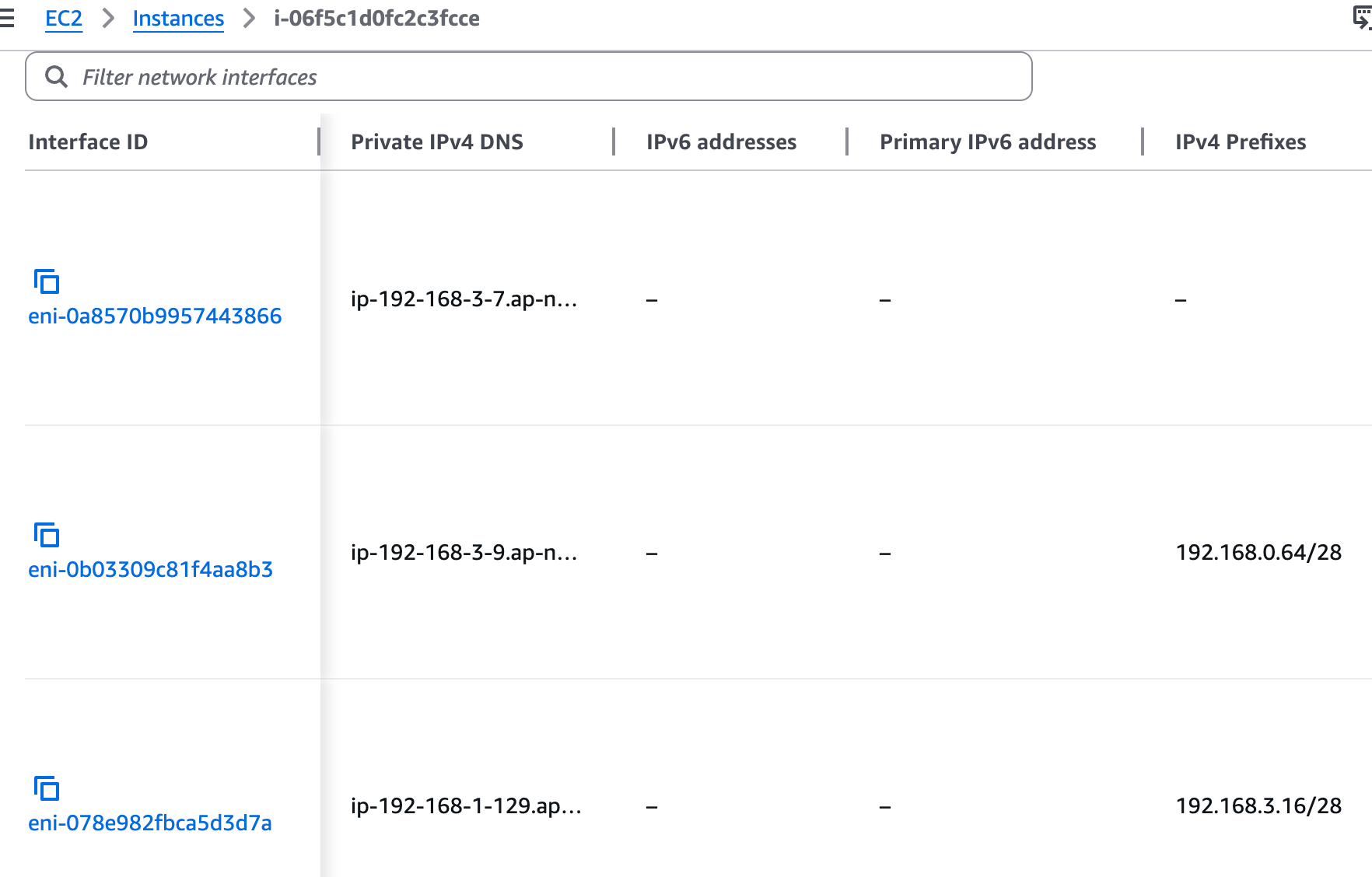
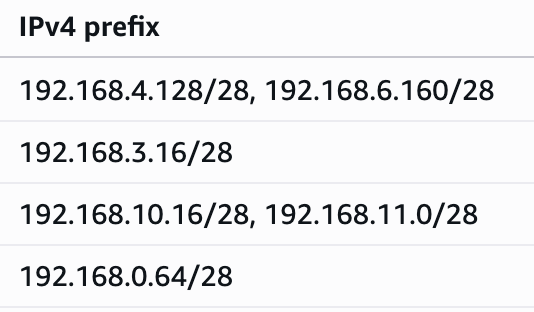
[IPv4 접두사 위임] 최대 파드 생성 및 확인
# 워커 노드 EC2 - 모니터링
while true; do ip -br -c addr show && echo "--------------" ; date "+%Y-%m-%d %H:%M:%S" ; sleep 1; done

# 터미널1
watch -d 'kubectl get pods -o wide'


# 터미널2
## 디플로이먼트 생성
cat <<EOF | kubectl apply -f -
apiVersion: apps/v1
kind: Deployment
metadata:
  name: nginx-deployment
  labels:
    app: nginx
spec:
  replicas: 15
  selector:
    matchLabels:
      app: nginx
  template:
    metadata:
      labels:
        app: nginx
    spec:
      containers:
      - name: nginx
        image: nginx:alpine
        ports:
        - containerPort: 80
EOF


# 파드 증가 테스트 >> 파드 정상 생성 확인, 워커 노드에서 eth, eni 갯수 확인
kubectl scale deployment nginx-deployment --replicas=50


# cni log 확인
for i in $N1 $N2 $N3; do echo ">> node $i <<"; ssh ec2-user@$i sudo cat /var/log/aws-routed-eni/ipamd.log | jq ; echo; done
(상위 생략)
{
  "level": "debug",
  "ts": "2026-03-24T15:33:20.464Z",
  "caller": "ipamd/ipamd.go:1479",
  "msg": "ENI eni-0eac3123a10629bc0 cannot be deleted because it is primary"
}
{
  "level": "debug",
  "ts": "2026-03-24T15:33:25.466Z",
  "caller": "ipamd/ipamd.go:765",
  "msg": "IP stats for Network Card 0 - total IPs: 32, assigned IPs: 15, cooldown IPs: 0"
}
{
  "level": "debug",
  "ts": "2026-03-24T15:33:25.466Z",
  "caller": "ipamd/ipamd.go:1479",
  "msg": "ENI eni-0eac3123a10629bc0 cannot be deleted because it is primary"
}


# IpamD debugging : IP 할당 가능하지만, maxPods 에서 제한됨!
2w git:(main*) $ for i in $N1 $N2 $N3; do echo ">> node $i <<"; ssh ec2-user@$i curl -s http://localhost:61679/v1/enis | jq; echo; done | grep -E 'node|TotalIPs|AssignedIPs'

>> node 13.125.90.155 <<
    "TotalIPs": 33,
    "AssignedIPs": 15,
>> node 3.36.10.59 <<
    "TotalIPs": 33,
    "AssignedIPs": 15,
>> node 52.79.83.80 <<
    "TotalIPs": 33,
    "AssignedIPs": 15,
[IPv4 접두사 위임] kubelet 에 maxPods (임시) 수정 후 최대 파드 생성 시도(110대)
# 모니터링
while true; do kubectl describe node -l tier=primary | grep pods | uniq ; sleep 1; done
while true; do kubectl get pod | grep Pending | wc -l ; sleep 1; done
# 워커 노드 3대 각각 접속 후 maxPods (임시) 수정
# 기본 정보 확인
2w git:(main*) $ ssh ec2-user@$N1
, #_
~\_ ####_ Amazon Linux 2023
~~ \_#####\
~~ \###|
~~ \#/ ___ https://aws.amazon.com/linux/amazon-linux-2023
~~ V~' '->
~~~ /
~~._. _/
_/ _/
_/m/'
Last login: Tue Mar 24 15:31:29 2026 from 125.128.148.220
[ec2-user@ip-192-168-3-7 ~]$ cat /etc/kubernetes/kubelet/config.json | grep maxPods
cat /etc/kubernetes/kubelet/config.json.d/40-nodeadm.conf | grep maxPods
"maxPods": 17,
"maxPods": 17
# sed 로 변경 : 기존 17 -> 변경 40
[ec2-user@ip-192-168-3-7 ~]$ sudo sed -i 's/"maxPods": 17/"maxPods": 50/g' /etc/kubernetes/kubelet/config.json
sudo sed -i 's/"maxPods": 17/"maxPods": 50/g' /etc/kubernetes/kubelet/config.json.d/40-nodeadm.conf
# 적용
[ec2-user@ip-192-168-3-7 ~]$ sudo systemctl restart kubelet
# Node2, Node3에도 동일하게 적용
- Node2 -
[ec2-user@ip-192-168-5-36 ~]$ sudo sed -i 's/"maxPods": 17/"maxPods": 50/g' /etc/kubernetes/kubelet/config.json
sudo sed -i 's/"maxPods": 17/"maxPods": 50/g' /etc/kubernetes/kubelet/config.json.d/40-nodeadm.conf
[ec2-user@ip-192-168-5-36 ~]$ sudo systemctl restart kubelet
[ec2-user@ip-192-168-11-144 ~]$ sudo sed -i 's/"maxPods": 17/"maxPods": 50/g' /etc/kubernetes/kubelet/config.json
sudo sed -i 's/"maxPods": 17/"maxPods": 50/g' /etc/kubernetes/kubelet/config.json.d/40-nodeadm.conf
[ec2-user@ip-192-168-11-144 ~]$ sudo systemctl restart kubelet
# 현재 파드 갯수
2w git:(main*) $ kubectl get pod -l app=nginx --no-headers=true | wc -l
50
2w git:(main*) $ k get pods
NAME READY STATUS RESTARTS AGE
nginx-deployment-54fc99c8d-24v92 1/1 Running 0 10m
nginx-deployment-54fc99c8d-4g6ms 1/1 Running 0 10m
nginx-deployment-54fc99c8d-54cqn 1/1 Running 0 10m
nginx-deployment-54fc99c8d-55xm4 1/1 Running 0 10m
nginx-deployment-54fc99c8d-58lfj 1/1 Running 0 10m
nginx-deployment-54fc99c8d-5pnt5 1/1 Running 0 10m
nginx-deployment-54fc99c8d-6cbz2 1/1 Running 0 10m
nginx-deployment-54fc99c8d-7mhfg 1/1 Running 0 10m
nginx-deployment-54fc99c8d-89pkp 1/1 Running 0 10m
nginx-deployment-54fc99c8d-9c5sg 1/1 Running 0 10m
nginx-deployment-54fc99c8d-9lxdp 1/1 Running 0 10m
nginx-deployment-54fc99c8d-9n2w7 1/1 Running 0 10m
nginx-deployment-54fc99c8d-cz8kd 1/1 Running 0 10m
nginx-deployment-54fc99c8d-dgrkv 1/1 Running 0 10m
nginx-deployment-54fc99c8d-dsp8c 1/1 Running 0 10m
nginx-deployment-54fc99c8d-fvrtw 1/1 Running 0 10m
nginx-deployment-54fc99c8d-gh9wn 1/1 Running 0 10m
nginx-deployment-54fc99c8d-hv97d 1/1 Running 0 10m
nginx-deployment-54fc99c8d-j7c5d 1/1 Running 0 10m
nginx-deployment-54fc99c8d-kmfmg 1/1 Running 0 10m
nginx-deployment-54fc99c8d-ld9zg 1/1 Running 0 10m
nginx-deployment-54fc99c8d-lfv98 1/1 Running 0 10m
nginx-deployment-54fc99c8d-lkvlc 1/1 Running 0 10m
nginx-deployment-54fc99c8d-lqhbt 1/1 Running 0 10m
nginx-deployment-54fc99c8d-lvdh5 1/1 Running 0 10m
nginx-deployment-54fc99c8d-mrrg5 1/1 Running 0 10m
nginx-deployment-54fc99c8d-mv54s 1/1 Running 0 10m
nginx-deployment-54fc99c8d-nn24r 1/1 Running 0 10m
nginx-deployment-54fc99c8d-p64bl 1/1 Running 0 10m
nginx-deployment-54fc99c8d-phfsd 1/1 Running 0 10m
nginx-deployment-54fc99c8d-ptp9r 1/1 Running 0 10m
nginx-deployment-54fc99c8d-qbjgq 1/1 Running 0 10m
nginx-deployment-54fc99c8d-qht7n 1/1 Running 0 10m
nginx-deployment-54fc99c8d-qnqtj 1/1 Running 0 10m
nginx-deployment-54fc99c8d-qvnjk 1/1 Running 0 10m
nginx-deployment-54fc99c8d-rvbtr 1/1 Running 0 10m
nginx-deployment-54fc99c8d-srcfz 1/1 Running 0 10m
nginx-deployment-54fc99c8d-swm2n 1/1 Running 0 10m
nginx-deployment-54fc99c8d-swxqk 1/1 Running 0 10m
nginx-deployment-54fc99c8d-tfrs8 1/1 Running 0 10m
nginx-deployment-54fc99c8d-twpfh 1/1 Running 0 10m
nginx-deployment-54fc99c8d-v8gjw 1/1 Running 0 10m
nginx-deployment-54fc99c8d-vb7z2 1/1 Running 0 10m
nginx-deployment-54fc99c8d-vl6j6 1/1 Running 0 10m
nginx-deployment-54fc99c8d-vls9s 1/1 Running 0 10m
nginx-deployment-54fc99c8d-vt7l8 1/1 Running 0 10m
nginx-deployment-54fc99c8d-w5frz 1/1 Running 0 10m
nginx-deployment-54fc99c8d-wjpmx 1/1 Running 0 10m
nginx-deployment-54fc99c8d-x9rxq 1/1 Running 0 10m
nginx-deployment-54fc99c8d-xpbxv 1/1 Running 0 10m
# Pod 추가
2w git:(main*) $ kubectl scale deployment nginx-deployment --replicas=60
deployment.apps/nginx-deployment scaled
2w git:(main*) $ k get pods
NAME READY STATUS RESTARTS AGE
nginx-deployment-54fc99c8d-24v92 1/1 Running 0 11m
nginx-deployment-54fc99c8d-2pddn 1/1 Running 0 14s
nginx-deployment-54fc99c8d-4g6ms 1/1 Running 0 11m
nginx-deployment-54fc99c8d-54cqn 1/1 Running 0 10m
nginx-deployment-54fc99c8d-55xm4 1/1 Running 0 10m
nginx-deployment-54fc99c8d-58lfj 1/1 Running 0 10m
nginx-deployment-54fc99c8d-5pnt5 1/1 Running 0 11m
nginx-deployment-54fc99c8d-5x29n 1/1 Running 0 14s
nginx-deployment-54fc99c8d-6cbz2 1/1 Running 0 10m
nginx-deployment-54fc99c8d-6lgrg 1/1 Running 0 14s
nginx-deployment-54fc99c8d-7mhfg 1/1 Running 0 10m
nginx-deployment-54fc99c8d-89pkp 1/1 Running 0 10m
nginx-deployment-54fc99c8d-9c5sg 1/1 Running 0 10m
nginx-deployment-54fc99c8d-9lxdp 1/1 Running 0 10m
nginx-deployment-54fc99c8d-9n2w7 1/1 Running 0 10m
nginx-deployment-54fc99c8d-c2dr2 1/1 Running 0 14s
nginx-deployment-54fc99c8d-cz8kd 1/1 Running 0 10m
nginx-deployment-54fc99c8d-dgrkv 1/1 Running 0 11m
nginx-deployment-54fc99c8d-dsp8c 1/1 Running 0 10m
nginx-deployment-54fc99c8d-fvrtw 1/1 Running 0 11m
nginx-deployment-54fc99c8d-gh9wn 1/1 Running 0 11m
nginx-deployment-54fc99c8d-hv97d 1/1 Running 0 10m
nginx-deployment-54fc99c8d-j7c5d 1/1 Running 0 11m
nginx-deployment-54fc99c8d-kmfmg 1/1 Running 0 10m
nginx-deployment-54fc99c8d-l5xln 1/1 Running 0 14s
nginx-deployment-54fc99c8d-ld9zg 1/1 Running 0 10m
nginx-deployment-54fc99c8d-lfv98 1/1 Running 0 11m
nginx-deployment-54fc99c8d-lkvlc 1/1 Running 0 11m
nginx-deployment-54fc99c8d-lqhbt 1/1 Running 0 10m
nginx-deployment-54fc99c8d-lvdh5 1/1 Running 0 10m
nginx-deployment-54fc99c8d-lxglj 1/1 Running 0 14s
nginx-deployment-54fc99c8d-mrrg5 1/1 Running 0 10m
nginx-deployment-54fc99c8d-mv54s 1/1 Running 0 11m
nginx-deployment-54fc99c8d-njpwr 1/1 Running 0 14s
nginx-deployment-54fc99c8d-nn24r 1/1 Running 0 10m
nginx-deployment-54fc99c8d-p64bl 1/1 Running 0 11m
nginx-deployment-54fc99c8d-phfsd 1/1 Running 0 10m
nginx-deployment-54fc99c8d-ptp9r 1/1 Running 0 10m
nginx-deployment-54fc99c8d-qbjgq 1/1 Running 0 10m
nginx-deployment-54fc99c8d-qht7n 1/1 Running 0 10m
nginx-deployment-54fc99c8d-qnqtj 1/1 Running 0 10m
nginx-deployment-54fc99c8d-qvnjk 1/1 Running 0 10m
nginx-deployment-54fc99c8d-rvbtr 1/1 Running 0 10m
nginx-deployment-54fc99c8d-srcfz 1/1 Running 0 10m
nginx-deployment-54fc99c8d-swm2n 1/1 Running 0 10m
nginx-deployment-54fc99c8d-swxqk 1/1 Running 0 10m
nginx-deployment-54fc99c8d-tfrs8 1/1 Running 0 11m
nginx-deployment-54fc99c8d-thrwn 1/1 Running 0 14s
nginx-deployment-54fc99c8d-tkldk 1/1 Running 0 14s
nginx-deployment-54fc99c8d-twpfh 1/1 Running 0 11m
nginx-deployment-54fc99c8d-v8gjw 1/1 Running 0 11m
nginx-deployment-54fc99c8d-vb7z2 1/1 Running 0 10m
nginx-deployment-54fc99c8d-vjz88 1/1 Running 0 14s
nginx-deployment-54fc99c8d-vl6j6 1/1 Running 0 10m
nginx-deployment-54fc99c8d-vls9s 1/1 Running 0 10m
nginx-deployment-54fc99c8d-vt7l8 1/1 Running 0 10m
nginx-deployment-54fc99c8d-w5frz 1/1 Running 0 10m
nginx-deployment-54fc99c8d-wjpmx 1/1 Running 0 11m
nginx-deployment-54fc99c8d-x9rxq 1/1 Running 0 10m
nginx-deployment-54fc99c8d-xpbxv 1/1 Running 0 10m
# Pod 110개로 증가 시 문제 발생
2w git:(main*) $ kubectl scale deployment nginx-deployment --replicas=110
deployment.apps/nginx-deployment scaled
2w git:(main*) $ k get pods
NAME READY STATUS RESTARTS AGE
nginx-deployment-54fc99c8d-24v92 1/1 Running 0 12m
nginx-deployment-54fc99c8d-2l7qw 1/1 Running 0 18s
nginx-deployment-54fc99c8d-2pddn 1/1 Running 0 64s
nginx-deployment-54fc99c8d-4fn88 1/1 Running 0 18s
nginx-deployment-54fc99c8d-4g6ms 1/1 Running 0 12m
nginx-deployment-54fc99c8d-4zbnf 0/1 ContainerCreating 0 18s
nginx-deployment-54fc99c8d-54cqn 1/1 Running 0 11m
nginx-deployment-54fc99c8d-55xm4 1/1 Running 0 11m
nginx-deployment-54fc99c8d-58lfj 1/1 Running 0 11m
nginx-deployment-54fc99c8d-58vbx 0/1 ContainerCreating 0 18s
nginx-deployment-54fc99c8d-5jmz9 1/1 Running 0 18s
nginx-deployment-54fc99c8d-5pnt5 1/1 Running 0 12m
nginx-deployment-54fc99c8d-5x29n 1/1 Running 0 64s
nginx-deployment-54fc99c8d-675n2 0/1 ContainerCreating 0 18s
nginx-deployment-54fc99c8d-6cbz2 1/1 Running 0 11m
nginx-deployment-54fc99c8d-6lgrg 1/1 Running 0 64s
nginx-deployment-54fc99c8d-75rfr 1/1 Running 0 18s
nginx-deployment-54fc99c8d-7mhfg 1/1 Running 0 11m
nginx-deployment-54fc99c8d-7sw48 1/1 Running 0 18s
nginx-deployment-54fc99c8d-7vglt 1/1 Running 0 18s
nginx-deployment-54fc99c8d-89pkp 1/1 Running 0 11m
nginx-deployment-54fc99c8d-8b2r4 1/1 Running 0 18s
nginx-deployment-54fc99c8d-8h8cj 1/1 Running 0 18s
nginx-deployment-54fc99c8d-8lsg4 1/1 Running 0 18s
nginx-deployment-54fc99c8d-94n7g 1/1 Running 0 18s
nginx-deployment-54fc99c8d-9c5sg 1/1 Running 0 11m
nginx-deployment-54fc99c8d-9ck8s 1/1 Running 0 18s
nginx-deployment-54fc99c8d-9gg4x 0/1 ContainerCreating 0 18s
nginx-deployment-54fc99c8d-9lxdp 1/1 Running 0 11m
nginx-deployment-54fc99c8d-9n2w7 1/1 Running 0 11m
nginx-deployment-54fc99c8d-9qlvz 0/1 ContainerCreating 0 18s
nginx-deployment-54fc99c8d-9xtzm 1/1 Running 0 18s
nginx-deployment-54fc99c8d-brdnv 1/1 Running 0 18s
nginx-deployment-54fc99c8d-c2dr2 1/1 Running 0 64s
nginx-deployment-54fc99c8d-c6kn8 1/1 Running 0 18s
nginx-deployment-54fc99c8d-cv56d 1/1 Running 0 18s
nginx-deployment-54fc99c8d-cz8kd 1/1 Running 0 11m
nginx-deployment-54fc99c8d-dgrkv 1/1 Running 0 12m
nginx-deployment-54fc99c8d-dhmt7 0/1 ContainerCreating 0 18s
nginx-deployment-54fc99c8d-dsp8c 1/1 Running 0 11m
nginx-deployment-54fc99c8d-dvhpt 1/1 Running 0 18s
nginx-deployment-54fc99c8d-fhskt 1/1 Running 0 18s
nginx-deployment-54fc99c8d-fvrtw 1/1 Running 0 12m
nginx-deployment-54fc99c8d-gbxgh 0/1 ContainerCreating 0 18s
nginx-deployment-54fc99c8d-gh9wn 1/1 Running 0 12m
nginx-deployment-54fc99c8d-hgh2x 0/1 ContainerCreating 0 18s
nginx-deployment-54fc99c8d-hr5cs 0/1 ContainerCreating 0 17s
nginx-deployment-54fc99c8d-hv97d 1/1 Running 0 11m
nginx-deployment-54fc99c8d-j7c5d 1/1 Running 0 12m
nginx-deployment-54fc99c8d-kmfmg 1/1 Running 0 11m
nginx-deployment-54fc99c8d-l4v5b 1/1 Running 0 18s
nginx-deployment-54fc99c8d-l5xln 1/1 Running 0 64s
nginx-deployment-54fc99c8d-ld9zg 1/1 Running 0 11m
nginx-deployment-54fc99c8d-lfv98 1/1 Running 0 12m
nginx-deployment-54fc99c8d-lkhsc 0/1 ContainerCreating 0 18s
nginx-deployment-54fc99c8d-lkvlc 1/1 Running 0 12m
nginx-deployment-54fc99c8d-lnzvd 1/1 Running 0 18s
nginx-deployment-54fc99c8d-lqhbt 1/1 Running 0 11m
nginx-deployment-54fc99c8d-lvdh5 1/1 Running 0 11m
nginx-deployment-54fc99c8d-lxglj 1/1 Running 0 64s
nginx-deployment-54fc99c8d-m5tjn 0/1 ContainerCreating 0 18s
nginx-deployment-54fc99c8d-mdnp5 1/1 Running 0 18s
nginx-deployment-54fc99c8d-mrrg5 1/1 Running 0 11m
nginx-deployment-54fc99c8d-mv54s 1/1 Running 0 12m
nginx-deployment-54fc99c8d-njpwr 1/1 Running 0 64s
nginx-deployment-54fc99c8d-nn24r 1/1 Running 0 11m
nginx-deployment-54fc99c8d-npl2l 1/1 Running 0 18s
nginx-deployment-54fc99c8d-nslzd 1/1 Running 0 18s
nginx-deployment-54fc99c8d-p64bl 1/1 Running 0 12m
nginx-deployment-54fc99c8d-phfsd 1/1 Running 0 11m
nginx-deployment-54fc99c8d-ptp9r 1/1 Running 0 11m
nginx-deployment-54fc99c8d-pvj9z 1/1 Running 0 18s
nginx-deployment-54fc99c8d-qbjgq 1/1 Running 0 11m
nginx-deployment-54fc99c8d-qc67j 1/1 Running 0 18s
nginx-deployment-54fc99c8d-qdhcg 1/1 Running 0 18s
nginx-deployment-54fc99c8d-qht7n 1/1 Running 0 11m
nginx-deployment-54fc99c8d-qnqtj 1/1 Running 0 11m
nginx-deployment-54fc99c8d-qvnjk 1/1 Running 0 11m
nginx-deployment-54fc99c8d-rvbtr 1/1 Running 0 11m
nginx-deployment-54fc99c8d-srcfz 1/1 Running 0 11m
nginx-deployment-54fc99c8d-sw2gw 0/1 ContainerCreating 0 18s
nginx-deployment-54fc99c8d-swm2n 1/1 Running 0 11m
nginx-deployment-54fc99c8d-swn4t 1/1 Running 0 18s
nginx-deployment-54fc99c8d-swxqk 1/1 Running 0 11m
nginx-deployment-54fc99c8d-t2wf9 0/1 ContainerCreating 0 18s
nginx-deployment-54fc99c8d-tfrs8 1/1 Running 0 12m
nginx-deployment-54fc99c8d-thrwn 1/1 Running 0 64s
nginx-deployment-54fc99c8d-tkldk 1/1 Running 0 64s
nginx-deployment-54fc99c8d-twpfh 1/1 Running 0 12m
nginx-deployment-54fc99c8d-v7n97 1/1 Running 0 18s
nginx-deployment-54fc99c8d-v8gjw 1/1 Running 0 12m
nginx-deployment-54fc99c8d-vb7z2 1/1 Running 0 11m
nginx-deployment-54fc99c8d-vjz88 1/1 Running 0 64s
nginx-deployment-54fc99c8d-vl6j6 1/1 Running 0 11m
nginx-deployment-54fc99c8d-vls9s 1/1 Running 0 11m
nginx-deployment-54fc99c8d-vnhhm 1/1 Running 0 18s
nginx-deployment-54fc99c8d-vt7l8 1/1 Running 0 11m
nginx-deployment-54fc99c8d-vx97k 1/1 Running 0 18s
nginx-deployment-54fc99c8d-vzmzq 0/1 ContainerCreating 0 17s
nginx-deployment-54fc99c8d-w5frz 1/1 Running 0 11m
nginx-deployment-54fc99c8d-w5hh2 1/1 Running 0 18s
nginx-deployment-54fc99c8d-wjfxt 0/1 ContainerCreating 0 18s
nginx-deployment-54fc99c8d-wjpmx 1/1 Running 0 12m
nginx-deployment-54fc99c8d-wvgz2 1/1 Running 0 18s
nginx-deployment-54fc99c8d-ww88w 0/1 ContainerCreating 0 18s
nginx-deployment-54fc99c8d-x9rxq 1/1 Running 0 11m
nginx-deployment-54fc99c8d-xpbxv 1/1 Running 0 11m
nginx-deployment-54fc99c8d-z8c24 1/1 Running 0 18s
nginx-deployment-54fc99c8d-zclrs 1/1 Running 0 18s
nginx-deployment-54fc99c8d-zrdsv 0/1 ContainerCreating 0 18s
# cni log 확인 : maxPods 는 가능하지만, IP 할당 실패!
$ for i in $N1 $N2 $N3; do echo ">> node $i <<"; ssh ec2-user@$i sudo cat /var/log/aws-routed-eni/ipamd.log | jq ; echo; done
{
"level": "debug",
"ts": "2026-03-24T15:45:12.360Z",
"caller": "rpc/rpc_grpc.pb.go:135",
"msg": "DelNetworkRequest: K8S_POD_NAME:\"nginx-deployment-54fc99c8d-t2wf9\" K8S_POD_NAMESPACE:\"default\" K8S_POD_INFRA_CONTAINER_ID:\"79a6060fcc1f845ad216191cbd16915d012e93a64c2a0955520c0deb7d7502e1\" Reason:\"PodDeleted\" ContainerID:\"79a6060fcc1f845ad216191cbd16915d012e93a64c2a0955520c0deb7d7502e1\" IfName:\"eth0\" NetworkName:\"aws-cni\" K8S_POD_UID:\"ba1a4274-17f4-4fbf-ba5d-a70aff5b6cd0\""
}
{
"level": "debug",
"ts": "2026-03-24T15:45:12.360Z",
"caller": "ipamd/rpc_handler.go:353",
"msg": "UnassignPodIPAddress: IP address pool stats: total 33, assigned 32, sandbox aws-cni/79a6060fcc1f845ad216191cbd16915d012e93a64c2a0955520c0deb7d7502e1/eth0"
}
{
"level": "debug",
"ts": "2026-03-24T15:45:12.360Z",
"caller": "ipamd/rpc_handler.go:353",
"msg": "UnassignPodIPAddress: Failed to find IPAM entry under full key, trying CRI-migrated version"
}
{
"level": "warn",
"ts": "2026-03-24T15:45:12.360Z",
"caller": "ipamd/rpc_handler.go:353",
"msg": "UnassignPodIPAddress: Failed to find sandbox _migrated-from-cri/79a6060fcc1f845ad216191cbd16915d012e93a64c2a0955520c0deb7d7502e1/unknown"
}
{
"level": "info",
"ts": "2026-03-24T15:45:12.360Z",
"caller": "rpc/rpc_grpc.pb.go:135",
"msg": "Send DelNetworkReply: IPAddress: [], err: 1 error occurred:\n\t* datastore: unknown pod\n\n"
}
# IpamD debugging commands https://github.com/aws/amazon-vpc-cni-k8s/blob/master/docs/troubleshooting.md
2w git:(main*) $ for i in $N1 $N2 $N3; do echo ">> node $i <<"; ssh ec2-user@$i curl -s http://localhost:61679/v1/enis | jq; echo; done | grep -E 'node|TotalIPs|AssignedIPs'
>> node 13.125.90.155 <<
"TotalIPs": 33,
"AssignedIPs": 32,
>> node 3.36.10.59 <<
"TotalIPs": 33,
"AssignedIPs": 32,
>> node 52.79.83.80 <<
"TotalIPs": 33,
"AssignedIPs": 32,
# 노드 정보 확인 : maxPods 가 50으로 이번에는 Prefix mode 에서 최대 IP 할당 후에도 IP 부족!
2w git:(main*) $ kubectl describe node -l tier=primary | grep pods
pods: 50
pods: 50
Normal NodeAllocatableEnforced 5m9s kubelet Updated Node Allocatable limit across pods
pods: 50
pods: 50
Normal NodeAllocatableEnforced 7m18s kubelet Updated Node Allocatable limit across pods
pods: 50
pods: 50
Normal NodeAllocatableEnforced 6m2s kubelet Updated Node Allocatable limit across pods
2w git:(main*) $ kubectl describe node -l tier=primary | grep pods
pods: 50
pods: 50
Normal NodeAllocatableEnforced 5m9s kubelet Updated Node Allocatable limit across pods
pods: 50
pods: 50
Normal NodeAllocatableEnforced 7m18s kubelet Updated Node Allocatable limit across pods
pods: 50
pods: 50
Normal NodeAllocatableEnforced 6m2s kubelet Updated Node Allocatable limit across pods
[0:46:46] mzc01-voieul:2w git:(main*) $ kubectl describe node -l tier=primary
Name: ip-192-168-11-144.ap-northeast-2.compute.internal
Roles: <none>
Labels: beta.kubernetes.io/arch=amd64
beta.kubernetes.io/instance-type=t3.medium
beta.kubernetes.io/os=linux
eks.amazonaws.com/capacityType=ON_DEMAND
eks.amazonaws.com/nodegroup=myeks-1nd-node-group
eks.amazonaws.com/nodegroup-image=ami-0041be04b53631868
eks.amazonaws.com/sourceLaunchTemplateId=lt-03601b7510b7a8120
eks.amazonaws.com/sourceLaunchTemplateVersion=1
failure-domain.beta.kubernetes.io/region=ap-northeast-2
failure-domain.beta.kubernetes.io/zone=ap-northeast-2c
k8s.io/cloud-provider-aws=5553ae84a0d29114870f67bbabd07d44
kubernetes.io/arch=amd64
kubernetes.io/hostname=ip-192-168-11-144.ap-northeast-2.compute.internal
kubernetes.io/os=linux
node.kubernetes.io/instance-type=t3.medium
tier=primary
topology.k8s.aws/zone-id=apne2-az3
topology.kubernetes.io/region=ap-northeast-2
topology.kubernetes.io/zone=ap-northeast-2c
Annotations: alpha.kubernetes.io/provided-node-ip: 192.168.11.144
node.alpha.kubernetes.io/ttl: 0
volumes.kubernetes.io/controller-managed-attach-detach: true
CreationTimestamp: Tue, 24 Mar 2026 20:34:32 +0900
Taints: <none>
Unschedulable: false
Lease:
HolderIdentity: ip-192-168-11-144.ap-northeast-2.compute.internal
AcquireTime: <unset>
RenewTime: Wed, 25 Mar 2026 00:46:54 +0900
Conditions:
Type Status LastHeartbeatTime LastTransitionTime Reason Message
---- ------ ----------------- ------------------ ------ -------
MemoryPressure False Wed, 25 Mar 2026 00:46:03 +0900 Tue, 24 Mar 2026 20:34:30 +0900 KubeletHasSufficientMemory kubelet has sufficient memory available
DiskPressure False Wed, 25 Mar 2026 00:46:03 +0900 Tue, 24 Mar 2026 20:34:30 +0900 KubeletHasNoDiskPressure kubelet has no disk pressure
PIDPressure False Wed, 25 Mar 2026 00:46:03 +0900 Tue, 24 Mar 2026 20:34:30 +0900 KubeletHasSufficientPID kubelet has sufficient PID available
Ready True Wed, 25 Mar 2026 00:46:03 +0900 Tue, 24 Mar 2026 20:34:41 +0900 KubeletReady kubelet is posting ready status
Addresses:
InternalIP: 192.168.11.144
ExternalIP: 52.79.83.80
InternalDNS: ip-192-168-11-144.ap-northeast-2.compute.internal
Hostname: ip-192-168-11-144.ap-northeast-2.compute.internal
ExternalDNS: ec2-52-79-83-80.ap-northeast-2.compute.amazonaws.com
Capacity:
cpu: 2
ephemeral-storage: 20893676Ki
hugepages-1Gi: 0
hugepages-2Mi: 0
memory: 3926448Ki
pods: 50
Allocatable:
cpu: 1930m
ephemeral-storage: 18181869946
hugepages-1Gi: 0
hugepages-2Mi: 0
memory: 3371440Ki
pods: 50
System Info:
Machine ID: ec287f15f893c0aea093bd290ee2c579
System UUID: ec287f15-f893-c0ae-a093-bd290ee2c579
Boot ID: 850231e2-eb5a-4f9c-88e4-cc715ca2225b
Kernel Version: 6.12.73-95.123.amzn2023.x86_64
OS Image: Amazon Linux 2023.10.20260302
Operating System: linux
Architecture: amd64
Container Runtime Version: containerd://2.2.1+unknown
Kubelet Version: v1.34.4-eks-f69f56f
Kube-Proxy Version:
ProviderID: aws:///ap-northeast-2c/i-088084a4dda1b52d3
Non-terminated Pods: (40 in total)
Namespace Name CPU Requests CPU Limits Memory Requests Memory Limits Age
--------- ---- ------------ ---------- --------------- ------------- ---
default nginx-deployment-54fc99c8d-4zbnf 0 (0%) 0 (0%) 0 (0%) 0 (0%) 2m58s
default nginx-deployment-54fc99c8d-55xm4 0 (0%) 0 (0%) 0 (0%) 0 (0%) 14m
default nginx-deployment-54fc99c8d-58lfj 0 (0%) 0 (0%) 0 (0%) 0 (0%) 14m
default nginx-deployment-54fc99c8d-675n2 0 (0%) 0 (0%) 0 (0%) 0 (0%) 2m58s
default nginx-deployment-54fc99c8d-7mhfg 0 (0%) 0 (0%) 0 (0%) 0 (0%) 14m
default nginx-deployment-54fc99c8d-8lsg4 0 (0%) 0 (0%) 0 (0%) 0 (0%) 2m58s
default nginx-deployment-54fc99c8d-94n7g 0 (0%) 0 (0%) 0 (0%) 0 (0%) 2m58s
default nginx-deployment-54fc99c8d-9ck8s 0 (0%) 0 (0%) 0 (0%) 0 (0%) 2m58s
default nginx-deployment-54fc99c8d-9xtzm 0 (0%) 0 (0%) 0 (0%) 0 (0%) 2m58s
default nginx-deployment-54fc99c8d-c2dr2 0 (0%) 0 (0%) 0 (0%) 0 (0%) 3m44s
default nginx-deployment-54fc99c8d-cv56d 0 (0%) 0 (0%) 0 (0%) 0 (0%) 2m58s
default nginx-deployment-54fc99c8d-dgrkv 0 (0%) 0 (0%) 0 (0%) 0 (0%) 14m
default nginx-deployment-54fc99c8d-dvhpt 0 (0%) 0 (0%) 0 (0%) 0 (0%) 2m58s
default nginx-deployment-54fc99c8d-fvrtw 0 (0%) 0 (0%) 0 (0%) 0 (0%) 14m
default nginx-deployment-54fc99c8d-hr5cs 0 (0%) 0 (0%) 0 (0%) 0 (0%) 2m57s
default nginx-deployment-54fc99c8d-hv97d 0 (0%) 0 (0%) 0 (0%) 0 (0%) 14m
default nginx-deployment-54fc99c8d-lfv98 0 (0%) 0 (0%) 0 (0%) 0 (0%) 14m
default nginx-deployment-54fc99c8d-lkvlc 0 (0%) 0 (0%) 0 (0%) 0 (0%) 14m
default nginx-deployment-54fc99c8d-m5tjn 0 (0%) 0 (0%) 0 (0%) 0 (0%) 2m58s
default nginx-deployment-54fc99c8d-mdnp5 0 (0%) 0 (0%) 0 (0%) 0 (0%) 2m58s
default nginx-deployment-54fc99c8d-mrrg5 0 (0%) 0 (0%) 0 (0%) 0 (0%) 14m
default nginx-deployment-54fc99c8d-njpwr 0 (0%) 0 (0%) 0 (0%) 0 (0%) 3m44s
default nginx-deployment-54fc99c8d-nn24r 0 (0%) 0 (0%) 0 (0%) 0 (0%) 14m
default nginx-deployment-54fc99c8d-nslzd 0 (0%) 0 (0%) 0 (0%) 0 (0%) 2m58s
default nginx-deployment-54fc99c8d-pvj9z 0 (0%) 0 (0%) 0 (0%) 0 (0%) 2m58s
default nginx-deployment-54fc99c8d-qc67j 0 (0%) 0 (0%) 0 (0%) 0 (0%) 2m58s
default nginx-deployment-54fc99c8d-qht7n 0 (0%) 0 (0%) 0 (0%) 0 (0%) 14m
default nginx-deployment-54fc99c8d-qnqtj 0 (0%) 0 (0%) 0 (0%) 0 (0%) 14m
default nginx-deployment-54fc99c8d-t2wf9 0 (0%) 0 (0%) 0 (0%) 0 (0%) 2m58s
default nginx-deployment-54fc99c8d-thrwn 0 (0%) 0 (0%) 0 (0%) 0 (0%) 3m44s
default nginx-deployment-54fc99c8d-tkldk 0 (0%) 0 (0%) 0 (0%) 0 (0%) 3m44s
default nginx-deployment-54fc99c8d-vb7z2 0 (0%) 0 (0%) 0 (0%) 0 (0%) 14m
default nginx-deployment-54fc99c8d-vjz88 0 (0%) 0 (0%) 0 (0%) 0 (0%) 3m44s
default nginx-deployment-54fc99c8d-w5hh2 0 (0%) 0 (0%) 0 (0%) 0 (0%) 2m58s
default nginx-deployment-54fc99c8d-wjpmx 0 (0%) 0 (0%) 0 (0%) 0 (0%) 14m
default nginx-deployment-54fc99c8d-ww88w 0 (0%) 0 (0%) 0 (0%) 0 (0%) 2m58s
default nginx-deployment-54fc99c8d-z8c24 0 (0%) 0 (0%) 0 (0%) 0 (0%) 2m58s
kube-system aws-node-cxrwh 50m (2%) 0 (0%) 0 (0%) 0 (0%) 34m
kube-system coredns-6d6d687b7b-vw7b9 100m (5%) 0 (0%) 70Mi (2%) 170Mi (5%) 21m
kube-system kube-proxy-xl6x2 100m (5%) 0 (0%) 0 (0%) 0 (0%) 22m
Allocated resources:
(Total limits may be over 100 percent, i.e., overcommitted.)
Resource Requests Limits
-------- -------- ------
cpu 250m (12%) 0 (0%)
memory 70Mi (2%) 170Mi (5%)
ephemeral-storage 0 (0%) 0 (0%)
hugepages-1Gi 0 (0%) 0 (0%)
hugepages-2Mi 0 (0%) 0 (0%)
Events:
Type Reason Age From Message
---- ------ ---- ---- -------
Normal Starting 22m kube-proxy
Normal Starting 5m19s kubelet Starting kubelet.
Warning InvalidDiskCapacity 5m19s kubelet invalid capacity 0 on image filesystem
Normal NodeHasSufficientMemory 5m19s (x3 over 5m19s) kubelet Node ip-192-168-11-144.ap-northeast-2.compute.internal status is now: NodeHasSufficientMemory
Normal NodeHasNoDiskPressure 5m19s (x3 over 5m19s) kubelet Node ip-192-168-11-144.ap-northeast-2.compute.internal status is now: NodeHasNoDiskPressure
Normal NodeHasSufficientPID 5m19s (x3 over 5m19s) kubelet Node ip-192-168-11-144.ap-northeast-2.compute.internal status is now: NodeHasSufficientPID
Normal NodeAllocatableEnforced 5m19s kubelet Updated Node Allocatable limit across pods
Name: ip-192-168-3-7.ap-northeast-2.compute.internal
Roles: <none>
Labels: beta.kubernetes.io/arch=amd64
beta.kubernetes.io/instance-type=t3.medium
beta.kubernetes.io/os=linux
eks.amazonaws.com/capacityType=ON_DEMAND
eks.amazonaws.com/nodegroup=myeks-1nd-node-group
eks.amazonaws.com/nodegroup-image=ami-0041be04b53631868
eks.amazonaws.com/sourceLaunchTemplateId=lt-03601b7510b7a8120
eks.amazonaws.com/sourceLaunchTemplateVersion=1
failure-domain.beta.kubernetes.io/region=ap-northeast-2
failure-domain.beta.kubernetes.io/zone=ap-northeast-2a
k8s.io/cloud-provider-aws=5553ae84a0d29114870f67bbabd07d44
kubernetes.io/arch=amd64
kubernetes.io/hostname=ip-192-168-3-7.ap-northeast-2.compute.internal
kubernetes.io/os=linux
node.kubernetes.io/instance-type=t3.medium
tier=primary
topology.k8s.aws/zone-id=apne2-az1
topology.kubernetes.io/region=ap-northeast-2
topology.kubernetes.io/zone=ap-northeast-2a
Annotations: alpha.kubernetes.io/provided-node-ip: 192.168.3.7
node.alpha.kubernetes.io/ttl: 0
volumes.kubernetes.io/controller-managed-attach-detach: true
CreationTimestamp: Tue, 24 Mar 2026 20:34:32 +0900
Taints: <none>
Unschedulable: false
Lease:
HolderIdentity: ip-192-168-3-7.ap-northeast-2.compute.internal
AcquireTime: <unset>
RenewTime: Wed, 25 Mar 2026 00:46:46 +0900
Conditions:
Type Status LastHeartbeatTime LastTransitionTime Reason Message
---- ------ ----------------- ------------------ ------ -------
MemoryPressure False Wed, 25 Mar 2026 00:42:31 +0900 Tue, 24 Mar 2026 20:34:30 +0900 KubeletHasSufficientMemory kubelet has sufficient memory available
DiskPressure False Wed, 25 Mar 2026 00:42:31 +0900 Tue, 24 Mar 2026 20:34:30 +0900 KubeletHasNoDiskPressure kubelet has no disk pressure
PIDPressure False Wed, 25 Mar 2026 00:42:31 +0900 Tue, 24 Mar 2026 20:34:30 +0900 KubeletHasSufficientPID kubelet has sufficient PID available
Ready True Wed, 25 Mar 2026 00:42:31 +0900 Tue, 24 Mar 2026 20:34:41 +0900 KubeletReady kubelet is posting ready status
Addresses:
InternalIP: 192.168.3.7
ExternalIP: 13.125.90.155
InternalDNS: ip-192-168-3-7.ap-northeast-2.compute.internal
Hostname: ip-192-168-3-7.ap-northeast-2.compute.internal
ExternalDNS: ec2-13-125-90-155.ap-northeast-2.compute.amazonaws.com
Capacity:
cpu: 2
ephemeral-storage: 20893676Ki
hugepages-1Gi: 0
hugepages-2Mi: 0
memory: 3926456Ki
pods: 50
Allocatable:
cpu: 1930m
ephemeral-storage: 18181869946
hugepages-1Gi: 0
hugepages-2Mi: 0
memory: 3371448Ki
pods: 50
System Info:
Machine ID: ec2b1a7fcc3df0160be3cb968d34e6e3
System UUID: ec2b1a7f-cc3d-f016-0be3-cb968d34e6e3
Boot ID: 15a55abc-9da6-4b6d-afa1-8e7b041d3690
Kernel Version: 6.12.73-95.123.amzn2023.x86_64
OS Image: Amazon Linux 2023.10.20260302
Operating System: linux
Architecture: amd64
Container Runtime Version: containerd://2.2.1+unknown
Kubelet Version: v1.34.4-eks-f69f56f
Kube-Proxy Version:
ProviderID: aws:///ap-northeast-2a/i-06f5c1d0fc2c3fcce
Non-terminated Pods: (39 in total)
Namespace Name CPU Requests CPU Limits Memory Requests Memory Limits Age
--------- ---- ------------ ---------- --------------- ------------- ---
default nginx-deployment-54fc99c8d-24v92 0 (0%) 0 (0%) 0 (0%) 0 (0%) 14m
default nginx-deployment-54fc99c8d-4fn88 0 (0%) 0 (0%) 0 (0%) 0 (0%) 2m58s
default nginx-deployment-54fc99c8d-5jmz9 0 (0%) 0 (0%) 0 (0%) 0 (0%) 2m58s
default nginx-deployment-54fc99c8d-6cbz2 0 (0%) 0 (0%) 0 (0%) 0 (0%) 14m
default nginx-deployment-54fc99c8d-75rfr 0 (0%) 0 (0%) 0 (0%) 0 (0%) 2m58s
default nginx-deployment-54fc99c8d-7vglt 0 (0%) 0 (0%) 0 (0%) 0 (0%) 2m58s
default nginx-deployment-54fc99c8d-89pkp 0 (0%) 0 (0%) 0 (0%) 0 (0%) 14m
default nginx-deployment-54fc99c8d-8h8cj 0 (0%) 0 (0%) 0 (0%) 0 (0%) 2m58s
default nginx-deployment-54fc99c8d-9c5sg 0 (0%) 0 (0%) 0 (0%) 0 (0%) 14m
default nginx-deployment-54fc99c8d-9gg4x 0 (0%) 0 (0%) 0 (0%) 0 (0%) 2m58s
default nginx-deployment-54fc99c8d-9lxdp 0 (0%) 0 (0%) 0 (0%) 0 (0%) 14m
default nginx-deployment-54fc99c8d-9qlvz 0 (0%) 0 (0%) 0 (0%) 0 (0%) 2m58s
default nginx-deployment-54fc99c8d-c6kn8 0 (0%) 0 (0%) 0 (0%) 0 (0%) 2m58s
default nginx-deployment-54fc99c8d-dsp8c 0 (0%) 0 (0%) 0 (0%) 0 (0%) 14m
default nginx-deployment-54fc99c8d-gh9wn 0 (0%) 0 (0%) 0 (0%) 0 (0%) 14m
default nginx-deployment-54fc99c8d-kmfmg 0 (0%) 0 (0%) 0 (0%) 0 (0%) 14m
default nginx-deployment-54fc99c8d-lkhsc 0 (0%) 0 (0%) 0 (0%) 0 (0%) 2m58s
default nginx-deployment-54fc99c8d-lqhbt 0 (0%) 0 (0%) 0 (0%) 0 (0%) 14m
default nginx-deployment-54fc99c8d-lvdh5 0 (0%) 0 (0%) 0 (0%) 0 (0%) 14m
default nginx-deployment-54fc99c8d-mv54s 0 (0%) 0 (0%) 0 (0%) 0 (0%) 14m
default nginx-deployment-54fc99c8d-npl2l 0 (0%) 0 (0%) 0 (0%) 0 (0%) 2m58s
default nginx-deployment-54fc99c8d-phfsd 0 (0%) 0 (0%) 0 (0%) 0 (0%) 14m
default nginx-deployment-54fc99c8d-qbjgq 0 (0%) 0 (0%) 0 (0%) 0 (0%) 14m
default nginx-deployment-54fc99c8d-qvnjk 0 (0%) 0 (0%) 0 (0%) 0 (0%) 14m
default nginx-deployment-54fc99c8d-rvbtr 0 (0%) 0 (0%) 0 (0%) 0 (0%) 14m
default nginx-deployment-54fc99c8d-srcfz 0 (0%) 0 (0%) 0 (0%) 0 (0%) 14m
default nginx-deployment-54fc99c8d-sw2gw 0 (0%) 0 (0%) 0 (0%) 0 (0%) 2m58s
default nginx-deployment-54fc99c8d-swn4t 0 (0%) 0 (0%) 0 (0%) 0 (0%) 2m58s
default nginx-deployment-54fc99c8d-swxqk 0 (0%) 0 (0%) 0 (0%) 0 (0%) 14m
default nginx-deployment-54fc99c8d-twpfh 0 (0%) 0 (0%) 0 (0%) 0 (0%) 14m
default nginx-deployment-54fc99c8d-v7n97 0 (0%) 0 (0%) 0 (0%) 0 (0%) 2m58s
default nginx-deployment-54fc99c8d-v8gjw 0 (0%) 0 (0%) 0 (0%) 0 (0%) 14m
default nginx-deployment-54fc99c8d-vls9s 0 (0%) 0 (0%) 0 (0%) 0 (0%) 14m
default nginx-deployment-54fc99c8d-vt7l8 0 (0%) 0 (0%) 0 (0%) 0 (0%) 14m
default nginx-deployment-54fc99c8d-x9rxq 0 (0%) 0 (0%) 0 (0%) 0 (0%) 14m
default nginx-deployment-54fc99c8d-zrdsv 0 (0%) 0 (0%) 0 (0%) 0 (0%) 2m58s
kube-system aws-node-tdfcv 50m (2%) 0 (0%) 0 (0%) 0 (0%) 34m
kube-system kube-ops-view-74cb6689b6-wbkbc 0 (0%) 0 (0%) 0 (0%) 0 (0%) 21m
kube-system kube-proxy-59b4j 100m (5%) 0 (0%) 0 (0%) 0 (0%) 22m
Allocated resources:
(Total limits may be over 100 percent, i.e., overcommitted.)
Resource Requests Limits
-------- -------- ------
cpu 150m (7%) 0 (0%)
memory 0 (0%) 0 (0%)
ephemeral-storage 0 (0%) 0 (0%)
hugepages-1Gi 0 (0%) 0 (0%)
hugepages-2Mi 0 (0%) 0 (0%)
Events:
Type Reason Age From Message
---- ------ ---- ---- -------
Normal Starting 22m kube-proxy
Normal Starting 7m29s kubelet Starting kubelet.
Normal NodeHasSufficientMemory 7m28s (x3 over 7m28s) kubelet Node ip-192-168-3-7.ap-northeast-2.compute.internal status is now: NodeHasSufficientMemory
Normal NodeHasNoDiskPressure 7m28s (x3 over 7m28s) kubelet Node ip-192-168-3-7.ap-northeast-2.compute.internal status is now: NodeHasNoDiskPressure
Normal NodeHasSufficientPID 7m28s (x3 over 7m28s) kubelet Node ip-192-168-3-7.ap-northeast-2.compute.internal status is now: NodeHasSufficientPID
Normal NodeAllocatableEnforced 7m28s kubelet Updated Node Allocatable limit across pods
Name: ip-192-168-5-36.ap-northeast-2.compute.internal
Roles: <none>
Labels: beta.kubernetes.io/arch=amd64
beta.kubernetes.io/instance-type=t3.medium
beta.kubernetes.io/os=linux
eks.amazonaws.com/capacityType=ON_DEMAND
eks.amazonaws.com/nodegroup=myeks-1nd-node-group
eks.amazonaws.com/nodegroup-image=ami-0041be04b53631868
eks.amazonaws.com/sourceLaunchTemplateId=lt-03601b7510b7a8120
eks.amazonaws.com/sourceLaunchTemplateVersion=1
failure-domain.beta.kubernetes.io/region=ap-northeast-2
failure-domain.beta.kubernetes.io/zone=ap-northeast-2b
k8s.io/cloud-provider-aws=5553ae84a0d29114870f67bbabd07d44
kubernetes.io/arch=amd64
kubernetes.io/hostname=ip-192-168-5-36.ap-northeast-2.compute.internal
kubernetes.io/os=linux
node.kubernetes.io/instance-type=t3.medium
tier=primary
topology.k8s.aws/zone-id=apne2-az2
topology.kubernetes.io/region=ap-northeast-2
topology.kubernetes.io/zone=ap-northeast-2b
Annotations: alpha.kubernetes.io/provided-node-ip: 192.168.5.36
node.alpha.kubernetes.io/ttl: 0
volumes.kubernetes.io/controller-managed-attach-detach: true
CreationTimestamp: Tue, 24 Mar 2026 20:34:33 +0900
Taints: <none>
Unschedulable: false
Lease:
HolderIdentity: ip-192-168-5-36.ap-northeast-2.compute.internal
AcquireTime: <unset>
RenewTime: Wed, 25 Mar 2026 00:46:52 +0900
Conditions:
Type Status LastHeartbeatTime LastTransitionTime Reason Message
---- ------ ----------------- ------------------ ------ -------
MemoryPressure False Wed, 25 Mar 2026 00:46:42 +0900 Tue, 24 Mar 2026 20:34:30 +0900 KubeletHasSufficientMemory kubelet has sufficient memory available
DiskPressure False Wed, 25 Mar 2026 00:46:42 +0900 Tue, 24 Mar 2026 20:34:30 +0900 KubeletHasNoDiskPressure kubelet has no disk pressure
PIDPressure False Wed, 25 Mar 2026 00:46:42 +0900 Tue, 24 Mar 2026 20:34:30 +0900 KubeletHasSufficientPID kubelet has sufficient PID available
Ready True Wed, 25 Mar 2026 00:46:42 +0900 Tue, 24 Mar 2026 20:34:43 +0900 KubeletReady kubelet is posting ready status
Addresses:
InternalIP: 192.168.5.36
ExternalIP: 3.36.10.59
InternalDNS: ip-192-168-5-36.ap-northeast-2.compute.internal
Hostname: ip-192-168-5-36.ap-northeast-2.compute.internal
ExternalDNS: ec2-3-36-10-59.ap-northeast-2.compute.amazonaws.com
Capacity:
cpu: 2
ephemeral-storage: 20893676Ki
hugepages-1Gi: 0
hugepages-2Mi: 0
memory: 3926448Ki
pods: 50
Allocatable:
cpu: 1930m
ephemeral-storage: 18181869946
hugepages-1Gi: 0
hugepages-2Mi: 0
memory: 3371440Ki
pods: 50
System Info:
Machine ID: ec28fab725c0754339e391d46fa3cad5
System UUID: ec28fab7-25c0-7543-39e3-91d46fa3cad5
Boot ID: 191abaa4-24c3-4dc8-82c4-303fe5eba37d
Kernel Version: 6.12.73-95.123.amzn2023.x86_64
OS Image: Amazon Linux 2023.10.20260302
Operating System: linux
Architecture: amd64
Container Runtime Version: containerd://2.2.1+unknown
Kubelet Version: v1.34.4-eks-f69f56f
Kube-Proxy Version:
ProviderID: aws:///ap-northeast-2b/i-0b6e02ee7b2185c36
Non-terminated Pods: (40 in total)
Namespace Name CPU Requests CPU Limits Memory Requests Memory Limits Age
--------- ---- ------------ ---------- --------------- ------------- ---
default nginx-deployment-54fc99c8d-2l7qw 0 (0%) 0 (0%) 0 (0%) 0 (0%) 2m58s
default nginx-deployment-54fc99c8d-2pddn 0 (0%) 0 (0%) 0 (0%) 0 (0%) 3m44s
default nginx-deployment-54fc99c8d-4g6ms 0 (0%) 0 (0%) 0 (0%) 0 (0%) 14m
default nginx-deployment-54fc99c8d-54cqn 0 (0%) 0 (0%) 0 (0%) 0 (0%) 14m
default nginx-deployment-54fc99c8d-58vbx 0 (0%) 0 (0%) 0 (0%) 0 (0%) 2m58s
default nginx-deployment-54fc99c8d-5pnt5 0 (0%) 0 (0%) 0 (0%) 0 (0%) 14m
default nginx-deployment-54fc99c8d-5x29n 0 (0%) 0 (0%) 0 (0%) 0 (0%) 3m44s
default nginx-deployment-54fc99c8d-6lgrg 0 (0%) 0 (0%) 0 (0%) 0 (0%) 3m44s
default nginx-deployment-54fc99c8d-7sw48 0 (0%) 0 (0%) 0 (0%) 0 (0%) 2m58s
default nginx-deployment-54fc99c8d-8b2r4 0 (0%) 0 (0%) 0 (0%) 0 (0%) 2m58s
default nginx-deployment-54fc99c8d-9n2w7 0 (0%) 0 (0%) 0 (0%) 0 (0%) 14m
default nginx-deployment-54fc99c8d-brdnv 0 (0%) 0 (0%) 0 (0%) 0 (0%) 2m58s
default nginx-deployment-54fc99c8d-cz8kd 0 (0%) 0 (0%) 0 (0%) 0 (0%) 14m
default nginx-deployment-54fc99c8d-dhmt7 0 (0%) 0 (0%) 0 (0%) 0 (0%) 2m58s
default nginx-deployment-54fc99c8d-fhskt 0 (0%) 0 (0%) 0 (0%) 0 (0%) 2m58s
default nginx-deployment-54fc99c8d-gbxgh 0 (0%) 0 (0%) 0 (0%) 0 (0%) 2m58s
default nginx-deployment-54fc99c8d-hgh2x 0 (0%) 0 (0%) 0 (0%) 0 (0%) 2m58s
default nginx-deployment-54fc99c8d-j7c5d 0 (0%) 0 (0%) 0 (0%) 0 (0%) 14m
default nginx-deployment-54fc99c8d-l4v5b 0 (0%) 0 (0%) 0 (0%) 0 (0%) 2m58s
default nginx-deployment-54fc99c8d-l5xln 0 (0%) 0 (0%) 0 (0%) 0 (0%) 3m44s
default nginx-deployment-54fc99c8d-ld9zg 0 (0%) 0 (0%) 0 (0%) 0 (0%) 14m
default nginx-deployment-54fc99c8d-lnzvd 0 (0%) 0 (0%) 0 (0%) 0 (0%) 2m58s
default nginx-deployment-54fc99c8d-lxglj 0 (0%) 0 (0%) 0 (0%) 0 (0%) 3m44s
default nginx-deployment-54fc99c8d-p64bl 0 (0%) 0 (0%) 0 (0%) 0 (0%) 14m
default nginx-deployment-54fc99c8d-ptp9r 0 (0%) 0 (0%) 0 (0%) 0 (0%) 14m
default nginx-deployment-54fc99c8d-qdhcg 0 (0%) 0 (0%) 0 (0%) 0 (0%) 2m58s
default nginx-deployment-54fc99c8d-swm2n 0 (0%) 0 (0%) 0 (0%) 0 (0%) 14m
default nginx-deployment-54fc99c8d-tfrs8 0 (0%) 0 (0%) 0 (0%) 0 (0%) 14m
default nginx-deployment-54fc99c8d-vl6j6 0 (0%) 0 (0%) 0 (0%) 0 (0%) 14m
default nginx-deployment-54fc99c8d-vnhhm 0 (0%) 0 (0%) 0 (0%) 0 (0%) 2m58s
default nginx-deployment-54fc99c8d-vx97k 0 (0%) 0 (0%) 0 (0%) 0 (0%) 2m58s
default nginx-deployment-54fc99c8d-vzmzq 0 (0%) 0 (0%) 0 (0%) 0 (0%) 2m57s
default nginx-deployment-54fc99c8d-w5frz 0 (0%) 0 (0%) 0 (0%) 0 (0%) 14m
default nginx-deployment-54fc99c8d-wjfxt 0 (0%) 0 (0%) 0 (0%) 0 (0%) 2m58s
default nginx-deployment-54fc99c8d-wvgz2 0 (0%) 0 (0%) 0 (0%) 0 (0%) 2m58s
default nginx-deployment-54fc99c8d-xpbxv 0 (0%) 0 (0%) 0 (0%) 0 (0%) 14m
default nginx-deployment-54fc99c8d-zclrs 0 (0%) 0 (0%) 0 (0%) 0 (0%) 2m58s
kube-system aws-node-6rnnn 50m (2%) 0 (0%) 0 (0%) 0 (0%) 33m
kube-system coredns-6d6d687b7b-4vltv 100m (5%) 0 (0%) 70Mi (2%) 170Mi (5%) 21m
kube-system kube-proxy-fv7fb 100m (5%) 0 (0%) 0 (0%) 0 (0%) 22m
Allocated resources:
(Total limits may be over 100 percent, i.e., overcommitted.)
Resource Requests Limits
-------- -------- ------
cpu 250m (12%) 0 (0%)
memory 70Mi (2%) 170Mi (5%)
ephemeral-storage 0 (0%) 0 (0%)
hugepages-1Gi 0 (0%) 0 (0%)
hugepages-2Mi 0 (0%) 0 (0%)
Events:
Type Reason Age From Message
---- ------ ---- ---- -------
Normal Starting 22m kube-proxy
Normal Starting 6m11s kubelet Starting kubelet.
Normal NodeHasSufficientMemory 6m11s (x3 over 6m11s) kubelet Node ip-192-168-5-36.ap-northeast-2.compute.internal status is now: NodeHasSufficientMemory
Normal NodeHasNoDiskPressure 6m11s (x3 over 6m11s) kubelet Node ip-192-168-5-36.ap-northeast-2.compute.internal status is now: NodeHasNoDiskPressure
Normal NodeHasSufficientPID 6m11s (x3 over 6m11s) kubelet Node ip-192-168-5-36.ap-northeast-2.compute.internal status is now: NodeHasSufficientPID
Normal NodeAllocatableEnforced 6m11s kubelet Updated Node Allocatable limit across pods
7. Service & Amazon EKS 네트워킹 지원
kube-proxy의 Iptables 프록시 모드 (kernel IPVS , iptables APIs → netfilter subsystem) http://www.linuxvirtualserver.org/software/ipvs.html
- In ipvs mode, kube-proxy uses the kernel IPVS and iptables APIs to create rules to redirect traffic from Service IPs to endpoint IPs.
- The IPVS proxy mode is based on netfilter hook function that is similar to iptables mode, but uses a hash table as the underlying data structure and works in the kernel space. That means kube-proxy in IPVS mode redirects traffic with lower latency than kube-proxy in iptables mode, with much better performance when synchronizing proxy rules. Compared to the iptables proxy mode, IPVS mode also supports a higher throughput of network traffic.
- IPVS Mode는 Linue Kernel에서 제공하는 L4 Load Balacner인 IPVS가 Service Proxy 역할을 수행하는 Mode이다.
- Packet Load Balancing 수행시 IPVS가 iptables보다 높은 성능을 보이기 때문에 IPVS Mode는 iptables Mode보다 높은 성능을 보여준다
- IPVS 프록시 모드는 iptables 모드와 유사한 넷필터 후크 기능을 기반으로 하지만, 해시 테이블을 기본 데이터 구조로 사용하고 커널 스페이스에서 동작한다.
- 이는 IPVS 모드의 kube-proxy는 iptables 모드의 kube-proxy보다 지연 시간이 짧은 트래픽을 리다이렉션하고, 프록시 규칙을 동기화할 때 성능이 훨씬 향상됨을 의미한다.
- 다른 프록시 모드와 비교했을 때, IPVS 모드는 높은 네트워크 트래픽 처리량도 지원한다.
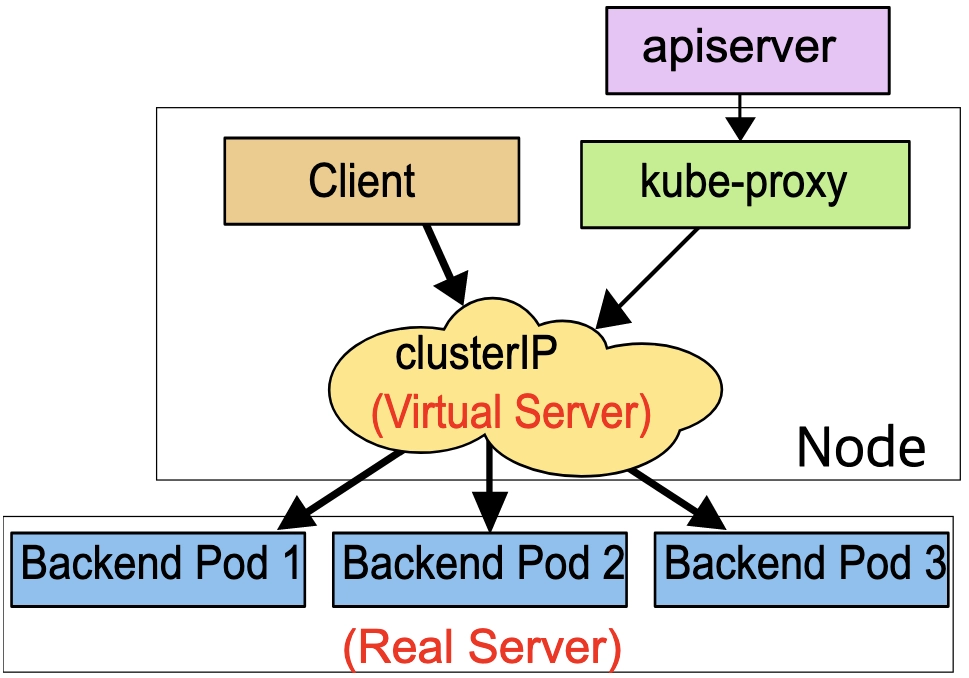
K8S 서비스 종류
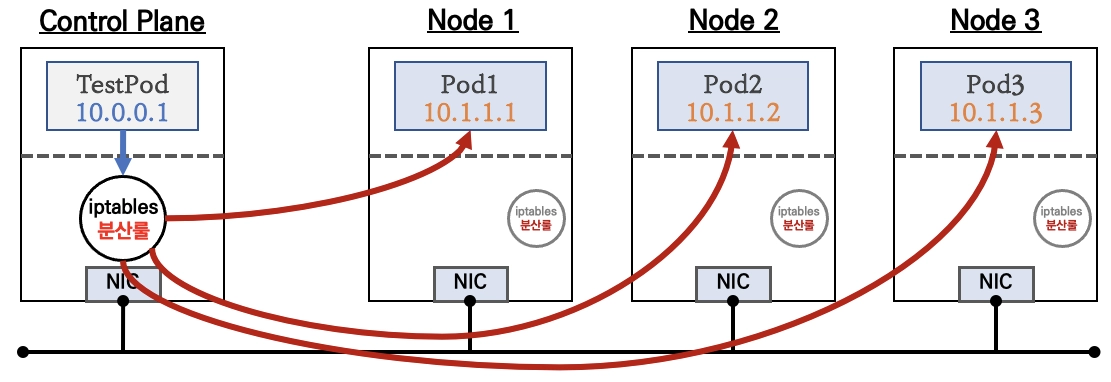

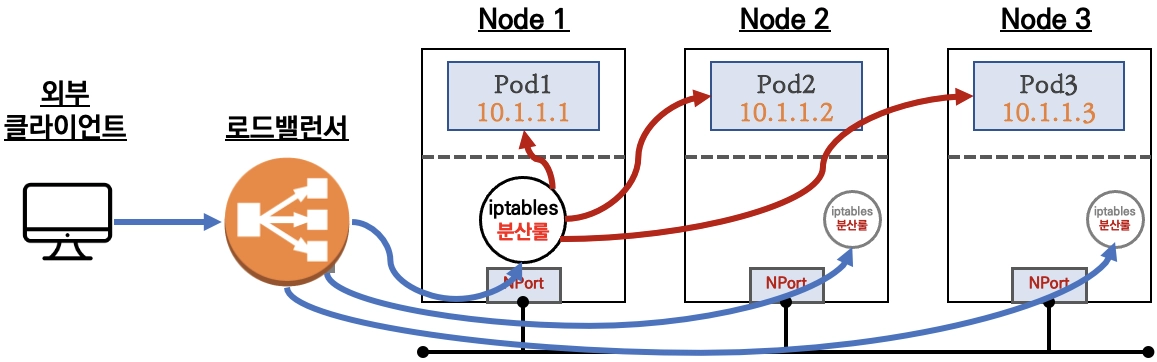
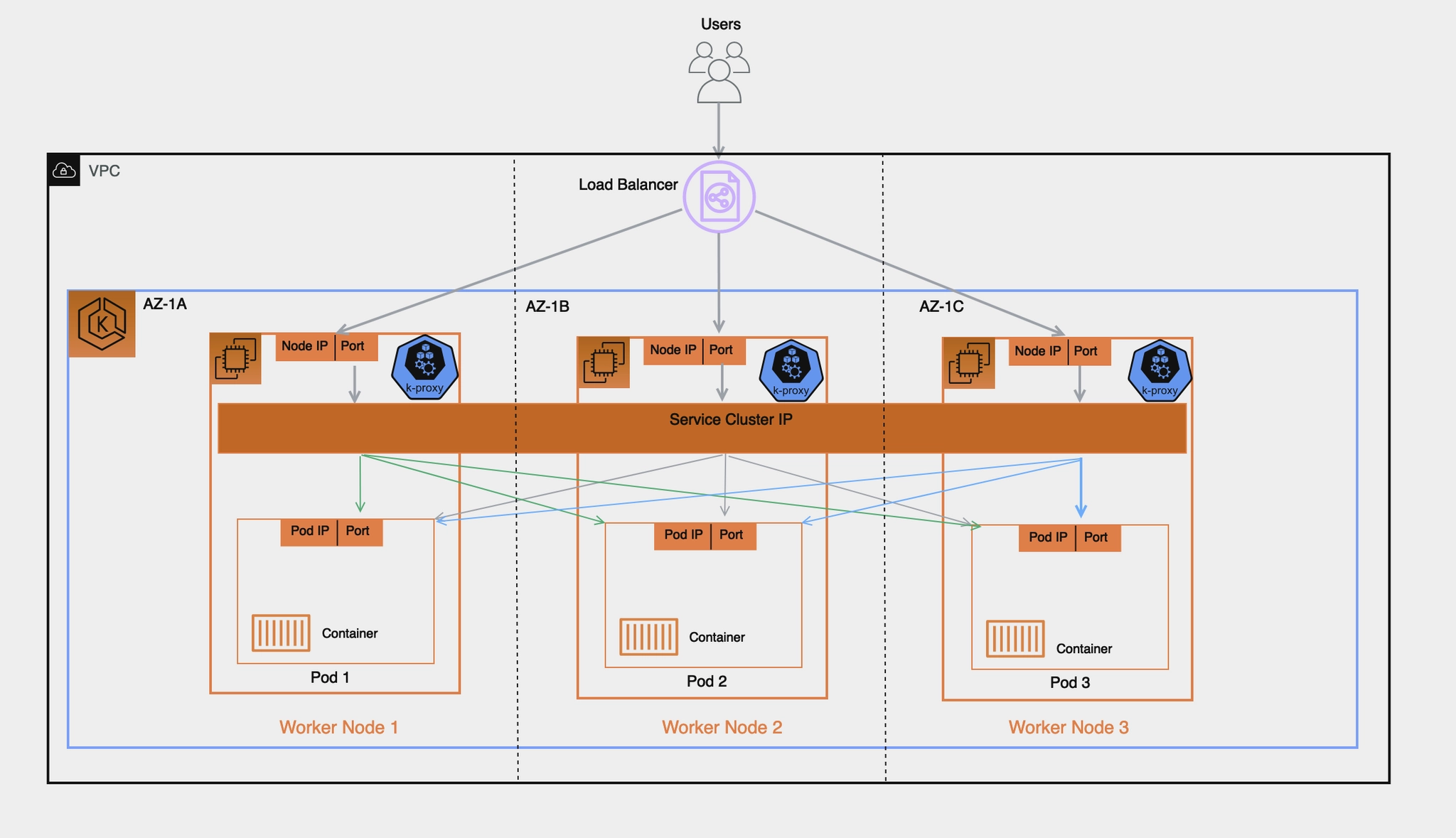
Amazon EKS 관련 서비스
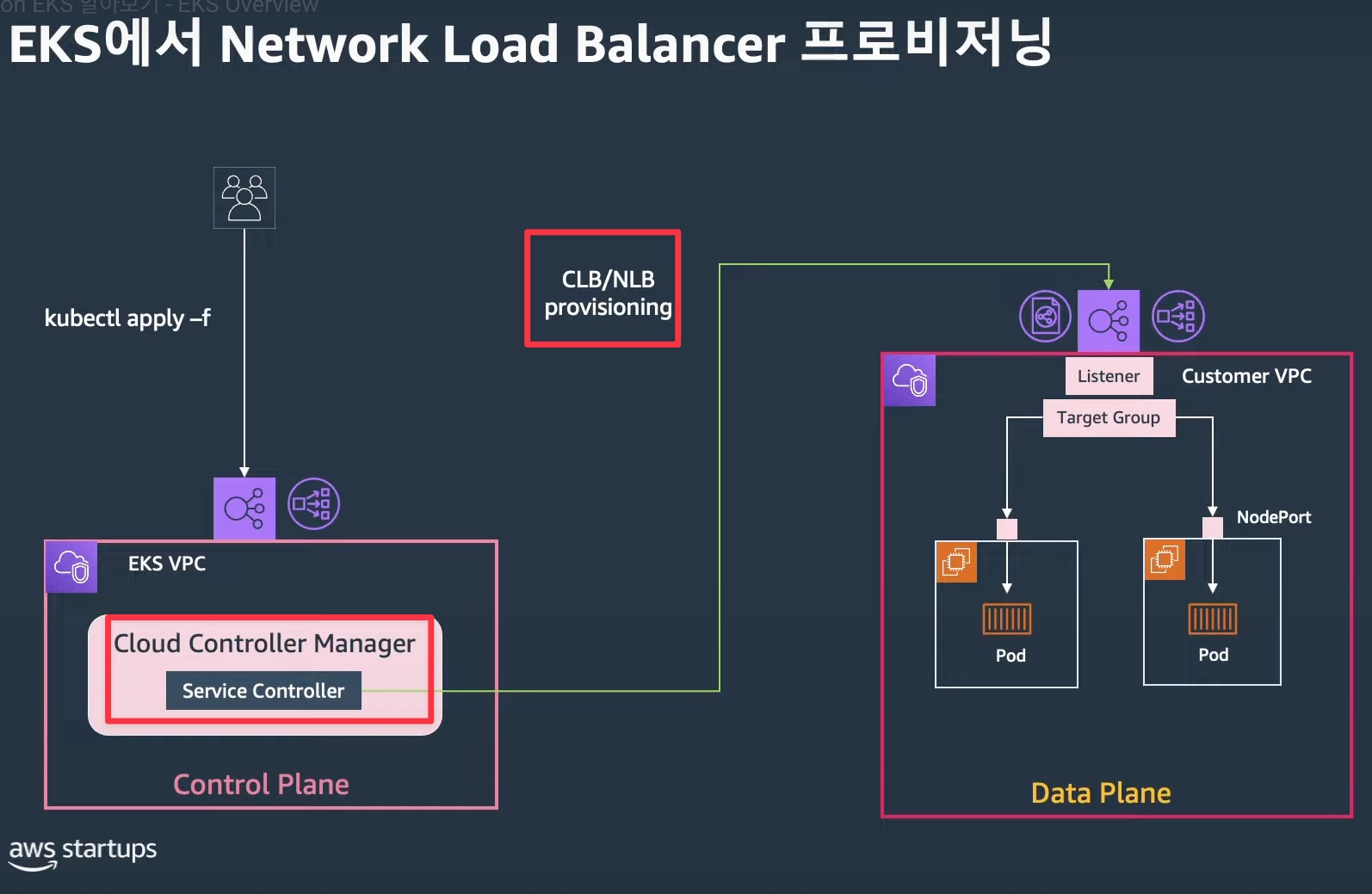

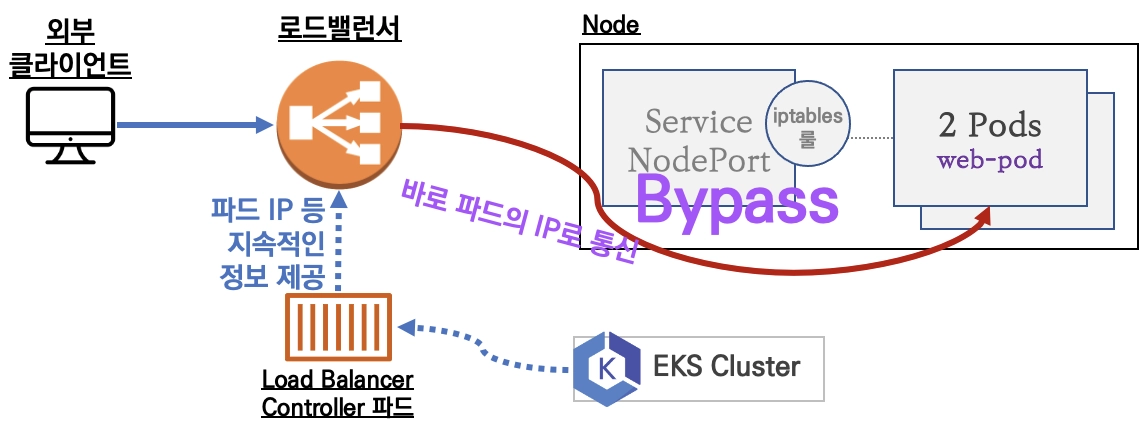
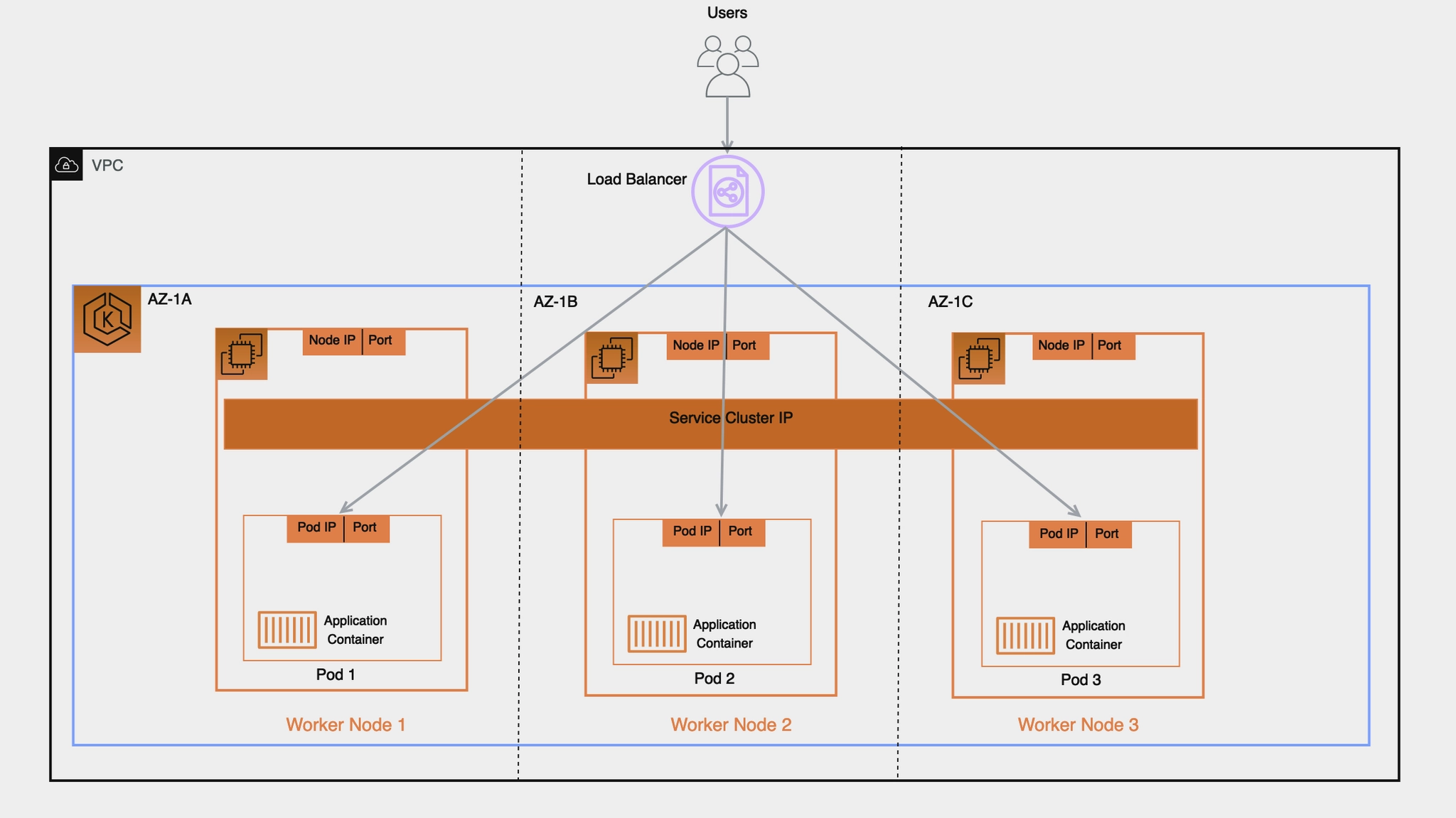
AWS 환경에서 외부 노출 방안 : Exposing Kubernetes Applications, Part 1: Service and Ingress Resources - 링크
1. Exposing a Service : In-tree Service Controller

2. Ingress Implementations : External Load Balancer

3. Ingress Implementations : Internal Reverse Proxy

4. Kubernetes Gateway API
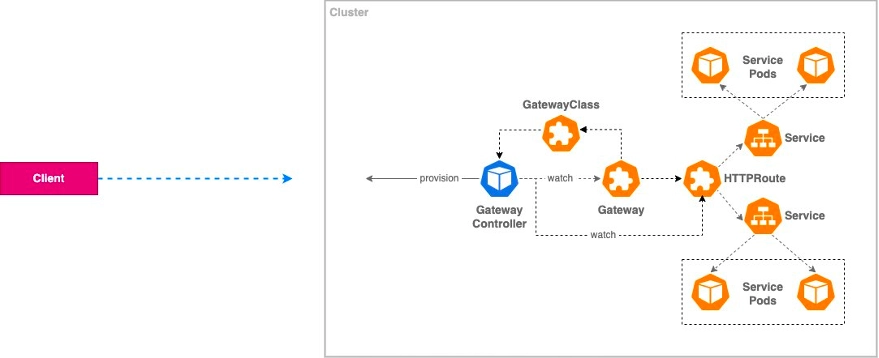
8. AWS LoadBalancer Controller (LBC) & Service (L4)
AWS LBC with IRSA 설치 - Docs , Github → 아래 8번 LBC 파드 그림 확인!
- AWS LBC(파드)가 AWS Service 를 이용하는 방법 : 방안1(IRSA), 방안2(Pod Identity), 방안3(EC2 Instance Profile - 비권장), 방안4(Static credentials - 절대 금지!) - 악분일상*
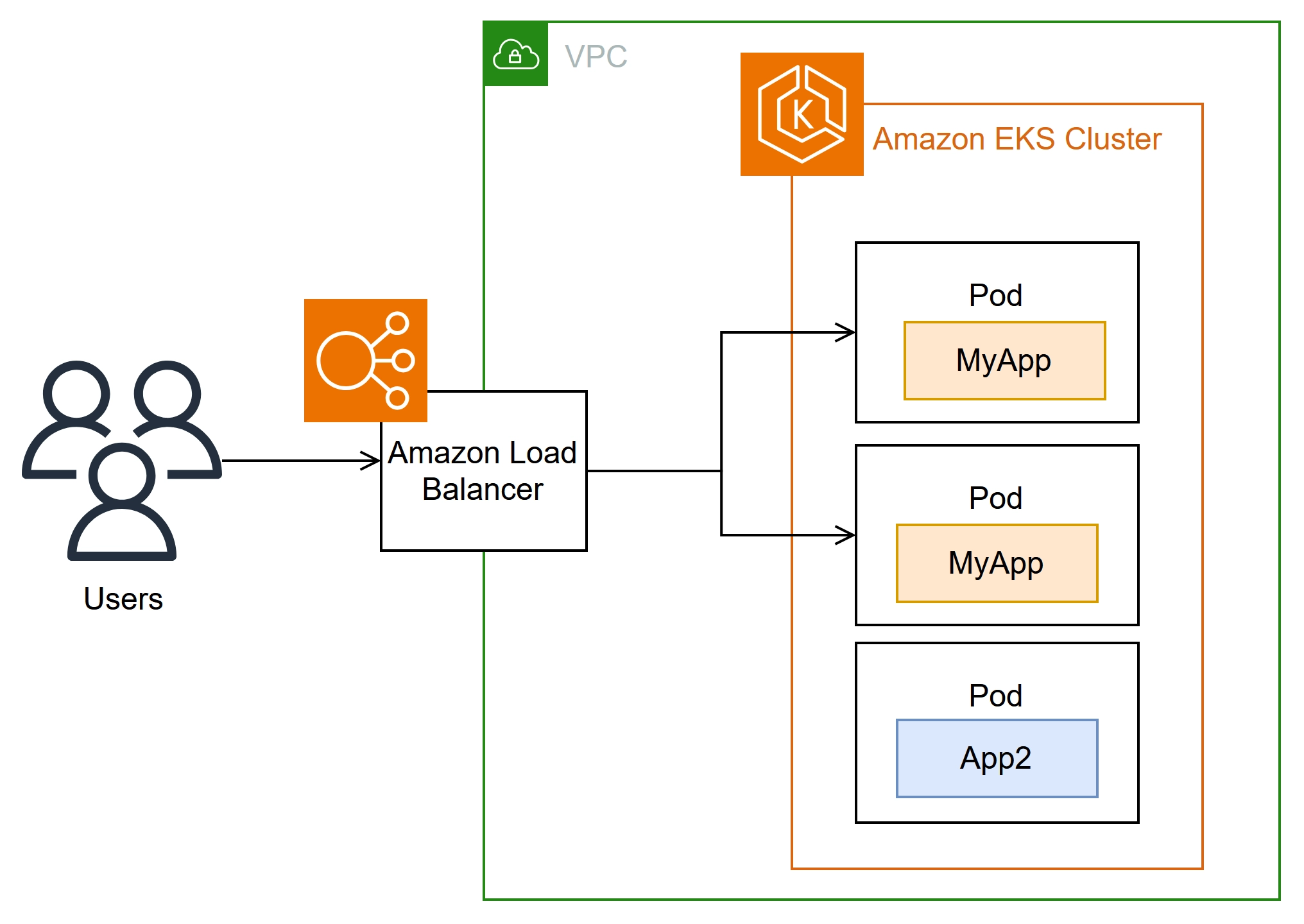
- 사전 확인
# OIDC Provider
{
"OpenIDConnectProviderList": [
{
"Arn": "arn:aws:iam::143649248460:oidc-provider/oidc.eks.ap-northeast-2.amazonaws.com/id/2E7C0989F5B22EFD9BDFB1179433EA84"
},
# public subnet 찾기
2w git:(main*) $ aws ec2 describe-subnets --filters "Name=tag:kubernetes.io/role/elb,Values=1" --output table
--------------------------------------------------------------------------------------------------------------------------------------------------
| DescribeSubnets |
+------------------------------------------------------------------------------------------------------------------------------------------------+
|| Subnets ||
|+----------------------------------------+-----------------------------------------------------------------------------------------------------+|
|| AssignIpv6AddressOnCreation | False ||
|| AvailabilityZone | ap-northeast-2a ||
|| AvailabilityZoneId | apne2-az1 ||
|| AvailableIpAddressCount | 1012 ||
|| CidrBlock | 192.168.0.0/22 ||
|| DefaultForAz | False ||
|| EnableDns64 | False ||
|| Ipv6Native | False ||
|| MapCustomerOwnedIpOnLaunch | False ||
|| MapPublicIpOnLaunch | True ||
|| OwnerId | 143649248460 ||
|| State | available ||
|| SubnetArn | arn:aws:ec2:ap-northeast-2:143649248460:subnet/subnet-0b8cdb569550ef75c ||
|| SubnetId | subnet-0b8cdb569550ef75c ||
|| VpcId | vpc-0cb1f9404c6c5d26f ||
|+----------------------------------------+-----------------------------------------------------------------------------------------------------+|
||| PrivateDnsNameOptionsOnLaunch |||
||+----------------------------------------------------------------------------------------------------------+---------------------------------+||
||| EnableResourceNameDnsAAAARecord | False |||
||| EnableResourceNameDnsARecord | False |||
||| HostnameType | ip-name |||
||+----------------------------------------------------------------------------------------------------------+---------------------------------+||
||| Tags |||
||+---------------------------------------------------------------------------+----------------------------------------------------------------+||
||| Key | Value |||
||+---------------------------------------------------------------------------+----------------------------------------------------------------+||
||| Name | myeks-PublicSubnet |||
||| Environment | cloudneta-lab |||
||| kubernetes.io/role/elb | 1 |||
||+---------------------------------------------------------------------------+----------------------------------------------------------------+||
|| Subnets ||
|+----------------------------------------+-----------------------------------------------------------------------------------------------------+|
|| AssignIpv6AddressOnCreation | False ||
|| AvailabilityZone | ap-northeast-2a ||
|| AvailabilityZoneId | apne2-az1 ||
|| AvailableIpAddressCount | 16379 ||
|| CidrBlock | 192.168.0.0/18 ||
|| DefaultForAz | False ||
|| EnableDns64 | False ||
|| Ipv6Native | False ||
|| MapCustomerOwnedIpOnLaunch | False ||
|| MapPublicIpOnLaunch | True ||
|| OwnerId | 143649248460 ||
|| State | available ||
|| SubnetArn | arn:aws:ec2:ap-northeast-2:143649248460:subnet/subnet-0b14d3060fd8373b2 ||
|| SubnetId | subnet-0b14d3060fd8373b2 ||
|| VpcId | vpc-0a39a3dba29e07508 ||
|+----------------------------------------+-----------------------------------------------------------------------------------------------------+|
||| PrivateDnsNameOptionsOnLaunch |||
||+----------------------------------------------------------------------------------------------------------+---------------------------------+||
||| EnableResourceNameDnsAAAARecord | False |||
||| EnableResourceNameDnsARecord | False |||
||| HostnameType | ip-name |||
||+----------------------------------------------------------------------------------------------------------+---------------------------------+||
||| Tags |||
||+-------------------------------+------------------------------------------------------------------------------------------------------------+||
||| Key | Value |||
||+-------------------------------+------------------------------------------------------------------------------------------------------------+||
||| aws:cloudformation:stack-id | arn:aws:cloudformation:ap-northeast-2:143649248460:stack/eks-study/aba7fc50-c7f6-11ef-8e15-02ac0990811d |||
||| kubernetes.io/role/elb | 1 |||
||| aws:cloudformation:stack-name| eks-study |||
||| Name | eks-study-PublicSubnet01 |||
||| aws:cloudformation:logical-id| PublicSubnet01 |||
||+-------------------------------+------------------------------------------------------------------------------------------------------------+||
|| Subnets ||
|+----------------------------------------+-----------------------------------------------------------------------------------------------------+|
|| AssignIpv6AddressOnCreation | False ||
|| AvailabilityZone | ap-northeast-2b ||
|| AvailabilityZoneId | apne2-az2 ||
|| AvailableIpAddressCount | 1007 ||
|| CidrBlock | 192.168.4.0/22 ||
|| DefaultForAz | False ||
|| EnableDns64 | False ||
|| Ipv6Native | False ||
|| MapCustomerOwnedIpOnLaunch | False ||
|| MapPublicIpOnLaunch | True ||
|| OwnerId | 143649248460 ||
|| State | available ||
|| SubnetArn | arn:aws:ec2:ap-northeast-2:143649248460:subnet/subnet-068b3b8d6bbcb22c7 ||
|| SubnetId | subnet-068b3b8d6bbcb22c7 ||
|| VpcId | vpc-0cb1f9404c6c5d26f ||
|+----------------------------------------+-----------------------------------------------------------------------------------------------------+|
||| PrivateDnsNameOptionsOnLaunch |||
||+----------------------------------------------------------------------------------------------------------+---------------------------------+||q
- IAM Policy 생성 - Docs
# IAM Policy json 파일 다운로드 : Download an IAM policy for the AWS Load Balancer Controller that allows it to make calls to AWS APIs on your behalf.
curl -o aws_lb_controller_policy.json https://raw.githubusercontent.com/kubernetes-sigs/aws-load-balancer-controller/refs/heads/main/docs/install/iam_policy.json

# AWSLoadBalancerControllerIAMPolicy 생성 : Create an IAM policy using the policy downloaded in the previous step.
2w git:(main*) $ aws iam create-policy \
    --policy-name AWSLoadBalancerControllerIAMPolicy \
    --policy-document file://aws_lb_controller_policy.json
- IRSA 생성
# IRSA 생성 : cloudforamtion 를 통해 IAM Role 생성
CLUSTER_NAME=myeks
eksctl get iamserviceaccount --cluster $CLUSTER_NAME
kubectl get serviceaccounts -n kube-system aws-load-balancer-controller


2w git:(main*) $ eksctl create iamserviceaccount \
  --cluster=myeks \
  --namespace=kube-system \
  --name=aws-load-balancer-controller \
  --attach-policy-arn=arn:aws:iam::123123123:policy/AWSLoadBalancerControllerIAMPolicy \
  --override-existing-serviceaccounts \
  --approve
2026-03-25 20:20:29 [ℹ]  1 iamserviceaccount (kube-system/aws-load-balancer-controller) was included (based on the include/exclude rules)
2026-03-25 20:20:29 [!]  metadata of serviceaccounts that exist in Kubernetes will be updated, as --override-existing-serviceaccounts was set
2026-03-25 20:20:29 [ℹ]  1 task: {
    2 sequential sub-tasks: {
        create IAM role for serviceaccount "kube-system/aws-load-balancer-controller",
        create serviceaccount "kube-system/aws-load-balancer-controller",
    } }2026-03-25 20:20:29 [ℹ]  building iamserviceaccount stack "eksctl-myeks-addon-iamserviceaccount-kube-system-aws-load-balancer-controller"
2026-03-25 20:20:29 [ℹ]  deploying stack "eksctl-myeks-addon-iamserviceaccount-kube-system-aws-load-balancer-controller"
2026-03-25 20:20:29 [ℹ]  waiting for CloudFormation stack "eksctl-myeks-addon-iamserviceaccount-kube-system-aws-load-balancer-controller"
2026-03-25 20:20:59 [ℹ]  waiting for CloudFormation stack "eksctl-myeks-addon-iamserviceaccount-kube-system-aws-load-balancer-controller"
2026-03-25 20:21:00 [ℹ]  created serviceaccount "kube-system/aws-load-balancer-controller"


# 확인
2w git:(main*) $ eksctl get iamserviceaccount --cluster $CLUSTER_NAME
NAMESPACE       NAME                            ROLE ARN
kube-system     aws-load-balancer-controller    arn:aws:iam::123123123:role/eksctl-myeks-addon-iamserviceaccount-kube-sys-Role1-6reRubGarPXP


# k8s 에 SA 확인
# Inspecting the newly created Kubernetes Service Account, we can see the role we want it to assume in our pod.
2w git:(main*) $ eksctl get iamserviceaccount --cluster $CLUSTER_NAME

NAMESPACE       NAME                            ROLE ARN
kube-system     aws-load-balancer-controller    arn:aws:iam::123123123:role/eksctl-myeks-addon-iamserviceaccount-kube-sys-Role1-6reRubGarPXP
2w git:(main*) $ kubectl get serviceaccounts -n kube-system aws-load-balancer-controller -o yaml

apiVersion: v1
kind: ServiceAccount
metadata:
  annotations:
    eks.amazonaws.com/role-arn: arn:aws:iam::123123123:role/eksctl-myeks-addon-iamserviceaccount-kube-sys-Role1-6reRubGarPXP
  creationTimestamp: "2026-03-25T11:21:00Z"
  labels:
    app.kubernetes.io/managed-by: eksctl
  name: aws-load-balancer-controller
  namespace: kube-system
  resourceVersion: "7352"
  uid: d06883ff-bae7-4911-98fb-af8b521b171c
- AWS LBC 설치 - Link , Docs , values , IMDS-Hop-Limit
# Helm Chart Repository 추가
2w git:(main*) $ helm repo add eks https://aws.github.io/eks-charts
helm repo update
"eks" has been added to your repositories
Hang tight while we grab the latest from your chart repositories...
...Successfully got an update from the "eks" chart repository
...Successfully got an update from the "geek-cookbook" chart repository
Update Complete. ⎈Happy Helming!⎈


# Helm Chart - AWS Load Balancer Controller 설치
# https://artifacthub.io/packages/helm/aws/aws-load-balancer-controller
# https://github.com/aws/eks-charts/blob/master/stable/aws-load-balancer-controller/values.yaml
2w git:(main*) $ helm install aws-load-balancer-controller eks/aws-load-balancer-controller -n kube-system --version 3.1.0 \
  --set clusterName=$CLUSTER_NAME \
  --set serviceAccount.name=aws-load-balancer-controller \
  --set serviceAccount.create=false
NAME: aws-load-balancer-controller
LAST DEPLOYED: Wed Mar 25 20:26:10 2026
NAMESPACE: kube-system
STATUS: deployed
REVISION: 1
TEST SUITE: None
NOTES:


# 확인
2w git:(main*) $ helm list -n kube-system
NAME                            NAMESPACE       REVISION        UPDATED                                 STATUS          CHART                                   APP VERSION
aws-load-balancer-controller    kube-system     1               2026-03-25 20:26:10.501179 +0900 KST    deployed        aws-load-balancer-controller-3.1.0      v3.1.0


# 파드 상태 실패 확인
2w git:(main*) $ kubectl get pod -n kube-system -l app.kubernetes.io/name=aws-load-balancer-controller

NAME                                            READY   STATUS             RESTARTS     AGE
aws-load-balancer-controller-7875649799-4w2fs   0/1     CrashLoopBackOff   2 (5s ago)   44s
aws-load-balancer-controller-7875649799-86phc   0/1     CrashLoopBackOff   2 (6s ago)   44s


# 로그 확인 : vpc id 정보 획득 실패!
w git:(main*) $ kubectl logs -n kube-system deployment/aws-load-balancer-controller
Found 2 pods, using pod/aws-load-balancer-controller-7875649799-4w2fs
{"level":"info","ts":"2026-03-25T11:27:17Z","msg":"version","GitVersion":"v3.1.0","GitCommit":"250024dbcc7a428cfd401c949e04de23c167d46e","BuildDate":"2026-02-24T18:21:40+0000"}
{"level":"error","ts":"2026-03-25T11:27:22Z","logger":"setup","msg":"unable to initialize AWS cloud","error":"failed to get VPC ID: failed to fetch VPC ID from instance metadata: error in fetching vpc id through ec2 metadata: get mac metadata: operation error ec2imds: GetMetadata, canceled, context deadline exceeded"}
- AWS LBC 가 Region 과 VPC ID 정보 획득 필요 : 방안1(helm 설치 시 파라미터 설정), 방안2(imds)
- https://sienna1022.tistory.com/m/entry/EKS-Node-Group-교체하다-맞는-장애-—-AL2에서-IMDS-Hop-Limit의-함정
- 방안1 : helm 설치 시 파라미터 설정 - values
- -set region=region-code
- -set vpcId=vpc-xxxxxxxx
# (참고) vpc id 확인
terraform state show 'module.vpc.aws_vpc.this[0]'
terraform state show 'module.vpc.aws_vpc.this[0]' | grep '    id'
terraform show -json | jq -r '.values.root_module.child_modules[] | select(.address == "module.vpc") | .resources[] | select(.address == "module.vpc.aws_vpc.this[0]") | .values.id'
vpc-0db6bf1bbadee777d

# (참고)
helm install aws-load-balancer-controller eks/aws-load-balancer-controller -n kube-system --version 3.1.0 \
  --set clusterName=myeks \
  --set serviceAccount.name=aws-load-balancer-controller \
  --set serviceAccount.create=false \
  --set region=ap-northeast-2 \
  --set vpcId=vpc-0db6bf1bbadee777d
- 방안2 : AWS 워커 노드들 인스턴스 메타데이터 옵션 수정 : 1 → 2 로 변경! (이 방법으로 설정)

# 디플로이먼트 리스타트!
2w git:(main*) $  kubectl rollout restart -n kube-system deploy aws-load-balancer-controller
deployment.apps/aws-load-balancer-controller restarted

# 파드 상태 확인
2w git:(main*) $ kubectl get pod -n kube-system -l app.kubernetes.io/name=aws-load-balancer-controller
NAME                                            READY   STATUS    RESTARTS   AGE
aws-load-balancer-controller-6d7988b599-n7wpm   1/1     Running   0          25s
aws-load-balancer-controller-6d7988b599-xb6dr   1/1     Running   0          42s


# crd 확인
2w git:(main*) $ kubectl get crd | grep -E 'elb|gateway'
albtargetcontrolconfigs.elbv2.k8s.aws           2026-03-25T11:26:09Z
ingressclassparams.elbv2.k8s.aws                2026-03-25T11:26:10Z
listenerruleconfigurations.gateway.k8s.aws      2026-03-25T11:26:10Z
loadbalancerconfigurations.gateway.k8s.aws      2026-03-25T11:26:10Z
targetgroupbindings.elbv2.k8s.aws               2026-03-25T11:26:10Z
targetgroupconfigurations.gateway.k8s.aws       2026-03-25T11:26:10Z


2w git:(main*) $ kubectl explain ingressclassparams.elbv2.k8s.aws.spec.listeners
GROUP:      elbv2.k8s.aws
KIND:       IngressClassParams
VERSION:    v1beta1

FIELD: listeners <[]Object>


DESCRIPTION:
    Listeners define a list of listeners with their protocol, port and
    attributes.

FIELDS:
  listenerAttributes    <[]Object>
    The attributes of the listener

  port  <integer>
    The port of the listener

  protocol      <string>
    The protocol of the listener


2w git:(main*) $ kubectl explain ingressclassparams.elbv2.k8s.aws.spec
GROUP:      elbv2.k8s.aws
KIND:       IngressClassParams
VERSION:    v1beta1

FIELD: spec <Object>


DESCRIPTION:
    IngressClassParamsSpec defines the desired state of IngressClassParams

FIELDS:
  PrefixListsIDs        <[]string>
    PrefixListsIDsLegacy defines the security group prefix lists for all
    Ingresses that belong to IngressClass with this IngressClassParams.
    Not Recommended, Use PrefixListsIDs (prefixListsIDs in JSON) instead

  certificateArn        <[]string>
    CertificateArn specifies the ARN of the certificates for all Ingresses that
    belong to IngressClass with this IngressClassParams.

  group <Object>
    Group defines the IngressGroup for all Ingresses that belong to IngressClass
    with this IngressClassParams.

  inboundCIDRs  <[]string>
    InboundCIDRs specifies the CIDRs that are allowed to access the Ingresses
    that belong to IngressClass with this IngressClassParams.

  ipAddressType <string>
  enum: ipv4, dualstack, dualstack-without-public-ipv4
    IPAddressType defines the ip address type for all Ingresses that belong to
    IngressClass with this IngressClassParams.

  ipamConfiguration     <Object>
    IPAMConfiguration defines the IPAM settings for a Load Balancer.

  listeners     <[]Object>
    Listeners define a list of listeners with their protocol, port and
    attributes.

  loadBalancerAttributes        <[]Object>
    LoadBalancerAttributes define the custom attributes to LoadBalancers for all
    Ingress that that belong to IngressClass with this IngressClassParams.

  loadBalancerName      <string>
    LoadBalancerName defines the name of the load balancer that will be created
    with this IngressClassParams.

  minimumLoadBalancerCapacity   <Object>
    MinimumLoadBalancerCapacity define the capacity reservation for
    LoadBalancers for all Ingress that belong to IngressClass with this
    IngressClassParams.

  namespaceSelector     <Object>
    NamespaceSelector restrict the namespaces of Ingresses that are allowed to
    specify the IngressClass with this IngressClassParams.
    * if absent or present but empty, it selects all namespaces.

  prefixListsIDs        <[]string>
    PrefixListsIDs defines the security group prefix lists for all Ingresses
    that belong to IngressClass with this IngressClassParams.

  scheme        <string>
  enum: internal, internet-facing
    Scheme defines the scheme for all Ingresses that belong to IngressClass with
    this IngressClassParams.

  sslPolicy     <string>
    SSLPolicy specifies the SSL Policy for all Ingresses that belong to
    IngressClass with this IngressClassParams.

  sslRedirectPort       <string>
    SSLRedirectPort specifies the SSL Redirect Port for all Ingresses that
    belong to IngressClass with this IngressClassParams.

  subnets       <Object>
    Subnets defines the subnets for all Ingresses that belong to IngressClass
    with this IngressClassParams.

  tags  <[]Object>
    Tags defines list of Tags on AWS resources provisioned for Ingresses that
    belong to IngressClass with this IngressClassParams.

  targetType    <string>
  enum: instance, ip
    TargetType defines the target type of target groups for all Ingresses that
    belong to IngressClass with this IngressClassParams.

  wafv2AclArn   <string>
    WAFv2ACLArn specifies ARN for the Amazon WAFv2 web ACL.

  wafv2AclName  <string>
    WAFv2ACLName specifies name of the Amazon WAFv2 web ACL.


# AWS Load Balancer Controller 확인
2w git:(main*) $ kubectl get deployment -n kube-system aws-load-balancer-controller

NAME                           READY   UP-TO-DATE   AVAILABLE   AGE
aws-load-balancer-controller   2/2     2            2           12m


2w git:(main*) $ kubectl describe deploy -n kube-system aws-load-balancer-controller

Name:                   aws-load-balancer-controller
Namespace:              kube-system
CreationTimestamp:      Wed, 25 Mar 2026 20:26:13 +0900
Labels:                 app.kubernetes.io/instance=aws-load-balancer-controller
                        app.kubernetes.io/managed-by=Helm
                        app.kubernetes.io/name=aws-load-balancer-controller
                        app.kubernetes.io/version=v3.1.0
                        helm.sh/chart=aws-load-balancer-controller-3.1.0
Annotations:            deployment.kubernetes.io/revision: 2
                        meta.helm.sh/release-name: aws-load-balancer-controller
                        meta.helm.sh/release-namespace: kube-system
Selector:               app.kubernetes.io/instance=aws-load-balancer-controller,app.kubernetes.io/name=aws-load-balancer-controller
Replicas:               2 desired | 2 updated | 2 total | 2 available | 0 unavailable
StrategyType:           RollingUpdate
MinReadySeconds:        0
RollingUpdateStrategy:  25% max unavailable, 25% max surge
Pod Template:
  Labels:           app.kubernetes.io/instance=aws-load-balancer-controller
                    app.kubernetes.io/name=aws-load-balancer-controller
  Annotations:      kubectl.kubernetes.io/restartedAt: 2026-03-25T20:34:25+09:00
                    prometheus.io/port: 8080
                    prometheus.io/scrape: true
  Service Account:  aws-load-balancer-controller
  Containers:
   aws-load-balancer-controller:
    Image:       public.ecr.aws/eks/aws-load-balancer-controller:v3.1.0
    Ports:       9443/TCP (webhook-server), 8080/TCP (metrics-server)
    Host Ports:  0/TCP (webhook-server), 0/TCP (metrics-server)
    Args:
      --cluster-name=myeks
      --ingress-class=alb
    Liveness:     http-get http://:61779/healthz delay=30s timeout=10s period=10s #success=1 #failure=2
    Readiness:    http-get http://:61779/readyz delay=10s timeout=10s period=10s #success=1 #failure=2
    Environment:  <none>
    Mounts:
      /tmp/k8s-webhook-server/serving-certs from cert (ro)
  Volumes:
   cert:
    Type:               Secret (a volume populated by a Secret)
    SecretName:         aws-load-balancer-tls
    Optional:           false
  Priority Class Name:  system-cluster-critical
  Node-Selectors:       <none>
  Tolerations:          <none>
Conditions:
  Type           Status  Reason
  ----           ------  ------
  Available      True    MinimumReplicasAvailable
  Progressing    True    NewReplicaSetAvailable
OldReplicaSets:  aws-load-balancer-controller-7875649799 (0/0 replicas created)
NewReplicaSet:   aws-load-balancer-controller-6d7988b599 (2/2 replicas created)
Events:
  Type    Reason             Age    From                   Message
  ----    ------             ----   ----                   -------
  Normal  ScalingReplicaSet  13m    deployment-controller  Scaled up replica set aws-load-balancer-controller-7875649799 from 0 to 2
  Normal  ScalingReplicaSet  5m     deployment-controller  Scaled up replica set aws-load-balancer-controller-6d7988b599 from 0 to 1
  Normal  ScalingReplicaSet  4m43s  deployment-controller  Scaled down replica set aws-load-balancer-controller-7875649799 from 2 to 1
  Normal  ScalingReplicaSet  4m43s  deployment-controller  Scaled up replica set aws-load-balancer-controller-6d7988b599 from 1 to 2
  Normal  ScalingReplicaSet  4m31s  deployment-controller  Scaled down replica set aws-load-balancer-controller-7875649799 from 1 to 0


2w git:(main*) $ kubectl describe deploy -n kube-system aws-load-balancer-controller | grep 'Service Account'
  Service Account:  aws-load-balancer-controller


# 클러스터롤, 롤 확인
2w git:(main*) $ kubectl describe clusterroles.rbac.authorization.k8s.io aws-load-balancer-controller-role

Name:         aws-load-balancer-controller-role
Labels:       app.kubernetes.io/instance=aws-load-balancer-controller
              app.kubernetes.io/managed-by=Helm
              app.kubernetes.io/name=aws-load-balancer-controller
              app.kubernetes.io/version=v3.1.0
              helm.sh/chart=aws-load-balancer-controller-3.1.0
Annotations:  meta.helm.sh/release-name: aws-load-balancer-controller
              meta.helm.sh/release-namespace: kube-system
PolicyRule:
  Resources                                              Non-Resource URLs  Resource Names  Verbs
  ---------                                              -----------------  --------------  -----
  targetgroupbindings.elbv2.k8s.aws                      []                 []              [create delete get list patch update watch]
  events                                                 []                 []              [create patch]
  configmaps                                             []                 []              [get delete create update]
  ingresses                                              []                 []              [get list patch update watch]
  services                                               []                 []              [get list patch update watch]
  ingresses.extensions                                   []                 []              [get list patch update watch]
  services.extensions                                    []                 []              [get list patch update watch]
  ingresses.networking.k8s.io                            []                 []              [get list patch update watch]
  services.networking.k8s.io                             []                 []              [get list patch update watch]
  globalaccelerators.aga.k8s.aws                         []                 []              [get list patch watch]
  listenerruleconfigurations.gateway.k8s.aws             []                 []              [get list watch patch]
  loadbalancerconfigurations.gateway.k8s.aws             []                 []              [get list watch patch]
  targetgroupconfigurations.gateway.k8s.aws              []                 []              [get list watch patch]
  gatewayclasses.gateway.networking.k8s.io               []                 []              [get list watch patch]
  gateways.gateway.networking.k8s.io                     []                 []              [get list watch patch]
  endpoints                                              []                 []              [get list watch]
  namespaces                                             []                 []              [get list watch]
  nodes                                                  []                 []              [get list watch]
  pods                                                   []                 []              [get list watch]
  endpointslices.discovery.k8s.io                        []                 []              [get list watch]
  ingressclassparams.elbv2.k8s.aws                       []                 []              [get list watch]
  grpcroutes.gateway.networking.k8s.io                   []                 []              [get list watch]
  httproutes.gateway.networking.k8s.io                   []                 []              [get list watch]
  referencegrants.gateway.networking.k8s.io              []                 []              [get list watch]
  tcproutes.gateway.networking.k8s.io                    []                 []              [get list watch]
  tlsroutes.gateway.networking.k8s.io                    []                 []              [get list watch]
  udproutes.gateway.networking.k8s.io                    []                 []              [get list watch]
  ingressclasses.networking.k8s.io                       []                 []              [get list watch]
  gatewayclasses.gateway.networking.k8s.io/status        []                 []              [get patch update]
  gateways.gateway.networking.k8s.io/status              []                 []              [get patch update]
  grpcroutes.gateway.networking.k8s.io/status            []                 []              [get patch update]
  httproutes.gateway.networking.k8s.io/status            []                 []              [get patch update]
  tcproutes.gateway.networking.k8s.io/status             []                 []              [get patch update]
  tlsroutes.gateway.networking.k8s.io/status             []                 []              [get patch update]
  udproutes.gateway.networking.k8s.io/status             []                 []              [get patch update]
  listenerruleconfigurations.gateway.k8s.aws/status      []                 []              [get patch watch]
  loadbalancerconfigurations.gateway.k8s.aws/status      []                 []              [get patch watch]
  targetgroupconfigurations.gateway.k8s.aws/status       []                 []              [get patch watch]
  albtargetcontrolconfigs.elbv2.k8s.aws                  []                 []              [get]
  globalaccelerators.aga.k8s.aws/finalizers              []                 []              [patch update]
  globalaccelerators.aga.k8s.aws/status                  []                 []              [patch update]
  ingresses/status                                       []                 []              [update patch]
  pods/status                                            []                 []              [update patch]
  services/status                                        []                 []              [update patch]
  targetgroupbindings/status                             []                 []              [update patch]
  ingresses.elbv2.k8s.aws/status                         []                 []              [update patch]
  pods.elbv2.k8s.aws/status                              []                 []              [update patch]
  services.elbv2.k8s.aws/status                          []                 []              [update patch]
  targetgroupbindings.elbv2.k8s.aws/status               []                 []              [update patch]
  ingresses.extensions/status                            []                 []              [update patch]
  pods.extensions/status                                 []                 []              [update patch]
  services.extensions/status                             []                 []              [update patch]
  targetgroupbindings.extensions/status                  []                 []              [update patch]
  listenerruleconfigurations.gateway.k8s.aws/finalizers  []                 []              [update patch]
  loadbalancerconfigurations.gateway.k8s.aws/finalizers  []                 []              [update patch]
  targetgroupconfigurations.gateway.k8s.aws/finalizers   []                 []              [update patch]
  gatewayclasses.gateway.networking.k8s.io/finalizers    []                 []              [update patch]
  gateways.gateway.networking.k8s.io/finalizers          []                 []              [update patch]
  ingresses.networking.k8s.io/status                     []                 []              [update patch]
  pods.networking.k8s.io/status                          []                 []              [update patch]
  services.networking.k8s.io/status                      []                 []              [update patch]
  targetgroupbindings.networking.k8s.io/status           []                 []              [update patch]
  grpcroutes.gateway.networking.k8s.io/finalizers        []                 []              [update]
  httproutes.gateway.networking.k8s.io/finalizers        []                 []              [update]
  tcproutes.gateway.networking.k8s.io/finalizers         []                 []              [update]
  tlsroutes.gateway.networking.k8s.io/finalizers         []                 []              [update]
  udproutes.gateway.networking.k8s.io/finalizers         []                 []              [update]
서비스/파드 배포 테스트 with NLB - Sample
# 모니터링
watch -d kubectl get pod,svc,ep,endpointslices

# 디플로이먼트 & 서비스 생성
2w git:(main*) $ cat << EOF > echo-service-nlb.yaml
apiVersion: apps/v1
kind: Deployment
metadata:
  name: deploy-echo
spec:
  replicas: 2
  selector:
    matchLabels:
      app: deploy-websrv
  template:
    metadata:
      labels:
        app: deploy-websrv
    spec:
      terminationGracePeriodSeconds: 0
      containers:
      - name: aews-websrv
        image: k8s.gcr.io/echoserver:1.10  # open https://registry.k8s.io/v2/echoserver/tags/list
        ports:
        - containerPort: 8080
---
apiVersion: v1
kind: Service
metadata:
  name: svc-nlb-ip-type
  annotations:
    service.beta.kubernetes.io/aws-load-balancer-nlb-target-type: ip
    service.beta.kubernetes.io/aws-load-balancer-scheme: internet-facing
    service.beta.kubernetes.io/aws-load-balancer-healthcheck-port: "8080"
    service.beta.kubernetes.io/aws-load-balancer-cross-zone-load-balancing-enabled: "true"
spec:
  allocateLoadBalancerNodePorts: false  # K8s 1.24+ 무의미한 NodePort 할당 차단
  ports:
    - port: 80
      targetPort: 8080
      protocol: TCP
  type: LoadBalancer
  selector:
    app: deploy-websrv
EOF

kubectl apply -f echo-service-nlb.yaml
deployment.apps/deploy-echo created
service/svc-nlb-ip-type created


# 모니터링 결과 확인
NAME                               READY   STATUS    RESTARTS   AGE
pod/deploy-echo-7549f6d6d8-76kk4   1/1     Running   0          4m10s
pod/deploy-echo-7549f6d6d8-gr979   1/1     Running   0          4m10s

NAME                      TYPE           CLUSTER-IP     EXTERNAL-IP                                                                         PORT(S)   AGE
service/kubernetes        ClusterIP      10.100.0.1     <none>                                                                              443/TCP   69m
service/svc-nlb-ip-type   LoadBalancer   10.100.43.66   k8s-default-svcnlbip-b91fc5e0ca-9dda16fa62d2acac.elb.ap-northeast-2.amazonaws.com   80/TCP    4m11s

NAME                        ENDPOINTS                              AGE
endpoints/kubernetes        192.168.0.98:443,192.168.9.3:443       69m
endpoints/svc-nlb-ip-type   192.168.10.76:8080,192.168.3.60:8080   4m11s

NAME                                                   ADDRESSTYPE   PORTS   ENDPOINTS                    AGE
endpointslice.discovery.k8s.io/kubernetes              IPv4          443     192.168.0.98,192.168.9.3     69m
endpointslice.discovery.k8s.io/svc-nlb-ip-type-vfh2q   IPv4          8080    192.168.10.76,192.168.3.60   4m11s


# 확인
2w git:(main*) $ kubectl get svc,ep,ingressclassparams,targetgroupbindings

Warning: v1 Endpoints is deprecated in v1.33+; use discovery.k8s.io/v1 EndpointSlice
NAME                      TYPE           CLUSTER-IP     EXTERNAL-IP                                                                         PORT(S)   AGE
service/kubernetes        ClusterIP      10.100.0.1     <none>                                                                              443/TCP   70m
service/svc-nlb-ip-type   LoadBalancer   10.100.43.66   k8s-default-svcnlbip-b91fc5e0ca-9dda16fa62d2acac.elb.ap-northeast-2.amazonaws.com   80/TCP    5m12s

NAME                        ENDPOINTS                              AGE
endpoints/kubernetes        192.168.0.98:443,192.168.9.3:443       70m
endpoints/svc-nlb-ip-type   192.168.10.76:8080,192.168.3.60:8080   5m12s

NAME                                   GROUP-NAME   SCHEME   IP-ADDRESS-TYPE   AGE
ingressclassparams.elbv2.k8s.aws/alb                                           24m

NAME                                                               SERVICE-NAME      SERVICE-PORT   TARGET-TYPE   AGE
targetgroupbinding.elbv2.k8s.aws/k8s-default-svcnlbip-36b1269480   svc-nlb-ip-type   80             ip            5m8s
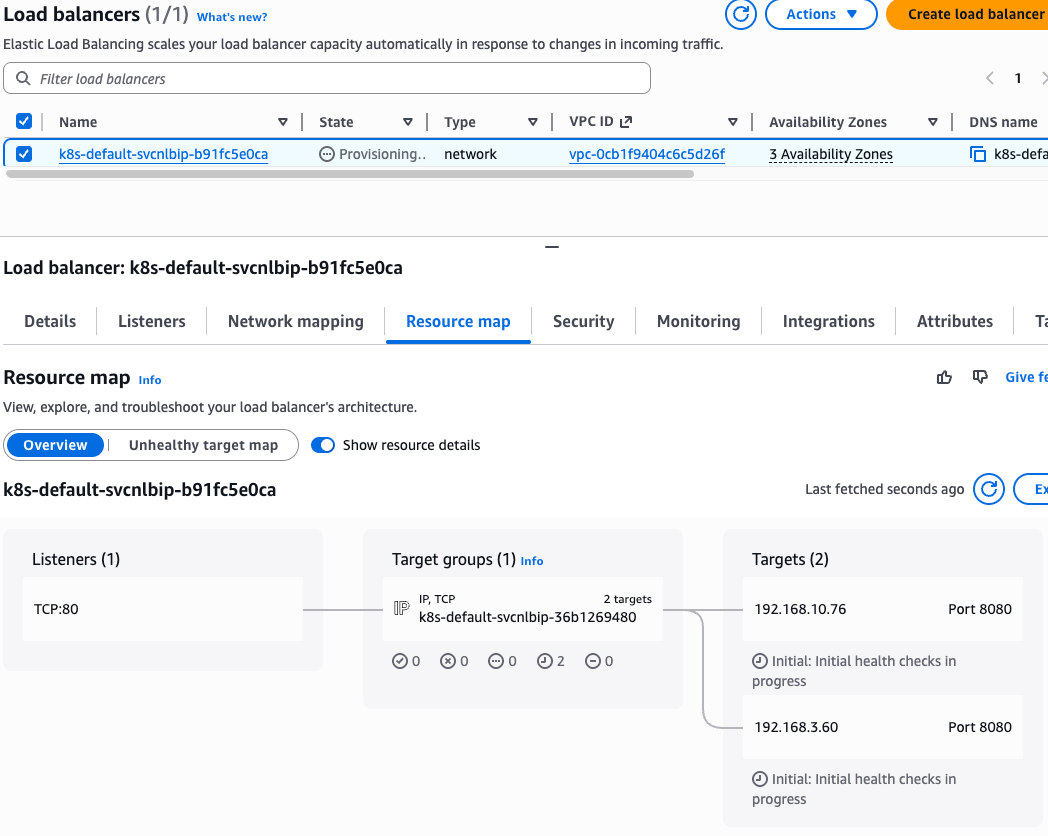

- Deregistration delay (draining interval) 간격 조정 (아래 값 추가)
- service.beta.kubernetes.io/aws-load-balancer-target-group-attributes: deregistration_delay.timeout_seconds=60

# AWS 관리콘솔에서 NLB 정보 확인
# 빠른 실습을 위해서 등록 취소 지연(드레이닝 간격) 수정 : 기본값 300초 echo-service-nlb.yaml 파일 IDE에서 아래 추가
..
apiVersion: v1
kind: Service
metadata:
name: svc-nlb-ip-type
annotations:
service.beta.kubernetes.io/aws-load-balancer-nlb-target-type: ip
service.beta.kubernetes.io/aws-load-balancer-scheme: internet-facing
service.beta.kubernetes.io/aws-load-balancer-healthcheck-port: "8080"
service.beta.kubernetes.io/aws-load-balancer-cross-zone-load-balancing-enabled: "true"
service.beta.kubernetes.io/aws-load-balancer-target-group-attributes: deregistration_delay.timeout_seconds=60
...
# 재적용
2w git:(main*) $ kubectl apply -f echo-service-nlb.yaml
deployment.apps/deploy-echo unchanged
service/svc-nlb-ip-type configured
# AWS ELB(NLB) 정보 확인
2w git:(main*) $ aws elbv2 describe-load-balancers | jq
{
"LoadBalancers": [
{
"LoadBalancerArn": "arn:aws:elasticloadbalancing:ap-northeast-2:123123123:loadbalancer/net/k8s-default-svcnlbip-b91fc5e0ca/9dda16fa62d2acac",
"DNSName": "k8s-default-svcnlbip-b91fc5e0ca-9dda16fa62d2acac.elb.ap-northeast-2.amazonaws.com",
"CanonicalHostedZoneId": "ZIBE1TIR4HY56",
"CreatedTime": "2026-03-25T11:45:39.239000+00:00",
"LoadBalancerName": "k8s-default-svcnlbip-b91fc5e0ca",
"Scheme": "internet-facing",
"VpcId": "vpc-0cb1f9404c6c5d26f",
"State": {
"Code": "active"
},
"Type": "network",
"AvailabilityZones": [
{
"ZoneName": "ap-northeast-2a",
"SubnetId": "subnet-0b8cdb569550ef75c",
"LoadBalancerAddresses": []
},
{
"ZoneName": "ap-northeast-2c",
"SubnetId": "subnet-070926d7fca763aed",
"LoadBalancerAddresses": []
},
{
"ZoneName": "ap-northeast-2b",
"SubnetId": "subnet-068b3b8d6bbcb22c7",
"LoadBalancerAddresses": []
}
],
"SecurityGroups": [
"sg-016aec576e297bc6d",
"sg-0ea39fb5474d03d3b"
],
"IpAddressType": "ipv4"
}
]
}
2w git:(main*) $ ALB_ARN=$(aws elbv2 describe-load-balancers --query 'LoadBalancers[?contains(LoadBalancerName, `k8s-default-svcnlbip`) == `true`].LoadBalancerArn' | jq -r '.[0]')
2w git:(main*) $ aws elbv2 describe-target-groups --load-balancer-arn $ALB_ARN | jq
{
"TargetGroups": [
{
"TargetGroupArn": "arn:aws:elasticloadbalancing:ap-northeast-2:123123123:targetgroup/k8s-default-svcnlbip-36b1269480/f68f9ca311a4d879",
"TargetGroupName": "k8s-default-svcnlbip-36b1269480",
"Protocol": "TCP",
"Port": 8080,
"VpcId": "vpc-0cb1f9404c6c5d26f",
"HealthCheckProtocol": "TCP",
"HealthCheckPort": "8080",
"HealthCheckEnabled": true,
"HealthCheckIntervalSeconds": 10,
"HealthCheckTimeoutSeconds": 10,
"HealthyThresholdCount": 3,
"UnhealthyThresholdCount": 3,
"LoadBalancerArns": [
"arn:aws:elasticloadbalancing:ap-northeast-2:123123123:loadbalancer/net/k8s-default-svcnlbip-b91fc5e0ca/9dda16fa62d2acac"
],
"TargetType": "ip",
"IpAddressType": "ipv4"
}
]
}
2w git:(main*) $ TARGET_GROUP_ARN=$(aws elbv2 describe-target-groups --load-balancer-arn $ALB_ARN | jq -r '.TargetGroups[0].TargetGroupArn')
2w git:(main*) $ aws elbv2 describe-target-health --target-group-arn $TARGET_GROUP_ARN | jq
{
"TargetHealthDescriptions": [
{
"Target": {
"Id": "192.168.3.60",
"Port": 8080,
"AvailabilityZone": "ap-northeast-2a"
},
"HealthCheckPort": "8080",
"TargetHealth": {
"State": "healthy"
}
},
{
"Target": {
"Id": "192.168.10.76",
"Port": 8080,
"AvailabilityZone": "ap-northeast-2c"
},
"HealthCheckPort": "8080",
"TargetHealth": {
"State": "healthy"
}
}
]
}
# 웹 접속 주소 확인
2w git:(main*) $ kubectl get svc svc-nlb-ip-type -o jsonpath='{.status.loadBalancer.ingress[0].hostname}' | awk '{ print "Pod Web URL = http://"$1 }'
Pod Web URL = http://k8s-default-svcnlbip-b91fc5e0ca-9dda16fa62d2acac.elb.ap-northeast-2.amazonaws.com
# 파드 로깅 모니터링
kubectl logs -l app=deploy-websrv -f
혹은
kubectl stern -l app=deploy-websrv
# 분산 접속 확인
2w git:(main*) $ NLB=$(kubectl get svc svc-nlb-ip-type -o jsonpath='{.status.loadBalancer.ingress[0].hostname}')
2w git:(main*) $ curl -s $NLB
Hostname: deploy-echo-7549f6d6d8-76kk4
Pod Information:
-no pod information available-
Server values:
server_version=nginx: 1.13.3 - lua: 10008
Request Information:
client_address=192.168.7.94
method=GET
real path=/
query=
request_version=1.1
request_scheme=http
request_uri=http://k8s-default-svcnlbip-b91fc5e0ca-9dda16fa62d2acac.elb.ap-northeast-2.amazonaws.com:8080/
Request Headers:
accept=*/*
host=k8s-default-svcnlbip-b91fc5e0ca-9dda16fa62d2acac.elb.ap-northeast-2.amazonaws.com
user-agent=curl/7.85.0
Request Body:
-no body in request-
2w git:(main*) $ for i in {1..100}; do curl -s $NLB | grep Hostname ; done | sort | uniq -c | sort -nr
51 Hostname: deploy-echo-7549f6d6d8-gr979
49 Hostname: deploy-echo-7549f6d6d8-76kk4
# 모니터링 결과
Generating self-signed cert
Generating a 2048 bit RSA private key
.......................+++
..............................................+++
writing new private key to '/certs/privateKey.key'
-----
Starting nginx
192.168.1.115 - - [25/Mar/2026:12:06:49 +0000] "GET / HTTP/1.1" 200 529 "-" "Mozilla/5.0 (Android 14; Mobile; rv:128.0) Gecko/128.0 Firefox/128.0"
192.168.1.115 - - [25/Mar/2026:12:09:26 +0000] "\x16\x03\x02\x01o\x01\x00\x01k\x03\x02RH\xC5\x1A#\xF7:N\xDF\xE2\xB4\x82/\xFF\x09T\x9F\xA7\xC4y\xB0h\xC6\x13\x8C\xA4\x1C=\x22\xE1\x1A\x98 \x84\xB4,\x85\xAFn\xE3Y\xBBbhl\xFF(=':\xA9\x82\xD9o\xC8\xA2\xD7\x93\x98\xB4\xEF\x80\xE5\xB9\x90\x00(\xC0" 400 173 "-" "-"
192.168.7.94 - - [25/Mar/2026:12:11:26 +0000] "GET / HTTP/1.1" 200 576 "-" "curl/7.85.0"
192.168.7.94 - - [25/Mar/2026:12:12:48 +0000] "GET / HTTP/1.1" 200 576 "-" "curl/7.85.0"
192.168.1.115 - - [25/Mar/2026:12:12:48 +0000] "GET / HTTP/1.1" 200 577 "-" "curl/7.85.0"
192.168.10.184 - - [25/Mar/2026:12:12:48 +0000] "GET / HTTP/1.1" 200 578 "-" "curl/7.85.0"
192.168.10.184 - - [25/Mar/2026:12:12:48 +0000] "GET / HTTP/1.1" 200 578 "-" "curl/7.85.0"
192.168.10.184 - - [25/Mar/2026:12:12:48 +0000] "GET / HTTP/1.1" 200 578 "-" "curl/7.85.0"
192.168.10.184 - - [25/Mar/2026:12:12:48 +0000] "GET / HTTP/1.1" 200 578 "-" "curl/7.85.0"
192.168.10.184 - - [25/Mar/2026:12:12:48 +0000] "GET / HTTP/1.1" 200 578 "-" "curl/7.85.0"
192.168.10.184 - - [25/Mar/2026:12:12:48 +0000] "GET / HTTP/1.1" 200 578 "-" "curl/7.85.0"
192.168.10.184 - - [25/Mar/2026:12:12:48 +0000] "GET / HTTP/1.1" 200 578 "-" "curl/7.85.0"
192.168.10.184 - - [25/Mar/2026:12:12:48 +0000] "GET / HTTP/1.1" 200 578 "-" "curl/7.85.0"
192.168.10.184 - - [25/Mar/2026:12:12:48 +0000] "GET / HTTP/1.1" 200 578 "-" "curl/7.85.0"
192.168.10.184 - - [25/Mar/2026:12:12:49 +0000] "GET / HTTP/1.1" 200 578 "-" "curl/7.85.0"
192.168.10.184 - - [25/Mar/2026:12:12:49 +0000] "GET / HTTP/1.1" 200 578 "-" "curl/7.85.0"
192.168.10.184 - - [25/Mar/2026:12:12:49 +0000] "GET / HTTP/1.1" 200 578 "-" "curl/7.85.0"
192.168.10.184 - - [25/Mar/2026:12:12:49 +0000] "GET / HTTP/1.1" 200 578 "-" "curl/7.85.0"
192.168.10.184 - - [25/Mar/2026:12:12:49 +0000] "GET / HTTP/1.1" 200 578 "-" "curl/7.85.0"
192.168.10.184 - - [25/Mar/2026:12:12:49 +0000] "GET / HTTP/1.1" 200 578 "-" "curl/7.85.0"
192.168.10.184 - - [25/Mar/2026:12:12:49 +0000] "GET / HTTP/1.1" 200 578 "-" "curl/7.85.0"
192.168.10.184 - - [25/Mar/2026:12:12:49 +0000] "GET / HTTP/1.1" 200 578 "-" "curl/7.85.0"
192.168.10.184 - - [25/Mar/2026:12:12:49 +0000] "GET / HTTP/1.1" 200 578 "-" "curl/7.85.0"
192.168.10.184 - - [25/Mar/2026:12:12:49 +0000] "GET / HTTP/1.1" 200 578 "-" "curl/7.85.0"
192.168.10.184 - - [25/Mar/2026:12:12:50 +0000] "GET / HTTP/1.1" 200 578 "-" "curl/7.85.0"
192.168.10.184 - - [25/Mar/2026:12:12:50 +0000] "GET / HTTP/1.1" 200 578 "-" "curl/7.85.0"
192.168.10.184 - - [25/Mar/2026:12:12:50 +0000] "GET / HTTP/1.1" 200 578 "-" "curl/7.85.0"
192.168.10.184 - - [25/Mar/2026:12:12:50 +0000] "GET / HTTP/1.1" 200 578 "-" "curl/7.85.0"
192.168.10.184 - - [25/Mar/2026:12:12:50 +0000] "GET / HTTP/1.1" 200 578 "-" "curl/7.85.0"
192.168.10.184 - - [25/Mar/2026:12:12:50 +0000] "GET / HTTP/1.1" 200 578 "-" "curl/7.85.0"
192.168.10.184 - - [25/Mar/2026:12:12:50 +0000] "GET / HTTP/1.1" 200 578 "-" "curl/7.85.0"
192.168.10.184 - - [25/Mar/2026:12:12:50 +0000] "GET / HTTP/1.1" 200 578 "-" "curl/7.85.0"
192.168.10.184 - - [25/Mar/2026:12:12:50 +0000] "GET / HTTP/1.1" 200 578 "-" "curl/7.85.0"
192.168.10.184 - - [25/Mar/2026:12:12:50 +0000] "GET / HTTP/1.1" 200 578 "-" "curl/7.85.0"
192.168.10.184 - - [25/Mar/2026:12:12:50 +0000] "GET / HTTP/1.1" 200 578 "-" "curl/7.85.0"
192.168.10.184 - - [25/Mar/2026:12:12:50 +0000] "GET / HTTP/1.1" 200 578 "-" "curl/7.85.0"
192.168.10.184 - - [25/Mar/2026:12:12:50 +0000] "GET / HTTP/1.1" 200 578 "-" "curl/7.85.0"
192.168.10.184 - - [25/Mar/2026:12:12:51 +0000] "GET / HTTP/1.1" 200 578 "-" "curl/7.85.0"
192.168.10.184 - - [25/Mar/2026:12:12:51 +0000] "GET / HTTP/1.1" 200 578 "-" "curl/7.85.0"
192.168.10.184 - - [25/Mar/2026:12:12:51 +0000] "GET / HTTP/1.1" 200 578 "-" "curl/7.85.0"
192.168.10.184 - - [25/Mar/2026:12:12:51 +0000] "GET / HTTP/1.1" 200 578 "-" "curl/7.85.0"
192.168.10.184 - - [25/Mar/2026:12:12:51 +0000] "GET / HTTP/1.1" 200 578 "-" "curl/7.85.0"
192.168.10.184 - - [25/Mar/2026:12:12:51 +0000] "GET / HTTP/1.1" 200 578 "-" "curl/7.85.0"
192.168.10.184 - - [25/Mar/2026:12:12:51 +0000] "GET / HTTP/1.1" 200 578 "-" "curl/7.85.0"
192.168.10.184 - - [25/Mar/2026:12:12:51 +0000] "GET / HTTP/1.1" 200 578 "-" "curl/7.85.0"
192.168.10.184 - - [25/Mar/2026:12:12:51 +0000] "GET / HTTP/1.1" 200 578 "-" "curl/7.85.0"
192.168.10.184 - - [25/Mar/2026:12:12:51 +0000] "GET / HTTP/1.1" 200 578 "-" "curl/7.85.0"
192.168.10.184 - - [25/Mar/2026:12:12:51 +0000] "GET / HTTP/1.1" 200 578 "-" "curl/7.85.0"
192.168.10.184 - - [25/Mar/2026:12:12:51 +0000] "GET / HTTP/1.1" 200 578 "-" "curl/7.85.0"
192.168.10.184 - - [25/Mar/2026:12:12:51 +0000] "GET / HTTP/1.1" 200 578 "-" "curl/7.85.0"
192.168.10.184 - - [25/Mar/2026:12:12:52 +0000] "GET / HTTP/1.1" 200 578 "-" "curl/7.85.0"
192.168.10.184 - - [25/Mar/2026:12:12:52 +0000] "GET / HTTP/1.1" 200 578 "-" "curl/7.85.0"
192.168.10.184 - - [25/Mar/2026:12:12:52 +0000] "GET / HTTP/1.1" 200 578 "-" "curl/7.85.0"
192.168.10.184 - - [25/Mar/2026:12:12:52 +0000] "GET / HTTP/1.1" 200 578 "-" "curl/7.85.0"
192.168.10.184 - - [25/Mar/2026:12:12:52 +0000] "GET / HTTP/1.1" 200 578 "-" "curl/7.85.0"
192.168.10.184 - - [25/Mar/2026:12:12:52 +0000] "GET / HTTP/1.1" 200 578 "-" "curl/7.85.0"
192.168.10.184 - - [25/Mar/2026:12:12:52 +0000] "GET / HTTP/1.1" 200 578 "-" "curl/7.85.0"
192.168.10.184 - - [25/Mar/2026:12:12:52 +0000] "GET / HTTP/1.1" 200 578 "-" "curl/7.85.0"
192.168.10.184 - - [25/Mar/2026:12:12:52 +0000] "GET / HTTP/1.1" 200 578 "-" "curl/7.85.0"
192.168.10.184 - - [25/Mar/2026:12:12:52 +0000] "GET / HTTP/1.1" 200 578 "-" "curl/7.85.0"
192.168.10.184 - - [25/Mar/2026:12:12:52 +0000] "GET / HTTP/1.1" 200 578 "-" "curl/7.85.0"
192.168.10.184 - - [25/Mar/2026:12:12:52 +0000] "GET / HTTP/1.1" 200 578 "-" "curl/7.85.0"
192.168.10.184 - - [25/Mar/2026:12:12:52 +0000] "GET / HTTP/1.1" 200 578 "-" "curl/7.85.0"
192.168.10.184 - - [25/Mar/2026:12:12:53 +0000] "GET / HTTP/1.1" 200 578 "-" "curl/7.85.0"
192.168.10.184 - - [25/Mar/2026:12:12:53 +0000] "GET / HTTP/1.1" 200 578 "-" "curl/7.85.0"
192.168.10.184 - - [25/Mar/2026:12:12:53 +0000] "GET / HTTP/1.1" 200 578 "-" "curl/7.85.0"
192.168.10.184 - - [25/Mar/2026:12:12:53 +0000] "GET / HTTP/1.1" 200 578 "-" "curl/7.85.0"
192.168.10.184 - - [25/Mar/2026:12:12:53 +0000] "GET / HTTP/1.1" 200 578 "-" "curl/7.85.0"
192.168.10.184 - - [25/Mar/2026:12:12:53 +0000] "GET / HTTP/1.1" 200 578 "-" "curl/7.85.0"
192.168.10.184 - - [25/Mar/2026:12:12:53 +0000] "GET / HTTP/1.1" 200 578 "-" "curl/7.85.0"
192.168.10.184 - - [25/Mar/2026:12:12:53 +0000] "GET / HTTP/1.1" 200 578 "-" "curl/7.85.0"
192.168.10.184 - - [25/Mar/2026:12:12:53 +0000] "GET / HTTP/1.1" 200 578 "-" "curl/7.85.0"
192.168.10.184 - - [25/Mar/2026:12:12:53 +0000] "GET / HTTP/1.1" 200 578 "-" "curl/7.85.0"
192.168.10.184 - - [25/Mar/2026:12:12:53 +0000] "GET / HTTP/1.1" 200 578 "-" "curl/7.85.0"
192.168.10.184 - - [25/Mar/2026:12:12:54 +0000] "GET / HTTP/1.1" 200 578 "-" "curl/7.85.0"
192.168.10.184 - - [25/Mar/2026:12:12:54 +0000] "GET / HTTP/1.1" 200 578 "-" "curl/7.85.0"
192.168.10.184 - - [25/Mar/2026:12:12:54 +0000] "GET / HTTP/1.1" 200 578 "-" "curl/7.85.0"
192.168.10.184 - - [25/Mar/2026:12:12:54 +0000] "GET / HTTP/1.1" 200 578 "-" "curl/7.85.0"
192.168.10.184 - - [25/Mar/2026:12:12:54 +0000] "GET / HTTP/1.1" 200 578 "-" "curl/7.85.0"
192.168.10.184 - - [25/Mar/2026:12:12:54 +0000] "GET / HTTP/1.1" 200 578 "-" "curl/7.85.0"
192.168.10.184 - - [25/Mar/2026:12:12:54 +0000] "GET / HTTP/1.1" 200 578 "-" "curl/7.85.0"
192.168.10.184 - - [25/Mar/2026:12:12:54 +0000] "GET / HTTP/1.1" 200 578 "-" "curl/7.85.0"
192.168.10.184 - - [25/Mar/2026:12:12:54 +0000] "GET / HTTP/1.1" 200 578 "-" "curl/7.85.0"
192.168.10.184 - - [25/Mar/2026:12:12:54 +0000] "GET / HTTP/1.1" 200 578 "-" "curl/7.85.0"
192.168.10.184 - - [25/Mar/2026:12:12:54 +0000] "GET / HTTP/1.1" 200 578 "-" "curl/7.85.0"
192.168.10.184 - - [25/Mar/2026:12:12:54 +0000] "GET / HTTP/1.1" 200 578 "-" "curl/7.85.0"
192.168.10.184 - - [25/Mar/2026:12:12:54 +0000] "GET / HTTP/1.1" 200 578 "-" "curl/7.85.0"
192.168.10.184 - - [25/Mar/2026:12:12:54 +0000] "GET / HTTP/1.1" 200 578 "-" "curl/7.85.0"
192.168.10.184 - - [25/Mar/2026:12:12:55 +0000] "GET / HTTP/1.1" 200 578 "-" "curl/7.85.0"
192.168.10.184 - - [25/Mar/2026:12:12:55 +0000] "GET / HTTP/1.1" 200 578 "-" "curl/7.85.0"
192.168.10.184 - - [25/Mar/2026:12:12:55 +0000] "GET / HTTP/1.1" 200 578 "-" "curl/7.85.0"
192.168.10.184 - - [25/Mar/2026:12:12:55 +0000] "GET / HTTP/1.1" 200 578 "-" "curl/7.85.0"
192.168.10.184 - - [25/Mar/2026:12:12:55 +0000] "GET / HTTP/1.1" 200 578 "-" "curl/7.85.0"
192.168.10.184 - - [25/Mar/2026:12:12:55 +0000] "GET / HTTP/1.1" 200 578 "-" "curl/7.85.0"
192.168.10.184 - - [25/Mar/2026:12:12:55 +0000] "GET / HTTP/1.1" 200 578 "-" "curl/7.85.0"
192.168.10.184 - - [25/Mar/2026:12:12:55 +0000] "GET / HTTP/1.1" 200 578 "-" "curl/7.85.0"
192.168.10.184 - - [25/Mar/2026:12:12:55 +0000] "GET / HTTP/1.1" 200 578 "-" "curl/7.85.0"
192.168.10.184 - - [25/Mar/2026:12:12:55 +0000] "GET / HTTP/1.1" 200 578 "-" "curl/7.85.0"
192.168.10.184 - - [25/Mar/2026:12:12:55 +0000] "GET / HTTP/1.1" 200 578 "-" "curl/7.85.0"
192.168.10.184 - - [25/Mar/2026:12:12:55 +0000] "GET / HTTP/1.1" 200 578 "-" "curl/7.85.0"
192.168.10.184 - - [25/Mar/2026:12:12:55 +0000] "GET / HTTP/1.1" 200 578 "-" "curl/7.85.0"
192.168.10.184 - - [25/Mar/2026:12:12:55 +0000] "GET / HTTP/1.1" 200 578 "-" "curl/7.85.0"
192.168.10.184 - - [25/Mar/2026:12:12:56 +0000] "GET / HTTP/1.1" 200 578 "-" "curl/7.85.0"
# 지속적인 접속 시도 : 아래 상세 동작 확인 시 유용(패킷 덤프 등)
2w git:(main*) $ while true; do curl -s --connect-timeout 1 $NLB | egrep 'Hostname|client_address'; echo "----------" ; date "+%Y-%m-%d %H:%M:%S" ; sleep 1; done
Hostname: deploy-echo-7549f6d6d8-76kk4
client_address=192.168.10.184
----------
2026-03-25 21:14:12
Hostname: deploy-echo-7549f6d6d8-gr979
client_address=192.168.10.184
----------
2026-03-25 21:14:13
Hostname: deploy-echo-7549f6d6d8-gr979
client_address=192.168.10.184
----------
2026-03-25 21:14:14
Hostname: deploy-echo-7549f6d6d8-76kk4
client_address=192.168.10.184
----------
2026-03-25 21:14:15
Hostname: deploy-echo-7549f6d6d8-gr979
client_address=192.168.10.184
----------
2026-03-25 21:14:16
Hostname: deploy-echo-7549f6d6d8-gr979
client_address=192.168.10.184
----------
2026-03-25 21:14:17
Hostname: deploy-echo-7549f6d6d8-gr979
client_address=192.168.10.184
----------
2026-03-25 21:14:18
Hostname: deploy-echo-7549f6d6d8-76kk4
client_address=192.168.10.184
----------
2026-03-25 21:14:19
Hostname: deploy-echo-7549f6d6d8-gr979
client_address=192.168.10.184
----------
2026-03-25 21:14:20
Hostname: deploy-echo-7549f6d6d8-76kk4
client_address=192.168.10.184
----------
2026-03-25 21:14:21
Hostname: deploy-echo-7549f6d6d8-gr979
client_address=192.168.10.184
----------
2026-03-25 21:14:23
Hostname: deploy-echo-7549f6d6d8-gr979
client_address=192.168.10.184
----------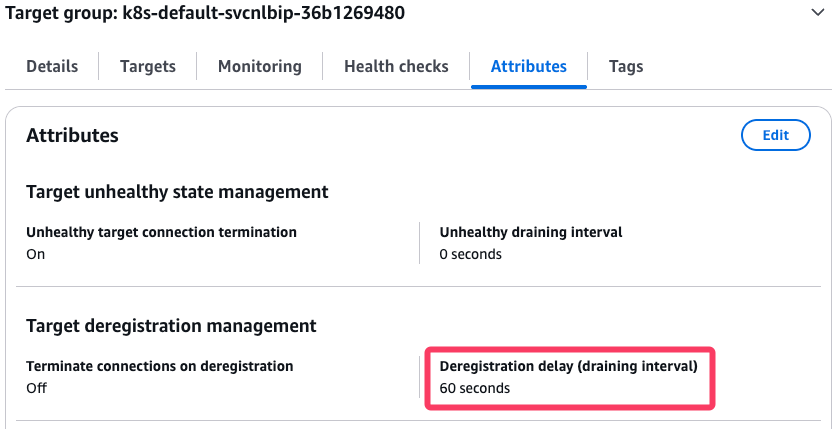
AWS NLB의 대상 그룹 확인 : IP를 확인해보자
파드 2개 → 1개 → 3개 설정 시 동작 : auto discovery ← 어떻게 가능할까?
# 작업용 EC2 - 파드 1개 설정
kubectl scale deployment deploy-echo --replicas=1


# (신규 터미널) 모니터링 확인
2w git:(main*) $ while true; do aws elbv2 describe-target-health --target-group-arn $TARGET_GROUP_ARN --output text; echo; done

TARGETHEALTHDESCRIPTIONS        8080
TARGET  ap-northeast-2a 192.168.3.60    8080
TARGETHEALTH    Target deregistration is in progress    Target.DeregistrationInProgress draining
TARGETHEALTHDESCRIPTIONS        8080
TARGET  ap-northeast-2c 192.168.10.76   8080
TARGETHEALTH    healthy


# 확인
2w git:(main*) $ for i in {1..100}; do curl -s --connect-timeout 1 $NLB | grep Hostname ; done | sort | uniq -c | sort -nr
 100 Hostname: deploy-echo-7549f6d6d8-76kk4

# 파드 3개 설정
2w git:(main*) $ kubectl scale deployment deploy-echo --replicas=3
deployment.apps/deploy-echo scaled

2w git:(main*) $ k get deploy -A
NAMESPACE     NAME                           READY   UP-TO-DATE   AVAILABLE   AGE
default       deploy-echo                    2/3     3            2           37m
kube-system   aws-load-balancer-controller   2/2     2            2           56m
kube-system   coredns                        2/2     2            2           96m


# 확인 : NLB 대상 타켓이 아직 initial 일 때 100번 반복 접속 시 어떻게 되는지 확인해보자!
2w git:(main*) $ while true; do aws elbv2 describe-target-health --target-group-arn $TARGET_GROUP_ARN --output text; echo; done
TARGETHEALTHDESCRIPTIONS        8080
TARGET  ap-northeast-2a 192.168.3.60    8080
TARGETHEALTH    Initial health checks in progress       Elb.InitialHealthChecking       initial
TARGETHEALTHDESCRIPTIONS        8080
TARGET  ap-northeast-2c 192.168.10.76   8080
TARGETHEALTH    healthy
TARGETHEALTHDESCRIPTIONS        8080
TARGET  ap-northeast-2b 192.168.4.226   8080
TARGETHEALTH Initial health checks in progress Elb.InitialHealthChecking initial- 실습 리소스 삭제: kubectl delete deploy deploy-echo; kubectl delete svc svc-nlb-ip-type
8. Ingress (L7 : HTTP)
- 인그레스 소개 : 클러스터 내부의 서비스(ClusterIP, NodePort, Loadbalancer)를 외부로 노출(HTTP/HTTPS) - Web Proxy 역할
- AWS Load Balancer Controller + Ingress (ALB) IP 모드 동작 with AWS VPC CNI

서비스/파드 배포 테스트 with Ingress(ALB) - ALB
# 모니터링
watch -d kubectl get pod,ingress,svc,ep,endpointslices -n game-2048

# 게임 파드와 Service, Ingress 배포
2w git:(main*) $ cat <<EOF | kubectl apply -f -
---
apiVersion: apps/v1
kind: Deployment
metadata:
  namespace: game-2048
  name: deployment-2048
spec:
  selector:
    matchLabels:
      app.kubernetes.io/name: app-2048
  replicas: 2
  template:
    metadata:
      labels:
        app.kubernetes.io/name: app-2048
    spec:
      containers:
      - image: public.ecr.aws/l6m2t8p7/docker-2048:latest
        imagePullPolicy: Always
        name: app-2048
        ports:
        - containerPort: 80
---
apiVersion: v1
kind: Service
metadata:
  namespace: game-2048
  name: service-2048
spec:
  ports:
    - port: 80
      targetPort: 80
      protocol: TCP
  type: NodePort
  selector:
    app.kubernetes.io/name: app-2048
---
apiVersion: networking.k8s.io/v1
kind: Ingress
metadata:
  namespace: game-2048
  name: ingress-2048
  annotations:
    alb.ingress.kubernetes.io/scheme: internet-facing
    alb.ingress.kubernetes.io/target-type: ip
spec:
  ingressClassName: alb
  rules:
    - http:
        paths:
        - path: /
          pathType: Prefix
          backend:
            service:
              name: service-2048
              port:
                number: 80
EOF
namespace/game-2048 created
deployment.apps/deployment-2048 created
service/service-2048 created
ingress.networking.k8s.io/ingress-2048 created


# 모니터링 결과
NAME                                   READY   STATUS    RESTARTS   AGE
pod/deployment-2048-7bf64bccb7-9t9s4   1/1     Running   0          65s
pod/deployment-2048-7bf64bccb7-cjp8z   1/1     Running   0          65s

NAME                                     CLASS   HOSTS   ADDRESS                                                                        PORTS   AGE
ingress.networking.k8s.io/ingress-2048   alb     *       k8s-game2048-ingress2-70d50ce3fd-1352279458.ap-northeast-2.elb.amazonaws.com   80      65s

NAME                   TYPE       CLUSTER-IP      EXTERNAL-IP   PORT(S)        AGE
service/service-2048   NodePort   10.100.52.253   <none>        80:32451/TCP   65s

NAME                     ENDPOINTS                          AGE
endpoints/service-2048   192.168.10.76:80,192.168.3.60:80   65s

NAME                                                ADDRESSTYPE   PORTS   ENDPOINTS                    AGE
endpointslice.discovery.k8s.io/service-2048-mgrxr   IPv4          80      192.168.3.60,192.168.10.76   65s


# 생성 확인
2w git:(main*) $ kubectl get ingressclass
kubectl get ingress,svc,ep,pod -n game-2048
NAME   CONTROLLER            PARAMETERS   AGE
alb    ingress.k8s.aws/alb   <none>       65m
Warning: v1 Endpoints is deprecated in v1.33+; use discovery.k8s.io/v1 EndpointSlice
NAME                                     CLASS   HOSTS   ADDRESS                                                                        PORTS   AGE
ingress.networking.k8s.io/ingress-2048   alb     *       k8s-game2048-ingress2-70d50ce3fd-1352279458.ap-northeast-2.elb.amazonaws.com   80      98s

NAME                   TYPE       CLUSTER-IP      EXTERNAL-IP   PORT(S)        AGE
service/service-2048   NodePort   10.100.52.253   <none>        80:32451/TCP   98s

NAME                     ENDPOINTS                          AGE
endpoints/service-2048   192.168.10.76:80,192.168.3.60:80   98s

NAME                                   READY   STATUS    RESTARTS   AGE
pod/deployment-2048-7bf64bccb7-9t9s4   1/1     Running   0          98s
pod/deployment-2048-7bf64bccb7-cjp8z   1/1     Running   0          98s


2w git:(main*) $ k get pod -owide -n game-2048
NAME                               READY   STATUS    RESTARTS   AGE   IP              NODE                                              NOMINATED NODE   READINESS GATES
deployment-2048-7bf64bccb7-9t9s4   1/1     Running   0          3m    192.168.3.60    ip-192-168-1-68.ap-northeast-2.compute.internal   <none>           <none>
deployment-2048-7bf64bccb7-cjp8z   1/1     Running   0          3m    192.168.10.76   ip-192-168-8-64.ap-northeast-2.compute.internal   <none>           <none>


# Ingress 확인
2w git:(main*) $ kubectl describe ingress -n game-2048 ingress-2048
Name:             ingress-2048
Labels:           <none>
Namespace:        game-2048
Address:          k8s-game2048-ingress2-70d50ce3fd-1352279458.ap-northeast-2.elb.amazonaws.com
Ingress Class:    alb
Default backend:  <default>
Rules:
  Host        Path  Backends
  ----        ----  --------
  *
              /   service-2048:80 (192.168.3.60:80,192.168.10.76:80)
Annotations:  alb.ingress.kubernetes.io/scheme: internet-facing
              alb.ingress.kubernetes.io/target-type: ip
Events:
  Type    Reason                  Age    From     Message
  ----    ------                  ----   ----     -------
  Normal  SuccessfullyReconciled  4m49s  ingress  Successfully reconciled


2w git:(main*) $ kubectl get ingress -n game-2048 ingress-2048 -o jsonpath="{.status.loadBalancer.ingress[*].hostname}{'\n'}"
k8s-game2048-ingress2-70d50ce3fd-1352279458.ap-northeast-2.elb.amazonaws.com


# 게임 접속 : ALB 주소로 웹 접속
2w git:(main*) $ kubectl get ingress -n game-2048 ingress-2048 -o jsonpath='{.status.loadBalancer.ingress[0].hostname}' | awk '{ print "Game URL = http://"$1 }'
Game URL = http://k8s-game2048-ingress2-70d50ce3fd-1352279458.ap-northeast-2.elb.amazonaws.com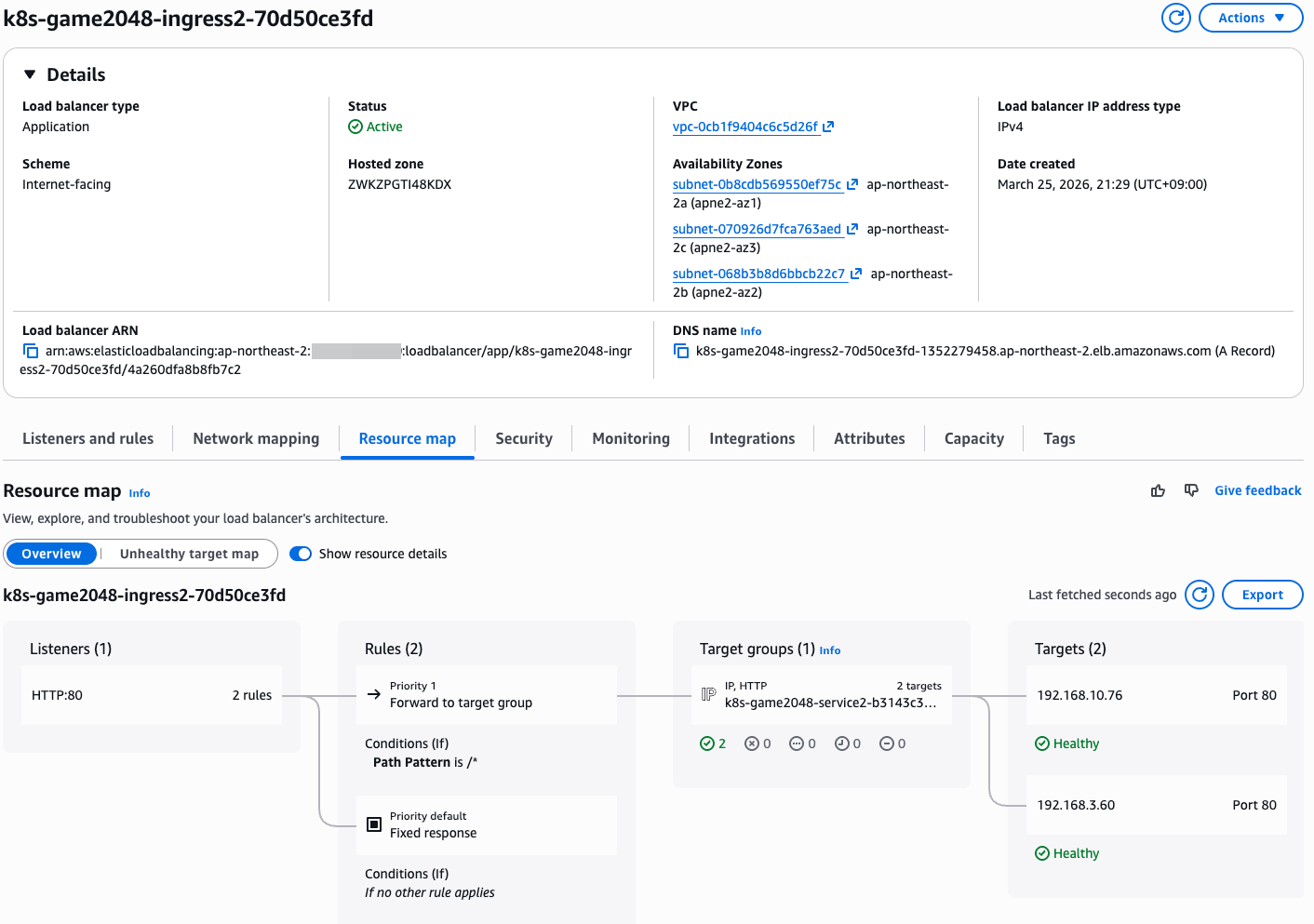

9. ExternalDNS
- 소개: K8S 서비스/인그레스/GatewayAPI 생성 시 도메인을 설정하면, AWS(Route 53), Azure(DNS), GCP(Cloud DNS) 에 A 레코드(TXT 레코드)로 자동 생성/삭제

- ExternalDNS CTRL 권한 주는 방법들 : 권장(IRSA, Pod Identity), 비권장(Node IAM Role, Static credentials)
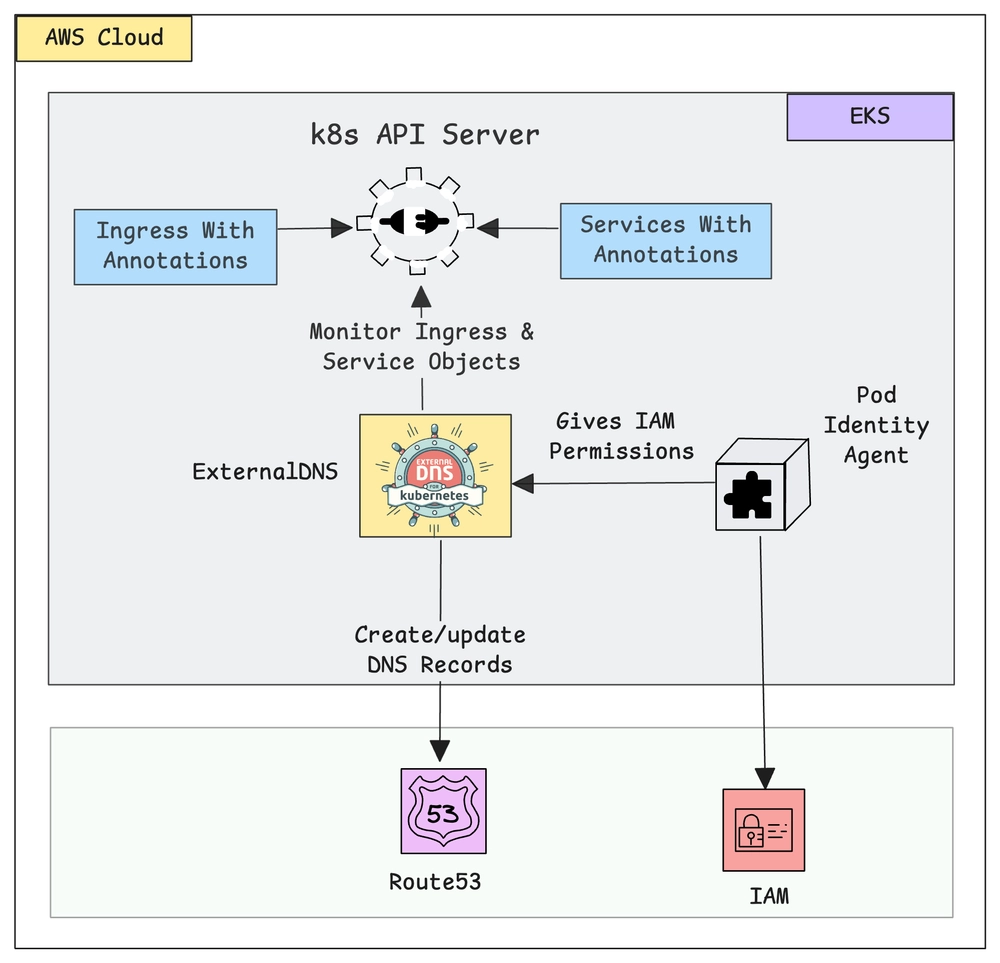
ExternalDNS 설치 : Public 도메인 소유를 하고 계셔야 합니다! - 링크
- IRSA 설정
# 정책 파일 작성
2w git:(main*) $ cat << EOF > externaldns_controller_policy.json
{
  "Version": "2012-10-17",
  "Statement": [
    {
      "Effect": "Allow",
      "Action": [
        "route53:ChangeResourceRecordSets",
        "route53:ListResourceRecordSets",
        "route53:ListTagsForResources"
      ],
      "Resource": [
        "arn:aws:route53:::hostedzone/*"
      ]
    },
    {
      "Effect": "Allow",
      "Action": [
        "route53:ListHostedZones"
      ],
      "Resource": [
        "*"
      ]
    }
  ]
}
EOF


# IAM 정책 생성
2w git:(main*) $ aws iam create-policy \
  --policy-name ExternalDNSControllerPolicy \
  --policy-document file://externaldns_controller_policy.json
{
    "Policy": {
        "PolicyName": "ExternalDNSControllerPolicy",
        "PolicyId": "ANPASC4RJSTGMLOE2D7EO",
        "Arn": "arn:aws:iam::143649248460:policy/ExternalDNSControllerPolicy",
        "Path": "/",
        "DefaultVersionId": "v1",
        "AttachmentCount": 0,
        "PermissionsBoundaryUsageCount": 0,
        "IsAttachable": true,
        "CreateDate": "2026-03-25T12:50:31+00:00",
        "UpdateDate": "2026-03-25T12:50:31+00:00"
    }
}


# 확인
2w git:(main*) $ ACCOUNT_ID=$(aws sts get-caller-identity --query "Account" --output text)
2w git:(main*) $ aws iam get-policy --policy-arn arn:aws:iam::$ACCOUNT_ID:policy/ExternalDNSControllerPolicy | jq

{
  "Policy": {
    "PolicyName": "ExternalDNSControllerPolicy",
    "PolicyId": "ANPASC4RJSTGMLOE2D7EO",
    "Arn": "arn:aws:iam::123123123:policy/ExternalDNSControllerPolicy",
    "Path": "/",
    "DefaultVersionId": "v1",
    "AttachmentCount": 0,
    "PermissionsBoundaryUsageCount": 0,
    "IsAttachable": true,
    "CreateDate": "2026-03-25T12:50:31+00:00",
    "UpdateDate": "2026-03-25T12:50:31+00:00",
    "Tags": []
  }
}

# IRSA 생성 : cloudforamtion 를 통해 IAM Role 생성
2w git:(main*) $ CLUSTER_NAME=myeks
2w git:(main*) $ eksctl create iamserviceaccount \
  --cluster=$CLUSTER_NAME \
  --namespace=kube-system \
  --name=external-dns \
  --attach-policy-arn=arn:aws:iam::$ACCOUNT_ID:policy/ExternalDNSControllerPolicy \
  --override-existing-serviceaccounts \
  --approve
2026-03-25 21:52:36 [ℹ]  1 existing iamserviceaccount(s) (kube-system/aws-load-balancer-controller) will be excluded
2026-03-25 21:52:36 [ℹ]  1 iamserviceaccount (kube-system/external-dns) was included (based on the include/exclude rules)
2026-03-25 21:52:36 [!]  metadata of serviceaccounts that exist in Kubernetes will be updated, as --override-existing-serviceaccounts was set
2026-03-25 21:52:36 [ℹ]  1 task: {
    2 sequential sub-tasks: {
        create IAM role for serviceaccount "kube-system/external-dns",
        create serviceaccount "kube-system/external-dns",
    } }2026-03-25 21:52:36 [ℹ]  building iamserviceaccount stack "eksctl-myeks-addon-iamserviceaccount-kube-system-external-dns"
2026-03-25 21:52:36 [ℹ]  deploying stack "eksctl-myeks-addon-iamserviceaccount-kube-system-external-dns"
2026-03-25 21:52:36 [ℹ]  waiting for CloudFormation stack "eksctl-myeks-addon-iamserviceaccount-kube-system-external-dns"
2026-03-25 21:53:06 [ℹ]  waiting for CloudFormation stack "eksctl-myeks-addon-iamserviceaccount-kube-system-external-dns"
2026-03-25 21:53:07 [ℹ]  created serviceaccount "kube-system/external-dns"


# 확인
2w git:(main*) $ eksctl get iamserviceaccount --cluster $CLUSTER_NAME
NAMESPACE      NAME                            ROLE ARN
kube-system     aws-load-balancer-controller    arn:aws:iam::123123123:role/eksctl-myeks-addon-iamserviceaccount-kube-sys-Role1-6reRubGarPXP
kube-system     external-dns                    arn:aws:iam::123123123:role/eksctl-myeks-addon-iamserviceaccount-kube-sys-Role1-LQL0bluzBpsP


# k8s 에 SA 확인
# Inspecting the newly created Kubernetes Service Account, we can see the role we want it to assume in our pod.
2w git:(main*) $ kubectl get serviceaccounts -n kube-system external-dns -o yaml

apiVersion: v1
kind: ServiceAccount
metadata:
  annotations:
    eks.amazonaws.com/role-arn: arn:aws:iam::123123123:role/eksctl-myeks-addon-iamserviceaccount-kube-sys-Role1-LQL0bluzBpsP
  creationTimestamp: "2026-03-25T12:53:09Z"
  labels:
    app.kubernetes.io/managed-by: eksctl
  name: external-dns
  namespace: kube-system
  resourceVersion: "25962"
- ExternalDNS 배포
# 자신의 도메인 변수 지정
MyDomain=<자신의 도메인>
MyDomain=test.com

# 설정 파일 작성
2w git:(main*) $ cat << EOF > external-dns-values.yaml
provider: aws

# 위에서 생성한 ServiceAccount와 연동
serviceAccount:
  create: false
  name: external-dns

# 필터링 설정 (보안상 권장)
# 특정 도메인만 관리하도록 제한 (예: example.com)
domainFilters:
  - $MyDomain

# 레코드 업데이트 정책
# sync: 쿠버네티스에서 삭제되면 Route 53에서도 삭제 (주의 필요)
# upsert-only: 생성/수정만 하고 삭제는 수동으로 (안전함)
policy: sync

# 리소스 감지 대상
sources:
  - service
  - ingress

# (선택) 텍스트 레코드에 식별자 추가 (여러 클러스터가 동일 도메인 관리 시 충돌 방지)
txtOwnerId: "stduy-myeks-cluster"

registry: txt

# 로그 레벨
logLevel: info
EOF


# Helm 레포지토리 추가 및 업데이트
2w git:(main*) $ helm repo add external-dns https://kubernetes-sigs.github.io/external-dns/
"external-dns" has been added to your repositories

2w git:(main*) $ helm repo update
Hang tight while we grab the latest from your chart repositories...
...Successfully got an update from the "external-dns" chart repository
...Successfully got an update from the "eks" chart repository
...Successfully got an update from the "geek-cookbook" chart repository
Update Complete. ⎈Happy Helming!⎈


# 차트 설치
2w git:(main*) $ helm install external-dns external-dns/external-dns \
  -n kube-system \
  -f external-dns-values.yaml
NAME: external-dns
LAST DEPLOYED: Wed Mar 25 22:14:16 2026
NAMESPACE: kube-system
STATUS: deployed
REVISION: 1
TEST SUITE: None
NOTES:
***********************************************************************
* External DNS                                                        *
***********************************************************************
  Chart version: 1.20.0
  App version:   0.20.0
  Image tag:     registry.k8s.io/external-dns/external-dns:v0.20.0
***********************************************************************
🚧 DEPRECATIONS 🚧

The following features, functions, or methods are deprecated and no longer recommended for use.

❗❗❗ DEPRECATED ❗❗❗ The legacy 'provider: <name>' configuration is in use. Support will be removed in future releases.


# 확인
2w git:(main*) $ helm list -n kube-system
NAME                          NAMESPACE       REVISION        UPDATED                                 STATUS          CHART                                   APP VERSION
aws-load-balancer-controller    kube-system     1               2026-03-25 20:26:10.501179 +0900 KST    deployed        aws-load-balancer-controller-3.1.0      v3.1.0
external-dns                    kube-system     1               2026-03-25 22:14:16.663819 +0900 KST    deployed        external-dns-1.20.0                     0.20.0

2w git:(main*) $ kubectl get pod -l app.kubernetes.io/name=external-dns -n kube-system
NAME                            READY   STATUS    RESTARTS   AGE
external-dns-574dfc7d88-jpwj6   1/1     Running   0          39s


# 로그 모니터링
kubectl logs deploy/external-dns -n kube-system -f
- Service(NLB) + 도메인 연동(ExternalDNS) - 도메인체크
# 터미널1 (모니터링)
watch -d 'kubectl get pod,svc'
kubectl logs deploy/external-dns -n kube-system -f
혹은
kubectl stern -l app.kubernetes.io/name=external-dns -n kube-system

# 테트리스 디플로이먼트 배포
2w git:(main*) $ cat <<EOF | kubectl apply -f -
apiVersion: apps/v1
kind: Deployment
metadata:
  name: tetris
  labels:
    app: tetris
spec:
  replicas: 1
  selector:
    matchLabels:
      app: tetris
  template:
    metadata:
      labels:
        app: tetris
    spec:
      containers:
      - name: tetris
        image: bsord/tetris
---
apiVersion: v1
kind: Service
metadata:
  name: tetris
  annotations:
    service.beta.kubernetes.io/aws-load-balancer-nlb-target-type: ip
    service.beta.kubernetes.io/aws-load-balancer-scheme: internet-facing
    service.beta.kubernetes.io/aws-load-balancer-cross-zone-load-balancing-enabled: "true"
    service.beta.kubernetes.io/aws-load-balancer-backend-protocol: "http"
    #service.beta.kubernetes.io/aws-load-balancer-healthcheck-port: "80"
spec:
  selector:
    app: tetris
  ports:
  - port: 80
    protocol: TCP
    targetPort: 80
  type: LoadBalancer
EOF
deployment.apps/tetris created
service/tetris created


# 배포 확인
kubectl get deploy,svc,ep tetris

# NLB에 ExternanDNS 로 도메인 연결
2w git:(main*) $ kubectl annotate service tetris "external-dns.alpha.kubernetes.io/hostname=tetris.$MyDomain"
service/tetris annotated


# 로그 모니터링 확인
providertime="2026-03-25T13:14:23Z" level=info msg="Using inCluster-config based on serviceaccount-token"
time="2026-03-25T13:14:23Z" level=info msg="Created Kubernetes client https://10.100.0.1:443"
time="2026-03-25T13:14:25Z" level=info msg="Applying provider record filter for domains: [test.com. .test.com. test.com. .test.com.]"
time="2026-03-25T13:14:25Z" level=info msg="All records are already up to date"
time="2026-03-25T13:15:25Z" level=info msg="Applying provider record filter for domains: [test.com. .test.com. test.com. .test.com.]"
time="2026-03-25T13:15:25Z" level=info msg="All records are already up to date"
time="2026-03-25T13:16:25Z" level=info msg="Applying provider record filter for domains: [test.com. .test.com. test.com. .test.com.]"
time="2026-03-25T13:16:25Z" level=info msg="All records are already up to date"
time="2026-03-25T13:17:26Z" level=info msg="Applying provider record filter for domains: [test.com. .test.com. test.com. .test.com.]"
time="2026-03-25T13:17:26Z" level=info msg="All records are already up to date"
time="2026-03-25T13:18:27Z" level=info msg="Applying provider record filter for domains: [test.com. .test.com. test.com. .test.com.]"
time="2026-03-25T13:18:27Z" level=info msg="All records are already up to date"
time="2026-03-25T13:19:26Z" level=info msg="Applying provider record filter for domains: [test.com. .test.com. test.com. .test.com.]"
time="2026-03-25T13:19:26Z" level=info msg="All records are already up to date"
time="2026-03-25T13:20:27Z" level=info msg="Applying provider record filter for domains: [test.com. .test.com. test.com. .test.com.]"
time="2026-03-25T13:20:27Z" level=info msg="Desired change: CREATE aaaa-tetris.test.com TXT" profile=default zoneID=/hostedzone/Z04801081UEZHM58V46LC zoneName=test.com.
time="2026-03-25T13:20:27Z" level=info msg="Desired change: CREATE cname-tetris.test.com TXT" profile=default zoneID=/hostedzone/Z04801081UEZHM58V46LC zoneName=test.com.
time="2026-03-25T13:20:27Z" level=info msg="Desired change: CREATE tetris.test.com A" profile=default zoneID=/hostedzone/Z04801081UEZHM58V46LC zoneName=test.com.
time="2026-03-25T13:20:27Z" level=info msg="Desired change: CREATE tetris.test.com AAAA" profile=default zoneID=/hostedzone/Z04801081UEZHM58V46LC zoneName=test.com.
time="2026-03-25T13:20:27Z" level=info msg="4 record(s) were successfully updated" profile=default zoneID=/hostedzone/Z04801081UEZHM58V46LC zoneName=test.com.
time="2026-03-25T13:20:28Z" level=info msg="Desired change: CREATE aaaa-tetris.test.com TXT" profile=default zoneID=/hostedzone/Z0621244335S34G7MYGM zoneName=test.com.
time="2026-03-25T13:20:28Z" level=info msg="Desired change: CREATE cname-tetris.test.com TXT" profile=default zoneID=/hostedzone/Z0621244335S34G7MYGM zoneName=test.com.
time="2026-03-25T13:20:28Z" level=info msg="Desired change: CREATE tetris.test.com A" profile=default zoneID=/hostedzone/Z0621244335S34G7MYGM zoneName=test.com.
time="2026-03-25T13:20:28Z" level=info msg="Desired change: CREATE tetris.test.com AAAA" profile=default zoneID=/hostedzone/Z0621244335S34G7MYGM zoneName=test.com.
time="2026-03-25T13:20:29Z" level=info msg="4 record(s) were successfully updated" profile=default zoneID=/hostedzone/Z0621244335S34G7MYGM zoneName=test.com.
time="2026-03-25T13:21:28Z" level=info msg="Applying provider record filter for domains: [test.com. .test.com. test.com. .test.com.]"


# Route53에 A레코드 확인
aws route53 list-resource-record-sets --hosted-zone-id "${MyDnzHostedZoneId}" --query "ResourceRecordSets[?Type == 'A']" | jq

# 확인
2w git:(main*) $ dig +short tetris.$MyDomain @8.8.8.8
15.164.146.107
52.79.130.2
13.209.137.1

2w git:(main*) $ dig +short tetris.$MyDomain
52.79.130.2
13.209.137.1
15.164.146.107

# 도메인 체크
echo -e "My Domain Checker Site1 = https://www.whatsmydns.net/#A/tetris.$MyDomain"
echo -e "My Domain Checker Site2 = https://dnschecker.org/#A/tetris.$MyDomain"

# 웹 접속 주소 확인 및 접속
echo -e "Tetris Game URL = http://tetris.$MyDomain"
- Route53 레코드 현황 & NLB 확인


- DNS 전파 확인

- 테트리스 게임 확인
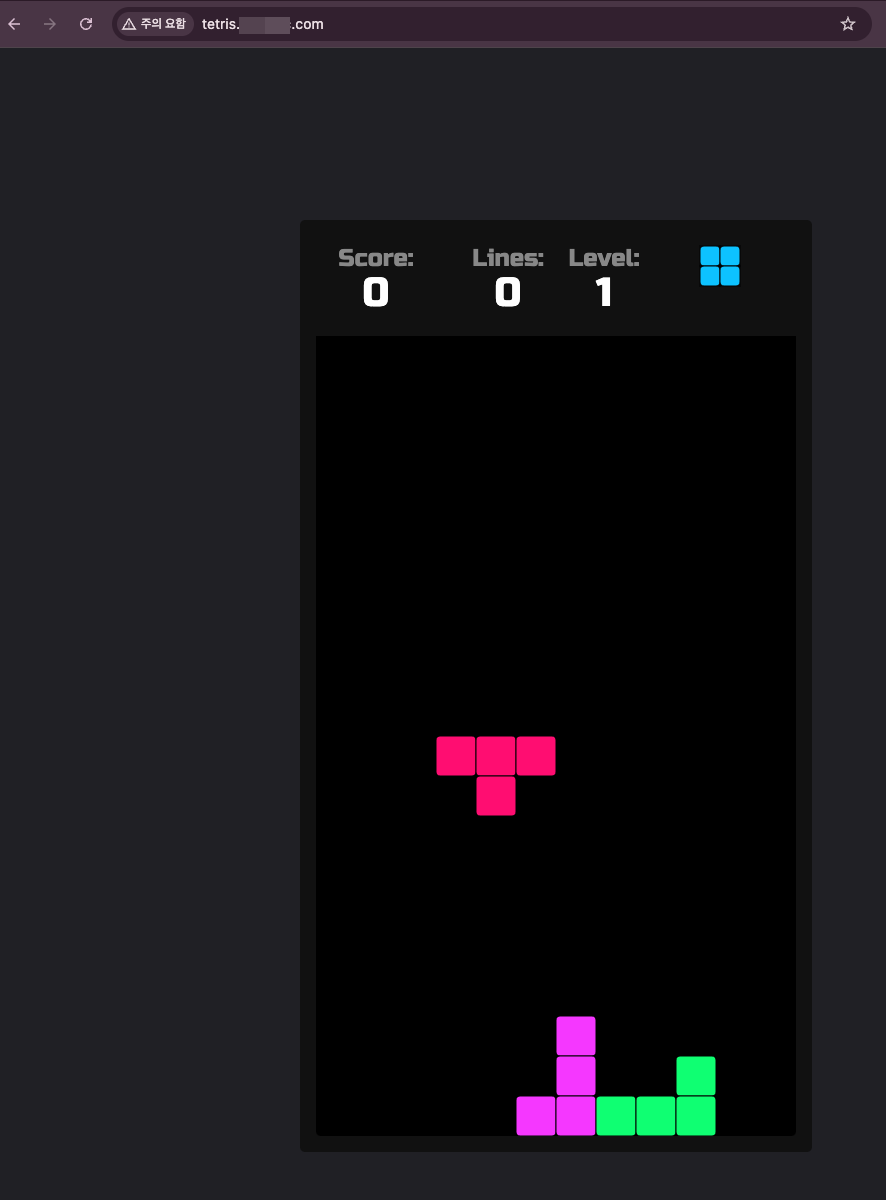
- 리소스 삭제 : kubectl delete deploy,svc tetris
- 로그 현황 참고
# Route53 레코드 삭제 로그 확인
time="2026-03-25T13:26:31Z" level=info msg="Applying provider record filter for domains: [test.com. .test.com. test.com. .test.com.]"
time="2026-03-25T13:26:31Z" level=info msg="All records are already up to date"
time="2026-03-25T13:27:31Z" level=info msg="Applying provider record filter for domains: [test.com. .test.com. test.com. .test.com.]"
time="2026-03-25T13:27:31Z" level=info msg="All records are already up to date"
time="2026-03-25T13:28:32Z" level=info msg="Applying provider record filter for domains: [test.com. .test.com. test.com. .test.com.]"
time="2026-03-25T13:28:32Z" level=info msg="All records are already up to date"
time="2026-03-25T13:29:33Z" level=info msg="Applying provider record filter for domains: [test.com. .test.com. test.com. .test.com.]"
time="2026-03-25T13:29:33Z" level=info msg="All records are already up to date"
time="2026-03-25T13:30:32Z" level=info msg="Applying provider record filter for domains: [test.com. .test.com. test.com. .test.com.]"
time="2026-03-25T13:30:32Z" level=info msg="All records are already up to date"
time="2026-03-25T13:31:34Z" level=info msg="Applying provider record filter for domains: [test.com. .test.com. test.com. .test.com.]"
time="2026-03-25T13:31:34Z" level=info msg="All records are already up to date"
time="2026-03-25T13:32:33Z" level=info msg="Applying provider record filter for domains: [test.com. .test.com. test.com. .test.com.]"
time="2026-03-25T13:32:33Z" level=info msg="All records are already up to date"
time="2026-03-25T13:33:34Z" level=info msg="Applying provider record filter for domains: [test.com. .test.com. test.com. .test.com.]"
time="2026-03-25T13:33:34Z" level=info msg="All records are already up to date"
time="2026-03-25T13:34:34Z" level=info msg="Applying provider record filter for domains: [test.com. .test.com. test.com. .test.com.]"
time="2026-03-25T13:34:34Z" level=info msg="All records are already up to date"
time="2026-03-25T13:35:34Z" level=info msg="Applying provider record filter for domains: [test.com. .test.com. test.com. .test.com.]"
time="2026-03-25T13:35:34Z" level=info msg="All records are already up to date"
time="2026-03-25T13:36:36Z" level=info msg="Applying provider record filter for domains: [test.com. .test.com. test.com. .test.com.]"
time="2026-03-25T13:36:36Z" level=info msg="Desired change: DELETE aaaa-tetris.test.com TXT" profile=default zoneID=/hostedzone/Z04801081UEZHM58V46LC zoneName=test.com.
time="2026-03-25T13:36:36Z" level=info msg="Desired change: DELETE cname-tetris.test.com TXT" profile=default zoneID=/hostedzone/Z04801081UEZHM58V46LC zoneName=test.com.
time="2026-03-25T13:36:36Z" level=info msg="Desired change: DELETE tetris.test.com A" profile=default zoneID=/hostedzone/Z04801081UEZHM58V46LC zoneName=test.com.
time="2026-03-25T13:36:36Z" level=info msg="Desired change: DELETE tetris.test.com AAAA" profile=default zoneID=/hostedzone/Z04801081UEZHM58V46LC zoneName=test.com.
time="2026-03-25T13:36:36Z" level=info msg="4 record(s) were successfully updated" profile=default zoneID=/hostedzone/Z04801081UEZHM58V46LC zoneName=test.com.
time="2026-03-25T13:36:37Z" level=info msg="Desired change: DELETE aaaa-tetris.test.com TXT" profile=default zoneID=/hostedzone/Z0621244335S34G7MYGM zoneName=test.com.
time="2026-03-25T13:36:37Z" level=info msg="Desired change: DELETE cname-tetris.test.com TXT" profile=default zoneID=/hostedzone/Z0621244335S34G7MYGM zoneName=test.com.
time="2026-03-25T13:36:37Z" level=info msg="Desired change: DELETE tetris.test.com A" profile=default zoneID=/hostedzone/Z0621244335S34G7MYGM zoneName=test.com.
time="2026-03-25T13:36:37Z" level=info msg="Desired change: DELETE tetris.test.com AAAA" profile=default zoneID=/hostedzone/Z0621244335S34G7MYGM zoneName=test.com.
time="2026-03-25T13:36:37Z" level=info msg="4 record(s) were successfully updated" profile=default zoneID=/hostedzone/Z0621244335S34G7MYGM zoneName=test.com.
10. Gateway API
- https://github.com/kubernetes-sigs/gateway-api : 현재 v1.5.1 릴리즈 - Release
- https://gateway-api.sigs.k8s.io/ : 공식 홈
- https://github.com/kubernetes-sigs/gateway-api/tree/main/conformance/reports : 버전 별 구현체 테스트 결과
- https://github.com/kubernetes-sigs/gateway-api/tree/main/conformance/reports/v1.3.0/aws-load-balancer-controller : AWS LBC
- AWS Load Balancer Controller adds general availability support for Kubernetes Gateway API - Link
- https://kubernetes-sigs.github.io/aws-load-balancer-controller/latest/guide/gateway/gateway/ : AWS LBC Gateway API

사전 준비 및 설정- Docs
- 사전 조건
# LBC > v2.13.0 버전 이상
2w git:(main*) $ kubectl describe pod -n kube-system -l app.kubernetes.io/name=aws-load-balancer-controller | grep Image: | uniq
    Image:         public.ecr.aws/eks/aws-load-balancer-controller:v3.1.0

# Installation of Gateway API CRDs # --server-side=true
# CRD 별도 설치 필요
2w git:(main*) $ kubectl apply -f https://github.com/kubernetes-sigs/gateway-api/releases/download/v1.3.0/standard-install.yaml     # [REQUIRED] # Standard Gateway API CRDs
kubectl apply -f https://github.com/kubernetes-sigs/gateway-api/releases/download/v1.3.0/experimental-install.yaml # [OPTIONAL: Used for L4 Routes] # Experimental Gateway API CRDs

customresourcedefinition.apiextensions.k8s.io/gatewayclasses.gateway.networking.k8s.io created
customresourcedefinition.apiextensions.k8s.io/gateways.gateway.networking.k8s.io created
customresourcedefinition.apiextensions.k8s.io/grpcroutes.gateway.networking.k8s.io created
customresourcedefinition.apiextensions.k8s.io/httproutes.gateway.networking.k8s.io created
customresourcedefinition.apiextensions.k8s.io/referencegrants.gateway.networking.k8s.io created
customresourcedefinition.apiextensions.k8s.io/backendtlspolicies.gateway.networking.k8s.io created
customresourcedefinition.apiextensions.k8s.io/gatewayclasses.gateway.networking.k8s.io configured
customresourcedefinition.apiextensions.k8s.io/gateways.gateway.networking.k8s.io configured
customresourcedefinition.apiextensions.k8s.io/grpcroutes.gateway.networking.k8s.io configured
customresourcedefinition.apiextensions.k8s.io/httproutes.gateway.networking.k8s.io configured
customresourcedefinition.apiextensions.k8s.io/referencegrants.gateway.networking.k8s.io configured
customresourcedefinition.apiextensions.k8s.io/tcproutes.gateway.networking.k8s.io created
customresourcedefinition.apiextensions.k8s.io/tlsroutes.gateway.networking.k8s.io created
customresourcedefinition.apiextensions.k8s.io/udproutes.gateway.networking.k8s.io created
customresourcedefinition.apiextensions.k8s.io/xbackendtrafficpolicies.gateway.networking.x-k8s.io created
customresourcedefinition.apiextensions.k8s.io/xlistenersets.gateway.networking.x-k8s.io created


2w git:(main*) $ kubectl api-resources | grep gateway.networking
backendtlspolicies                  btlspolicy        gateway.networking.k8s.io/v1alpha3     true         BackendTLSPolicy
gatewayclasses                      gc                gateway.networking.k8s.io/v1           false        GatewayClass
gateways                            gtw               gateway.networking.k8s.io/v1           true         Gateway
grpcroutes                                            gateway.networking.k8s.io/v1           true         GRPCRoute
httproutes                                            gateway.networking.k8s.io/v1           true         HTTPRoute
referencegrants                     refgrant          gateway.networking.k8s.io/v1beta1      true         ReferenceGrant
tcproutes                                             gateway.networking.k8s.io/v1alpha2     true         TCPRoute
tlsroutes                                             gateway.networking.k8s.io/v1alpha2     true         TLSRoute
udproutes                                             gateway.networking.k8s.io/v1alpha2     true         UDPRoute
xbackendtrafficpolicies             xbtrafficpolicy   gateway.networking.x-k8s.io/v1alpha1   true         XBackendTrafficPolicy
xlistenersets                       lset              gateway.networking.x-k8s.io/v1alpha1   true         XListenerSet


2w git:(main*) $ kubectl explain gatewayclasses.gateway.networking.k8s.io.spec
GROUP:      gateway.networking.k8s.io
KIND:       GatewayClass
VERSION:    v1

FIELD: spec <Object>


DESCRIPTION:
    Spec defines the desired state of GatewayClass.

FIELDS:
  controllerName <string> -required-
    ControllerName is the name of the controller that is managing Gateways of
    this class. The value of this field MUST be a domain prefixed path.

    Example: "example.net/gateway-controller".

    This field is not mutable and cannot be empty.

    Support: Core

  description    <string>
    Description helps describe a GatewayClass with more details.

  parametersRef  <Object>
    ParametersRef is a reference to a resource that contains the configuration
    parameters corresponding to the GatewayClass. This is optional if the
    controller does not require any additional configuration.

    ParametersRef can reference a standard Kubernetes resource, i.e. ConfigMap,
    or an implementation-specific custom resource. The resource can be
    cluster-scoped or namespace-scoped.

    If the referent cannot be found, refers to an unsupported kind, or when
    the data within that resource is malformed, the GatewayClass SHOULD be
    rejected with the "Accepted" status condition set to "False" and an
    "InvalidParameters" reason.

    A Gateway for this GatewayClass may provide its own `parametersRef`. When
    both are specified,
    the merging behavior is implementation specific.
    It is generally recommended that GatewayClass provides defaults that can be
    overridden by a Gateway.

    Support: Implementation-specific


2w git:(main*) $ kubectl explain gatewayclasses.gateway.networking.k8s.io.spec.parametersRef

GROUP:      gateway.networking.k8s.io
KIND:       GatewayClass
VERSION:    v1

FIELD: parametersRef <Object>


DESCRIPTION:
    ParametersRef is a reference to a resource that contains the configuration
    parameters corresponding to the GatewayClass. This is optional if the
    controller does not require any additional configuration.

    ParametersRef can reference a standard Kubernetes resource, i.e. ConfigMap,
    or an implementation-specific custom resource. The resource can be
    cluster-scoped or namespace-scoped.

    If the referent cannot be found, refers to an unsupported kind, or when
    the data within that resource is malformed, the GatewayClass SHOULD be
    rejected with the "Accepted" status condition set to "False" and an
    "InvalidParameters" reason.

    A Gateway for this GatewayClass may provide its own `parametersRef`. When
    both are specified,
    the merging behavior is implementation specific.
    It is generally recommended that GatewayClass provides defaults that can be
    overridden by a Gateway.

    Support: Implementation-specific

FIELDS:
  group  <string> -required-
    Group is the group of the referent.

  kind   <string> -required-
    Kind is kind of the referent.

  name   <string> -required-
    Name is the name of the referent.

  namespace      <string>
    Namespace is the namespace of the referent.
    This field is required when referring to a Namespace-scoped resource and
    MUST be unset when referring to a Cluster-scoped resource.


# Installation of LBC Gateway API specific CRDs
2w git:(main*) $ kubectl apply -f https://raw.githubusercontent.com/kubernetes-sigs/aws-load-balancer-controller/refs/heads/main/config/crd/gateway/gateway-crds.yaml
Warning: resource customresourcedefinitions/listenerruleconfigurations.gateway.k8s.aws is missing the kubectl.kubernetes.io/last-applied-configuration annotation which is required by kubectl apply. kubectl apply should only be used on resources created declaratively by either kubectl create --save-config or kubectl apply. The missing annotation will be patched automatically.
customresourcedefinition.apiextensions.k8s.io/listenerruleconfigurations.gateway.k8s.aws configured
Warning: resource customresourcedefinitions/loadbalancerconfigurations.gateway.k8s.aws is missing the kubectl.kubernetes.io/last-applied-configuration annotation which is required by kubectl apply. kubectl apply should only be used on resources created declaratively by either kubectl create --save-config or kubectl apply. The missing annotation will be patched automatically.
customresourcedefinition.apiextensions.k8s.io/loadbalancerconfigurations.gateway.k8s.aws configured
Warning: resource customresourcedefinitions/targetgroupconfigurations.gateway.k8s.aws is missing the kubectl.kubernetes.io/last-applied-configuration annotation which is required by kubectl apply. kubectl apply should only be used on resources created declaratively by either kubectl create --save-config or kubectl apply. The missing annotation will be patched automatically.
customresourcedefinition.apiextensions.k8s.io/targetgroupconfigurations.gateway.k8s.aws configured


2w git:(main*) $ kubectl get crd | grep gateway.k8s.aws
listenerruleconfigurations.gateway.k8s.aws            2026-03-25T11:26:10Z
loadbalancerconfigurations.gateway.k8s.aws            2026-03-25T11:26:10Z
targetgroupconfigurations.gateway.k8s.aws             2026-03-25T11:26:10Z


2w git:(main*) $ kubectl api-resources | grep gateway.k8s.aws
listenerruleconfigurations                            gateway.k8s.aws/v1beta1                true         ListenerRuleConfiguration
loadbalancerconfigurations                            gateway.k8s.aws/v1beta1                true         LoadBalancerConfiguration
targetgroupconfigurations                             gateway.k8s.aws/v1beta1                true         TargetGroupConfiguration                            gateway.k8s.aws/v1beta1                true         TargetGroupConfiguration
- LBC 에 Gateway API 활성화
# 설치 정보 확인
2w git:(main*) $ helm list -n kube-system
NAME                          NAMESPACE       REVISION        UPDATED                                 STATUS          CHART                                   APP VERSION
aws-load-balancer-controller    kube-system     1               2026-03-25 20:26:10.501179 +0900 KST    deployed        aws-load-balancer-controller-3.1.0      v3.1.0
external-dns                    kube-system     1               2026-03-25 22:14:16.663819 +0900 KST    deployed        external-dns-1.20.0                     0.20.0


2w git:(main*) $ helm get values -n kube-system aws-load-balancer-controller # helm values 에 Args 및 활성화 값이 현재는 없음
USER-SUPPLIED VALUES:
clusterName: myeks
serviceAccount:
  create: false
  name: aws-load-balancer-controller


2w git:(main*) $ kubectl describe deploy -n kube-system aws-load-balancer-controller | grep Args: -A2
    Args:
      --cluster-name=myeks
      --ingress-class=alb


# 모니터링
kubectl get pod -n kube-system -l app.kubernetes.io/name=aws-load-balancer-controller --watch

# deployment 에 feature flag를 활성화 : By default, the LBC will not listen to Gateway API CRDs.
KUBE_EDITOR="nano" kubectl edit deploy -n kube-system aws-load-balancer-controller
...
      - args:
        - --cluster-name=myeks
        - --ingress-class=alb
        - --feature-gates=NLBGatewayAPI=true,ALBGatewayAPI=true
...
# 확인
2w git:(main*) $ kubectl describe deploy -n kube-system aws-load-balancer-controller | grep Args: -A3
    Args:
      --cluster-name=myeks
      --ingress-class=alb
      --feature-gates=NLBGatewayAPI=true,ALBGatewayAPI=true
- ExternalDNS 에 gateway api 지원 설정 - Docs
# deployment 에 gateway api 지원 설정 : external-dns-values.yaml 파일 편집 -> 아래 추가
--------------------------
# 리소스 감지 대상
sources:
  - service
  - ingress
  - gateway-httproute
  - gateway-grpcroute
  - gateway-tlsroute
  - gateway-tcproute
  - gateway-udproute
--------------------------


# ExternalDNS 에 gateway api 지원 설정
2w git:(main*) $ kubectl describe deploy -n kube-system aws-load-balancer-controller | grep Args: -A3

    Args:
      --cluster-name=myeks
      --ingress-class=alb
      --feature-gates=NLBGatewayAPI=true,ALBGatewayAPI=true


2w git:(main*) $ helm upgrade -i external-dns external-dns/external-dns -n kube-system -f external-dns-values.yaml

Release "external-dns" has been upgraded. Happy Helming!
NAME: external-dns
LAST DEPLOYED: Wed Mar 25 23:07:10 2026
NAMESPACE: kube-system
STATUS: deployed
REVISION: 2
TEST SUITE: None
NOTES:
***********************************************************************
* External DNS                                                        *
***********************************************************************
  Chart version: 1.20.0
  App version:   0.20.0
  Image tag:     registry.k8s.io/external-dns/external-dns:v0.20.0
***********************************************************************
🚧 DEPRECATIONS 🚧

The following features, functions, or methods are deprecated and no longer recommended for use.

❗❗❗ DEPRECATED ❗❗❗ The legacy 'provider: <name>' configuration is in use. Support will be removed in future releases.


# 확인
2w git:(main*) $ kubectl describe deploy -n kube-system external-dns | grep Args: -A15

    Args:
      --log-level=info
      --log-format=text
      --interval=1m
      --source=service
      --source=ingress
      --source=gateway-httproute
      --source=gateway-grpcroute
      --source=gateway-tlsroute
      --source=gateway-tcproute
      --source=gateway-udproute
      --policy=sync
      --registry=txt
      --txt-owner-id=stduy-myeks-cluster
      --domain-filter=mz-poc.com
      --provider=aws
샘플 애플리케이션 배포 및 gateway api(externaldns) 를 사용한 http 접속
Customizing your ELB resources

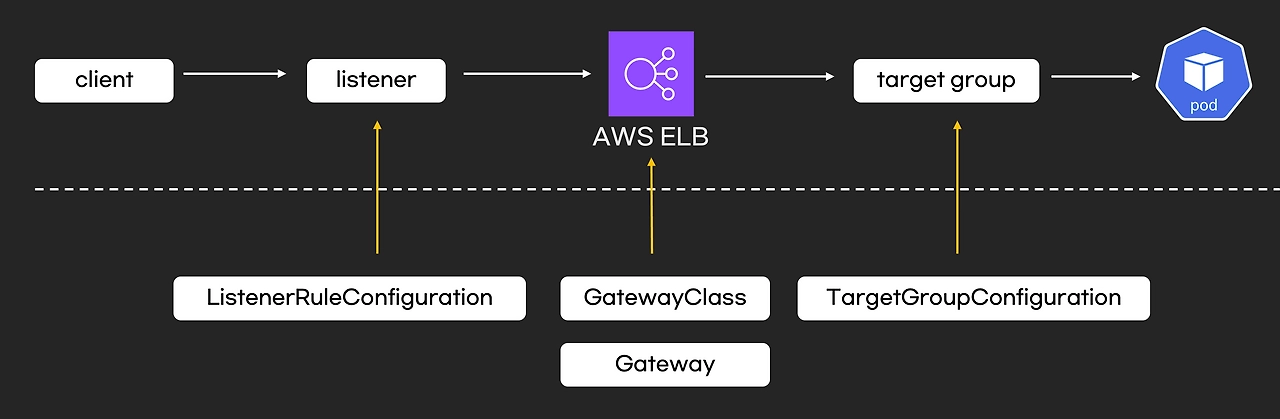
- 모니터링
# 로그 모니터링
kubectl logs -l app.kubernetes.io/name=aws-load-balancer-controller -n kube-system -f
혹은
kubectl stern -l app.kubernetes.io/name=aws-load-balancer-controller -n kube-system
- loadbalancerconfigurations - Docs
# loadbalancerconfigurations 생성
2w git:(main*) $ kubectl explain loadbalancerconfigurations.gateway.k8s.aws.spec.scheme
GROUP:      gateway.k8s.aws
KIND:       LoadBalancerConfiguration
VERSION:    v1beta1

FIELD: scheme <string>
ENUM:
    internal
    internet-facing

DESCRIPTION:
    scheme defines the type of LB to provision. If unspecified, it will be
    automatically inferred.


#
2w git:(main*) $ cat << EOF | kubectl apply -f -
apiVersion: gateway.k8s.aws/v1beta1
kind: LoadBalancerConfiguration
metadata:
  name: lbc-config
  namespace: default
spec:
  scheme: internet-facing
EOF
loadbalancerconfiguration.gateway.k8s.aws/lbc-config created


# 확인
2w git:(main*) $ kubectl get loadbalancerconfiguration -owide
NAME         AGE
lbc-config   3s
- gatewayclasses
# gatewayclasses 생성
2w git:(main*) $ kubectl explain gatewayclasses.spec
GROUP:      gateway.networking.k8s.io
KIND:       GatewayClass
VERSION:    v1

FIELD: spec <Object>


DESCRIPTION:
    Spec defines the desired state of GatewayClass.

FIELDS:
  controllerName <string> -required-
    ControllerName is the name of the controller that is managing Gateways of
    this class. The value of this field MUST be a domain prefixed path.

    Example: "example.net/gateway-controller".

    This field is not mutable and cannot be empty.

    Support: Core

  description    <string>
    Description helps describe a GatewayClass with more details.

  parametersRef  <Object>
    ParametersRef is a reference to a resource that contains the configuration
    parameters corresponding to the GatewayClass. This is optional if the
    controller does not require any additional configuration.

    ParametersRef can reference a standard Kubernetes resource, i.e. ConfigMap,
    or an implementation-specific custom resource. The resource can be
    cluster-scoped or namespace-scoped.

    If the referent cannot be found, refers to an unsupported kind, or when
    the data within that resource is malformed, the GatewayClass SHOULD be
    rejected with the "Accepted" status condition set to "False" and an
    "InvalidParameters" reason.

    A Gateway for this GatewayClass may provide its own `parametersRef`. When
    both are specified,
    the merging behavior is implementation specific.
    It is generally recommended that GatewayClass provides defaults that can be
    overridden by a Gateway.

    Support: Implementation-specific


2w git:(main*) $ kubectl explain gatewayclasses.spec.parametersRef
GROUP:      gateway.networking.k8s.io
KIND:       GatewayClass
VERSION:    v1

FIELD: parametersRef <Object>


DESCRIPTION:
    ParametersRef is a reference to a resource that contains the configuration
    parameters corresponding to the GatewayClass. This is optional if the
    controller does not require any additional configuration.

    ParametersRef can reference a standard Kubernetes resource, i.e. ConfigMap,
    or an implementation-specific custom resource. The resource can be
    cluster-scoped or namespace-scoped.

    If the referent cannot be found, refers to an unsupported kind, or when
    the data within that resource is malformed, the GatewayClass SHOULD be
    rejected with the "Accepted" status condition set to "False" and an
    "InvalidParameters" reason.

    A Gateway for this GatewayClass may provide its own `parametersRef`. When
    both are specified,
    the merging behavior is implementation specific.
    It is generally recommended that GatewayClass provides defaults that can be
    overridden by a Gateway.

    Support: Implementation-specific

FIELDS:
  group  <string> -required-
    Group is the group of the referent.

  kind   <string> -required-
    Kind is kind of the referent.

  name   <string> -required-
    Name is the name of the referent.

  namespace      <string>
    Namespace is the namespace of the referent.
    This field is required when referring to a Namespace-scoped resource and
    MUST be unset when referring to a Cluster-scoped resource.


#
2w git:(main*) $ cat << EOF | kubectl apply -f -
apiVersion: gateway.networking.k8s.io/v1
kind: GatewayClass
metadata:
  name: aws-alb
spec:
  controllerName: gateway.k8s.aws/alb
  parametersRef:
    group: gateway.k8s.aws
    kind: LoadBalancerConfiguration
    name: lbc-config
    namespace: default
EOF
gatewayclass.gateway.networking.k8s.io/aws-alb created


2w git:(main*) $ kubectl get gatewayclasses -o wide  # k get gc
NAME      CONTROLLER            ACCEPTED   AGE   DESCRIPTION
aws-alb   gateway.k8s.aws/alb   True       5s
- gateway
# gateways 생성
2w git:(main*) $ kubectl explain gateways.spec
cat << EOF | kubectl apply -f -
apiVersion: gateway.networking.k8s.io/v1
kind: Gateway
metadata:
  name: alb-http
spec:
  gatewayClassName: aws-alb
  listeners:
  - name: http
    protocol: HTTP
    port: 80
EOF
GROUP:      gateway.networking.k8s.io
KIND:       Gateway
VERSION:    v1

FIELD: spec <Object>


DESCRIPTION:
    Spec defines the desired state of Gateway.

FIELDS:
  addresses      <[]Object>
    Addresses requested for this Gateway. This is optional and behavior can
    depend on the implementation. If a value is set in the spec and the
    requested address is invalid or unavailable, the implementation MUST
    indicate this in the associated entry in GatewayStatus.Addresses.

    The Addresses field represents a request for the address(es) on the
    "outside of the Gateway", that traffic bound for this Gateway will use.
    This could be the IP address or hostname of an external load balancer or
    other networking infrastructure, or some other address that traffic will
    be sent to.

    If no Addresses are specified, the implementation MAY schedule the
    Gateway in an implementation-specific manner, assigning an appropriate
    set of Addresses.

    The implementation MUST bind all Listeners to every GatewayAddress that
    it assigns to the Gateway and add a corresponding entry in
    GatewayStatus.Addresses.

    Support: Extended

  allowedListeners       <Object>
    AllowedListeners defines which ListenerSets can be attached to this Gateway.
    While this feature is experimental, the default value is to allow no
    ListenerSets.

  backendTLS     <Object>
    BackendTLS configures TLS settings for when this Gateway is connecting to
    backends with TLS.

    Support: Core

  gatewayClassName       <string> -required-
    GatewayClassName used for this Gateway. This is the name of a
    GatewayClass resource.

  infrastructure <Object>
    Infrastructure defines infrastructure level attributes about this Gateway
    instance.

    Support: Extended

  listeners      <[]Object> -required-
    Listeners associated with this Gateway. Listeners define
    logical endpoints that are bound on this Gateway's addresses.
    At least one Listener MUST be specified.

    ## Distinct Listeners

    Each Listener in a set of Listeners (for example, in a single Gateway)
    MUST be _distinct_, in that a traffic flow MUST be able to be assigned to
    exactly one listener. (This section uses "set of Listeners" rather than
    "Listeners in a single Gateway" because implementations MAY merge
    configuration
    from multiple Gateways onto a single data plane, and these rules _also_
    apply in that case).

    Practically, this means that each listener in a set MUST have a unique
    combination of Port, Protocol, and, if supported by the protocol, Hostname.

    Some combinations of port, protocol, and TLS settings are considered
    Core support and MUST be supported by implementations based on the objects
    they support:

    HTTPRoute

    1. HTTPRoute, Port: 80, Protocol: HTTP
    2. HTTPRoute, Port: 443, Protocol: HTTPS, TLS Mode: Terminate, TLS keypair
    provided

    TLSRoute

    1. TLSRoute, Port: 443, Protocol: TLS, TLS Mode: Passthrough

    "Distinct" Listeners have the following property:

    **The implementation can match inbound requests to a single distinct
    Listener**.

    When multiple Listeners share values for fields (for
    example, two Listeners with the same Port value), the implementation
    can match requests to only one of the Listeners using other
    Listener fields.

    When multiple listeners have the same value for the Protocol field, then
    each of the Listeners with matching Protocol values MUST have different
    values for other fields.

    The set of fields that MUST be different for a Listener differs per
    protocol.
    The following rules define the rules for what fields MUST be considered for
    Listeners to be distinct with each protocol currently defined in the
    Gateway API spec.

    The set of listeners that all share a protocol value MUST have _different_
    values for _at least one_ of these fields to be distinct:

    * **HTTP, HTTPS, TLS**: Port, Hostname
    * **TCP, UDP**: Port

    One **very** important rule to call out involves what happens when an
    implementation:

    * Supports TCP protocol Listeners, as well as HTTP, HTTPS, or TLS protocol
      Listeners, and
    * sees HTTP, HTTPS, or TLS protocols with the same `port` as one with TCP
      Protocol.

    In this case all the Listeners that share a port with the
    TCP Listener are not distinct and so MUST NOT be accepted.

    If an implementation does not support TCP Protocol Listeners, then the
    previous rule does not apply, and the TCP Listeners SHOULD NOT be
    accepted.

    Note that the `tls` field is not used for determining if a listener is
    distinct, because
    Listeners that _only_ differ on TLS config will still conflict in all cases.

    ### Listeners that are distinct only by Hostname

    When the Listeners are distinct based only on Hostname, inbound request
    hostnames MUST match from the most specific to least specific Hostname
    values to choose the correct Listener and its associated set of Routes.

    Exact matches MUST be processed before wildcard matches, and wildcard
    matches MUST be processed before fallback (empty Hostname value)
    matches. For example, `"foo.example.com"` takes precedence over
    `"*.example.com"`, and `"*.example.com"` takes precedence over `""`.

    Additionally, if there are multiple wildcard entries, more specific
    wildcard entries must be processed before less specific wildcard entries.
    For example, `"*.foo.example.com"` takes precedence over `"*.example.com"`.

    The precise definition here is that the higher the number of dots in the
    hostname to the right of the wildcard character, the higher the precedence.

    The wildcard character will match any number of characters _and dots_ to
    the left, however, so `"*.example.com"` will match both
    `"foo.bar.example.com"` _and_ `"bar.example.com"`.

    ## Handling indistinct Listeners

    If a set of Listeners contains Listeners that are not distinct, then those
    Listeners are _Conflicted_, and the implementation MUST set the "Conflicted"
    condition in the Listener Status to "True".

    The words "indistinct" and "conflicted" are considered equivalent for the
    purpose of this documentation.

    Implementations MAY choose to accept a Gateway with some Conflicted
    Listeners only if they only accept the partial Listener set that contains
    no Conflicted Listeners.

    Specifically, an implementation MAY accept a partial Listener set subject to
    the following rules:

    * The implementation MUST NOT pick one conflicting Listener as the winner.
      ALL indistinct Listeners must not be accepted for processing.
    * At least one distinct Listener MUST be present, or else the Gateway
    effectively
      contains _no_ Listeners, and must be rejected from processing as a whole.

    The implementation MUST set a "ListenersNotValid" condition on the
    Gateway Status when the Gateway contains Conflicted Listeners whether or
    not they accept the Gateway. That Condition SHOULD clearly
    indicate in the Message which Listeners are conflicted, and which are
    Accepted. Additionally, the Listener status for those listeners SHOULD
    indicate which Listeners are conflicted and not Accepted.

    ## General Listener behavior

    Note that, for all distinct Listeners, requests SHOULD match at most one
    Listener.
    For example, if Listeners are defined for "foo.example.com" and
    "*.example.com", a
    request to "foo.example.com" SHOULD only be routed using routes attached
    to the "foo.example.com" Listener (and not the "*.example.com" Listener).

    This concept is known as "Listener Isolation", and it is an Extended feature
    of Gateway API. Implementations that do not support Listener Isolation MUST
    clearly document this, and MUST NOT claim support for the
    `GatewayHTTPListenerIsolation` feature.

    Implementations that _do_ support Listener Isolation SHOULD claim support
    for the Extended `GatewayHTTPListenerIsolation` feature and pass the
    associated
    conformance tests.

    ## Compatible Listeners

    A Gateway's Listeners are considered _compatible_ if:

    1. They are distinct.
    2. The implementation can serve them in compliance with the Addresses
       requirement that all Listeners are available on all assigned
       addresses.

    Compatible combinations in Extended support are expected to vary across
    implementations. A combination that is compatible for one implementation
    may not be compatible for another.

    For example, an implementation that cannot serve both TCP and UDP listeners
    on the same address, or cannot mix HTTPS and generic TLS listens on the same
    port
    would not consider those cases compatible, even though they are distinct.

    Implementations MAY merge separate Gateways onto a single set of
    Addresses if all Listeners across all Gateways are compatible.

    In a future release the MinItems=1 requirement MAY be dropped.

    Support: Core


gateway.gateway.networking.k8s.io/alb-http created


# gateways 확인 : 약어 gtw
2w git:(main*) $ kubectl get gateways  # k get gtw
NAME       CLASS     ADDRESS                                                                     PROGRAMMED   AGE
alb-http   aws-alb   k8s-default-albhttp-bc3439871e-332515140.ap-northeast-2.elb.amazonaws.com   Unknown      95s


# ALB 생성 확인
2w git:(main*) $ aws elbv2 describe-load-balancers | jq

{
  "LoadBalancers": [
    {
      "LoadBalancerArn": "arn:aws:elasticloadbalancing:ap-northeast-2:123123123:loadbalancer/app/k8s-default-albhttp-bc3439871e/d0665c603e6ccfa3",
      "DNSName": "k8s-default-albhttp-bc3439871e-332515140.ap-northeast-2.elb.amazonaws.com",
      "CanonicalHostedZoneId": "ZWKZPGTI48KDX",
      "CreatedTime": "2026-03-25T14:26:40.040000+00:00",
      "LoadBalancerName": "k8s-default-albhttp-bc3439871e",
      "Scheme": "internet-facing",
      "VpcId": "vpc-0cb1f9404c6c5d26f",
      "State": {
        "Code": "provisioning"
      },
      "Type": "application",
      "AvailabilityZones": [
        {
          "ZoneName": "ap-northeast-2b",
          "SubnetId": "subnet-068b3b8d6bbcb22c7",
          "LoadBalancerAddresses": []
        },
        {
          "ZoneName": "ap-northeast-2c",
          "SubnetId": "subnet-070926d7fca763aed",
          "LoadBalancerAddresses": []
        },
        {
          "ZoneName": "ap-northeast-2a",
          "SubnetId": "subnet-0b8cdb569550ef75c",
          "LoadBalancerAddresses": []
        }
      ],
      "SecurityGroups": [
        "sg-0483ce2ef76d4a2dc",
        "sg-0e07085b19b5af3f6"
      ],
      "IpAddressType": "ipv4"
    }
  ]
}

# 로그 모니터링 결과
kubectl logs -l app.kubernetes.io/name=aws-load-balancer-controller -n kube-system -f
(상위 생략)
ersion":"44962","generation":1,"creationTimestamp":"2026-03-25T14:26:36Z","annotations":{"kubectl.kubernetes.io/last-applied-configuration":"{\"apiVersion\":\"gateway.networking.k8s.io/v1\",\"kind\":\"Gateway\",\"metadata\":{\"annotations\":{},\"name\":\"alb-http\",\"namespace\":\"default\"},\"spec\":{\"gatewayClassName\":\"aws-alb\",\"listeners\":[{\"name\":\"http\",\"port\":80,\"protocol\":\"HTTP\"}]}}\n"},"managedFields":[{"manager":"kubectl-client-side-apply","operation":"Update","apiVersion":"gateway.networking.k8s.io/v1","time":"2026-03-25T14:26:36Z","fieldsType":"FieldsV1","fieldsV1":{"f:metadata":{"f:annotations":{".":{},"f:kubectl.kubernetes.io/last-applied-configuration":{}}},"f:spec":{".":{},"f:gatewayClassName":{},"f:listeners":{".":{},"k:{\"name\":\"http\"}":{".":{},"f:allowedRoutes":{".":{},"f:namespaces":{".":{},"f:from":{}}},"f:name":{},"f:port":{},"f:protocol":{}}}}}}]},"spec":{"gatewayClassName":"aws-alb","listeners":[{"name":"http","port":80,"protocol":"HTTP","allowedRoutes":{"namespaces":{"from":"Same"}}}]},"status":{"conditions":[{"type":"Accepted","status":"Unknown","lastTransitionTime":"1970-01-01T00:00:00Z","reason":"Pending","message":"Waiting for controller"},{"type":"Programmed","status":"Unknown","lastTransitionTime":"1970-01-01T00:00:00Z","reason":"Pending","message":"Waiting for controller"}]}}}
{"level":"info","ts":"2026-03-25T14:26:37Z","logger":"backend-sg-provider","msg":"created SecurityGroup","name":"k8s-traffic-myeks-34dc390c32","id":"sg-0483ce2ef76d4a2dc"}
{"level":"info","ts":"2026-03-25T14:26:37Z","logger":"controllers.gateway.k8s.aws/alb","msg":"Auto Create SG","LB SGs":[{"$ref":"#/resources/AWS::EC2::SecurityGroup/ManagedLBSecurityGroup/status/groupID"},"sg-0483ce2ef76d4a2dc"],"backend SG":"sg-0483ce2ef76d4a2dc"}
{"level":"info","ts":"2026-03-25T14:26:37Z","logger":"controllers.gateway.k8s.aws/alb","msg":"successfully built model","model":"{\"id\":\"default/alb-http\",\"resources\":{\"AWS::EC2::SecurityGroup\":{\"ManagedLBSecurityGroup\":{\"spec\":{\"groupName\":\"k8s-default-albhttp-402c89dc74\",\"description\":\"[k8s] Managed SecurityGroup for LoadBalancer\",\"ingress\":[{\"ipProtocol\":\"tcp\",\"fromPort\":80,\"toPort\":80,\"ipRanges\":[{\"cidrIP\":\"0.0.0.0/0\"}]}]}}},\"AWS::ElasticLoadBalancingV2::LoadBalancer\":{\"LoadBalancer\":{\"spec\":{\"name\":\"k8s-default-albhttp-bc3439871e\",\"type\":\"application\",\"scheme\":\"internet-facing\",\"ipAddressType\":\"ipv4\",\"subnetMapping\":[{\"subnetID\":\"subnet-068b3b8d6bbcb22c7\"},{\"subnetID\":\"subnet-070926d7fca763aed\"},{\"subnetID\":\"subnet-0b8cdb569550ef75c\"}],\"securityGroups\":[{\"$ref\":\"#/resources/AWS::EC2::SecurityGroup/ManagedLBSecurityGroup/status/groupID\"},\"sg-0483ce2ef76d4a2dc\"]}}},\"FrontendNLBTargetGroup\":{\"FrontendNLBTargetGroup\":{\"TargetGroups\":{}}}}}"}
"level":"info","ts":"2026-03-25T14:26:38Z","logger":"controllers.gateway.k8s.aws/alb","msg":"creating securityGroup","resourceID":"ManagedLBSecurityGroup"}
{"level":"info","ts":"2026-03-25T14:26:38Z","logger":"controllers.gateway.k8s.aws/alb","msg":"created securityGroup","resourceID":"ManagedLBSecurityGroup","securityGroupID":"sg-0e07085b19b5af3f6"}
{"level":"info","ts":"2026-03-25T14:26:38Z","msg":"authorizing securityGroup ingress","securityGroupID":"sg-0e07085b19b5af3f6","permission":[{"FromPort":80,"IpProtocol":"tcp","IpRanges":[{"CidrIp":"0.0.0.0/0","Description":""}],"Ipv6Ranges":null,"PrefixListIds":null,"ToPort":80,"UserIdGroupPairs":null}]}
{"level":"info","ts":"2026-03-25T14:26:39Z","msg":"authorized securityGroup ingress","securityGroupID":"sg-0e07085b19b5af3f6"}
{"level":"info","ts":"2026-03-25T14:26:39Z","logger":"controllers.gateway.k8s.aws/alb","msg":"creating loadBalancer","stackID":"default/alb-http","resourceID":"LoadBalancer"}
{"level":"info","ts":"2026-03-25T14:26:40Z","logger":"controllers.gateway.k8s.aws/alb","msg":"created loadBalancer","stackID":"default/alb-http","resourceID":"LoadBalancer","arn":"arn:aws:elasticloadbalancing:ap-northeast-2:143649248460:loadbalancer/app/k8s-default-albhttp-bc3439871e/d0665c603e6ccfa3"}
{"level":"info","ts":"2026-03-25T14:26:40Z","logger":"controllers.gateway.k8s.aws/alb","msg":"successfully deployed model","gateway":{"name":"alb-http","namespace":"default"}}
{"level":"error","ts":"2026-03-25T14:26:40Z","logger":"controllers.gateway.k8s.aws/alb","msg":"Failed to process gateway update","gw":{"name":"alb-http","namespace":"default"},"error":"requeue needed after 2m0s: Monitoring provisioning state"}
{"level":"info","ts":"2026-03-25T14:26:40Z","logger":"controllers.gateway.k8s.aws/alb","msg":"Got request for reconcile","gw":{"kind":"Gateway","apiVersion":"gateway.networking.k8s.io/v1","metadata":{"name":"alb-http","namespace":"default","uid":"2edb037a-ea9b-47cc-bb03-8a2c4de0f4b2","resourceVersion":"44978","generation":1,"creationTimestamp":"2026-03-25T14:26:36Z","annotations":{"kubectl.kubernetes.io/last-applied-configuration":"{\"apiVersion\":\"gateway.networking.k8s.io/v1\",\"kind\":\"Gateway\",\"metadata\":{\"annotations\":{},\"name\":\"alb-http\",\"namespace\":\"default\"},\"spec\":{\"gatewayClassName\":\"aws-alb\",\"listeners\":[{\"name\":\"http\",\"port\":80,\"protocol\":\"HTTP\"}]}}\n"},"finalizers":["gateway.k8s.aws/alb"],"managedFields":[{"manager":"kubectl-client-side-apply","operation":"Update","apiVersion":"gateway.networking.k8s.io/v1","time":"2026-03-25T14:26:36Z","fieldsType":"FieldsV1","fieldsV1":{"f:metadata":{"f:annotations":{".":{},"f:kubectl.kubernetes.io/last-applied-configuration":{}}},"f:spec":{".":{},"f:gatewayClassName":{},"f:listeners":{".":{},"k:{\"name\":\"http\"}":{".":{},"f:allowedRoutes":{".":{},"f:namespaces":{".":{},"f:from":{}}},"f:name":{},"f:port":{},"f:protocol":{}}}}}},{"manager":"controller","operation":"Update","apiVersion":"gateway.networking.k8s.io/v1","time":"2026-03-25T14:26:37Z","fieldsType":"FieldsV1","fieldsV1":{"f:metadata":{"f:finalizers":{".":{},"v:\"gateway.k8s.aws/alb\"":{}}}}},{"manager":"controller","operation":"Update","apiVersion":"gateway.networking.k8s.io/v1","time":"2026-03-25T14:26:40Z","fieldsType":"FieldsV1","fieldsV1":{"f:status":{"f:addresses":{},"f:conditions":{"k:{\"type\":\"Accepted\"}":{"f:lastTransitionTime":{},"f:message":{},"f:observedGeneration":{},"f:reason":{},"f:status":{}},"k:{\"type\":\"Programmed\"}":{"f:lastTransitionTime":{},"f:message":{},"f:observedGeneration":{}}},"f:listeners":{".":{},"k:{\"name\":\"http\"}":{".":{},"f:attachedRoutes":{},"f:conditions":{".":{},"k:{\"type\":\"Accepted\"}":{".":{},"f:lastTransitionTime":{},"f:message":{},"f:observedGeneration":{},"f:reason":{},"f:status":{},"f:type":{}},"k:{\"type\":\"Conflicted\"}":{".":{},"f:lastTransitionTime":{},"f:message":{},"f:observedGeneration":{},"f:reason":{},"f:status":{},"f:type":{}},"k:{\"type\":\"Programmed\"}":{".":{},"f:lastTransitionTime":{},"f:message":{},"f:observedGeneration":{},"f:reason":{},"f:status":{},"f:type":{}},"k:{\"type\":\"ResolvedRefs\"}":{".":{},"f:lastTransitionTime":{},"f:message":{},"f:observedGeneration":{},"f:reason":{},"f:status":{},"f:type":{}}},"f:name":{},"f:supportedKinds":{}}}}},"subresource":"status"}]},"spec":{"gatewayClassName":"aws-alb","listeners":[{"name":"http","port":80,"protocol":"HTTP","allowedRoutes":{"namespaces":{"from":"Same"}}}]},"status":{"addresses":[{"type":"Hostname","value":"k8s-default-albhttp-bc3439871e-332515140.ap-northeast-2.elb.amazonaws.com"}],"conditions":[{"type":"Accepted","status":"True","observedGeneration":1,"lastTransitionTime":"2026-03-25T14:26:40Z","reason":"Accepted","message":""},{"type":"Programmed","status":"Unknown","observedGeneration":1,"lastTransitionTime":"2026-03-25T14:26:40Z","reason":"Pending","message":"Waiting for load balancer to be active."}],"listeners":[{"name":"http","supportedKinds":[{"group":"gateway.networking.k8s.io","kind":"HTTPRoute"}],"attachedRoutes":0,"conditions":[{"type":"Conflicted","status":"True","observedGeneration":1,"lastTransitionTime":"2026-03-25T14:26:40Z","reason":"NoConflicts","message":"Listener has no conflict."},{"type":"Accepted","status":"True","observedGeneration":1,"lastTransitionTime":"2026-03-25T14:26:40Z","reason":"Accepted","message":"Listener is accepted."},{"type":"ResolvedRefs","status":"True","observedGeneration":1,"lastTransitionTime":"2026-03-25T14:26:40Z","reason":"ResolvedRefs","message":"Listener has all refs resolved."},{"type":"Programmed","status":"False","observedGeneration":1,"lastTransitionTime":"2026-03-25T14:26:40Z","reason":"Pending","message":"Listener is pending to be programmed."}]}]}}}
{"level":"info","ts":"2026-03-25T14:26:40Z","logger":"controllers.gateway.k8s.aws/alb","msg":"Auto Create SG","LB SGs":[{"$ref":"#/resources/AWS::EC2::SecurityGroup/ManagedLBSecurityGroup/status/groupID"},"sg-0483ce2ef76d4a2dc"],"backend SG":"sg-0483ce2ef76d4a2dc"}
{"level":"info","ts":"2026-03-25T14:26:40Z","logger":"controllers.gateway.k8s.aws/alb","msg":"successfully built model","model":"{\"id\":\"default/alb-http\",\"resources\":{\"AWS::EC2::SecurityGroup\":{\"ManagedLBSecurityGroup\":{\"spec\":{\"groupName\":\"k8s-default-albhttp-402c89dc74\",\"description\":\"[k8s] Managed SecurityGroup for LoadBalancer\",\"ingress\":[{\"ipProtocol\":\"tcp\",\"fromPort\":80,\"toPort\":80,\"ipRanges\":[{\"cidrIP\":\"0.0.0.0/0\"}]}]}}},\"AWS::ElasticLoadBalancingV2::LoadBalancer\":{\"LoadBalancer\":{\"spec\":{\"name\":\"k8s-default-albhttp-bc3439871e\",\"type\":\"application\",\"scheme\":\"internet-facing\",\"ipAddressType\":\"ipv4\",\"subnetMapping\":[{\"subnetID\":\"subnet-068b3b8d6bbcb22c7\"},{\"subnetID\":\"subnet-070926d7fca763aed\"},{\"subnetID\":\"subnet-0b8cdb569550ef75c\"}],\"securityGroups\":[{\"$ref\":\"#/resources/AWS::EC2::SecurityGroup/ManagedLBSecurityGroup/status/groupID\"},\"sg-0483ce2ef76d4a2dc\"]}}},\"FrontendNLBTargetGroup\":{\"FrontendNLBTargetGroup\":{\"TargetGroups\":{}}}}}"}
{"level":"error","ts":"2026-03-25T14:26:40Z","logger":"controllers.gateway.k8s.aws/alb","msg":"Failed to process gateway update","gw":{"name":"alb-http","namespace":"default"},"error":"requeue needed after 2m0s: monitor provisioning state for load balancer: k8s-default-albhttp-bc3439871e"}
{"level":"info","ts":"2026-03-25T14:28:40Z","logger":"controllers.gateway.k8s.aws/alb","msg":"Got request for reconcile","gw":{"kind":"Gateway","apiVersion":"gateway.networking.k8s.io/v1","metadata":{"name":"alb-http","namespace":"default","uid":"2edb037a-ea9b-47cc-bb03-8a2c4de0f4b2","resourceVersion":"44978","generation":1,"creationTimestamp":"2026-03-25T14:26:36Z","annotations":{"kubectl.kubernetes.io/last-applied-configuration":"{\"apiVersion\":\"gateway.networking.k8s.io/v1\",\"kind\":\"Gateway\",\"metadata\":{\"annotations\":{},\"name\":\"alb-http\",\"namespace\":\"default\"},\"spec\":{\"gatewayClassName\":\"aws-alb\",\"listeners\":[{\"name\":\"http\",\"port\":80,\"protocol\":\"HTTP\"}]}}\n"},"finalizers":["gateway.k8s.aws/alb"],"managedFields":[{"manager":"kubectl-client-side-apply","operation":"Update","apiVersion":"gateway.networking.k8s.io/v1","time":"2026-03-25T14:26:36Z","fieldsType":"FieldsV1","fieldsV1":{"f:metadata":{"f:annotations":{".":{},"f:kubectl.kubernetes.io/last-applied-configuration":{}}},"f:spec":{".":{},"f:gatewayClassName":{},"f:listeners":{".":{},"k:{\"name\":\"http\"}":{".":{},"f:allowedRoutes":{".":{},"f:namespaces":{".":{},"f:from":{}}},"f:name":{},"f:port":{},"f:protocol":{}}}}}},{"manager":"controller","operation":"Update","apiVersion":"gateway.networking.k8s.io/v1","time":"2026-03-25T14:26:37Z","fieldsType":"FieldsV1","fieldsV1":{"f:metadata":{"f:finalizers":{".":{},"v:\"gateway.k8s.aws/alb\"":{}}}}},{"manager":"controller","operation":"Update","apiVersion":"gateway.networking.k8s.io/v1","time":"2026-03-25T14:26:40Z","fieldsType":"FieldsV1","fieldsV1":{"f:status":{"f:addresses":{},"f:conditions":{"k:{\"type\":\"Accepted\"}":{"f:lastTransitionTime":{},"f:message":{},"f:observedGeneration":{},"f:reason":{},"f:status":{}},"k:{\"type\":\"Programmed\"}":{"f:lastTransitionTime":{},"f:message":{},"f:observedGeneration":{}}},"f:listeners":{".":{},"k:{\"name\":\"http\"}":{".":{},"f:attachedRoutes":{},"f:conditions":{".":{},"k:{\"type\":\"Accepted\"}":{".":{},"f:lastTransitionTime":{},"f:message":{},"f:observedGeneration":{},"f:reason":{},"f:status":{},"f:type":{}},"k:{\"type\":\"Conflicted\"}":{".":{},"f:lastTransitionTime":{},"f:message":{},"f:observedGeneration":{},"f:reason":{},"f:status":{},"f:type":{}},"k:{\"type\":\"Programmed\"}":{".":{},"f:lastTransitionTime":{},"f:message":{},"f:observedGeneration":{},"f:reason":{},"f:status":{},"f:type":{}},"k:{\"type\":\"ResolvedRefs\"}":{".":{},"f:lastTransitionTime":{},"f:message":{},"f:observedGeneration":{},"f:reason":{},"f:status":{},"f:type":{}}},"f:name":{},"f:supportedKinds":{}}}}},"subresource":"status"}]},"spec":{"gatewayClassName":"aws-alb","listeners":[{"name":"http","port":80,"protocol":"HTTP","allowedRoutes":{"namespaces":{"from":"Same"}}}]},"status":{"addresses":[{"type":"Hostname","value":"k8s-default-albhttp-bc3439871e-332515140.ap-northeast-2.elb.amazonaws.com"}],"conditions":[{"type":"Accepted","status":"True","observedGeneration":1,"lastTransitionTime":"2026-03-25T14:26:40Z","reason":"Accepted","message":""},{"type":"Programmed","status":"Unknown","observedGeneration":1,"lastTransitionTime":"2026-03-25T14:26:40Z","reason":"Pending","message":"Waiting for load balancer to be active."}],"listeners":[{"name":"http","supportedKinds":[{"group":"gateway.networking.k8s.io","kind":"HTTPRoute"}],"attachedRoutes":0,"conditions":[{"type":"Conflicted","status":"True","observedGeneration":1,"lastTransitionTime":"2026-03-25T14:26:40Z","reason":"NoConflicts","message":"Listener has no conflict."},{"type":"Accepted","status":"True","observedGeneration":1,"lastTransitionTime":"2026-03-25T14:26:40Z","reason":"Accepted","message":"Listener is accepted."},{"type":"ResolvedRefs","status":"True","observedGeneration":1,"lastTransitionTime":"2026-03-25T14:26:40Z","reason":"ResolvedRefs","message":"Listener has all refs resolved."},{"type":"Programmed","status":"False","observedGeneration":1,"lastTransitionTime":"2026-03-25T14:26:40Z","reason":"Pending","message":"Listener is pending to be programmed."}]}]}}}
{"level":"info","ts":"2026-03-25T14:28:40Z","logger":"controllers.gateway.k8s.aws/alb","msg":"Auto Create SG","LB SGs":[{"$ref":"#/resources/AWS::EC2::SecurityGroup/ManagedLBSecurityGroup/status/groupID"},"sg-0483ce2ef76d4a2dc"],"backend SG":"sg-0483ce2ef76d4a2dc"}
{"level":"info","ts":"2026-03-25T14:28:40Z","logger":"controllers.gateway.k8s.aws/alb","msg":"successfully built model","model":"{\"id\":\"default/alb-http\",\"resources\":{\"AWS::EC2::SecurityGroup\":{\"ManagedLBSecurityGroup\":{\"spec\":{\"groupName\":\"k8s-default-albhttp-402c89dc74\",\"description\":\"[k8s] Managed SecurityGroup for LoadBalancer\",\"ingress\":[{\"ipProtocol\":\"tcp\",\"fromPort\":80,\"toPort\":80,\"ipRanges\":[{\"cidrIP\":\"0.0.0.0/0\"}]}]}}},\"AWS::ElasticLoadBalancingV2::LoadBalancer\":{\"LoadBalancer\":{\"spec\":{\"name\":\"k8s-default-albhttp-bc3439871e\",\"type\":\"application\",\"scheme\":\"internet-facing\",\"ipAddressType\":\"ipv4\",\"subnetMapping\":[{\"subnetID\":\"subnet-068b3b8d6bbcb22c7\"},{\"subnetID\":\"subnet-070926d7fca763aed\"},{\"subnetID\":\"subnet-0b8cdb569550ef75c\"}],\"securityGroups\":[{\"$ref\":\"#/resources/AWS::EC2::SecurityGroup/ManagedLBSecurityGroup/status/groupID\"},\"sg-0483ce2ef76d4a2dc\"]}}},\"FrontendNLBTargetGroup\":{\"FrontendNLBTargetGroup\":{\"TargetGroups\":{}}}}}"}
{"level":"info","ts":"2026-03-25T14:28:40Z","logger":"controllers.gateway.k8s.aws/alb","msg":"successfully deployed model","gateway":{"name":"alb-http","namespace":"default"}}
{"level":"info","ts":"2026-03-25T14:28:40Z","logger":"controllers.gateway.k8s.aws/alb","msg":"Got request for reconcile","gw":{"kind":"Gateway","apiVersion":"gateway.networking.k8s.io/v1","metadata":{"name":"alb-http","namespace":"default","uid":"2edb037a-ea9b-47cc-bb03-8a2c4de0f4b2","resourceVersion":"45385","generation":1,"creationTimestamp":"2026-03-25T14:26:36Z","annotations":{"kubectl.kubernetes.io/last-applied-configuration":"{\"apiVersion\":\"gateway.networking.k8s.io/v1\",\"kind\":\"Gateway\",\"metadata\":{\"annotations\":{},\"name\":\"alb-http\",\"namespace\":\"default\"},\"spec\":{\"gatewayClassName\":\"aws-alb\",\"listeners\":[{\"name\":\"http\",\"port\":80,\"protocol\":\"HTTP\"}]}}\n"},"finalizers":["gateway.k8s.aws/alb"],"managedFields":[{"manager":"kubectl-client-side-apply","operation":"Update","apiVersion":"gateway.networking.k8s.io/v1","time":"2026-03-25T14:26:36Z","fieldsType":"FieldsV1","fieldsV1":{"f:metadata":{"f:annotations":{".":{},"f:kubectl.kubernetes.io/last-applied-configuration":{}}},"f:spec":{".":{},"f:gatewayClassName":{},"f:listeners":{".":{},"k:{\"name\":\"http\"}":{".":{},"f:allowedRoutes":{".":{},"f:namespaces":{".":{},"f:from":{}}},"f:name":{},"f:port":{},"f:protocol":{}}}}}},{"manager":"controller","operation":"Update","apiVersion":"gateway.networking.k8s.io/v1","time":"2026-03-25T14:26:37Z","fieldsType":"FieldsV1","fieldsV1":{"f:metadata":{"f:finalizers":{".":{},"v:\"gateway.k8s.aws/alb\"":{}}}}},{"manager":"controller","operation":"Update","apiVersion":"gateway.networking.k8s.io/v1","time":"2026-03-25T14:28:40Z","fieldsType":"FieldsV1","fieldsV1":{"f:status":{"f:addresses":{},"f:conditions":{"k:{\"type\":\"Accepted\"}":{"f:lastTransitionTime":{},"f:message":{},"f:observedGeneration":{},"f:reason":{},"f:status":{}},"k:{\"type\":\"Programmed\"}":{"f:lastTransitionTime":{},"f:message":{},"f:observedGeneration":{},"f:reason":{},"f:status":{}}},"f:listeners":{".":{},"k:{\"name\":\"http\"}":{".":{},"f:attachedRoutes":{},"f:conditions":{".":{},"k:{\"type\":\"Accepted\"}":{".":{},"f:lastTransitionTime":{},"f:message":{},"f:observedGeneration":{},"f:reason":{},"f:status":{},"f:type":{}},"k:{\"type\":\"Conflicted\"}":{".":{},"f:lastTransitionTime":{},"f:message":{},"f:observedGeneration":{},"f:reason":{},"f:status":{},"f:type":{}},"k:{\"type\":\"Programmed\"}":{".":{},"f:lastTransitionTime":{},"f:message":{},"f:observedGeneration":{},"f:reason":{},"f:status":{},"f:type":{}},"k:{\"type\":\"ResolvedRefs\"}":{".":{},"f:lastTransitionTime":{},"f:message":{},"f:observedGeneration":{},"f:reason":{},"f:status":{},"f:type":{}}},"f:name":{},"f:supportedKinds":{}}}}},"subresource":"status"}]},"spec":{"gatewayClassName":"aws-alb","listeners":[{"name":"http","port":80,"protocol":"HTTP","allowedRoutes":{"namespaces":{"from":"Same"}}}]},"status":{"addresses":[{"type":"Hostname","value":"k8s-default-albhttp-bc3439871e-332515140.ap-northeast-2.elb.amazonaws.com"}],"conditions":[{"type":"Accepted","status":"True","observedGeneration":1,"lastTransitionTime":"2026-03-25T14:26:40Z","reason":"Accepted","message":""},{"type":"Programmed","status":"True","observedGeneration":1,"lastTransitionTime":"2026-03-25T14:28:40Z","reason":"Programmed","message":"arn:aws:elasticloadbalancing:ap-northeast-2:143649248460:loadbalancer/app/k8s-default-albhttp-bc3439871e/d0665c603e6ccfa3"}],"listeners":[{"name":"http","supportedKinds":[{"group":"gateway.networking.k8s.io","kind":"HTTPRoute"}],"attachedRoutes":0,"conditions":[{"type":"Accepted","status":"True","observedGeneration":1,"lastTransitionTime":"2026-03-25T14:28:40Z","reason":"Accepted","message":"Listener is accepted."},{"type":"Conflicted","status":"True","observedGeneration":1,"lastTransitionTime":"2026-03-25T14:28:40Z","reason":"NoConflicts","message":"Listener has no conflict."},{"type":"Programmed","status":"True","observedGeneration":1,"lastTransitionTime":"2026-03-25T14:28:40Z","reason":"Programmed","message":"Listener is programmed."},{"type":"ResolvedRefs","status":"True","observedGeneration":1,"lastTransitionTime":"2026-03-25T14:28:40Z","reason":"ResolvedRefs","message":"Listener has all refs resolved."}]}]}}}
{"level":"info","ts":"2026-03-25T14:28:40Z","logger":"controllers.gateway.k8s.aws/alb","msg":"Auto Create SG","LB SGs":[{"$ref":"#/resources/AWS::EC2::SecurityGroup/ManagedLBSecurityGroup/status/groupID"},"sg-0483ce2ef76d4a2dc"],"backend SG":"sg-0483ce2ef76d4a2dc"}
{"level":"info","ts":"2026-03-25T14:28:40Z","logger":"controllers.gateway.k8s.aws/alb","msg":"successfully built model","model":"{\"id\":\"default/alb-http\",\"resources\":{\"AWS::EC2::SecurityGroup\":{\"ManagedLBSecurityGroup\":{\"spec\":{\"groupName\":\"k8s-default-albhttp-402c89dc74\",\"description\":\"[k8s] Managed SecurityGroup for LoadBalancer\",\"ingress\":[{\"ipProtocol\":\"tcp\",\"fromPort\":80,\"toPort\":80,\"ipRanges\":[{\"cidrIP\":\"0.0.0.0/0\"}]}]}}},\"AWS::ElasticLoadBalancingV2::LoadBalancer\":{\"LoadBalancer\":{\"spec\":{\"name\":\"k8s-default-albhttp-bc3439871e\",\"type\":\"application\",\"scheme\":\"internet-facing\",\"ipAddressType\":\"ipv4\",\"subnetMapping\":[{\"subnetID\":\"subnet-068b3b8d6bbcb22c7\"},{\"subnetID\":\"subnet-070926d7fca763aed\"},{\"subnetID\":\"subnet-0b8cdb569550ef75c\"}],\"securityGroups\":[{\"$ref\":\"#/resources/AWS::EC2::SecurityGroup/ManagedLBSecurityGroup/status/groupID\"},\"sg-0483ce2ef76d4a2dc\"]}}},\"FrontendNLBTargetGroup\":{\"FrontendNLBTargetGroup\":{\"TargetGroups\":{}}}}}"}
{"level":"info","ts":"2026-03-25T14:28:41Z","logger":"controllers.gateway.k8s.aws/alb","msg":"successfully deployed model","gateway":{"name":"alb-http","namespace":"default"}}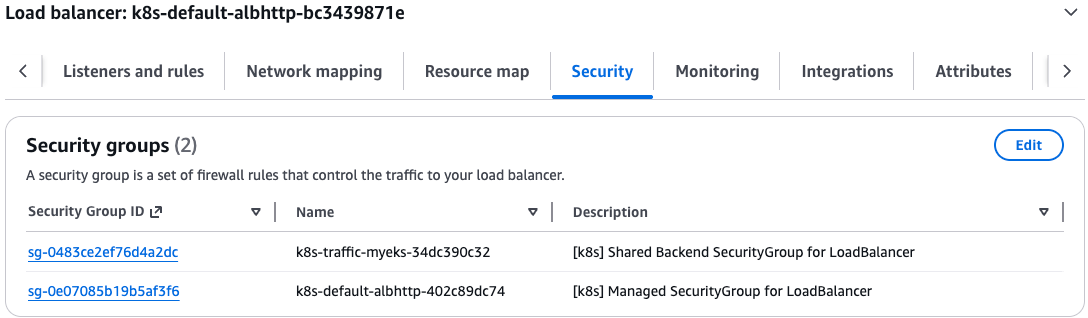
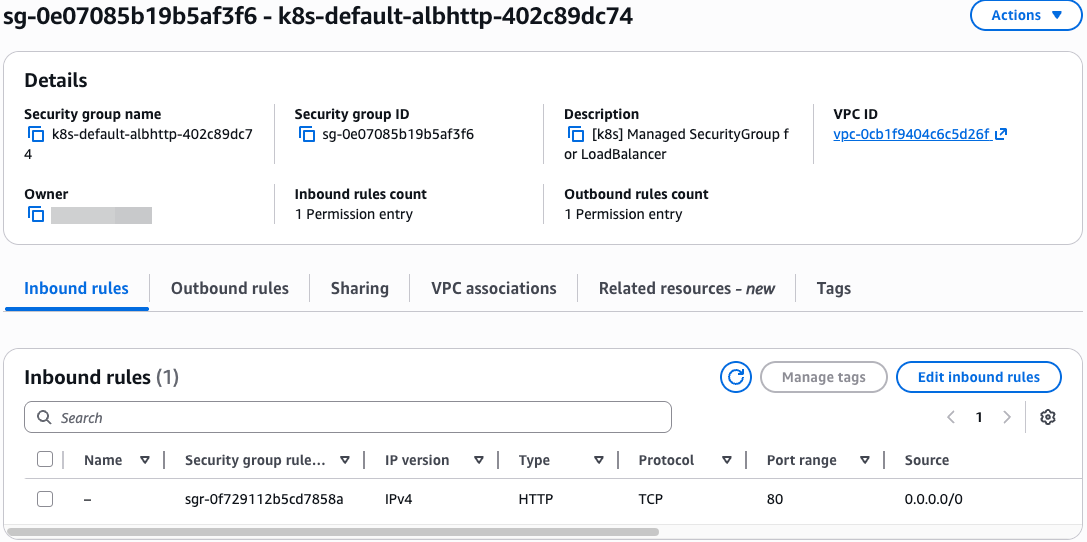
- 샘플 애플리케이션 배포
# 게임 파드와 Service 배포
2w git:(main*) $
cat <<EOF | kubectl apply -f -
apiVersion: apps/v1
kind: Deployment
metadata:
  name: deployment-2048
spec:
  selector:
    matchLabels:
      app.kubernetes.io/name: app-2048
  replicas: 2
  template:
    metadata:
      labels:
        app.kubernetes.io/name: app-2048
    spec:
      containers:
      - image: public.ecr.aws/l6m2t8p7/docker-2048:latest
        imagePullPolicy: Always
        name: app-2048
        ports:
        - containerPort: 80
---
apiVersion: v1
kind: Service
metadata:
  name: service-2048
spec:
  ports:
    - port: 80
      targetPort: 80
      protocol: TCP
  type: ClusterIP
  selector:
    app.kubernetes.io/name: app-2048
EOF
deployment.apps/deployment-2048 created
service/service-2048 created


# 모니터링 확인
2w git:(main*) $ watch -d kubectl get pod,ingress,svc,ep,endpointslices
NAME                                   READY   STATUS    RESTARTS   AGE
pod/deployment-2048-7bf64bccb7-7mpj9   1/1     Running   0          25s
pod/deployment-2048-7bf64bccb7-z27f4   1/1     Running   0          25s

NAME                   TYPE        CLUSTER-IP      EXTERNAL-IP   PORT(S)   AGE
service/kubernetes     ClusterIP   10.100.0.1      <none>        443/TCP   3h53m
service/service-2048   ClusterIP   10.100.103.12   <none>        80/TCP    25s

NAME                     ENDPOINTS                           AGE
endpoints/kubernetes     192.168.0.98:443,192.168.9.3:443    3h53m
endpoints/service-2048   192.168.2.104:80,192.168.6.142:80   25s

NAME                                                ADDRESSTYPE   PORTS   ENDPOINTS                     AGE
endpointslice.discovery.k8s.io/kubernetes           IPv4          443     192.168.0.98,192.168.9.3      3h53m
endpointslice.discovery.k8s.io/service-2048-ldmwj   IPv4          80      192.168.2.104,192.168.6.142   25s
- TargetGroupConfiguration - Docs
# TargetGroupConfiguration 생성
kubectl explain httproutes.gateway.k8s.aws.spec
kubectl explain targetgroupconfigurations.gateway.k8s.aws.spec.defaultConfiguration

2w git:(main*) $ cat << EOF | kubectl apply -f -
apiVersion: gateway.k8s.aws/v1beta1
kind: TargetGroupConfiguration
metadata:
  name: backend-tg-config
spec:
  targetReference:
    name: service-2048
  defaultConfiguration:
    targetType: ip
    protocol: HTTP
EOF
targetgroupconfiguration.gateway.k8s.aws/backend-tg-config created

# 확인
2w git:(main*) $ kubectl get targetgroupconfigurations -owide
NAME                SERVICE-NAME   AGE
backend-tg-config   service-2048   10s
- httproute
# 서비스 도메인명 변수 지정
GWMYDOMAIN=<각자 자신의 도메인명>
GWMYDOMAIN=gwapi.test.com

# httproute 생성
kubectl explain httproutes.spec
kubectl explain httproutes.spec.parentRefs
kubectl explain httproutes.spec.hostnames
kubectl explain httproutes.spec.rules

2w git:(main*) $ cat << EOF | kubectl apply -f -
apiVersion: gateway.networking.k8s.io/v1
kind: HTTPRoute
metadata:
  name: alb-http-route
spec:
  parentRefs:
  - group: gateway.networking.k8s.io
    kind: Gateway
    name: alb-http
    sectionName: http
  hostnames:
  - $GWMYDOMAIN
  rules:
  - backendRefs:
    - name: service-2048
      port: 80
EOF
httproute.gateway.networking.k8s.io/alb-http-route created

# 확인
2w git:(main*) $ kubectl get httproute
NAME             HOSTNAMES              AGE
alb-http-route   ["gwapi.test.com"]   17s

# ALB 확인
aws elbv2 describe-load-balancers | jq
aws elbv2 describe-target-groups | jq
- 접속 테스트
# 확인
2w git:(main*) $ dig +short $GWMYDOMAIN @8.8.8.8
15.165.83.216
43.200.27.150
3.36.182.212

2w git:(main*) $ dig +short $GWMYDOMAIN
15.165.83.216
3.36.182.212
43.200.27.150

# 도메인 체크
echo -e "My Domain Checker Site1 = https://www.whatsmydns.net/#A/$GWMYDOMAIN"
echo -e "My Domain Checker Site2 = https://dnschecker.org/#A/$GWMYDOMAIN"

# 웹 접속 주소 확인 및 접속
echo -e "GW Api Sample URL = http://$GWMYDOMAIN"
- 삭제 : kubectl delete httproute,targetgroupconfigurations,Gateway,GatewayClass --all
(실습 완료 후) 자원 삭제
# IRSA 설정 삭제
CLUSTER_NAME=myeks
eksctl delete iamserviceaccount --cluster=$CLUSTER_NAME --namespace=kube-system --name=external-dns
eksctl delete iamserviceaccount --cluster=$CLUSTER_NAME --namespace=kube-system --name=aws-load-balancer-controller

# 확인
eksctl get iamserviceaccount --cluster $CLUSTER_NAME- 테라폼으로 생성된 리소스 삭제 : terraform destroy -auto-approve && rm -rf ~/.kube/config
'STUDY - AEWS' 카테고리의 다른 글
| 1주차 - EKS 소개 및 배포 (0) | 2026.03.19 |
|---|
